# PayPal SOAP API basics (/api/nvp-soap/PayPalSOAPAPIArchitecture)
> **Note:** **Deprecation notice**: PayPal's SOAP APIs are legacy APIs, but PayPal continues to support them. To access the most current features and security:
>
> * For new integrations, [start with the latest tools](/).
> * For existing integrations, [visit the upgrade hub](/upgrade/).
The PayPal SOAP API is based on open standards known collectively as web services, which include the Simple Object Access Protocol (SOAP), Web Services Definition Language (WSDL), and the XML Schema Definition language (XSD). A wide range of development tools on a variety of platforms support web services.
Like many web services, PayPal SOAP is a combination of client-side and server-side schemas, hardware and software servers, and core services.
**PayPal SOAP High-level Diagram**
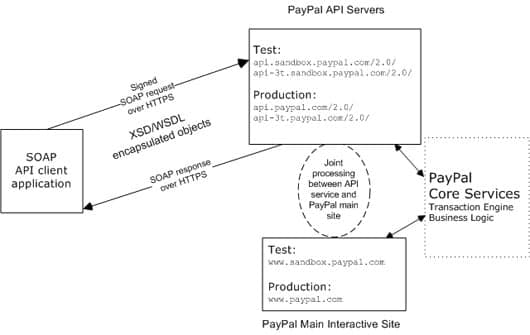 In an object-oriented processing model, the interface to SOAP requests/responses is an object in your application's native programming language. Your third-party SOAP client generates business-object interfaces and network stubs from PayPal-provided WSDL and XSD files that specify the PayPal SOAP message structure, its contents, and the PayPal API service bindings. A business application works with data in the form of object properties to send and receive data by calling object methods. The SOAP client handles the details of building the SOAP request, sending it to the PayPal service, and converting the response back to an object.
## PayPal WSDL/XSD schema definitions [#paypal-wsdlxsd-schema-definitions]
The PayPal Web Services schema and its underlying eBay Business Language (eBL) base and core components are required for developing applications with the PayPal Web Services API. The following are the locations of the WSDL and XSD files.
**Location of PayPal WSDL and XSD Files**
| Development and Testing with the PayPal sandbox | |
| ----------------------------------------------- | ----------------------------------------------------------------------------------------------------------------------------------------------------------------------------------------------------------------------------------------------------- |
| PayPal Schema | [https://www.sandbox.paypal.com/wsdl/PayPalSvc.wsdl](https://www.sandbox.paypal.com/wsdl/PayPalSvc.wsdl) |
| eBL Base Components and Component Types | [https://www.sandbox.paypal.com/wsdl/eBLBaseComponents.xsd](https://www.sandbox.paypal.com/wsdl/eBLBaseComponents.xsd)
In an object-oriented processing model, the interface to SOAP requests/responses is an object in your application's native programming language. Your third-party SOAP client generates business-object interfaces and network stubs from PayPal-provided WSDL and XSD files that specify the PayPal SOAP message structure, its contents, and the PayPal API service bindings. A business application works with data in the form of object properties to send and receive data by calling object methods. The SOAP client handles the details of building the SOAP request, sending it to the PayPal service, and converting the response back to an object.
## PayPal WSDL/XSD schema definitions [#paypal-wsdlxsd-schema-definitions]
The PayPal Web Services schema and its underlying eBay Business Language (eBL) base and core components are required for developing applications with the PayPal Web Services API. The following are the locations of the WSDL and XSD files.
**Location of PayPal WSDL and XSD Files**
| Development and Testing with the PayPal sandbox | |
| ----------------------------------------------- | ----------------------------------------------------------------------------------------------------------------------------------------------------------------------------------------------------------------------------------------------------- |
| PayPal Schema | [https://www.sandbox.paypal.com/wsdl/PayPalSvc.wsdl](https://www.sandbox.paypal.com/wsdl/PayPalSvc.wsdl) |
| eBL Base Components and Component Types | [https://www.sandbox.paypal.com/wsdl/eBLBaseComponents.xsd](https://www.sandbox.paypal.com/wsdl/eBLBaseComponents.xsd)
[https://www.sandbox.paypal.com/wsdl/CoreComponentTypes.xsd](https://www.sandbox.paypal.com/wsdl/CoreComponentTypes.xsd) |
| Production with the Live PayPal API | |
| PayPal Schema | [https://www.paypal.com/wsdl/PayPalSvc.wsdl](https://www.paypal.com/wsdl/PayPalSvc.wsdl) |
| eBL Base Components and Component Types | [https://www.paypal.com/wsdl/eBLBaseComponents.xsd](https://www.paypal.com/wsdl/eBLBaseComponents.xsd)
[https://www.paypal.com/wsdl/CoreComponentTypes.xsd](https://www.paypal.com/wsdl/CoreComponentTypes.xsd) |
## PayPal SOAP API Definitions [#paypal-soap-api-definitions]
The PayPal SOAP API comprises individual API definitions for specific business functions. As a foundation, the API relies on eBay Business Language (eBL) base and core components. The core eBL structures `AbstractRequestType` and `AbstractResponseType` are the basis of the SOAP request and response of each PayPal API. `AbstractResponseType` is also the framework for error messages common across all PayPal APIs.
PayPal has made some schema design decisions that can affect how businesses design their own applications.
* Enumerations — Enumerations are defined directly in the PayPal API schema.
* Troubleshooting information — The PayPal API returns information about elements that trigger errors.
* Backward compatibility — The PayPal API is versioned so that business applications are backward compatible when new elements are introduced to the server-side schema.
> **Note:** **Note:** eBL defines many structures that are specific to processing auctions. PayPal's SOAP schema includes these definitions to maintain compatibility with eBay's SOAP. The material focuses only on those SOAP definitions pertinent to use of the PayPal SOAP API.
## Security [#security]
The PayPal SOAP API service is protected to ensure that only authorized PayPal members use it. There are four levels of security:
1. A required API `Username` and API `Password`.
2. A third required authentication mechanism, which is either one of the following:
* Client-side request signing using a PayPal-issued [API Certificate](/api/nvp-soap/apiCredentials/#api-certificates)
* Request authentication using an [API Signature](/api/nvp-soap/apiCredentials/#api-signatures) included in the request
3. If you're calling the API on behalf of a third-party merchant, you must specify the email address on file with PayPal of the third-party merchant or the merchant's account ID (sometimes called Payer ID) in the `Subject` field.
> **Note:** **Note:** Third-parties can obtain their merchant ID by logging in to [paypal.com](https://www.paypal.com), clicking the profile icon on the top right side of the page and then selecting **Profile and settings** in the **Business Profile** menu. (If the profile icon at the top of the page is not visible, click **Profile**, which appears in the top menu when the **My Account** tab is selected.) Click **My business info** on the left, and the **Merchant account ID** is displayed in the list of profile items on the right.
Typically, a merchant grants third-party permissions to a shopping cart, so the shopping cart can call the API on the merchant's behalf. The merchant must have previously [granted you permission](/api/nvp-soap) to execute the API operation.
4. Transport Layer Security (TLS) data transport. See the PayPal developer [Information Security guidelines](/api) for more information on TLS.
A failure of authenticated security at any one of these levels denies access to the PayPal SOAP API service.
## SOAP RequesterCredentials: username, password, signature, and subject [#soap-requestercredentials-username-password-signature-and-subject]
For the security of your business, PayPal must verify that merchants or third-party developers are permitted to initiate a transaction before they make one. PayPal authenticates each request. If the request cannot be authenticated, a SOAP security fault is returned.
In the SOAP request header, your SOAP client must set the `Username`, `Password` elements to pass an API username/password combination. In addition, you can set the `Signature` to specify your API signature string. If you're calling the API on behalf of a third-party merchant, you must set the `Subject` element to specify the authorizing third-party's email address or merchant account ID (sometimes called Payer ID).
> **Note:** **Note:** Third-parties can obtain their merchant ID by logging in to [paypal.com](https://www.paypal.com), clicking the profile icon on the top right side of the page and then selecting **Profile and settings** in the **Business Profile** menu. (If the profile icon at the top of the page is not visible, click **Profile**, which appears in the top menu when the **My Account** tab is selected.) Click **My business info** on the left, and the **Merchant account ID** is displayed in the list of profile items on the right.
Typically, a merchant grants third-party permissions to a shopping cart, so the shopping cart can call the API on the merchant's behalf. The merchant must have previously [granted you permission](/api/nvp-soap) to execute the API operation.
The following example shows part of the `RequesterCredentials` elements.
Most of these elements are required for all SOAP requests.
```html lineNumbers
API-Username
API-Password
API-Signature
Authorizing-Merchant-Email -or- Authorizing-Merchant-Account-ID
```
**RequesterCredentials Authentication Elements in SOAP Header**
| Element | Value | Description |
| ----------- | -------------------------------------------------------------------------------- | -------------------------------------------------------------------------------------------------------------------------------------------------------------------------------------------------------------------------------------------------------------------------------------------------------------- |
| `Username` | `API-Username` | Your API username, which is auto-generated by PayPal when you [apply for certificate or signature API credentials](/api/nvp-soap/apiCredentials/) to use the PayPal SOAP API. You can see this value on [https://www.paypal.com/](https://www.paypal.com/) in your Profile under API Access > API Credentials. |
| `Password` | `API-Password` | Your API password, which you specify when you [apply for certificate or signature API credentials](/api/nvp-soap/apiCredentials/) to use the PayPal SOAP API. |
| `Signature` | `API-Signature` | Your [API signature](/api/nvp-soap/apiCredentials/), if you use one instead of an API Certificate. |
| `Subject` | `Authorizing-Merchant-Email` or`Authorizing-Merchant-Account-ID` | The email address or merchant account ID (sometimes called Payer ID) of a third-party for whom you are sending requests to the PayPal SOAP API. Your API username must have been [granted permission](/api/nvp-soap) by this third-party to make a PayPal API request on its behalf. |
## SOAP service endpoints [#soap-service-endpoints]
The service endpoint that processes your SOAP requests depends on your API credentials type.
**SOAP Service Endpoints**
| API Credentials Type | Live Production Endpoint | Test (Sandbox) Endpoint |
| -------------------- | ---------------------------------------------------------------- | -------------------------------------------------------------------------------- |
| API Certificate | [https://api.paypal.com/2.0/](https://api.paypal.com/2.0/) | [https://api.sandbox.paypal.com/2.0/](https://api.sandbox.paypal.com/2.0/) |
| API Signature | [https://api-3t.paypal.com/2.0/](https://api-3t.paypal.com/2.0/) | [https://api-3t.sandbox.paypal.com/2.0/](https://api-3t.sandbox.paypal.com/2.0/) |
## SOAP request envelope [#soap-request-envelope]
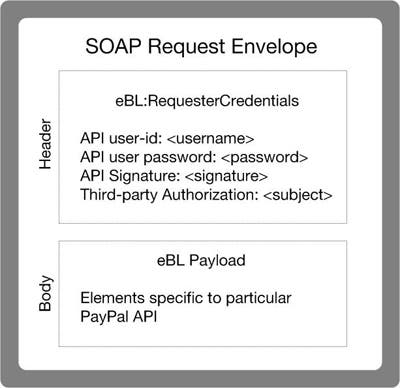
The following diagram illustrates the contents of a PayPal SOAP request envelope.
All PayPal APIs are based on two core structures: `AbstractRequestType` and `AbstractResponseType`.
**Diagram of the SOAP Request Envelope**
 ## Request structure [#request-structure]
The following annotated description of the SOAP request structure shows the elements required by the PayPal SOAP API.
### General structure of PayPal API SOAP request [#general-structure-of-paypal-api-soap-request]
```html lineNumbers
1.
2.
3.
4.
5.
6. API-Username
7. API-Password
8.
9.
10.
11.
12.
13.
14.
15.
16. API-Version
17. Data
18.
19.
20.
21.
```
**Annotation of Generic SOAP Request**
| Lines | Comment |
| ------------- | ---------------------------------------------------------------------------------------------------------------------------------------------------------------------------------------------------------------------------------------------------------------------------------------------------- |
| 6, 7 | The `Username` and `Password` fields are part of the PayPal SOAP API `RequesterCredentials` security authentication mechanism you must construct for every SOAP request header. See [RequesterCredentials](#soap-requestercredentials-username-password-signature-and-subject) for more information. |
| 8 | The `Signature` element should include your API Signature if that is the type of [API credential](/api/nvp-soap/apiCredentials/) you are using. |
| 9 | The `Subject` element should be included when using third-party permissions (performing transactions on behalf of another merchant who authorized you to do so). Pass the authorizing third-party's merchant account ID (sometimes called Payer ID) or email address. |
| 13 through 20 | The SOAP request for every PayPal API follows this element-naming pattern. The API's specific name is appended with `Req`, and in this element the `Specific-API-Name-Req` is nested. Each `Specific-API-Name-Request` has a corresponding `Specific-API-Name-RequestType`. |
| 16 | The number of the PayPal SOAP API version is required on each SOAP request. This version number is the value of `ns:version` in [https://www.paypal.com/wsdl/PayPalSvc.wsdl](https://www.paypal.com/wsdl/PayPalSvc.wsdl). |
| 17 | For details about required and optional elements and values for specific requests, see the [API references](/api/nvp-soap/). |
## SOAP message style: doc-literal [#soap-message-style-doc-literal]
PayPal uses `doc-literal` SOAP messaging, not `rpc-encoding`. With `doc-literal`, a single service interface call passes an XML document in the request to the PayPal API server, which responds with an XML document instance.
## Response structure [#response-structure]
The following is an annotated description of the structure of a successful SOAP response from the PayPal API where `Ack=Success`:
```html lineNumbers
1.
2.
3.
4.
5.
6.
7.
8.
9.
10. <Specific-API-Operation-Name>-Response xmlns="urn:ebay:api:PayPalAPI">
11. DateTime-In-UTC/GMT-Format
12. Success
13. API-Version
14. Correlation-ID
15. API-Build-Number
16. <Elements-For-Specific-API-Response>Elements-For-Specific-API-Response>
17. Specific-API-Operation-Name-Response>
18.
19.
```
**Annotation of Generic SOAP Response**
| Lines | Comment |
| ------- | ----------------------------------------------------------------------------------------------------------------------------------------------------------------------------------------------------------------------------------------------------------------------------------------------------------------------------------------------------------------------------------------------------------------------------------------------- |
| 10 - 17 | The `Specific-API-Operation-Name-Response` start and end elements. An example of an API operation is `SetExpressCheckout`. See the [NVP/SOAP API reference](/api/nvp-soap/) for a complete list. |
| 11 | Each API response contains a `Timestamp` with its date and time in UTC/GMT format. |
| 12 | The acknowledgment (`Ack`) element contains the string `Success` indicating the corresponding request was successfully processed. When there's an error, `Ack` is set to a value other than `Success`, and the response body contains an `Errors` element with information to help you troubleshoot the cause of the error. See [Error Responses](#error-responses) for more information. |
| 14 | The `CorrelationID` element contains information about the PayPal application that processed the request. Use the value of this element if you need to troubleshoot a problem with one of your requests. |
| 16 | The different PayPal APIs return different elements depending on their response definitions. For detailed information, see the descriptions in the [API reference](/api/nvp-soap/). > **Note:** **Note:** Because a field is defined in the formal structure of an API response, this does not mean that the field is necessarily returned. Data is returned in a response only if PayPal has recorded data that corresponds to the field. |
## Error responses [#error-responses]
If the `Ack` value is not `Success`, the payment or desired action may not go through.
Possible values of the `Ack` response field are the following:
* `Success` — The request was successful.
* `SuccessWithWarning` — The request was successful but a warning error code was also returned.
* `Failure` — The API request failed. See error messages for details.
* `FailureWithWarning` — The API request failed and additional warning messages were returned.
If a request is malformed or contains some other error, the body of the SOAP response contains an `Errors` element with other elements that can help you troubleshoot the cause of the error.
The structure of error messages is as follows:
## Request structure [#request-structure]
The following annotated description of the SOAP request structure shows the elements required by the PayPal SOAP API.
### General structure of PayPal API SOAP request [#general-structure-of-paypal-api-soap-request]
```html lineNumbers
1.
2.
3.
4.
5.
6. API-Username
7. API-Password
8.
9.
10.
11.
12.
13.
14.
15.
16. API-Version
17. Data
18.
19.
20.
21.
```
**Annotation of Generic SOAP Request**
| Lines | Comment |
| ------------- | ---------------------------------------------------------------------------------------------------------------------------------------------------------------------------------------------------------------------------------------------------------------------------------------------------- |
| 6, 7 | The `Username` and `Password` fields are part of the PayPal SOAP API `RequesterCredentials` security authentication mechanism you must construct for every SOAP request header. See [RequesterCredentials](#soap-requestercredentials-username-password-signature-and-subject) for more information. |
| 8 | The `Signature` element should include your API Signature if that is the type of [API credential](/api/nvp-soap/apiCredentials/) you are using. |
| 9 | The `Subject` element should be included when using third-party permissions (performing transactions on behalf of another merchant who authorized you to do so). Pass the authorizing third-party's merchant account ID (sometimes called Payer ID) or email address. |
| 13 through 20 | The SOAP request for every PayPal API follows this element-naming pattern. The API's specific name is appended with `Req`, and in this element the `Specific-API-Name-Req` is nested. Each `Specific-API-Name-Request` has a corresponding `Specific-API-Name-RequestType`. |
| 16 | The number of the PayPal SOAP API version is required on each SOAP request. This version number is the value of `ns:version` in [https://www.paypal.com/wsdl/PayPalSvc.wsdl](https://www.paypal.com/wsdl/PayPalSvc.wsdl). |
| 17 | For details about required and optional elements and values for specific requests, see the [API references](/api/nvp-soap/). |
## SOAP message style: doc-literal [#soap-message-style-doc-literal]
PayPal uses `doc-literal` SOAP messaging, not `rpc-encoding`. With `doc-literal`, a single service interface call passes an XML document in the request to the PayPal API server, which responds with an XML document instance.
## Response structure [#response-structure]
The following is an annotated description of the structure of a successful SOAP response from the PayPal API where `Ack=Success`:
```html lineNumbers
1.
2.
3.
4.
5.
6.
7.
8.
9.
10. <Specific-API-Operation-Name>-Response xmlns="urn:ebay:api:PayPalAPI">
11. DateTime-In-UTC/GMT-Format
12. Success
13. API-Version
14. Correlation-ID
15. API-Build-Number
16. <Elements-For-Specific-API-Response>Elements-For-Specific-API-Response>
17. Specific-API-Operation-Name-Response>
18.
19.
```
**Annotation of Generic SOAP Response**
| Lines | Comment |
| ------- | ----------------------------------------------------------------------------------------------------------------------------------------------------------------------------------------------------------------------------------------------------------------------------------------------------------------------------------------------------------------------------------------------------------------------------------------------- |
| 10 - 17 | The `Specific-API-Operation-Name-Response` start and end elements. An example of an API operation is `SetExpressCheckout`. See the [NVP/SOAP API reference](/api/nvp-soap/) for a complete list. |
| 11 | Each API response contains a `Timestamp` with its date and time in UTC/GMT format. |
| 12 | The acknowledgment (`Ack`) element contains the string `Success` indicating the corresponding request was successfully processed. When there's an error, `Ack` is set to a value other than `Success`, and the response body contains an `Errors` element with information to help you troubleshoot the cause of the error. See [Error Responses](#error-responses) for more information. |
| 14 | The `CorrelationID` element contains information about the PayPal application that processed the request. Use the value of this element if you need to troubleshoot a problem with one of your requests. |
| 16 | The different PayPal APIs return different elements depending on their response definitions. For detailed information, see the descriptions in the [API reference](/api/nvp-soap/). > **Note:** **Note:** Because a field is defined in the formal structure of an API response, this does not mean that the field is necessarily returned. Data is returned in a response only if PayPal has recorded data that corresponds to the field. |
## Error responses [#error-responses]
If the `Ack` value is not `Success`, the payment or desired action may not go through.
Possible values of the `Ack` response field are the following:
* `Success` — The request was successful.
* `SuccessWithWarning` — The request was successful but a warning error code was also returned.
* `Failure` — The API request failed. See error messages for details.
* `FailureWithWarning` — The API request failed and additional warning messages were returned.
If a request is malformed or contains some other error, the body of the SOAP response contains an `Errors` element with other elements that can help you troubleshoot the cause of the error.
The structure of error messages is as follows:
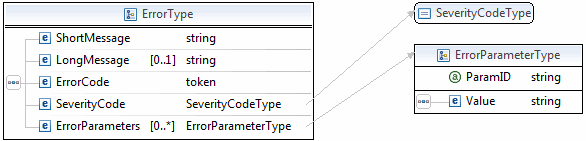 The most important of these additional elements are as follows:
* `ShortMessage`
* `LongMessage`
* `ErrorCode`
Additional information can appear as part of `ErrorParametersType`. For example, if the response returned within the `ParamID` element is `ProcessorResponse`, the `Value` element would contain a third-party card processor's specific error, such as `0091`. Values set in the `ErrorParametersType` are not set by PayPal; rather, they are passed through from the source.
> **Note:** **Note:** PayPal only passes selected values in `ErrorParametersType`.
The following example shows the error response if your API username and password do not match a legitimate API username and password on file with PayPal.
### Example of the SOAP error response: bad username or password [#example-of-the-soap-error-response-bad-username-or-password]
```html lineNumbers
[DETAILS NOT SHOWN]
2005-02-09T21:51:26Z
Failure
Authentication/Authorization Failed
Username/Password is incorrect
10002
Error
Debugging-Info
124.00
1.0006
<...otherelements=""in=""response...="">
```
## CorrelationID for reporting problems to PayPal [#correlationid-for-reporting-problems-to-paypal]
The value returned in `CorrelationID` is important for PayPal to determine the precise cause of any error you might encounter. If you have to troubleshoot a problem with your requests, we suggest that you capture the value of `CorrelationID` so you can report it to PayPal.
## UTF-8 character encoding [#utf-8-character-encoding]
The PayPal API assumes that all data in requests is in Unicode, specifically, the Unicode (or UCS) Transformation Format, 8-bit encoding form (UTF-8).
In responses, the API always returns data in UTF-8.
## Date/time formats [#datetime-formats]
The PayPal SOAP API schema defines date/time values as Coordinated Universal Time (UTC/GMT), using ISO 8601 format, and of type `ns:dateTime`.
An example date/time stamp is 2006-08-24T05:38:48Z
## Core currency amount data type [#core-currency-amount-data-type]
The core currency amount data type is called `BasicAmountType` and is derived from `string`. All currency amount fields have the following structure:
1. The `currencyID` attribute is required.
2. The amount must have two decimal places, except in the case of [currencies that do not support decimal amounts](/api/nvp-soap/currency-codes/).
3. The decimal separator must be a period (".").
4. You must not use any thousands separator.
5. `BasicAmountType` has a data type of `ebl:CurrencyCodeType`, which defines a large number of different currency codes. However, for your processing to succeed, you must set *currencyCode* to a valid [currency code](/api/nvp-soap/currency-codes/).
### Example [#example]
The field name, `Amount`, is an example; actual field names can vary depending on the [specific API operation](/api/nvp-soap/).
```html lineNumbers
3.00
```
The most important of these additional elements are as follows:
* `ShortMessage`
* `LongMessage`
* `ErrorCode`
Additional information can appear as part of `ErrorParametersType`. For example, if the response returned within the `ParamID` element is `ProcessorResponse`, the `Value` element would contain a third-party card processor's specific error, such as `0091`. Values set in the `ErrorParametersType` are not set by PayPal; rather, they are passed through from the source.
> **Note:** **Note:** PayPal only passes selected values in `ErrorParametersType`.
The following example shows the error response if your API username and password do not match a legitimate API username and password on file with PayPal.
### Example of the SOAP error response: bad username or password [#example-of-the-soap-error-response-bad-username-or-password]
```html lineNumbers
[DETAILS NOT SHOWN]
2005-02-09T21:51:26Z
Failure
Authentication/Authorization Failed
Username/Password is incorrect
10002
Error
Debugging-Info
124.00
1.0006
<...otherelements=""in=""response...="">
```
## CorrelationID for reporting problems to PayPal [#correlationid-for-reporting-problems-to-paypal]
The value returned in `CorrelationID` is important for PayPal to determine the precise cause of any error you might encounter. If you have to troubleshoot a problem with your requests, we suggest that you capture the value of `CorrelationID` so you can report it to PayPal.
## UTF-8 character encoding [#utf-8-character-encoding]
The PayPal API assumes that all data in requests is in Unicode, specifically, the Unicode (or UCS) Transformation Format, 8-bit encoding form (UTF-8).
In responses, the API always returns data in UTF-8.
## Date/time formats [#datetime-formats]
The PayPal SOAP API schema defines date/time values as Coordinated Universal Time (UTC/GMT), using ISO 8601 format, and of type `ns:dateTime`.
An example date/time stamp is 2006-08-24T05:38:48Z
## Core currency amount data type [#core-currency-amount-data-type]
The core currency amount data type is called `BasicAmountType` and is derived from `string`. All currency amount fields have the following structure:
1. The `currencyID` attribute is required.
2. The amount must have two decimal places, except in the case of [currencies that do not support decimal amounts](/api/nvp-soap/currency-codes/).
3. The decimal separator must be a period (".").
4. You must not use any thousands separator.
5. `BasicAmountType` has a data type of `ebl:CurrencyCodeType`, which defines a large number of different currency codes. However, for your processing to succeed, you must set *currencyCode* to a valid [currency code](/api/nvp-soap/currency-codes/).
### Example [#example]
The field name, `Amount`, is an example; actual field names can vary depending on the [specific API operation](/api/nvp-soap/).
```html lineNumbers
3.00
```