# BMGetButtonDetails API operation (SOAP) (/api/nvp-soap/get-button-details-soap)


> **Note:** **Important:** NVP/SOAP is a legacy integration method. We accept new integrations and support existing integrations, but there are newer solutions. If you're starting an integration, [we recommend our latest solutions](/).

Shows information about a hosted PayPal Payments Standard button.

> **Note:** **Important:**
>
> The Button Manager API is deprecated. For new integrations, see the associated topic.
>
> | Button                                          | See                                                                               |
> | ----------------------------------------------- | --------------------------------------------------------------------------------- |
> | **Buy Now**<br />                               | [PayPal Checkout Overview](/checkout)<br />                                       |
> | **Add to Cart**<br />                           | [Solution Providers](https://www.paypal.com/webapps/mpp/solution-providers)<br /> |
> | **Donate**<br />                                | [Create a Donate button](/api/nvp-soap/paypal-payments-pro)<br />                 |
> | **Automatic Billing**<br /> **Subscribe**<br /> | [Subscriptions Overview](/subscriptions/about)<br />                              |

You can use this information to set the fields that have not changed when you update a button.

## BMGetButtonDetails request [#bmgetbuttondetails-request]

The request includes the ID of the hosted button for which to get details.

<img src="https://www.paypalobjects.com/webstatic/en_US/developer/docs/api/BMGetButtonDetailsRequest.gif" />

### BMGetButtonDetails request parameters [#bmgetbuttondetails-request-parameters]

| Field<br />            | Description<br />                                                                                            |
| ---------------------- | ------------------------------------------------------------------------------------------------------------ |
| `HostedButtonID`<br /> | `xs:string`<br /&#x3E; &#x2A;(Required)* The ID of the hosted button whose details you want to obtain.<br /> |

## BMGetButtonDetails response [#bmgetbuttondetails-response]

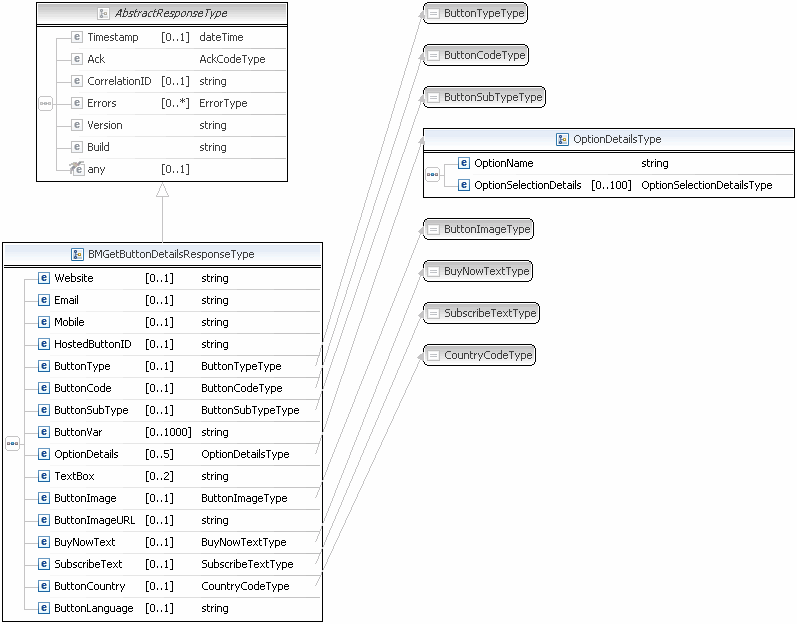
The response fields contain all non-inventory information related to the button.
<img src="https://www.paypalobjects.com/webstatic/en_US/developer/docs/api/BMGetButtonDetailsResponse.gif" />

<img src="https://www.paypalobjects.com/webstatic/en_US/developer/docs/api/OptionDetailsType.gif" alt="OptionsDetailsType,Diagram" />

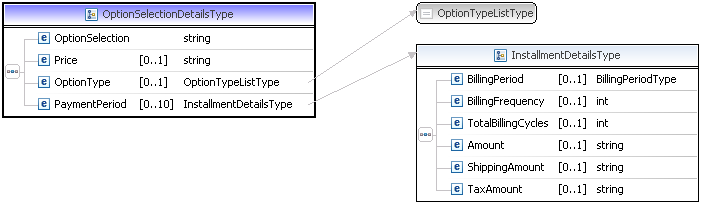
<img src="https://www.paypalobjects.com/webstatic/en_US/developer/docs/api/OptionSelectionDetailsType.gif" alt="OptionSelectionDetailsType,Diagram" />

### BMGetButtonDetails response fields [#bmgetbuttondetails-response-fields]

| Field<br />            | Description<br />                                                                                                                                                                                                                                                                                                                                                                                            |
| ---------------------- | ------------------------------------------------------------------------------------------------------------------------------------------------------------------------------------------------------------------------------------------------------------------------------------------------------------------------------------------------------------------------------------------------------------ |
| `ButtonType`<br />     | `ebl:ButtonTypeType`<br /> The kind of button. Value is:<br /> <br />`BUYNOW`. The **Buy Now** button.<br />`CART`. The **Add to Cart** button.<br />`SUBSCRIBE`. The **Subscribe** button.<br />`DONATE`. The **Donate** button.<br />`UNSUBSCRIBE`. The **Unsubscribe** button.<br />`VIEWCART`. The **View Cart** button.<br />`AUTOBILLING`. The **Automatic Billing** button. Since version 63.0.<br /> |
| `ButtonCode`<br />     | `ebl:ButtonCodeType`<br /> The kind of button code. Value is:<br /> <br />`HOSTED`. A secure button stored on PayPal.<br />`ENCRYPTED`. An encrypted button, not stored on PayPal.<br />`CLEARTEXT`. An unencrypted button, not stored on PayPal.<br />                                                                                                                                                      |
| `ButtonSubType`<br />  | `ebl:ButtonSubTypeType`<br /> The use of button. Value is:<br /> <br />`PRODUCTS`. The button is used to purchase products.<br />`SERVICES`. The button to purchase services.<br />                                                                                                                                                                                                                          |
| `HostedButtonID`<br /> | `xs:string`<br /> The ID of a PayPal-hosted button.<br />                                                                                                                                                                                                                                                                                                                                                    |
| `Website`<br />        | `xs:string`<br /> HTML code for web pages<br />                                                                                                                                                                                                                                                                                                                                                              |
| `Email`<br />          | `xs:string`<br /> Code for email links and links in other documents that support external links<br />                                                                                                                                                                                                                                                                                                        |
| `ButtonVar`<br />      | `xs:string`<br /> HTML standard button variables<br />                                                                                                                                                                                                                                                                                                                                                       |

### Option details fields [#option-details-fields]

| Field<br />                    | Description<br />                                                              |
| ------------------------------ | ------------------------------------------------------------------------------ |
| `OptionName`<br />             | `xs:string`<br /&#x3E; &#x2A;(Optional)* The menu name.<br />                  |
| `OptionSelectionDetails`<br /> | `ns:OptionSelectionDetailsType`<br /&#x3E; &#x2A;(Optional)* Menu items.<br /> |

### Option selection details fields [#option-selection-details-fields]

| Field                   | Description                                                                                                                                                                                    |
| ----------------------- | ---------------------------------------------------------------------------------------------------------------------------------------------------------------------------------------------- |
| `OptionSelection`<br /> | `xs:string`<br /&#x3E; &#x2A;(Optional)* The menu item's name<br />                                                                                                                            |
| `Price`<br />           | `xs:string`<br /&#x3E; &#x2A;(Optional)* The price associated with the first menu item.<br /> > **Note:** &#x2A;*Note:** If you specify a price, you cannot set a button variable to `amount`. |

## BMGetButtonDetails errors [#bmgetbuttondetails-errors]

| Error code | Short and long messages                                                                                                         | User action                                                                                                                                                                                 |
| ---------- | ------------------------------------------------------------------------------------------------------------------------------- | ------------------------------------------------------------------------------------------------------------------------------------------------------------------------------------------- |
| 10001      | Internal Error<br />Internal Error                                                                                              | To learn more about possible causes and corrective actions, see [What is API error code 10001?](https://www.paypal.com/selfhelp/article/what-is-api-error-code-10001-ts1041/3?channel=MTS). |
| 11950      | Invalid Data<br />A hosted button ID must be specified.                                                                         |                                                                                                                                                                                             |
| 11951      | Invalid Argument<br />The hosted button ID specified is invalid.                                                                |                                                                                                                                                                                             |
| 11951      | Operation Refused<br />Operation not supported for Sample Buttons.                                                              |                                                                                                                                                                                             |
| 11992      | Invalid Argument<br />You do not have permissions to access this button. Verify the hosted button ID and try the request again. |                                                                                                                                                                                             |