# Payflow Gateway Developer Guide and Reference (/api/nvp-soap/payflow/integration-guide)
This guide is intended for developers integrating with *PayPal Payments Pro*,
*PayPal Payments Advanced*, *Payflow Pro* or *Payflow Link*. For more information, see [Intended Audience](#intended-audience).
## Overview [#overview]
This guide describes the data parameters for the Gateway payments solutions.
### Scope [#scope]
This guide is a reference to the payment card data parameters available for
Submit transaction requests over the Payflow Gateway to multiple supported
processors. It also covers the resulting response data parameters and errors.
The guide describes the requirements of an ever-growing list of processing
platforms. Parameters in the guide are organized into various categories,
which include a core set of request parameters supported by all processors,
additional parameters unique to individual processors, and purchasing card
parameters specialized to monitor credit card use in businesses. This guide
also provides a section on response parameters and error codes.
Although this guide explains getting started with the SDK, setting up credit card processing, and testing your integration, this is not a tutorial on integration. For use cases and examples, see [PayPal Developer website](/api/nvp-soap/payflow/integration-guide/) and [Payflow Gateway SDK](https://github.com/paypal/payflow-gateway).
Use the navigation bar on the left of the page to browse topics.
### Related Documentation [#related-documentation]
For additional information on Payflow payments solutions:
* See [PayPal Manager](https://manager.paypal.com)
* See [Revision History](/api/nvp-soap/payflow/integration-guide/reference/revision-history/) for updates to this guide.
### Intended Audience [#intended-audience]
This guide provides Payflow Gateway payments solutions to web or app developers
who have a background in payments services.
#### Who Should Use This Document [#who-should-use-this-document]
This comprehensive developer guide includes integration information for multiple Payflow solutions.
> **Note:** **Note:** Legacy Payflow Link features are not included in this guide. For legacy Payflow Link features refer to the [Payflow Link User's Guide](https://www.paypalobjects.com/webstatic/en_US/developer/docs/pdf/pp_payflowlink_guide.pdf).
Additionally, all Payflow features explained in this guide are not necessarily available to every Payflow customer. This section will help you determine whether you should use this document and which sections of the document are relevant to you.
To view the Payflow solutions available to you, log in to [PayPal Manager](https://manager.paypal.com). PayPal Manager displays your Payflow *Services* in the *Service Summary* box.
##### Payflow Link [#payflow-link]
Payflow Link merchants can choose PayPal or another merchant bank to process their transactions via the Payflow Gateway.
**a) Legacy Payflow Link** merchants see the following in the *Service Summary* box in PayPal Manager:
*Payflow Link*
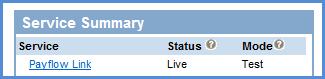 If you are a legacy Payflow Link merchant, do not use this guide; instead, use
the [Payflow Link User's Guide](https://www.paypalobjects.com/webstatic/en_US/developer/docs/pdf/pp_payflowlink_guide.pdf).
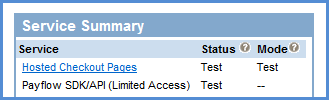
**b) New Payflow Link** merchants see the following in the *Service Summary* box in PayPal Manager:
*Hosted Checkout Pages & Payflow SDK/API (Limited Access)*.
If *PayPal Payments Advanced* is also listed, you are not a Payflow Link customer.
If you are a legacy Payflow Link merchant, do not use this guide; instead, use
the [Payflow Link User's Guide](https://www.paypalobjects.com/webstatic/en_US/developer/docs/pdf/pp_payflowlink_guide.pdf).
**b) New Payflow Link** merchants see the following in the *Service Summary* box in PayPal Manager:
*Hosted Checkout Pages & Payflow SDK/API (Limited Access)*.
If *PayPal Payments Advanced* is also listed, you are not a Payflow Link customer.
 Use this guide if you are a new Payflow Link merchant who uses the Secure
Token or API.
Use the [Payflow Link User's Guide](https://www.paypalobjects.com/webstatic/en_US/developer/docs/pdf/pp_payflowlink_guide.pdf) if you are a new Payflow Link
merchant who uses the legacy Payflow Link input tag integration.
Limited API Access means you can perform all API functions except for Sales
and Authorization transactions. For Sales and Authorization type transactions
you must use the [Hosted Checkout Pages](/api/nvp-soap/payflow/integration-guide/configure-hosted-checkout/).
##### Payflow Pro [#payflow-pro]
Payflow Pro merchants can choose PayPal or another merchant bank to process their transactions via the Gateway.
**a) Legacy Payflow Pro** merchants see the following in the *Service Summary* box in PayPal Manager:
*Payflow Pro*
Use this guide if you are a new Payflow Link merchant who uses the Secure
Token or API.
Use the [Payflow Link User's Guide](https://www.paypalobjects.com/webstatic/en_US/developer/docs/pdf/pp_payflowlink_guide.pdf) if you are a new Payflow Link
merchant who uses the legacy Payflow Link input tag integration.
Limited API Access means you can perform all API functions except for Sales
and Authorization transactions. For Sales and Authorization type transactions
you must use the [Hosted Checkout Pages](/api/nvp-soap/payflow/integration-guide/configure-hosted-checkout/).
##### Payflow Pro [#payflow-pro]
Payflow Pro merchants can choose PayPal or another merchant bank to process their transactions via the Gateway.
**a) Legacy Payflow Pro** merchants see the following in the *Service Summary* box in PayPal Manager:
*Payflow Pro*
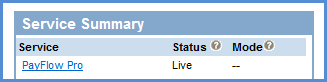 Legacy Payflow Pro merchants should use this guide; however, these merchants can only use the API integration and do not have the Hosted Checkout Pages service. If you are a legacy Payflow Pro merchant, skip the section on [Configuring Hosted Checkout Pages](/api/nvp-soap/payflow/integration-guide/configure-hosted-checkout/).
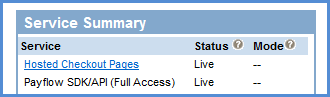
**b) New Payflow Pro** merchants can take advantage of all of the Gateway features including Hosted Checkout Pages. These merchants can see the following in the *Service Summary* box in PayPal Manager:
*Hosted Checkout Pages & Payflow SDK/API (Full Access)*
Legacy Payflow Pro merchants should use this guide; however, these merchants can only use the API integration and do not have the Hosted Checkout Pages service. If you are a legacy Payflow Pro merchant, skip the section on [Configuring Hosted Checkout Pages](/api/nvp-soap/payflow/integration-guide/configure-hosted-checkout/).
**b) New Payflow Pro** merchants can take advantage of all of the Gateway features including Hosted Checkout Pages. These merchants can see the following in the *Service Summary* box in PayPal Manager:
*Hosted Checkout Pages & Payflow SDK/API (Full Access)*
 ##### PayPal Payments Advanced [#paypal-payments-advanced]
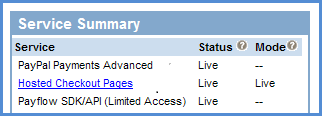
Transactions submitted by PayPal Payments Advanced merchants are processed through the Gateway with PayPal acting as the merchant bank. PayPal Payments Advanced merchants can see the following in the *Service Summary* box in PayPal Manager:
*PayPal Payments Advanced* with *Hosted Checkout Pages* & *Payflow SDK/API (Limited Access)*
##### PayPal Payments Advanced [#paypal-payments-advanced]
Transactions submitted by PayPal Payments Advanced merchants are processed through the Gateway with PayPal acting as the merchant bank. PayPal Payments Advanced merchants can see the following in the *Service Summary* box in PayPal Manager:
*PayPal Payments Advanced* with *Hosted Checkout Pages* & *Payflow SDK/API (Limited Access)*
 Limited API Access means you can perform all API functions except for Sales and Authorization transactions. For Sales and Authorization type transactions you must use [Hosted Checkout Pages](/api/nvp-soap/payflow/integration-guide/security-pci-compliance/#hosted-checkout-pages).
##### PayPal Payments Pro [#paypal-payments-pro]
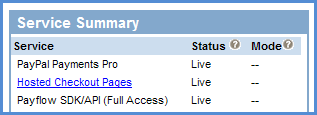
Transactions submitted by PayPal Payments Pro merchants are processed through the Gateway with PayPal acting as the merchant bank. PayPal Payments Pro merchants can use all of the Gateway features supported by PayPal. These merchants can see the following in the *Service Summary* box in PayPal Manager:
*PayPal Payments Pro* with *Hosted Checkout Pages* & *Payflow SDK/API (Full Access)*
Limited API Access means you can perform all API functions except for Sales and Authorization transactions. For Sales and Authorization type transactions you must use [Hosted Checkout Pages](/api/nvp-soap/payflow/integration-guide/security-pci-compliance/#hosted-checkout-pages).
##### PayPal Payments Pro [#paypal-payments-pro]
Transactions submitted by PayPal Payments Pro merchants are processed through the Gateway with PayPal acting as the merchant bank. PayPal Payments Pro merchants can use all of the Gateway features supported by PayPal. These merchants can see the following in the *Service Summary* box in PayPal Manager:
*PayPal Payments Pro* with *Hosted Checkout Pages* & *Payflow SDK/API (Full Access)*