# Adaptive Payments API: Getting Started (/archive/adaptive-payments/gs-AdaptivePayments)
> **Note:** **Important:** Adaptive Payments is not available for new integrations. PayPal provides this documentation to support existing integrations. If you're starting an integration, [we recommend our latest solutions](https://www.paypal.com/us/business/accept-payments).
Get up and running with the Adaptive Payments API:
* [Overview](#overview)
* [Key concepts](#key-concepts)
* [Make your first call](#make-your-first-call)
* [Next steps](#next-steps)
## Overview [#overview]
The Adaptive Payments API enables merchants and developers to select the payment scenario most suitable to their needs.
Merchants and developers can create applications that manage payments, payment pre-approvals, and refunds. Merchants and developers also can send money peer-to-peer, and can split payments in both the [parallel](https://www.paypalobjects.com/webstatic/en_US/developer/docs/pdf/pp_dev_Datasheet_APP_R3.pdf) and the [chained](https://www.paypalobjects.com/webstatic/en_US/developer/docs/pdf/pp_dev_Datasheet_APC_R3.pdf) models. Merchants and developers can accept guest payments and can schedule disbursements.
The Adaptive Payments API works on multiple platforms, including the web and mobile platforms.
## Key concepts [#key-concepts]
Adaptive Payments operations enable the sending and receiving of payments involving two or more parties. Each Adaptive Payments API transaction includes a sender and one or more receivers of the payment. Each transaction also includes the application owner, or *API caller*, who is an invisible third party that provides the transaction flow and makes the API calls.
In most scenarios, the buyer initiates *send* type of payment transactions and the seller initiates *pay* type of payment transactions.
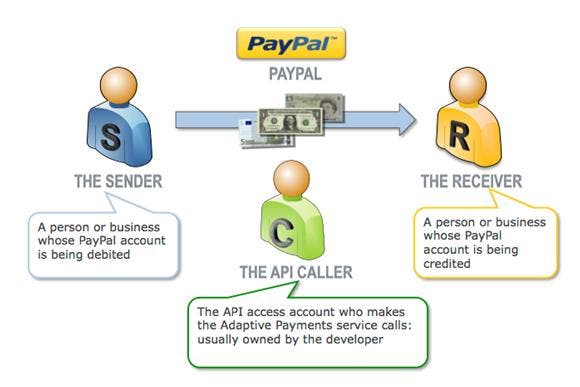 The Adaptive Payments API uses the `Pay` operation to make payments between a sender and one or more receivers of that payment. Payments can be split between receivers (in either "chained" or "parallel" modes) and additional operations in the API lets senders authorize and pre-approve an application to make payments on their behalf. The flexibility of the operations in the API make for an "adaptive" set of functions that addresses a wide range of payment scenarios.
### Payment approvals [#payment-approvals]
As with any payment, payments made through the Adaptive Payments API must be authorized and approved by the payment sender. To provide the best possible user experience for senders, the Adaptive Payments API provides the following payment approval methods:
```html lineNumbers
The Adaptive Payments API uses the `Pay` operation to make payments between a sender and one or more receivers of that payment. Payments can be split between receivers (in either "chained" or "parallel" modes) and additional operations in the API lets senders authorize and pre-approve an application to make payments on their behalf. The flexibility of the operations in the API make for an "adaptive" set of functions that addresses a wide range of payment scenarios.
### Payment approvals [#payment-approvals]
As with any payment, payments made through the Adaptive Payments API must be authorized and approved by the payment sender. To provide the best possible user experience for senders, the Adaptive Payments API provides the following payment approval methods:
```html lineNumbers
- Web Redirect
- The default method where applications redirect the sender of the payment to PayPal for approval.
- Embedded Process
- Applications embed the payment authorization process into the application itself.
- Implicit
- Applications act as the sender of the payment and _implicitly_ authorize the payment.
- Preapproved
- Applications obtain a pre-approval from the sender.
```
## Make your first call [#make-your-first-call]
To call the Adaptive Payments `Pay` operation, supply the necessary HTTP headers and the call *payload* to the service endpoint.
A call to the `Pay` operation involves these users:
* API caller, represents your application and the account whose credentials the application uses to make the call
* Sender, the account making the payment
* Receiver, the account receiving the payment
To make the `Pay` call and authorize the payment after the `Pay` operation succeeds:
1. Obtain the endpoint for the service and environment you are addressing.The sandbox endpoint for the Adaptive Payments `Pay` operation is `https://svcs.sandbox.paypal.com/AdaptivePayments/Pay`.
2. Format the HTTP headers for the call. Supply the following headers to call the `Pay` operation:
```html lineNumbers
// Sandbox API credentials for the API caller account
X-PAYPAL-SECURITY-USERID: Sandbox-Caller-User-Id
X-PAYPAL-SECURITY-PASSWORD: Sandbox-Caller-Password
X-PAYPAL-SECURITY-SIGNATURE: Sandbox-Caller-Security-Signature
// Global sandbox Application ID
X-PAYPAL-APPLICATION-ID: APP-80W284485P519543T
// Input and output formats
X-PAYPAL-REQUEST-DATA-FORMAT: JSON
X-PAYPAL-RESPONSE-DATA-FORMAT: JSON
```
3. Format the call payload. The `Pay` operation requires several payload input fields, shown here as a JSON object:
```html lineNumbers
{
[{
"actionType": "PAY", // Payment action type
"currencyCode": "USD", // Payment currency code
"receiverList": {
"receiver": [{
"amount": "1.00", // Payment amount
"email": "Sandbox-Receiver-eMail" // Receiver's email address
}],
"returnUrl": "https://example.com/return", // Redirect URL after approval
"cancelUrl": "https://example.com/cancel", // Redirect URL after cancellation
"requestEnvelope": {
"errorLanguage": "en_US", // Language used to display errors
"detailLevel": "ReturnAll" // Error detail level
}
```
That's it. You're now set to make the call.
1. Make the call.
2. If the `Pay` call is successful — the `ack` field in the response contains `Success`— redirect the sender to PayPal so that he or she can authorize the payment:
1\. Get the `payKey` value from the response of the `Pay` call. This example shows a successful `Pay` response:
```html lineNumbers
{
"responseEnvelope": {
"timestamp": "2011-08-20T15:12:20.833-07:00", // Time stamp
"ack": "Success", // Status
"correlationId": "nnnnnnnnnnnn", // Correlation ID
"build": "nnnnnnn" // Server version
},
"payKey": "Your-payKey", // Key used to authorize payment
"paymentExecStatus": "CREATED" // Status of payment
}
```
2\. Use the `payKey` value in an authorization redirect to PayPal with this sandbox URI: `https://www.sandbox.paypal.com/cgi-bin/webscr?cmd=_ap-payment&paykey=` When redirected to PayPal, the sender is presented with a PayPal authorization window where they can log in and approve the payment.
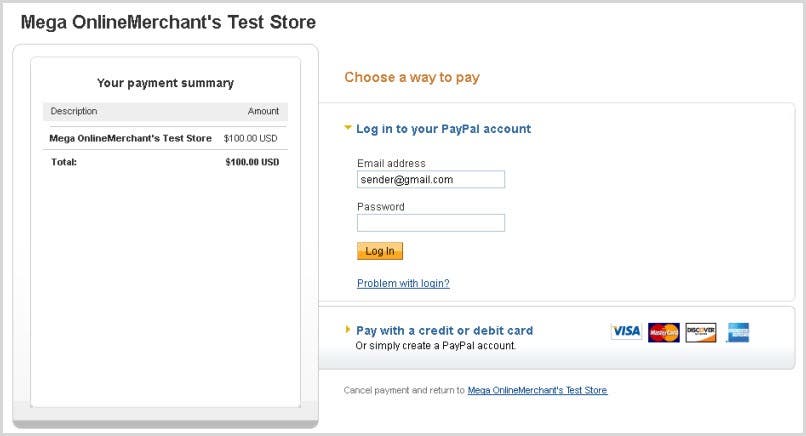 3\. After the buyer authorizes the payment, the transaction is complete and he or she is redirected to the URL specified by the `returnUrl` input field in your `Pay` request.
> **Note:** **Note:** For a pre-approval, the authorization redirect is: `
3\. After the buyer authorizes the payment, the transaction is complete and he or she is redirected to the URL specified by the `returnUrl` input field in your `Pay` request.
> **Note:** **Note:** For a pre-approval, the authorization redirect is: ``[https://www.sandbox.paypal.com/cgi-bin/webscr?cmd=\_ap-preapproval\&preapprovalkey=](https://www.sandbox.paypal.com/cgi-bin/webscr?cmd=_ap-preapproval\&preapprovalkey=)Your-preapproval-key\`
### Try it [#try-it]
The following cURL command contains a call to the `Pay` operation. Run the command by copying and pasting it into a code window. (If cURL is not installed on your system, you can download the free cURL executable from [https://curl.haxx.se/download.html](https://curl.haxx.se/download.html).)
```bash lineNumbers
curl https://svcs.sandbox.paypal.com/AdaptivePayments/Pay \
-s \
--insecure \
-H "X-PAYPAL-SECURITY-USERID: caller_1312486258_biz_api1.gmail.com" \
-H "X-PAYPAL-SECURITY-PASSWORD: 1312486294" \
-H "X-PAYPAL-SECURITY-SIGNATURE: AbtI7HV1xB428VygBUcIhARzxch4AL65.T18CTeylixNNxDZUu0iO87e" \
-H "X-PAYPAL-REQUEST-DATA-FORMAT: JSON" \
-H "X-PAYPAL-RESPONSE-DATA-FORMAT: JSON" \
-H "X-PAYPAL-APPLICATION-ID: APP-80W284485P519543T" \
-d '{
"actionType": "PAY",
"currencyCode": "USD",
"receiverList": {
"receiver": [{
"amount": "1.00",
"email": "rec1_1312486368_biz@gmail.com"
}]
},
"returnUrl": "https://example.com/success.html",
"cancelUrl": "https://example.com/failure.html",
"requestEnvelope": {
"errorLanguage": "en_US",
"detailLevel": "ReturnAll"
}
}'
```
You have made your first call to the Adaptive Payments API.
After you issue the command, the Adaptive Payments service returns a successful response that includes a valid sandbox `payKey`.
The previous call is made possible by the use of a publicly-available set of sandbox credentials (highlighted in the call). While you can extract the `payKey` from the response and use it in an authorization redirect, you cannot authorize the sandbox transaction. However, if you substitute the credentials and e-mail address from your sandbox accounts into the previous command, you can complete the entire transaction flow in the sandbox.
If your `Pay` call fails with your own sandbox credentials, review the call response for the error details and address the problem before you resubmit the call. If your call succeeds, insert the returned `payKey` value into this URL:
```html lineNumbers
https://www.sandbox.paypal.com/cgi-bin/webscr?cmd=_ap-payment&paykey=
```
Log in to the PayPal window with your sandbox buyer account credentials to complete the transaction. Then, log in to your sandbox account and review the account balances and e-mail to see the transaction results.
## Next steps [#next-steps]
Use these suggestions to enhance your understanding of the Adaptive Payments API:
1. Set up your sandbox environment. To make PayPal API test calls, you need a sandbox account, test users, and PayPal API credentials. If you're not familiar with how to make a PayPal call or use the sandbox, see [Apps 101](/api/nvp-soap/apps101/).
2. Substitute your own sandbox credentials and user-specific inputs in the previous cURL command. Then, reissue the command to ensure you have correctly set up your sandbox users. Note that the cURL example uses:
* An API caller
* A receiver
* A sender
3. For a complete API reference, see the [Adaptive Payments Integration Guide](/archive/adaptive-payments/integration-guide/APIntro).
4. For answers to API questions and to share ideas:
* [PayPal Merchant Integration and Technical Support forum](https://www.paypal-community.com/t5/Merchant-Integration-Technical/ct-p/mts)
* [Stack Overflow](https://stackoverflow.com/questions/tagged/paypal) PayPal Forum