# Subscribe: Sample HTML button code (/archive/paypal-payments-standard/integration-guide/html-example-subscribe)
> **Warning:** This product is [deprecated](/archive/product-lifecycle) and should not be used for new integrations. Use [Payment Links and Buttons](/payment-links-buttons/overview) instead. For information about migrating, visit the [Upgrade Hub](https://developer.paypal.com/upgrade/wps/guide/).
These code samples demonstrate various features for a PayPal-hosted Subscribe
button:
* [Basic Subscribe button](#basic-subscribe-button)
* [Trial periods](#trial-periods)
* [Limited billing cycles](#limited-billing-cycles)
* [Product options](#product-options)
* [Unsubscribe button](#unsubscribe-button)
* [Password management](#password-management)
* [Reattempted payments](#reattempted-payments)
* [Email payment links](#email-payment-links)
> **Note:** **Important:** This page contains unencrypted button code for
> illustrative purposes only. To prevent malicious tampering of buttons on
> your live website, always encrypt your manually created buttons.
## Basic Subscribe button [#basic-subscribe-button]
This sample HTML code illustrates a basic Subscribe button with these
features:
* No trial periods.
* A subscription price of $5.00 USD.
* A monthly billing cycle.
* The subscription ends only when the merchant or subscriber cancels it.
```html lineNumbers
```
## Trial periods [#trial-periods]
This sample HTML code illustrates a Subscribe button with these features:
* An initial trial period that is free and lasts for seven days.
* A second trial period that costs $5.00 USD and lasts for an additional three weeks.
* The regular subscription begins four weeks after the subscriber signs up.
```html lineNumbers
```
## Limited billing cycles [#limited-billing-cycles]
This sample HTML code illustrates a Subscribe button that requires renewal,
with these features:
* A subscription price of $69.95 USD.
* A monthly billing cycle.
* Expiration after six months, requiring renewal.
```html lineNumbers
```
## Product options [#product-options]
When you add product options to your Subscribe buttons with HTML code that you
write yourself. You can have a maximum of 10 product options, each with their
own sets of choices. The options can be either drop-down menus or text boxes.
When you add product options to your Subscribe buttons with HTML code that you
write yourself. You can have a maximum of 10 product options, each with their
own sets of choices. The options can be either drop-down menus or text boxes.
* [Product options](#product-options)
* [Product options as text boxes](#product-options-as-text-boxes)
### Product options [#product-options-1]
This sample HTML code illustrates a basic Subscribe button with a drop-down
menu of product options.
```html lineNumbers
```
The Subscribe button with an options drop-down menu:
The Subscribe button with an options drop-down menu: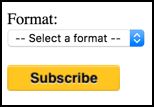 ## Product options as text boxes [#product-options-as-text-boxes]
This sample code illustrates a basic Subscribe button with a text box for
entering product options.
```html lineNumbers
```
The Subscribe button with an options text box:
The Subscribe button with an options text box:
## Product options as text boxes [#product-options-as-text-boxes]
This sample code illustrates a basic Subscribe button with a text box for
entering product options.
```html lineNumbers
```
The Subscribe button with an options text box:
The Subscribe button with an options text box: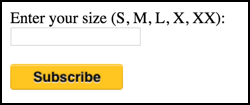 ## Unsubscribe button [#unsubscribe-button]
While other payment buttons are implemented by HTML form markup, Unsubscribe
buttons are image links to the subscription cancellation function on the
PayPal website. The URL for the image link is specified with the
`HREF` attribute, and it includes these URL-encoded parameters:
* `cmd` – value i `_subscr-find`, which tells PayPal to cancel the current, active subscription of the PayPal account holder who clicked the Unsubscribe button.
* `alias` – value is the secure merchant account ID of the subscription provider's PayPal account. This value is in the **My business info** section of your PayPal account profile.
This code implements an Unsubscribe button that lets subscribers cancel their
current, active subscriptions.
```html lineNumbers
## Unsubscribe button [#unsubscribe-button]
While other payment buttons are implemented by HTML form markup, Unsubscribe
buttons are image links to the subscription cancellation function on the
PayPal website. The URL for the image link is specified with the
`HREF` attribute, and it includes these URL-encoded parameters:
* `cmd` – value i `_subscr-find`, which tells PayPal to cancel the current, active subscription of the PayPal account holder who clicked the Unsubscribe button.
* `alias` – value is the secure merchant account ID of the subscription provider's PayPal account. This value is in the **My business info** section of your PayPal account profile.
This code implements an Unsubscribe button that lets subscribers cancel their
current, active subscriptions.
```html lineNumbers
 ```
This code displays this button image:
This code displays this button image:
## Password management [#password-management]
This sample HTML code illustrates a Subscribe button that has PayPal generate
usernames and passwords automatically.
```html lineNumbers
```
## Reattempted payments [#reattempted-payments]
This sample HTML code illustrates a Subscribe button that has PayPal reattempt
failed recurring payments before canceling subscriptions.
```html lineNumbers
```
## Email payment links [#email-payment-links]
The sample URL code in this section illustrates a basic Subscribe email
payment link with these features:
* No trial period.
* A subscription price of $5.00 USD.
* A one-month billing cycle.
* No limit on the number of billing cycles.
The subscription ends only when the merchant or subscriber cancels it.
> **Note:** **Important:** The example email payment link is included for
> illustrative purposes only. In a production environment, you should always
> use a hosted email payment link to prevent malicious users from tampering
> with the code. Non-hosted email payment links are not secure.
> **Note:**
>
> ```text lineNumbers
> https://www.paypal.com/cgi-bin/webscr?&business=alice@mystore.com&item_name=Alice%27s%20Weekly%20Digest&=&=&=M¤cy_code=USD
> ```
For information on pasting button code, see
[Copy and paste button code](/archive/paypal-payments-standard/integration-guide/copy-paste-code).
## See also [#see-also]
* [HTML reference](/archive/paypal-payments-standard/integration-guide/html-reference-landing)
* [Subscribe basic payment options](/archive/paypal-payments-standard/integration-guide/subscribe-step-1)
* [Customize advanced features](/archive/paypal-payments-standard/integration-guide/step-3)
* [Subscribe checkout experience](/archive/paypal-payments-standard/integration-guide/checkout-exp-subscribe)
```
This code displays this button image:
This code displays this button image:
## Password management [#password-management]
This sample HTML code illustrates a Subscribe button that has PayPal generate
usernames and passwords automatically.
```html lineNumbers
```
## Reattempted payments [#reattempted-payments]
This sample HTML code illustrates a Subscribe button that has PayPal reattempt
failed recurring payments before canceling subscriptions.
```html lineNumbers
```
## Email payment links [#email-payment-links]
The sample URL code in this section illustrates a basic Subscribe email
payment link with these features:
* No trial period.
* A subscription price of $5.00 USD.
* A one-month billing cycle.
* No limit on the number of billing cycles.
The subscription ends only when the merchant or subscriber cancels it.
> **Note:** **Important:** The example email payment link is included for
> illustrative purposes only. In a production environment, you should always
> use a hosted email payment link to prevent malicious users from tampering
> with the code. Non-hosted email payment links are not secure.
> **Note:**
>
> ```text lineNumbers
> https://www.paypal.com/cgi-bin/webscr?&business=alice@mystore.com&item_name=Alice%27s%20Weekly%20Digest&=&=&=M¤cy_code=USD
> ```
For information on pasting button code, see
[Copy and paste button code](/archive/paypal-payments-standard/integration-guide/copy-paste-code).
## See also [#see-also]
* [HTML reference](/archive/paypal-payments-standard/integration-guide/html-reference-landing)
* [Subscribe basic payment options](/archive/paypal-payments-standard/integration-guide/subscribe-step-1)
* [Customize advanced features](/archive/paypal-payments-standard/integration-guide/step-3)
* [Subscribe checkout experience](/archive/paypal-payments-standard/integration-guide/checkout-exp-subscribe)