# Integrate Payment Selection Page (/archive/paypal-plus/br/payment-selection-page)
To collect payment information, you must integrate a payment selection page by using an embedded iFrame or mini browser.
## Embed an iFrame [#embed-an-iframe]
You can display the payment selection page in an iFrame where buyers enter their credit card information. To render it, you must complete the following tasks.
1. Include the JavaScript library on your checkout page using the following script:
```html lineNumbers
```
2. Define a placeholder DIV on your checkout page for the payment selection page:
```html lineNumbers
```
3. Render the payment selection page using the following script. Include the `approval_url` returned from the previously issued request to create a payment.
```html lineNumbers
```
4. Create an external **Continue** button by setting the following parameters in the script to render the payment selection page:
* `disableContinue: "continueButton"`
* `enableContinue: "continueButton"`
When the external **Continue** button is pressed, a response object that contains the payer's ID, the `rememberedCards` token, and the installment selection is posted to the checkout page if execution of payment can proceed. If payment execution cannot proceed, an error is displayed.
Add the following script to your external **Continue** button:
```html lineNumbers
```
The following sample client-side JavaScript handles the response object that is posted when the external **Continue** button is pressed.
```text lineNumbers
// Register postMessage Listener for the iframe.
if (window.addEventListener) {
window.addEventListener("message", messageListener, false);
log("addEventListener successful", "debug");
} else if (window.attachEvent) {
window.attachEvent("onmessage", messageListener);
log("attachEvent successful", "debug");
} else {
log("Could not attach message listener", "debug");
throw new Error("Can't attach message listener");
}
function messageListener(event) {
try {
//this is how we extract the message from the incoming events, data format should look like {"action":"inlineCheckout","checkoutSession":"error","result":"missing data in the credit card form"}
var data = JSON.parse(event.data);
//insert logic here to handle success events or errors, if any
}
} catch (exc) {}
}
```
> **Note:** **Note:** To personalize the iFrame, merchants can adjust several of the CSS attributes. For more information, see [Custom Style for Payment Wall](/archive/paypal-plus/br/style-payment-wall).
## Display mini browser [#display-mini-browser]
You can display the payment selection page in a mini browser where buyers enter their credit card information. A button is required to open the mini browser without the browser's pop-up blocker blocking it. To render it, you must complete the following tasks.
1. Use this script to include the JavaScript library on your checkout page.
```html lineNumbers
```
2. Render the payment selection page using the following script and example button. Include the 'approval\_url' returned from the previously issued request to create a payment.
```html lineNumbers
```
## Payment selection page components [#payment-selection-page-components]
The components in the previous examples enable integration of and later launch the payment selection page.
### PayPal Plus JavaScript library [#paypal-plus-javascript-library]
Loading the `ppplusdcc.min.js` JavaScript library creates a new object called `PAYPAL.apps.PPP`. The `PPP` object defines the API.
### PayPal Plus API [#paypal-plus-api]
To use the PayPal Plus API, send the `PPP` object with the required parameters in your request.
| Parameter | Type | Description |
| -------------------------------------- | ------------------ | --------------------------------------------------------------------------------------------------------------------------------------------------------------------------------------------------------------------------------------------------------------------------------------------------------------------------------------------------------------------------------------------------------------------------------------- |
| `approvalUrl` | string | **(Required)** The `approvalUrl` returned by the create payment call. |
| `payerEmail` | string | **(Required)** Email address of the payer providing payment information for checkout. |
| `payerFirstName` | string | **(Required)** First name of the payer providing payment information for checkout. This name must match the name on the credit card. |
| `payerLastName` | string | **(Required)** Last name of the payer providing payment information for checkout. This name must match the name on the credit card. |
| `payerPhone` | string | **(Required for seller protection)** Phone number of the payer providing payment information for checkout. |
| `payerTaxId` | string | **(Required)** Tax identification number of the payer providing payment information for checkout. Required for Brazilian citizens, leave blank for non-citizens. |
| `placeholder` | string | **(Required)** The ID of a DOM object where the payment selection page is embedded in your checkout page. The payment selection page adapts to the width of the specified object. If `miniBrowser` is `true`, then this can be set to any non-empty string. |
| `country` | string | Country where the PayPal Plus service is deployed. Allowed values: `US`, `BR`, `MX` (defaults to `US`). |
| `collectBillingAddress` | Boolean | If set to `true` address fields `Line1`, `Line2`(optional), `City`, `Postal Code`, `Country`, and `State` are collected through iFrame. |
| `css` | JSON string | If provided, customized CSS is applied. If ignored, default style is retained for payment wall. |
| `disableContinue` | callback or string | If a string is provided, that string is interpreted as the ID of the outside **Continue** button (can be any element), which is disabled if no payment is selected. If a callback is provided, that callback is invoked. |
| `enableContinue` | callback or string | If a string is provided, that string is interpreted as the ID of the outside **Continue** button (may be any element), which is enabled when a payment selection is made. If a callback is provided, that callback is invoked when the outside **Continue** button is clicked. |
| `onMiniBrowserClose` | callback | Called when the mini browser window has been closed without completing checkout. |
| `disallowRememberedCards` | Boolean | Controls whether the user is given the option of remembering cards. You may not want to deal with the integration burden of storing data for remembered cards, and if so, you should set this parameter to `true` so that users do not mistakenly believe that their card will be remembered. Allowed values are `true` or `false`. Defaults to `false` so that remembering cards is enabled. |
| `language` | string | Language in which to render the PayPal Plus payment selection page. This should be the language used in your website and checkout page so that all content is consistent for the buyer. Allowed values are: `en_US`, `pt_BR`, `es_MX` (defaults to `en_US`). |
| `merchantInstallmentSelectionOptional` | Boolean | When `merchantInstallmentSelection` is > 0, if `true` the payer can change the installment term; if `false` or `undefined`, (default) the payer cannot modify the term. |
| `miniBrowser` | Boolean | If `true` the application loads in a mini browser instead of an iFrame. > **Note:** **Note:** An external **Continue** button is not necessary if the application runs in a mini browser |
| `mode` | string | Depending on the mode, the library loads the payment selection page from different locations. Allowed values are `live` and `sandbox`. If you specify `live`, it is loaded from paypal.com whereas `sandbox` loads it from sandbox.paypal.com. The library also issues a warning to the console if the mode is set to `sandbox`. In `live` mode, warnings are issued only if required parameters are missing. |
| `onContinue` | callback | If a callback is provided, that callback is invoked and passes the `rememberedCards` token, the `payerId`, the `payment_id`, and the installments term when PayPal Plus has completed finished processing payment. |
| `onError` | callback | If a callback is provided, that callback is invoked when PayPal Plus throws an error. |
| `onLoad` | callback | Called when the payment selection page loads successfully. |
| `rememberedCards` | string | Holds the IDs needed for PayPal to retrieve the user's remembered card data. The user can choose from those remembered cards, which expedites the payment process and improve the conversion rate. The value for this parameter should be saved in a secure way inside the user's account and should be the exact string that is returned in the Continue `response_body` and delete card event objects. (Defaults to an empty string.) |
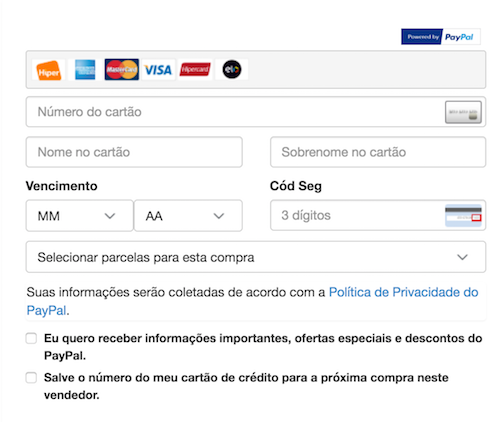
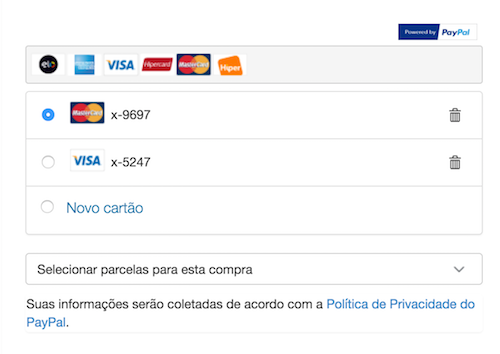
## Sample payment selection pages [#sample-payment-selection-pages]
These examples show how the payment selection page may look after your integration and configuration is complete:
## Next [#next]
* Optional: [Update the payment selection page](/archive/paypal-plus/br/payment-selection-page)
* Optional: [Populate an order review page](/archive/paypal-plus/br/order-review-page)
* Required: [Test your integration and execute the payment](/archive/paypal-plus/br/test-and-execute)
 ## Next [#next]
* Optional: [Update the payment selection page](/archive/paypal-plus/br/payment-selection-page)
* Optional: [Populate an order review page](/archive/paypal-plus/br/order-review-page)
* Required: [Test your integration and execute the payment](/archive/paypal-plus/br/test-and-execute)
## Next [#next]
* Optional: [Update the payment selection page](/archive/paypal-plus/br/payment-selection-page)
* Optional: [Populate an order review page](/archive/paypal-plus/br/order-review-page)
* Required: [Test your integration and execute the payment](/archive/paypal-plus/br/test-and-execute)