# Fastlane for PayPal Complete Payments (/limited-release/accelerated-checkout)
> **Note:** **Note:** Fastlane is a limited-release solution. Features may change when the release becomes generally available. While you can integrate Fastlane in sandbox today, you must be part of the early adopter program in order to use Fastlane until our GA release.
## Purpose [#purpose]
This integration guide specifies how a partner or merchant can integrate Fastlane, an accelerated checkout product on the PayPal Complete Payments Platform, into their site.
## Scope [#scope]
Fastlane is an accelerated checkout solution targeted at guest payers to your store. If the payer already has a store account and has logged into it, continue to render your pre-existing checkout flow for store logged-in members. For store guest members, render the following integration flow.
## Integration flow [#integration-flow]
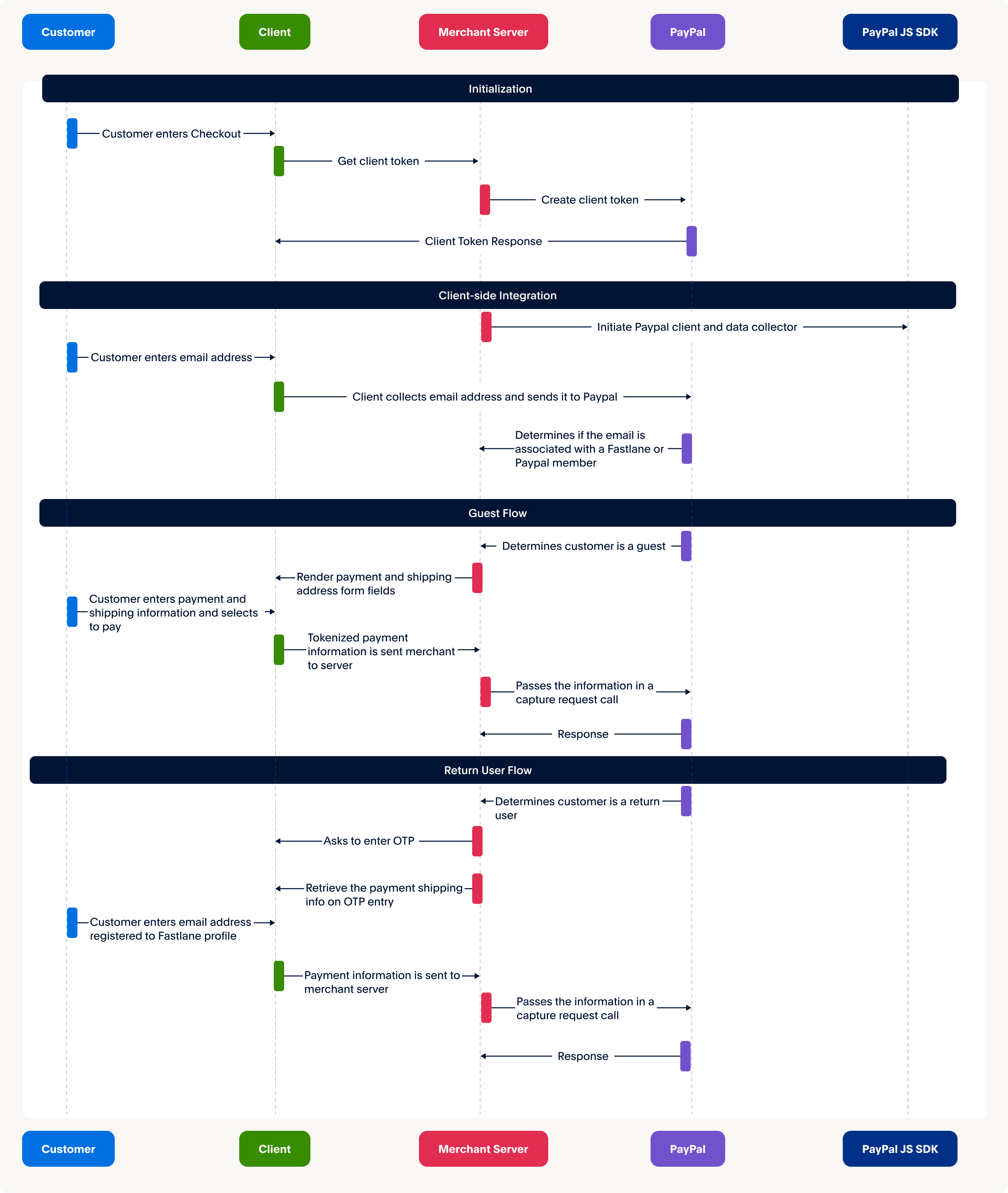
The following diagram depicts the integration changes required to enable Fastlane.
## 1. Set up server side [#1-set-up-server-side]
Take the following steps to set up Fastlane on the server side.
### Generate server-side client token [#generate-server-side-client-token]
To instantiate the JavaScript SDK and Fastlane components:
1. Generate an SDK token through a server-side call.
2. Pass the token into the SDK.
> **Note:** **Important** To protect yourself against cross-site scripting attacks, send domains in a comma-separated format in the request to generate a client token. You must provide the root domain name; for example, `example.com`. Specifying subdomains, wildcards or HTTP protocols such as `https://` will result in an error.
#### Request the token to initialize SDK [#request-the-token-to-initialize-sdk]
#### Merchant
```bash lineNumbers
curl -s -X POST https://api-m.sandbox.paypal.com/v1/oauth2/token \
-u 'CLIENT_ID:CLIENT_SECRET' \
-H 'Content-Type: application/x-www-form-urlencoded' \
-d 'grant_type=client_credentials' \
-d 'response_type=sdk_token' \
-d 'intent=sdk_init' \
-d 'domains[]=/merchant.com,/merchant2.com'
```
#### Platform
```bash lineNumbers
curl -s -X POST https://api-m.sandbox.paypal.com/v1/oauth2/token \
-u 'CLIENT_ID:CLIENT_SECRET' \
-H 'Content-Type: application/x-www-form-urlencoded' \
-H 'PayPal-Auth-Assertion: AUTH-ASSERTION-TOKEN' \
-d 'grant_type=client_credentials' \
-d 'response_type=sdk_token' \
-d 'intent=sdk_init' \
-d 'domains[]=/merchant.com,/merchant2.com'
```
#### Modify the code [#modify-the-code]
Copy the code sample and modify it as follows:
1. Replace `CLIENT-ID` with your client ID.
2. Replace `CLIENT-SECRET` with your client secret.
3. Replace `domains` with your own domains.
#### Sample response [#sample-response]
```json lineNumbers
{
"access_token" : "eyJraW...",
"app_id": "APP-80W2...",
"expires_in": 32400,
"nonce": "2024-01...",
"scope": "...",
"token_type": "Bearer"
}
```
## 2. Set up client side [#2-set-up-client-side]
Take the following steps to integrate on the client side.
### Initialize SDK and Fastlane [#initialize-sdk-and-fastlane]
Fastlane is initialized through a call to `paypal.fastlane` and passed a configuration object. Pass the device data when initializing Fastlane to prevent fraudulent access to `Fastlane` profiles.
First, initialize the SDK through the following script tag on your HTML page:
```html lineNumbers
```
The new component for Fastlane is called `fastlane`. The following fields are required to initialize the SDK:
* `client-id`
* `data-sdk-client-token`
* `data-client-metadata-id`
Next, initialize the `Fastlane` component:
```javascript lineNumbers
// instantiates the Fastlane module
const fastlane = await window.paypal.Fastlane({
// For more details about available options parameters, see the Reference section.
});
// sets the SDK to run in sandbox mode
window.localStorage.setItem("fastlaneEnv", "sandbox");
// Specifying the locale if necessary
fastlane.setLocale('en_us');
```
#### Specify locale [#specify-locale]
After you initialize the `Fastlane` component, you can specify the locales where the Fastlane components render.
Fastlane supports the following languages:
* `en_us` (default) - US English
* `es_us` - Spanish
* `fr_us` - French
* `zh_us` - Chinese
### Capture email address [#capture-email-address]
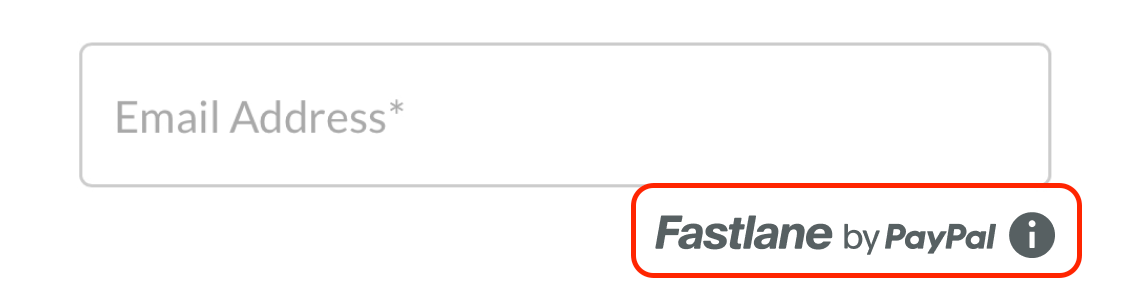
The first step of the checkout flow involves gathering the email address from the payer. Given that this email address will be shared with PayPal, we recommend that you notify the payer accordingly. Make sure to display the Fastlane watermark along with an information icon beneath the email address input field.
Refer to [Render the Fastlane watermark](/limited-release/accelerated-checkout/#render-the-fastlane-watermark) for instructions on rendering the watermark component.
> **Note:** **Note** PayPal is a data controller and a key business partner for Fastlane services. As such, payer email addresses are shared with PayPal. Inform payers about PayPal by using our SDK to display the "Powered by Fastlane" logo and an informational tooltip. If you have any inquiries about Fastlane or data protection legislation, seek guidance from your legal advisors.
## 3. Look up and authenticate payer [#3-look-up-and-authenticate-payer]
After collecting the payer's email address, call `identity.lookupCustomerByEmail(email)`. This method looks up an email address to determine if the payer is a Fastlane or PayPal member.
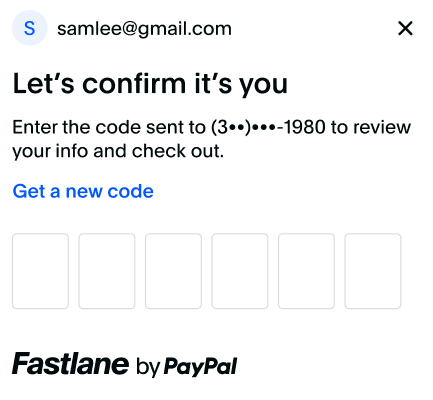
Fastlane members need to authenticate themselves before you can get their profile information. They are presented with a screen to enter a one-time password sent to their registered mobile number.
You can use the following sample to trigger the authentication flow and handle the response.
> **Note:** **Note:** The following sample sets a variable called `renderFastlaneMemberExperience` to simplify the conditional logic. Feel free to use any method to handle this in your implementation.
```javascript lineNumbers
const {
customerContextId
} = await identity.lookupCustomerByEmail(document.getElementById("email").value);
var renderFastlaneMemberExperience = false;
if (customerContextId) {
// Email is associated with a Fastlane member or a PayPal member,
// send customerContextId to trigger the authentication flow.
const {
authenticationState,
profileData
} = await identity.triggerAuthenticationFlow(customerContextId);
if (authenticationState === "succeeded") {
// Fastlane member successfully authenticated themselves
// profileData contains their profile details
renderFastlaneMemberExperience = true;
const name = profileData.name;
const shippingAddress = profileData.shippingAddress;
const card = profileData.card;
} else {
// Member failed or cancelled to authenticate. Treat them as a guest payer
renderFastlaneMemberExperience = false;
}
} else {
// No profile found with this email address. This is a guest payer
renderFastlaneMemberExperience = false;
}
```
The `triggerAuthenticationFlow()` method returns an `AuthenticatedCustomerResult` object. You can use the value of the `authenticationState` property in this object to determine if the payer has authenticated themselves. The returned object also contains the payer's default shipping address and card.
If a Fastlane member fails or declines to authenticate, render the same experience that you would for a guest payer.
Refer to [Reference types](/limited-release/accelerated-checkout/#reference-types) for more information on what options can be passed to each function shown in the previous code sample.
## 4. Render shipping address [#4-render-shipping-address]
The integration varies depending on the payer use case. The following table explains the different scenarios to implement:
| Use case | Integration required |
| -------------------------------------------------------------------------------------------------------- | ------------------------------------------------------------------------------------------------------------------------------------------ |
| Fastlane members with a shipping address | Render the shipping address from the payer profile, the Fastlane watermark, and the change address button that calls `showAddressSelector` |
| Guest payers and Fastlane members without a shipping address or an address in a region you don't support | Render your own shipping address collection form and pass it into the server-side transaction request. |
### Render address for Fastlane member [#render-address-for-fastlane-member]
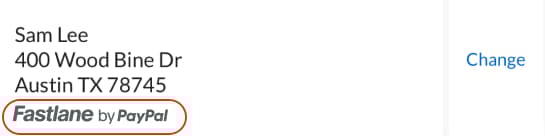
After the Fastlane member is authenticated, their shipping information is returned in the `profileData.shippingAddress` object. Use that returned data to render shipping information on your checkout page.
A Fastlane member may have multiple shipping addresses in their profile or want to enter a new address. Render a button to change the address.
Call the `profile.showShippingAddressSelector()` method when the payer selects the `changeAddressButton`. This gives the payer a list of addresses to pick from or enter a new address. When the payer makes a selection, the method returns the selected address. If they cancel without changing the selection, `selectionChanged` is set to `false`, and `selectedAddress` is set to `null`.
To restrict shipping to specific countries or regions, specify the `shippingAddressOptions` parameter when initializing the Fastlane component. Refer to [Reference types](/limited-release/accelerated-checkout/#reference-types) for more information.
If PayPal doesn't provide a shipping address for a Fastlane member, you'll need to render your own shipping address form.
When displaying a shipping address from a payer's Fastlane profile, you must display the Fastlane watermark without the info icon below the address as shown previously. For details on how to render the watermark, refer to [Render the Fastlane watermark](/limited-release/accelerated-checkout/#render-the-fastlane-watermark).
> **Note:** **Note:** Fastlane requires a US billing address, but the shipping address can be anywhere your site ships. If the payer selects another address from the list, or adds a new address, send the address in the server-side `v2/orders` request.
### Render address for guest users [#render-address-for-guest-users]
Guest users don't have an address in Fastlane. You'll need to render your existing shipping form to collect shipping information and pass it to PayPal upon checkout. This ensures that if a payer creates a Fastlane profile, the profile is created with the payer's shipping address.
### JavaScript sample [#javascript-sample]
You can use the following code as a reference to implement the shipping address for both user types.
```javascript lineNumbers
if (renderFastlaneMemberExperience) {
if (profileData.shippingAddress) {
// Render shipping address from the profile
const changeAddressButton = document.getElementById("your-change-address-button");
changeAddressButton.addEventListener("click", async () => {
const {
selectedAddress,
selectionChanged
} = await profile.showShippingAddressSelector();
if (selectionChanged) {
// selectedAddress contains the new address
} else {
// Selection modal was dismissed without selection
}
});
} else {
// Render your shipping address form
}
} else {
// Render your shipping address form
}
```
## 5. Accept payment [#5-accept-payment]
Fastlane offers two different integration patterns to accept payments.
### Select component or flexible integration [#select-component-or-flexible-integration]
The component integration requires minimal integration effort from your end. Component is our recommended integration path and automatically handles certain integration items without the need for additional logic. However, if you require finer control of the user interface and styling, we recommend the flexible integration.
The flexible integration requires you to handle the billing address on your own. If you use the flexible integration, you'll need to:
* Render the card menu and the watermark.
* Build conditional logic to determine when to show card fields.
* Render form fields to collect the billing address and pass it to the transaction.
### Component [#component]
The `FastlanePaymentComponent` is a smart payment UI component that automatically renders the following:
* Selected card
* **Change card** link for payers to change selected cards.
* Card fields for guest users or for Fastlane members who don't have a card in their profile.
* Billing address fields.
### Sample code [#sample-code]
#### HTML
```html lineNumbers
```
#### JavaScript
```javascript lineNumbers
const shippingAddress = {
name: {
firstName: "Jen",
lastName: "Smith",
fullName: "Jen Smith", // you can omit the fullName parameter if you pass the first and last name separately
},
company: "PayPal",
addressLine1: "1 E 1st St",
addressLine2: "5th Floor",
adminArea1: "Bartlett",
adminArea2: "IL",
postalCode: "60103",
countryCode: "US",
phone: "14155551212"
}
const options = {
fields: {
phoneNumber: {
// Example of how to prefill the phone number field
// in the FastlanePaymentComponent
prefill: "4026607986"
},
cardholderName: {
// Example of how to prefill the cardholder name field
// in the FastlanePaymentComponent
prefill: "John Doe"
},
},
styles: {
root: { // Specify styles here
backgroundColorPrimary: "#ffffff"
}
}
};
// This sample assumes you created a global named fastlane
// to reference the Fastlane SDK
const fastlanePaymentComponent = await fastlane.FastlanePaymentComponent({
options,
shippingAddress
});
fastlanePaymentComponent.render("#payment-container");
// Event listener when the user clicks to place the order
const submitButton = document.getElementById("submit-button");
submitButton.addEventListener("click", async ()=> {
const { id } = await fastlanePaymentComponent.getPaymentToken();
// Send the paymentToken id and captured device data to the server
// to complete checkout
});
```
To complete the transaction, send the `paymentToken.id` to your server and create a transaction with it.
Refer to [Reference types](/limited-release/accelerated-checkout/#reference-types) for more information on what options you can pass to each function in the previous code samples.
The flexible integration varies by user type. The following table presents the different scenarios you'll need to implement.
| User type | Render |
| -------------------------------------------------------------------------- | ----------------------------------------------------------------------------------------------------------------------- |
| Fastlane members with a stored card | The selected card from the `profile` object, Fastlane watermark, and change card button that calls `showCardSelector()` |
| Fastlane members without a card, with an unsupported card, or guest payers | The `FastlaneCardComponent` to accept new card information and a form to capture the payer's billing address |
### Sample code [#sample-code-1]
Use the following code as a reference to implement the flexible payment integration. It covers the following:
* Rendering the selected card and the change button
* Showing the card fields when required
* Collecting the billing address
#### HTML
```html lineNumbers
Change card
```
#### JavaScript
```javascript lineNumbers
const name = profileData.name;
const shippingAddress = profileData.shippingAddress;
const card = profileData.card;
var selectedCardForCheckout = card;
if (memberAuthenticatedSuccessfully && card) { // Refer to Lookup & Authenticate section for details
// Render the card here
// Render Fastlane watermark
// Render a change button and call `profile.showCardSelector()` when selected
} else {
// User is a guest, failed to authenticate, or does not have a card in the profile
// Render the card fields
// This sample assumes you created a global named fastlane
// to reference the Fastlane SDK
const fastlaneCardComponentOptions = {
fields: {
phoneNumber: {
// Example of how to prefill the phone number field in the FastlaneCardComponent
prefill: "4026607986"
},
cardholderName: {
//Example of enabling and prefilling the cardholder name field
prefill: "John Doe",
enabled: true
}
},
styles: {
root: { //specify styles here
backgroundColorPrimary: "#ffffff"
}
}
};
const fastlaneCardComponent = await fastlane.FastlaneCardComponent(
fastlaneCardComponentOptions
);
fastlaneCardComponent.render("#card-container");
}
// Handle changes to the card selection
const changeCardButton = document.getElementById("change-card-button");
changeCardButton.addEventListener("click", async ()=> {
const { selectionChanged, selectedCard } = await profile.showCardSelector();
if (selectionChanged) {
// selectedCard contains the new card
// selectedCard.id contains the paymentToken
// selectedCard.paymentSource.card contains more details such as last 4 card digits
selectedCardForCheckout = selectedCard
// Re-render the selected card UI if required
} else {
// Selection modal was dismissed without selection
}
});
// Handle form submission
const submitButton = document.getElementById("submit-button");
submitButton.addEventListener("click", async ()=> {
var paymentToken = null;
// if the Card Component is rendered, pass the billing address and get the payment token
if (selectedCardForCheckout) {
paymentToken = selectedCardForCheckout.id;
} else {
paymentToken = await fastlaneCardComponent.getPaymentToken({
billingAddress: {
addressLine1: "2211 North 1st St",
adminArea1: "CA",
adminArea2: "San Jose",
postalCode: "95131",
countryCode: "US"
}
});
}
// Send the paymentToken and captured device data to server
// to complete checkout
});
```
When displaying the card from a payer's Fastlane profile, display the Fastlane watermark without the info icon beneath the card. For details on how to render the watermark, refer to [Rendering the Fastlane watermark](/limited-release/accelerated-checkout/#render-the-fastlane-watermark).
### Rendering card assets [#rendering-card-assets]
When choosing the flexible integration pattern, render the card brand logo of the selected card for the payer to see. Use the following assets to ensure payers receive a uniform experience.
| Card brand | Image URL |
| ------------------------------------------------------------------------------------------------------------------------------------------------------------ | ---------------------------------------------------------------------------------------------------------------------------------------------------------------- |
| Amex | [https://www.paypalobjects.com/fastlane-v1/assets/cc\_amex\_light.81e1.svg](https://www.paypalobjects.com/fastlane-v1/assets/cc_amex_light.81e1.svg) |
| Diner's Club | [https://www.paypalobjects.com/fastlane-v1/assets/cc\_dinersclub\_light.354d.svg](https://www.paypalobjects.com/fastlane-v1/assets/cc_dinersclub_light.354d.svg) |
| Mastercard Discover | |
| [https://www.paypalobjects.com/fastlane-v1/assets/cc\_discover\_light.85a5.svg](https://www.paypalobjects.com/fastlane-v1/assets/cc_discover_light.85a5.svg) | |
| JCB | [https://www.paypalobjects.com/fastlane-v1/assets/cc\_jcb\_light.6fb4.svg](https://www.paypalobjects.com/fastlane-v1/assets/cc_jcb_light.6fb4.svg) |
| Mastercard | [https://www.paypalobjects.com/fastlane-v1/assets/cc\_mastercard\_light.1621.svg](https://www.paypalobjects.com/fastlane-v1/assets/cc_mastercard_light.1621.svg) |
| Union Pay | |
| [https://www.paypalobjects.com/fastlane-v1/assets/cc\_unionpay\_light.1519.svg](https://www.paypalobjects.com/fastlane-v1/assets/cc_unionpay_light.1519.svg) | |
| Visa | [https://www.paypalobjects.com/fastlane-v1/assets/cc\_visa\_light.0a3a.svg](https://www.paypalobjects.com/fastlane-v1/assets/cc_visa_light.0a3a.svg) |
> **Note:** **Note:** Your checkout needs to collect a billing address and cardholder name to use Fastlane. When calling the `getPaymentToken()` method, pass the billing address as shown previously.
If you have enabled the Cardholder Name field, the cardholder name will be collected automatically. If you have disabled it, you will need to send it in the `getPaymentToken()` method.
## 6. Create order [#6-create-order]
On your server, create an order by calling the Orders API. Pass the single-use token, item details, and shipping address. Provide detailed item descriptions and product images for each item the payer purchased.
Providing detailed item descriptions and product images has the following advantages:
* Creates the ideal user experience for email communications with the payer
* Streamlines potential dispute resolutions.
For partners or platforms, use the `PayPal-Partner-Attribution-ID` header and the `BN-CODE` to attribute transactions to the appropriate partner accounts.
### One-shot checkout through Orders API with shipping [#one-shot-checkout-through-orders-api-with-shipping]
```bash lineNumbers
curl -v -k -X POST https://api-m.sandbox.paypal.com/v2/checkout/orders \
-H 'PayPal-Request-Id: UNIQUE_ID' \
-H 'Authorization: Bearer PAYPAL_ACCESS_TOKEN' \
-H 'Content-Type: application/json' \
-H 'PayPal-Client-Metadata-Id: YOUR_CMID' \
-d '{
"intent": "CAPTURE",
"payment_source": {
"card": {
"single_use_token": "1h371660pr490622k" // Payment token from the client
}
},
"purchase_units": [
{
"amount": {
"currency_code": "USD",
"value": "50.00",
"breakdown": {
"item_total": {
"currency_code": "USD",
"value": "40.00"
},
"shipping": {
"currency_code": "USD",
"value": "10.00"
}
}
},
"items": [
{
"name": "Coffee",
"description": "1 pound of coffee beans",
"sku": "sku03",
"unit_amount": {
"currency_code": "USD",
"value": "40.00"
},
"quantity": "1",
"category": "PHYSICAL_GOODS",
"image_url": "https://example.com/static/images/items/1/coffee_beans.jpg",
"url": "https://example.com/items/1/coffee_beans",
"upc": {
"type": "UPC-A",
"code": "987654321015"
}
}
],
"shipping": {
"type": "SHIPPING",
"name": {
"full_name": "Firstname Lastname"
},
"address": {
"address_line_1": "123 Fake St.",
"admin_area_2": "Los Angeles",
"admin_area_1": "CA", // Must be sent in 2-letter format
"postal_code": "90049",
"country_code": "US"
},
"phone_number": {
"country_code": "1",
"national_number": "5555555555"
}
}
}
]
}'
```
> **Note:** **Important:** If the payer is picking up the item from a store, modify the shipping type in the `purchase_units.shipping` object to `PICKUP_IN_STORE`. This ensures that payer profiles aren't created with the store address as their shipping address.
### Headers for partner merchants [#headers-for-partner-merchants]
If you are integrating on behalf of a partner merchant, you'll need the following additional headers:
```bash lineNumbers
-H "PayPal-Partner-Attribution-ID: BN-CODE" \
-H "PayPal-Auth-Assertion: AUTH-ASSERTION-TOKEN"
```
### Save Fastlane payment tokens [#save-fastlane-payment-tokens]
To save the `paymentToken` from the Fastlane SDK, use the `store_in_vault` attribute in the [`v2/orders`](/api/orders/v2#orders_create!path=payment_source/card/attributes/vault/store_in_vault\&t=request) request on your server.
### Render the Fastlane watermark [#render-the-fastlane-watermark]
You can render the Fastlane watermark with or without an info icon.
The image tag in the watermark container div allows the watermark to render instantly. The mouse-over tooltip functionality displays when the watermark component loads.
### With info icon [#with-info-icon]
#### HTML
```html lineNumbers
```
#### JavaScript
```javascript lineNumbers
const fastlaneWatermark = (await fastlane.FastlaneWatermarkComponent({
includeAdditionalInfo: true
}));
fastlaneWatermark.render("#watermark-container");
```
### Without icon info [#without-icon-info]
#### HTML
```html lineNumbers
```
#### JavaScript
```javascript lineNumbers
const fastlaneWatermark = (await fastlane.FastlaneWatermarkComponent({
includeAdditionalInfo: false
}));
fastlaneWatermark.render("#watermark-container");
```
#### Preload watermark assets to optimize Fastlane [#preload-watermark-assets-to-optimize-fastlane]
For a better payer experience, we recommend preloading the watermark asset by adding the following code to the `` section of the page. Note that this is an optional but recommended step.
```html lineNumbers
```
## Error Conditions [#error-conditions]
| Error Condition | How to Handle |
| -------------------------------------------------------------------------------------------------------------------------------------------------------------- | ---------------------------------------------------------------------------------------------------------------------------------------------------------------------------------------------------------------------------- |
| Authorization error while initializing `fastlane`. This error indicates that your merchant account and client credentials may not be provisioned for Fastlane. | Talk to your account team for assistance. |
| The Ryan persona does not have any saved cards or shipping addresses. | This can happen for a number of reasons, but the most common is that you have restrictions on the card brand or the shipping address location. Refer to the shipping address and payment sections for handling instructions. |
| `FastlaneCardComponent.getPaymentToken()` does not return a payment token. | Ensure you are passing the required parameters formatted appropriately to the method. |
| Server-side errors. | Refer to the PayPal [`orders/v2`](/api/orders/v2/orders-create) documentation. |
| Client token generation errors. | Refer to the [Authentication documentation](/api/rest/authentication/). |
| The following methods return undefined: identity.triggerAuthenticationFlow(), profile.showShippingAddressSelector(), profile.showCardSelector() | Fastlane has been disabled from within the PayPal dashboard. Refer to the section below. |
## Disablement Flows [#disablement-flows]
If Fastlane has been disabled from within the PayPal dashboard, the Fastlane client SDKs are built so that there will be no interruption to your buyers. This means the SDK will revert to the guest experience without the ability for a buyer to opt-in to creating a Fastlane profile. Card fields will work as expected and processing guest transactions will continue to function.
In the event of Fastlane being disabled from within the PayPal dashboard, note that the following methods will return undefined.
* `identity.triggerAuthenticationFlow()`
* `profile.showShippingAddressSelector()`
* `profile.showCardSelector()`
## Test your integration [#test-your-integration]
To test your integration in the sandbox environment, set the following local storage variables before initializing the Fastlane component.
```javascript lineNumbers
window.localStorage.setItem("axoEnv", "sandbox");
```
After integrating Fastlane on your website, launch the site and use the following values to test the integration for the 3 user types:
### Test guest payer flow [#test-guest-payer-flow]
* Provide an email address that is new and not associated with a sandbox Fastlane account.
* Go through the checkout process using one of the following test card numbers. Be sure that the opt-in toggle is in the "on" state. You can enter any valid phone number. No SMS is sent in sandbox mode.
* Upon completing the transaction, a Fastlane profile is created that can be used for testing subsequent transactions as a Fastlane member.
### Test Fastlane member flow [#test-fastlane-member-flow]
* Go through the previous steps and register a new Fastlane account. Be sure to remember the email address used when you created the account so that you can use it for additional testing.
* When the authentication modal appears and you are prompted for a one-time password (OTP) use `111111` to simulate authentication. Use any other 6-digit number to simulate failed authentication.
* Make sure that you test the payer's ability to update shipping addresses and cards associated with their profile.
PayPal members without a Fastlane profile do not require any additional handling within your integration. Our client SDK handles this use case for you in the following ways:
* After performing the `lookupCustomerByEmail` method, we return a `customerContextId` as if this were a Fastlane member.
* Trigger the `triggerAuthenticationFlow` method. Our SDK displays a call to action to the buyer explaining that they can create a Fastlane profile populated with information from their PayPal account with one click.
* If the buyer selects yes, we return `profileData` exactly as we would for a Fastlane member.
* If the buyer closes the dialog, we return an empty `profileData` object and you handle the buyer as any Fastlane guest.
### Use test card numbers [#use-test-card-numbers]
Use the following mock card numbers to test transactions.
| **Card Number** | **Brand** |
| ---------------- | ---------------- |
| 4005519200000004 | Visa |
| 4012000033330026 | Visa |
| 4012000077777777 | Visa |
| 5555555555554444 | Master Card |
| 378282246310005 | American Express |
## Reference types [#reference-types]
> **Note:** **Note:** You may see references to **Connect** in the SDK. These are artifacts from a deprecated integration path. Only use methods and components named **Fastlane**.
### Fastlane window configuration parameters [#fastlane-window-configuration-parameters]
`window.paypal.Fastlane(options);` configuration parameters:
```typescript lineNumbers
interface FastlaneOptions {
shippingAddressOptions: AddressOptions,
cardOptions: CardOptions,
styles: StyleOptions
}
/*
* To restrict the use of Fastlane to specific countries or regions, set
* allowedLocations to an array containing the countries or regions where Fastlane
* should be allowed.
*
* To allow all regions within a particular country, specify the country's
* ISO 3166-1 alpha-2 country code only.
*
* To allow only specific regions in a country, specify the country's
* ISO 3166-1 alpha-2 country code, followed by a colon (":"), followed by the
* name of the region.
*
* Examples:
*
- [ "US" ] = Allow all regions within the United States
*
- [ "US:CA", "US:AZ" ] = Allow in California and Arizona, but nowhere else
*
- [ "US:CA", "US:AZ", "FR" ] = Allow in California, Arizona, and France,
* but nowhere else
*/
interface AddressOptions {
// default: empty array = all locations allowed
allowedLocations: [AddressLocationEnum];
}
Enum AddressLocationEnum {
{ISO-country-code}
{ISO-country-code}:{ISO-region-code}
}
interface CardOptions {
// default: empty array = all brands allowed
allowedBrands: [CardBrandEnum];
}
Enum CardBrandEnum {
VISA
MASTERCARD
AMEX
DINERS
DISCOVER
JCB
CHINA_UNION_PAY
MAESTRO
ELO
MIR
HIPER
HIPERCARD
}
type create = (options: FastlaneOptions) => Fastlane;
```
### Fastlane namespace [#fastlane-namespace]
This is returned as the result of calling `fastlane.create({\...})`.
```typescript lineNumbers
interface Fastlane {
identity {
lookupCustomerByEmail: (email: string) => LookupCustomerResult,
triggerAuthenticationFlow: (customerContextId: string, options: AuthenticationFlowOptions) => AuthenticatedCustomerResult
}
profile {
showShippingAddressSelector: () => ShowShippingAddressSelectorResult,
showCardSelector: () => ShowCardSelectorResult,
}
setLocale: (locale: string) => void, // options: en_us, es_us, fr_us, zh_us
FastlaneCardComponent: (options: FastlaneCardComponentOptions) => FastlaneCardComponent,
FastlanePaymentComponent: (options: FastlanePaymentComponentOptions) => FastlanePaymentComponent,
FastlaneWatermarkComponent: (options: FastlaneWatermarkOptions) => FastlaneWatermarkComponent
}
```
### LookupCustomerResult [#lookupcustomerresult]
The `LookupCustomerResult` object type is returned from the `identity.lookupCustomerByEmail(email)` method.
```typescript lineNumbers
interface LookupCustomerResult {
customerContextId: string
}
```
### Fastlane watermark component [#fastlane-watermark-component]
```typescript lineNumbers
interface FastlaneWatermarkOptions {
includeAdditionalInfo: boolean
}
interface FastlaneWatermark {
render: (container) => null
}
```
### 7. AuthenticatedCustomerResult [#7-authenticatedcustomerresult]
The `AuthenticatedCustomerResult` object type is returned from the `identity.triggerAuthenticationFlow()` call.
```typescript lineNumbers
interface AuthenticatedCustomerResult {
authenticationState: 'succeeded'|'failed'|'canceled'|'not_found';
profileData: ProfileData;
}
interface ProfileData {
name: Name;
shippingAddress: Shipping;
card: PaymentToken;
}
interface Name = {
firstName: string;
lastName: string;
fullName: string;
};
interface Phone = {
nationalNumber: string;
countryCode: string;
};
interface Address = {
addressLine1: string,
addressLine2: string,
adminArea1: string,
adminArea2: string;
postalCode: string,
countryCode: string
phone: Phone;
};
interface Shipping = {
name: Name;
phone: Phone;
address: Address;
companyName: string;
}
interface BillingAddress = Address;
interface PaymentToken {
id: string; // This is the paymentToken
paymentSource: PaymentSource;
}
interface PaymentSource {
card: CardPaymentSource;
}
interface CardPaymentSource {
brand: string;
expiry: string; // "YYYY-MM"
lastDigits: string; // "1111"
name: string;
billingAddress: Address;
}
```
### Profile method reference types [#profile-method-reference-types]
```typescript lineNumbers
interface ShowShippingAddressSelectorResult {
selectionChanged: boolean;
selectedAddress: Address;
}
interface ShowCardSelectorResult {
selectionChanged: boolean;
selectedCard: PaymentToken;
}
```
### Fastlane card component [#fastlane-card-component]
The `FastlaneCardComponent` is a subset of the Hosted Card Fields interface.
Use the following code to create an instance of the `FastlaneCardComponent`:
```javascript lineNumbers
const fastlaneCardComponent = await fastlane.FastlaneCardComponent({...});
await fastlaneCardComponent.render("#card-container")
```
### Fastlane card component reference types [#fastlane-card-component-reference-types]
```typescript lineNumbers
type FastlaneCardComponent = (options: FastlaneCardComponentOptions) => FastlaneCardComponent;
interface FastlaneCardComponent {
render: (container) => FastlaneCardComponent;
getPaymentToken: async (options: PaymentTokenOptions) => PaymentToken;
}
interface FastlaneCardComponentOptions {
styles: StyleOptions;
fields: {Field};
}
interface Field {
placeholder: string;
prefill: string;
}
interface PaymentTokenOptions {
billingAddress: Address;
}
```
### Fastlane payment component [#fastlane-payment-component]
Create a `FastlanePaymentComponent` with the following code:
```javascript lineNumbers
const fastlanePaymentComponent = await fastlane.FastlaneEmailComponent({ ... });
fastlanePaymentComponent.render("#payment-container");
```
#### Payment component reference types [#payment-component-reference-types]
```typescript lineNumbers
type FastlanePaymentComponent = (options: FastlanePaymentComponentOptions) => FastlanePaymentComponent;
interface FastlanePaymentComponent {
render: (container) => FastlanePaymentComponent;
getPaymentToken: async () => PaymentToken;
setShippingAddress: (shippingAddress: Address) => void;
}
interface FastlanePaymentComponentOptions {
styles: StyleOptions;
fields: {Field};
shippingAddress: Address;
}
interface Field {
placeholder: string;
prefill: string;
}
```
### Card field configurations [#card-field-configurations]
You can configure the card fields in the `FastlaneCardFieldComponent` or `FastlanePaymentComponent` when initializing the components.
```typescript lineNumbers
const styles: {};
const fields: {
number: {
placeholder: "Enter your card number",
},
phoneNumber: {
prefill: "555-555-5555"
},
cardholderName: {
prefill: "John Doe",
enabled: true
}
}
}
const fastlaneCardComponent = fastlane.FastlaneCardComponent({
styles,
fields
});
fastlaneCardComponent.render(elem);
const fastlanePaymentComponent = fastlane.FastlanePaymentComponent({
styles,
fields
});/n
fastlanePaymentComponent.render(elem);/n
```
#### Available fields [#available-fields]
| Name | Type | Attributes | Description |
| ----------------- | ----- | ------------ | --------------------------------------------------------------------------------------------------------------------------------------------------------------------------------------------------------------------- |
| `number` | field | `` | A field for a card number. |
| `expirationDate` | field | `` | A field for an expiration date in `MM/YYYY` or `MM/YY` format. This should not be used with the `expirationMonth` and `expirationYear` properties. |
| `expirationMonth` | field | `` | A field for an expiration month in `MM` format. This should be used with the `expirationYear` property. |
| `expirationYear` | field | `` | A field for an expiration year in `YYYY` or `YY` format. This should be used with the `expirationMonth` property. |
| `cvv` | field | `` | A field for 3 or 4-digit card verification code such as a CVV or CID. If you want to create a CVV-only payment method nonce to verify a card already stored in your vault, omit all other fields to only collect CVV. |
| `postalCode` | field | `` | A field for the postal or region code. |
| `cardholderName` | field | `` | A field for the cardholder's name on the credit card. |
| `phoneNumber` | field | `` | A field for the cardholder's name on the credit card. |
### Style options and guidelines [#style-options-and-guidelines]
Colors can be any value that CSS allows, including hex values, RGB, RGBA, and color names.
```typescript lineNumbers
interface StyleOptions {
root: {
backgroundColor: string // default: #ffffff,
errorColor: string, // default: #C40B0B
fontFamily: string, // default: "PayPal Open"
textColorBase: string, // default: #222222
fontSizeBase: string, // default: 16px
padding: string, // default: 4 px
primaryColor: string // default #?
},
input: {
backgroundColor: string, // default #ffffff
borderRadius: string, // default: 0.25rem
borderColor: string, // default: #DCDCDC
borderWidth: string, // default: 1px
textColorBase: string, // default #222222
focusBorderColor: string, // default: #0021A3
},
```
## Make checkout components accessible [#make-checkout-components-accessible]
When styling Fastlane components to match your checkout page, there are some guidelines you'll need to follow to provide an accessible and transparent experience to your payer.
* Ensure adequate contrast between the `backgroundColor` and `textColor`. All text, especially the legal text under the opt-in, is clear and legible. If the contrast ratio between the two variables is not 4.5:1, we will automatically set them to the default values in the following table.
* Ensure adequate contrast between the `borderColor`, which drives the consent toggle coloring, and the `backgroundColor`.
> **Note:** **Important:** All Fastlane integrations must conform to current [WCAG levels A and AA](https://www.w3.org/TR/WCAG21/). Be sure to comply with these standards when styling any Fastlane UI components.
The following is a list of how this interface applies to each of the Fastlane components:
| Value | Description | Default |
| ------------------------ | ------------------------------------------------------------------------------------------------------------------------------------------------------- | ------------- |
| `root.backgroundColor` | The background color of the Fastlane Components. | `#ffffff` |
| `root.errorColor` | The color of errors in the components. | `#D9360B` |
| `root.fontFamily` | The font family used throughout the UI. | `PayPal Open` |
| `root.fontSizeBase` | The base font size. Increasing this value will change the text size of all text within the UI components. | `16px` |
| `root.textColorBase` | The text color used across all text within the UI components. | `#010B0D` |
| `root.padding` | The padding between content and borders. | `4px` |
| `root.primaryColor` | Sets the default color for the checkbox for billing address, the change card link, the toggle primary color, and the legal links for privacy and terms. | `#0057FF` |
| `input.backgroundColor` | The background color of the inputs within the components. | `#ffffff` |
| `input.borderRadius` | The border radius used for the email field. | `0.25em` |
| `input.borderColor` | The border color of the email field. | `#DADDDD` |
| `input.focusBorderColor` | The border color of the email field when focused. | `#0057FF` |
| `input.borderWidth` | The width of the input borders. | `1px` |
| `input.textColorBase` | The text color used for text within input fields. | `#010B0D` |
The following table lists the required data to create a Fastlane profile, how to pass the information, and which data takes priority.
| Data property | First priority | Second priority |
| ---------------- | --------------------------------------- | -------------------------------------------------------------------------------- |
| Phone number | UI | -- |
| Email | UI | -- |
| Billing address | API | UI - tokenize. Requires first name, last name, street, city, state, zip, country |
| Shipping address | API | UI - tokenize |
| First name | Derived from billing address first name | -- |
| Last name | Derived from billing address last name | -- |
## FAQs [#faqs]
### Will Fastlane work if I save a payer's payment method? [#will-fastlane-work-if-i-save-a-payers-payment-method]
Yes, the `paymentToken` returned on the client can be saved to the vault when creating a transaction on your server. You can save a payment method only when using the `store_in_vault` attribute of the [create order request](/api/orders/v2#orders_create!path=payment_source/card/attributes/vault/store_in_vault\&t=request).
We currently do not support the ability to save a buyer's card information prior to transacting.
### How long is a payment token valid? [#how-long-is-a-payment-token-valid]
A `paymentToken` is valid for 3 hours from issuance.
### What if the payer's shipping address is in a location that my site doesn't ship to? [#what-if-the-payers-shipping-address-is-in-a-location-that-my-site-doesnt-ship-to]
When you initially call `window.paypal.fastlane.create()`, you can pass in a list of allowed locations using the `addressOptions` object. See [reference types](/limited-release/accelerated-checkout/#reference-types) for details.
### How should I handle cases where a payer navigates away from the checkout page to add or remove items? [#how-should-i-handle-cases-where-a-payer-navigates-away-from-the-checkout-page-to-add-or-remove-items]
It's best practice to call the `triggerAuthenticationFlow()` method every time the checkout page is reloaded. Internal logic within our SDK determines whether we require the payer to authenticate through a one-time password or restore the session. In either case, the method returns the `authenticatedCustomerResult`. This also includes a new `paymentToken`.
#### How can I test Fastlane outside the US? [#how-can-i-test-fastlane-outside-the-us]
Fastlane is only available to payers in the US. If you are outside the US, you must use a VPN to test payer flows.

 ## 1. Set up server side [#1-set-up-server-side]
Take the following steps to set up Fastlane on the server side.
### Generate server-side client token [#generate-server-side-client-token]
To instantiate the JavaScript SDK and Fastlane components:
1. Generate an SDK token through a server-side call.
2. Pass the token into the SDK.
> **Note:** **Important** To protect yourself against cross-site scripting attacks, send domains in a comma-separated format in the request to generate a client token. You must provide the root domain name; for example, `example.com`. Specifying subdomains, wildcards or HTTP protocols such as `https://` will result in an error.
#### Request the token to initialize SDK [#request-the-token-to-initialize-sdk]
#### Merchant
```bash lineNumbers
curl -s -X POST https://api-m.sandbox.paypal.com/v1/oauth2/token \
-u 'CLIENT_ID:CLIENT_SECRET' \
-H 'Content-Type: application/x-www-form-urlencoded' \
-d 'grant_type=client_credentials' \
-d 'response_type=sdk_token' \
-d 'intent=sdk_init' \
-d 'domains[]=/merchant.com,/merchant2.com'
```
#### Platform
```bash lineNumbers
curl -s -X POST https://api-m.sandbox.paypal.com/v1/oauth2/token \
-u 'CLIENT_ID:CLIENT_SECRET' \
-H 'Content-Type: application/x-www-form-urlencoded' \
-H 'PayPal-Auth-Assertion: AUTH-ASSERTION-TOKEN' \
-d 'grant_type=client_credentials' \
-d 'response_type=sdk_token' \
-d 'intent=sdk_init' \
-d 'domains[]=/merchant.com,/merchant2.com'
```
#### Modify the code [#modify-the-code]
Copy the code sample and modify it as follows:
1. Replace `CLIENT-ID` with your client ID.
2. Replace `CLIENT-SECRET` with your client secret.
3. Replace `domains` with your own domains.
#### Sample response [#sample-response]
```json lineNumbers
{
"access_token" : "eyJraW...",
"app_id": "APP-80W2...",
"expires_in": 32400,
"nonce": "2024-01...",
"scope": "...",
"token_type": "Bearer"
}
```
## 2. Set up client side [#2-set-up-client-side]
Take the following steps to integrate on the client side.
### Initialize SDK and Fastlane [#initialize-sdk-and-fastlane]
Fastlane is initialized through a call to `paypal.fastlane` and passed a configuration object. Pass the device data when initializing Fastlane to prevent fraudulent access to `Fastlane` profiles.
First, initialize the SDK through the following script tag on your HTML page:
```html lineNumbers
```
The new component for Fastlane is called `fastlane`. The following fields are required to initialize the SDK:
* `client-id`
* `data-sdk-client-token`
* `data-client-metadata-id`
Next, initialize the `Fastlane` component:
```javascript lineNumbers
// instantiates the Fastlane module
const fastlane = await window.paypal.Fastlane({
// For more details about available options parameters, see the Reference section.
});
// sets the SDK to run in sandbox mode
window.localStorage.setItem("fastlaneEnv", "sandbox");
// Specifying the locale if necessary
fastlane.setLocale('en_us');
```
#### Specify locale [#specify-locale]
After you initialize the `Fastlane` component, you can specify the locales where the Fastlane components render.
Fastlane supports the following languages:
* `en_us` (default) - US English
* `es_us` - Spanish
* `fr_us` - French
* `zh_us` - Chinese
### Capture email address [#capture-email-address]
The first step of the checkout flow involves gathering the email address from the payer. Given that this email address will be shared with PayPal, we recommend that you notify the payer accordingly. Make sure to display the Fastlane watermark along with an information icon beneath the email address input field.
## 1. Set up server side [#1-set-up-server-side]
Take the following steps to set up Fastlane on the server side.
### Generate server-side client token [#generate-server-side-client-token]
To instantiate the JavaScript SDK and Fastlane components:
1. Generate an SDK token through a server-side call.
2. Pass the token into the SDK.
> **Note:** **Important** To protect yourself against cross-site scripting attacks, send domains in a comma-separated format in the request to generate a client token. You must provide the root domain name; for example, `example.com`. Specifying subdomains, wildcards or HTTP protocols such as `https://` will result in an error.
#### Request the token to initialize SDK [#request-the-token-to-initialize-sdk]
#### Merchant
```bash lineNumbers
curl -s -X POST https://api-m.sandbox.paypal.com/v1/oauth2/token \
-u 'CLIENT_ID:CLIENT_SECRET' \
-H 'Content-Type: application/x-www-form-urlencoded' \
-d 'grant_type=client_credentials' \
-d 'response_type=sdk_token' \
-d 'intent=sdk_init' \
-d 'domains[]=/merchant.com,/merchant2.com'
```
#### Platform
```bash lineNumbers
curl -s -X POST https://api-m.sandbox.paypal.com/v1/oauth2/token \
-u 'CLIENT_ID:CLIENT_SECRET' \
-H 'Content-Type: application/x-www-form-urlencoded' \
-H 'PayPal-Auth-Assertion: AUTH-ASSERTION-TOKEN' \
-d 'grant_type=client_credentials' \
-d 'response_type=sdk_token' \
-d 'intent=sdk_init' \
-d 'domains[]=/merchant.com,/merchant2.com'
```
#### Modify the code [#modify-the-code]
Copy the code sample and modify it as follows:
1. Replace `CLIENT-ID` with your client ID.
2. Replace `CLIENT-SECRET` with your client secret.
3. Replace `domains` with your own domains.
#### Sample response [#sample-response]
```json lineNumbers
{
"access_token" : "eyJraW...",
"app_id": "APP-80W2...",
"expires_in": 32400,
"nonce": "2024-01...",
"scope": "...",
"token_type": "Bearer"
}
```
## 2. Set up client side [#2-set-up-client-side]
Take the following steps to integrate on the client side.
### Initialize SDK and Fastlane [#initialize-sdk-and-fastlane]
Fastlane is initialized through a call to `paypal.fastlane` and passed a configuration object. Pass the device data when initializing Fastlane to prevent fraudulent access to `Fastlane` profiles.
First, initialize the SDK through the following script tag on your HTML page:
```html lineNumbers
```
The new component for Fastlane is called `fastlane`. The following fields are required to initialize the SDK:
* `client-id`
* `data-sdk-client-token`
* `data-client-metadata-id`
Next, initialize the `Fastlane` component:
```javascript lineNumbers
// instantiates the Fastlane module
const fastlane = await window.paypal.Fastlane({
// For more details about available options parameters, see the Reference section.
});
// sets the SDK to run in sandbox mode
window.localStorage.setItem("fastlaneEnv", "sandbox");
// Specifying the locale if necessary
fastlane.setLocale('en_us');
```
#### Specify locale [#specify-locale]
After you initialize the `Fastlane` component, you can specify the locales where the Fastlane components render.
Fastlane supports the following languages:
* `en_us` (default) - US English
* `es_us` - Spanish
* `fr_us` - French
* `zh_us` - Chinese
### Capture email address [#capture-email-address]
The first step of the checkout flow involves gathering the email address from the payer. Given that this email address will be shared with PayPal, we recommend that you notify the payer accordingly. Make sure to display the Fastlane watermark along with an information icon beneath the email address input field.
 Refer to [Render the Fastlane watermark](/limited-release/accelerated-checkout/#render-the-fastlane-watermark) for instructions on rendering the watermark component.
> **Note:** **Note** PayPal is a data controller and a key business partner for Fastlane services. As such, payer email addresses are shared with PayPal. Inform payers about PayPal by using our SDK to display the "Powered by Fastlane" logo and an informational tooltip. If you have any inquiries about Fastlane or data protection legislation, seek guidance from your legal advisors.
## 3. Look up and authenticate payer [#3-look-up-and-authenticate-payer]
After collecting the payer's email address, call `identity.lookupCustomerByEmail(email)`. This method looks up an email address to determine if the payer is a Fastlane or PayPal member.
Fastlane members need to authenticate themselves before you can get their profile information. They are presented with a screen to enter a one-time password sent to their registered mobile number.
Refer to [Render the Fastlane watermark](/limited-release/accelerated-checkout/#render-the-fastlane-watermark) for instructions on rendering the watermark component.
> **Note:** **Note** PayPal is a data controller and a key business partner for Fastlane services. As such, payer email addresses are shared with PayPal. Inform payers about PayPal by using our SDK to display the "Powered by Fastlane" logo and an informational tooltip. If you have any inquiries about Fastlane or data protection legislation, seek guidance from your legal advisors.
## 3. Look up and authenticate payer [#3-look-up-and-authenticate-payer]
After collecting the payer's email address, call `identity.lookupCustomerByEmail(email)`. This method looks up an email address to determine if the payer is a Fastlane or PayPal member.
Fastlane members need to authenticate themselves before you can get their profile information. They are presented with a screen to enter a one-time password sent to their registered mobile number.
 You can use the following sample to trigger the authentication flow and handle the response.
> **Note:** **Note:** The following sample sets a variable called `renderFastlaneMemberExperience` to simplify the conditional logic. Feel free to use any method to handle this in your implementation.
```javascript lineNumbers
const {
customerContextId
} = await identity.lookupCustomerByEmail(document.getElementById("email").value);
var renderFastlaneMemberExperience = false;
if (customerContextId) {
// Email is associated with a Fastlane member or a PayPal member,
// send customerContextId to trigger the authentication flow.
const {
authenticationState,
profileData
} = await identity.triggerAuthenticationFlow(customerContextId);
if (authenticationState === "succeeded") {
// Fastlane member successfully authenticated themselves
// profileData contains their profile details
renderFastlaneMemberExperience = true;
const name = profileData.name;
const shippingAddress = profileData.shippingAddress;
const card = profileData.card;
} else {
// Member failed or cancelled to authenticate. Treat them as a guest payer
renderFastlaneMemberExperience = false;
}
} else {
// No profile found with this email address. This is a guest payer
renderFastlaneMemberExperience = false;
}
```
The `triggerAuthenticationFlow()` method returns an `AuthenticatedCustomerResult` object. You can use the value of the `authenticationState` property in this object to determine if the payer has authenticated themselves. The returned object also contains the payer's default shipping address and card.
If a Fastlane member fails or declines to authenticate, render the same experience that you would for a guest payer.
Refer to [Reference types](/limited-release/accelerated-checkout/#reference-types) for more information on what options can be passed to each function shown in the previous code sample.
## 4. Render shipping address [#4-render-shipping-address]
The integration varies depending on the payer use case. The following table explains the different scenarios to implement:
| Use case | Integration required |
| -------------------------------------------------------------------------------------------------------- | ------------------------------------------------------------------------------------------------------------------------------------------ |
| Fastlane members with a shipping address | Render the shipping address from the payer profile, the Fastlane watermark, and the change address button that calls `showAddressSelector` |
| Guest payers and Fastlane members without a shipping address or an address in a region you don't support | Render your own shipping address collection form and pass it into the server-side transaction request. |
You can use the following sample to trigger the authentication flow and handle the response.
> **Note:** **Note:** The following sample sets a variable called `renderFastlaneMemberExperience` to simplify the conditional logic. Feel free to use any method to handle this in your implementation.
```javascript lineNumbers
const {
customerContextId
} = await identity.lookupCustomerByEmail(document.getElementById("email").value);
var renderFastlaneMemberExperience = false;
if (customerContextId) {
// Email is associated with a Fastlane member or a PayPal member,
// send customerContextId to trigger the authentication flow.
const {
authenticationState,
profileData
} = await identity.triggerAuthenticationFlow(customerContextId);
if (authenticationState === "succeeded") {
// Fastlane member successfully authenticated themselves
// profileData contains their profile details
renderFastlaneMemberExperience = true;
const name = profileData.name;
const shippingAddress = profileData.shippingAddress;
const card = profileData.card;
} else {
// Member failed or cancelled to authenticate. Treat them as a guest payer
renderFastlaneMemberExperience = false;
}
} else {
// No profile found with this email address. This is a guest payer
renderFastlaneMemberExperience = false;
}
```
The `triggerAuthenticationFlow()` method returns an `AuthenticatedCustomerResult` object. You can use the value of the `authenticationState` property in this object to determine if the payer has authenticated themselves. The returned object also contains the payer's default shipping address and card.
If a Fastlane member fails or declines to authenticate, render the same experience that you would for a guest payer.
Refer to [Reference types](/limited-release/accelerated-checkout/#reference-types) for more information on what options can be passed to each function shown in the previous code sample.
## 4. Render shipping address [#4-render-shipping-address]
The integration varies depending on the payer use case. The following table explains the different scenarios to implement:
| Use case | Integration required |
| -------------------------------------------------------------------------------------------------------- | ------------------------------------------------------------------------------------------------------------------------------------------ |
| Fastlane members with a shipping address | Render the shipping address from the payer profile, the Fastlane watermark, and the change address button that calls `showAddressSelector` |
| Guest payers and Fastlane members without a shipping address or an address in a region you don't support | Render your own shipping address collection form and pass it into the server-side transaction request. |
 ### Render address for Fastlane member [#render-address-for-fastlane-member]
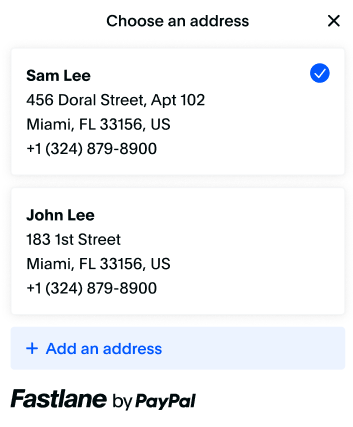
After the Fastlane member is authenticated, their shipping information is returned in the `profileData.shippingAddress` object. Use that returned data to render shipping information on your checkout page.
A Fastlane member may have multiple shipping addresses in their profile or want to enter a new address. Render a button to change the address.
Call the `profile.showShippingAddressSelector()` method when the payer selects the `changeAddressButton`. This gives the payer a list of addresses to pick from or enter a new address. When the payer makes a selection, the method returns the selected address. If they cancel without changing the selection, `selectionChanged` is set to `false`, and `selectedAddress` is set to `null`.
To restrict shipping to specific countries or regions, specify the `shippingAddressOptions` parameter when initializing the Fastlane component. Refer to [Reference types](/limited-release/accelerated-checkout/#reference-types) for more information.
If PayPal doesn't provide a shipping address for a Fastlane member, you'll need to render your own shipping address form.
When displaying a shipping address from a payer's Fastlane profile, you must display the Fastlane watermark without the info icon below the address as shown previously. For details on how to render the watermark, refer to [Render the Fastlane watermark](/limited-release/accelerated-checkout/#render-the-fastlane-watermark).
> **Note:** **Note:** Fastlane requires a US billing address, but the shipping address can be anywhere your site ships. If the payer selects another address from the list, or adds a new address, send the address in the server-side `v2/orders` request.
### Render address for guest users [#render-address-for-guest-users]
Guest users don't have an address in Fastlane. You'll need to render your existing shipping form to collect shipping information and pass it to PayPal upon checkout. This ensures that if a payer creates a Fastlane profile, the profile is created with the payer's shipping address.
### JavaScript sample [#javascript-sample]
You can use the following code as a reference to implement the shipping address for both user types.
```javascript lineNumbers
if (renderFastlaneMemberExperience) {
if (profileData.shippingAddress) {
// Render shipping address from the profile
const changeAddressButton = document.getElementById("your-change-address-button");
changeAddressButton.addEventListener("click", async () => {
const {
selectedAddress,
selectionChanged
} = await profile.showShippingAddressSelector();
if (selectionChanged) {
// selectedAddress contains the new address
} else {
// Selection modal was dismissed without selection
}
});
} else {
// Render your shipping address form
}
} else {
// Render your shipping address form
}
```
## 5. Accept payment [#5-accept-payment]
Fastlane offers two different integration patterns to accept payments.
### Select component or flexible integration [#select-component-or-flexible-integration]
The component integration requires minimal integration effort from your end. Component is our recommended integration path and automatically handles certain integration items without the need for additional logic. However, if you require finer control of the user interface and styling, we recommend the flexible integration.
The flexible integration requires you to handle the billing address on your own. If you use the flexible integration, you'll need to:
* Render the card menu and the watermark.
* Build conditional logic to determine when to show card fields.
* Render form fields to collect the billing address and pass it to the transaction.
### Component [#component]
The `FastlanePaymentComponent` is a smart payment UI component that automatically renders the following:
* Selected card
* **Change card** link for payers to change selected cards.
* Card fields for guest users or for Fastlane members who don't have a card in their profile.
* Billing address fields.
### Sample code [#sample-code]
#### HTML
```html lineNumbers
```
#### JavaScript
```javascript lineNumbers
const shippingAddress = {
name: {
firstName: "Jen",
lastName: "Smith",
fullName: "Jen Smith", // you can omit the fullName parameter if you pass the first and last name separately
},
company: "PayPal",
addressLine1: "1 E 1st St",
addressLine2: "5th Floor",
adminArea1: "Bartlett",
adminArea2: "IL",
postalCode: "60103",
countryCode: "US",
phone: "14155551212"
}
const options = {
fields: {
phoneNumber: {
// Example of how to prefill the phone number field
// in the FastlanePaymentComponent
prefill: "4026607986"
},
cardholderName: {
// Example of how to prefill the cardholder name field
// in the FastlanePaymentComponent
prefill: "John Doe"
},
},
styles: {
root: { // Specify styles here
backgroundColorPrimary: "#ffffff"
}
}
};
// This sample assumes you created a global named fastlane
// to reference the Fastlane SDK
const fastlanePaymentComponent = await fastlane.FastlanePaymentComponent({
options,
shippingAddress
});
fastlanePaymentComponent.render("#payment-container");
// Event listener when the user clicks to place the order
const submitButton = document.getElementById("submit-button");
submitButton.addEventListener("click", async ()=> {
const { id } = await fastlanePaymentComponent.getPaymentToken();
// Send the paymentToken id and captured device data to the server
// to complete checkout
});
```
To complete the transaction, send the `paymentToken.id` to your server and create a transaction with it.
Refer to [Reference types](/limited-release/accelerated-checkout/#reference-types) for more information on what options you can pass to each function in the previous code samples.
The flexible integration varies by user type. The following table presents the different scenarios you'll need to implement.
| User type | Render |
| -------------------------------------------------------------------------- | ----------------------------------------------------------------------------------------------------------------------- |
| Fastlane members with a stored card | The selected card from the `profile` object, Fastlane watermark, and change card button that calls `showCardSelector()` |
| Fastlane members without a card, with an unsupported card, or guest payers | The `FastlaneCardComponent` to accept new card information and a form to capture the payer's billing address |
### Sample code [#sample-code-1]
Use the following code as a reference to implement the flexible payment integration. It covers the following:
* Rendering the selected card and the change button
* Showing the card fields when required
* Collecting the billing address
#### HTML
```html lineNumbers
### Render address for Fastlane member [#render-address-for-fastlane-member]
After the Fastlane member is authenticated, their shipping information is returned in the `profileData.shippingAddress` object. Use that returned data to render shipping information on your checkout page.
A Fastlane member may have multiple shipping addresses in their profile or want to enter a new address. Render a button to change the address.
Call the `profile.showShippingAddressSelector()` method when the payer selects the `changeAddressButton`. This gives the payer a list of addresses to pick from or enter a new address. When the payer makes a selection, the method returns the selected address. If they cancel without changing the selection, `selectionChanged` is set to `false`, and `selectedAddress` is set to `null`.
To restrict shipping to specific countries or regions, specify the `shippingAddressOptions` parameter when initializing the Fastlane component. Refer to [Reference types](/limited-release/accelerated-checkout/#reference-types) for more information.
If PayPal doesn't provide a shipping address for a Fastlane member, you'll need to render your own shipping address form.
When displaying a shipping address from a payer's Fastlane profile, you must display the Fastlane watermark without the info icon below the address as shown previously. For details on how to render the watermark, refer to [Render the Fastlane watermark](/limited-release/accelerated-checkout/#render-the-fastlane-watermark).
> **Note:** **Note:** Fastlane requires a US billing address, but the shipping address can be anywhere your site ships. If the payer selects another address from the list, or adds a new address, send the address in the server-side `v2/orders` request.
### Render address for guest users [#render-address-for-guest-users]
Guest users don't have an address in Fastlane. You'll need to render your existing shipping form to collect shipping information and pass it to PayPal upon checkout. This ensures that if a payer creates a Fastlane profile, the profile is created with the payer's shipping address.
### JavaScript sample [#javascript-sample]
You can use the following code as a reference to implement the shipping address for both user types.
```javascript lineNumbers
if (renderFastlaneMemberExperience) {
if (profileData.shippingAddress) {
// Render shipping address from the profile
const changeAddressButton = document.getElementById("your-change-address-button");
changeAddressButton.addEventListener("click", async () => {
const {
selectedAddress,
selectionChanged
} = await profile.showShippingAddressSelector();
if (selectionChanged) {
// selectedAddress contains the new address
} else {
// Selection modal was dismissed without selection
}
});
} else {
// Render your shipping address form
}
} else {
// Render your shipping address form
}
```
## 5. Accept payment [#5-accept-payment]
Fastlane offers two different integration patterns to accept payments.
### Select component or flexible integration [#select-component-or-flexible-integration]
The component integration requires minimal integration effort from your end. Component is our recommended integration path and automatically handles certain integration items without the need for additional logic. However, if you require finer control of the user interface and styling, we recommend the flexible integration.
The flexible integration requires you to handle the billing address on your own. If you use the flexible integration, you'll need to:
* Render the card menu and the watermark.
* Build conditional logic to determine when to show card fields.
* Render form fields to collect the billing address and pass it to the transaction.
### Component [#component]
The `FastlanePaymentComponent` is a smart payment UI component that automatically renders the following:
* Selected card
* **Change card** link for payers to change selected cards.
* Card fields for guest users or for Fastlane members who don't have a card in their profile.
* Billing address fields.
### Sample code [#sample-code]
#### HTML
```html lineNumbers
```
#### JavaScript
```javascript lineNumbers
const shippingAddress = {
name: {
firstName: "Jen",
lastName: "Smith",
fullName: "Jen Smith", // you can omit the fullName parameter if you pass the first and last name separately
},
company: "PayPal",
addressLine1: "1 E 1st St",
addressLine2: "5th Floor",
adminArea1: "Bartlett",
adminArea2: "IL",
postalCode: "60103",
countryCode: "US",
phone: "14155551212"
}
const options = {
fields: {
phoneNumber: {
// Example of how to prefill the phone number field
// in the FastlanePaymentComponent
prefill: "4026607986"
},
cardholderName: {
// Example of how to prefill the cardholder name field
// in the FastlanePaymentComponent
prefill: "John Doe"
},
},
styles: {
root: { // Specify styles here
backgroundColorPrimary: "#ffffff"
}
}
};
// This sample assumes you created a global named fastlane
// to reference the Fastlane SDK
const fastlanePaymentComponent = await fastlane.FastlanePaymentComponent({
options,
shippingAddress
});
fastlanePaymentComponent.render("#payment-container");
// Event listener when the user clicks to place the order
const submitButton = document.getElementById("submit-button");
submitButton.addEventListener("click", async ()=> {
const { id } = await fastlanePaymentComponent.getPaymentToken();
// Send the paymentToken id and captured device data to the server
// to complete checkout
});
```
To complete the transaction, send the `paymentToken.id` to your server and create a transaction with it.
Refer to [Reference types](/limited-release/accelerated-checkout/#reference-types) for more information on what options you can pass to each function in the previous code samples.
The flexible integration varies by user type. The following table presents the different scenarios you'll need to implement.
| User type | Render |
| -------------------------------------------------------------------------- | ----------------------------------------------------------------------------------------------------------------------- |
| Fastlane members with a stored card | The selected card from the `profile` object, Fastlane watermark, and change card button that calls `showCardSelector()` |
| Fastlane members without a card, with an unsupported card, or guest payers | The `FastlaneCardComponent` to accept new card information and a form to capture the payer's billing address |
### Sample code [#sample-code-1]
Use the following code as a reference to implement the flexible payment integration. It covers the following:
* Rendering the selected card and the change button
* Showing the card fields when required
* Collecting the billing address
#### HTML
```html lineNumbers
