# Sofort deprecation impact (/limited-release/apm/sofort/deprecation)


> **Note:** **\*** &#x2A;*Important:** Sofort will be sunset on April 18, 2024. PayPal will not support Sofort payments starting April 19, 2024. Offer your users PayPal wallet and other alternative payment methods. [Learn more](https://www.paypal.com/us/cshelp/article/sofort-deprecation-help1145).

This document explains how the deprecation of the [Sofort](/limited-release/apm/sofort/) alternative payment method (APM) will impact the following integration patterns:

* Smart Payment Buttons

* Standalone button

* Payment Fields

* Orders V2 REST API

Each section covers the expected behavior for each integration after Sofort has been sunset in the APM platform.

## Smart Payment Buttons [#smart-payment-buttons]

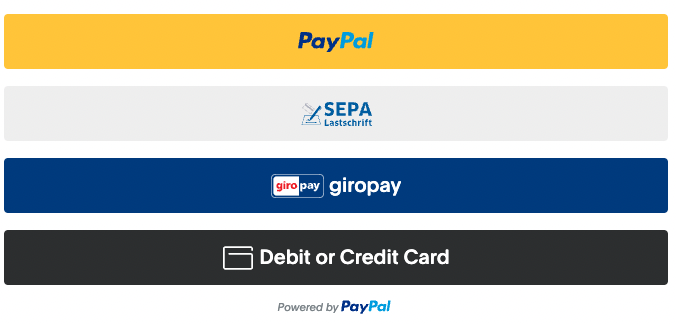
If your [Smart Payment Buttons (SPB) integration](/sdk/js/reference/#link-buttons) is set up to show all available payment buttons, the `sofort` button won't show up as a supported payment method.

<div className="pl-[1.625rem]" />

```javascript lineNumbers
<script src="https://www.paypal.com/sdk/js?client-id={client-id}&components=buttons"></script>

<script>
   paypal.Buttons({
   ...
   }).render('#paypal-button-container');
</script>
```

![Smart,Payment,Buttons,sample](https://www.paypalobjects.com/devdoc/sofort-deprecation-smart-payment-buttons.png)

The exception is when the merchant passes `sofort` in the `enable-funding` query parameter when the SDK loads: the `sofort` button will show up. See the [**enable-funding and disable-funding query parameters**](#link-enablefundinganddisablefundingqueryparameters) section for details.

## Standalone button [#standalone-button]

If your [standalone button integration](/platforms/checkout/standard/customize/standalone-buttons/) checks funding eligibility and specifies which payment buttons to show, the `sofort` button won't show up as a supported payment method. No other standalone button integrations are impacted.

<div className="pl-[1.625rem]" />

```javascript lineNumbers
<script src="https://www.paypal.com/sdk/js?client-id={client-id}&components=buttons,funding-eligibility"></script>

<script>

   var button = paypal.Buttons({
      fundingSource: paypal.FUNDING.SOFORT,
   });

   // buttons with fundingSource of paypal.FUNDING.SOFORT will no longer be eligible
   if (button.isEligible()) {
      button.render('#paypal-button-container');
   }
</script>
```

The exception is when the merchant passes `sofort` in the `enable-funding` query parameter when the SDK loads: the `sofort` button will show up. See the [**enable-funding and disable-funding query parameters**](#link-enablefundinganddisablefundingqueryparameters) section for details.

## Payment Fields [#payment-fields]

For integrations using `payment-fields` and standalone buttons, the standalone `sofort` button won't render and the payment fields won't be submittable. The payment fields will still render, but without the standalone button, the form cannot be submitted. If you are rendering `payment-fields`, it is recommended to only render them if the associated button meets the `isEligibile` requirement.

<div className="pl-[1.625rem]" />

```javascript lineNumbers
<script src="https://www.paypal.com/sdk/js?client-id={client-id}&components=buttons,payment-fieldsfunding-eligibility"></script>

<script>

   var button = paypal.Buttons({
      fundingSource: paypal.FUNDING.SOFORT,
   });

   var paymentFields = paypal.PaymentFields({
      fundingSource: paypal.FUNDING.SOFORT,
   });

   // Only render the payment fields and button if the button is eligible
   if (button.isEligible()) {
      button.render('#paypal-button-container');
      paymentFields.render('#paypal-payment-fields-container');
   }
</script>
```

See the **JS SDK** tab of the Sofort [**Integration**](/limited-release/apm/sofort/#link-integrate) section for more details about the JavaScript SDK integration.

## Orders V2 REST API [#orders-v2-rest-api]

For API integrations, requests to either `/v2/checkout/orders` or `/v2/checkout/orders/{orderId}/confirm-payment-source` with an embedded `sofort` payment source will receive a `403 Forbidden` HTML response with the following error message:

<div className="pl-[1.625rem]" />

```javascript lineNumbers
{
  "name": "NOT_AUTHORIZED",
  "details": [
    {
      "issue": "PERMISSION_DENIED",
      "description": "You do not have permission to access or perform operations on this resource."
    }
  ],
  "message": "Authorization failed due to insufficient permissions.",
  "debug_id": "ebdc46ef682c6",
  "links": [
    {
      "href": "/api/orders/v2/#error-PERMISSION_DENIED",
      "rel": "information_link",
      "method": "GET"
    }
  ]
}
```

See the **Orders API** tab of the Sofort [**Integration**](/limited-release/apm/sofort/#link-integrate) section for more details about the Orders V2 REST API integration.

## enable-funding and disable-funding query parameters [#enable-funding-and-disable-funding-query-parameters]

To ensure compatibility with existing integrations, the `sofort` option will continue to be supported for integrations that pass [`enable-funding`](/sdk/js/configuration/#enable-funding) and [`disable-funding`](/sdk/js/configuration/#disable-funding) query parameters in the `<script>` tag. If we remove `sofort` from these as a recognized value, the SDK will throw a validation error and the SDK will fail to load entirely.

This example shows what happens when the `enable-funding` query parameter passes an unrecognized value:

### Sample request [#sample-request]

<div className="pl-[1.625rem]" />

```bash lineNumbers
https://www.paypal.com/sdk/js?client-id=test&components=buttons,funding-eligibility&enable-funding=unknown
```

### Sample response [#sample-response]

<div className="pl-[1.625rem]" />

```javascript lineNumbers
throw new Error("SDK Validation error: 'Invalid query value for enable-funding: unknown'" );

/* Original Error:

Invalid query value for enable-funding: unknown (debug id: f227561ac6cf6)

*/
```

If an existing integration passes `sofort` in the `enable-funding` object, this will override the sunset logic that hides the Sofort payment button. When a buyer selects the `sofort` button, they will be redirected to the [guest checkout flow](https://www.paypal.com/us/cshelp/article/how-do-i-accept-credit-cards-with-express-checkout-using-the-guest-checkout-option-ts1623) to choose another payment method.

Avoid future complications by removing the `sofort` value from your `enable-funding` and `disable-funding` objects.

## paypal.getFundingSources [#paypalgetfundingsources]

[/sdk/js/reference/#link-paypalgetfundingsources](/sdk/js/reference/#link-paypalgetfundingsources)

To ensure compatibility with existing integrations that use [`paypal.getFundingSources`](/sdk/js/reference/#link-paypalgetfundingsources), `enable-funding`, and `disable-funding`:

* The `paypal.getFundingSources` response will continue to return `sofort` in the list of supported funding sources.

* The `paypal.isFundingEligible(paypal.FUNDING.SOFORT)` parameter returns `false`, unless you have loaded `enable-funding=sofort` into the SDK script.

<div className="pl-[1.625rem]" />

```javascript lineNumbers
paypal.getFundingSources().forEach(function(fundingSource) {
// ...
});
```

<div className="pl-[1.625rem]" />

```javascript lineNumbers
[
    "paypal",
    "venmo",
    "itau",
    "credit",
    "paylater",
    "applepay",
    "ideal",
    "sepa",
    "bancontact",
    "giropay",
    "eps",
    "sofort",
    "mybank",
    "blik",
    "p24",
    "wechatpay",
    "payu",
    "trustly",
    "oxxo",
    "boleto",
    "boletobancario",
    "mercadopago",
    "multibanco",
    "satispay",
    "paidy",
    "card"
]
```