# App Switch: Direct API one-time payments (/limited-release/commerce-platform/accept-payments/standard/customize/app-switch/api-one-time-payments)
## Overview [#overview]
With App Switch, payers start a transaction by selecting PayPal as a payment method on the merchant app or on the merchant mobile website. They then switch to the PayPal app to approve the payment and return to the merchant to finish the transaction. App Switch streamlines the checkout process by allowing a payer to log in through app Long Lived Session (LLS), biometrics, and multi-factor authentication from the PayPal app to complete the purchase.
When App Switch isn't available, payers continue as is with their current checkout experience in the merchant app or mobile web.
This is a standalone API integration. The merchant manages the payer's interaction between their app or website and the PayPal app. The transaction flow depends on where the payer starts the transaction and how the merchant completes it after PayPal redirects the payer back from the PayPal app.
> **Info:** This App Switch integration is currently only supported for US merchants and buyers.
## Know before you code [#know-before-you-code]
> **Info:** * Integrate [Orders v2 API](/api/rest/integration/orders-api/).
> * Learn [How to use PayPal REST APIs](/api/rest/integration/orders-api/) and support use cases.
> * App Switch supports only `PAY_NOW` flows and doesn't support `"Continue"` flows.
## Payment flow [#payment-flow]
Payers can initiate App Switch in a couple of ways:
* The payer is on the native merchant app and switches to the PayPal consumer app to review and approve the transaction.
* The payer is on the merchant website on a mobile browser and switches to the PayPal consumer app to review and approve the transaction.
When the payer takes an action in the PayPal app, PayPal returns the payer to the merchant in one of the following ways:
* If the payer starts in the merchant app, the PayPal app automatically redirects them back to the merchant app.
* If the payer starts on the merchant website, the merchant can choose to redirect the payer automatically or require a manual redirect. For a manual redirect, the payer follows instructions in the PayPal app to return to the merchant website.
## Best practices [#best-practices]
* If your merchant encounters a server-side timeout during the Create Order call and need to retry, use the same idempotency key. This ensures the order ID remains the same. Avoid creating a new order.
* During checkout, if the payer updates the cart, do not create a new order. Use the [Patch Order](/api/orders/v2/orders-trackers-patch) call to update the cart before redirecting the payer to PayPal. Patch the complete purchase unit because the total amount may also change.
* Post the Create Order call only after the payer selects the PayPal button. Apply this guidance to all PayPal-bound transactions, including those that use App Switch.
When the payer selects the PayPal button on your merchant's checkout page:
* Disable the button to prevent multiple clicks while the user stays on the same screen.
* Re-enable the button if the user navigates away from your merchant's app and then returns.
## Unsupported integrations [#unsupported-integrations]
Avoid opting in for App Switch in the following situations:
* App Switch supports only mobile devices, including mobile apps and mobile websites. App Switch does not support desktop devices and tablets.
* The merchant app checkout is hosted in a web view, or a third-party app hosts the merchant website in a web view. Using App Switch in this scenario may cause unexpected redirects, browser launches, or app installation prompts.
* The checkout experience is embedded in an iFrame. Like web views, iFrames handle links differently and can result in an undesired payer experience when you use App Switch.
* The merchant checkout is hosted with Safari View Controller or Chrome Custom Tabs. These components open web content in a browser tab that mimics the app's appearance but does not fully support App Switch.
## Integrate App Switch [#integrate-app-switch]
Integrate App Switch into a native app or mobile website:
* To configure App Switch, use the server-side Create Order API request. Your merchant can also pass this information using the Orders v2 API.
* Your merchant needs to gather specific information from the system and include it in the Create Order API as part of your App Switch request.
## Integrate merchant native mobile app [#integrate-merchant-native-mobile-app]
The payer starts the transaction in the merchant's native app and switches to the PayPal app to complete the payment. After completing the transaction, PayPal redirects the payer back to the merchant app.
 ### App Switch scenarios [#app-switch-scenarios]
* When the merchant passes `app_switch_context`, the payer starts in the native merchant app, switches to the PayPal app to complete the transaction, and is automatically redirected back to the merchant app.
* If the merchant passes `app_switch_context` but the app switch to the PayPal app fails, the payer switches to their default browser, where the PayPal pay sheet loads. After completing the transaction, the payer returns to the merchant app.
* If the merchant does not pass `app_switch_context` or PayPal sets `app_switch_eligibility` to false, the payer completes the transaction using the current checkout experience without switching to the PayPal app.
### Prerequisites [#prerequisites]
For traffic from your merchant's native app, complete several checks before your merchant passes the `app_switch_context` parameter to PayPal.
> **Note:** Passing `app_switch_context` means your merchant is opting in to App Switch behavior.
* Register for [Universal Links](https://developer.apple.com/documentation/xcode/supporting-universal-links-in-your-app) (iOS) and [App Links](https://developer.android.com/studio/write/app-link-indexing) (Android) before your merchant starts integrating with the Direct API.
* For Android devices, ensure the payer has enabled **Open supported links** for the merchant app. When PayPal redirects the payer to your merchant's app using app links, the payer lands on the mobile website instead of the app checkout if **Open supported links** is not enabled.
* If supported links are not enabled, we recommend that your merchant does not pass the `app_switch_context` parameter. In the following code, the app checks whether supported links are enabled for the Android app. This determines whether to opt in or out of App Switch behavior:
```kotlin lineNumbers
// Kotlin
fun hasEnabledSupportedLinks(context: Context): Boolean {
val intent = Intent(Intent.ACTION_VIEW, app_link_return_uri).apply {
addCategory(Intent.CATEGORY_BROWSABLE)
}
val resolvedActivity = context.packageManager.resolveActivity(intent, PackageManager.MATCH_DEFAULT_ONLY)
return if (resolvedActivity?.activityInfo?.packageName == context.packageName) {
// Open Supported Links for my native app enabled
// i.e. can return to this app via AppLinks invoked by PayPal
// opt-in to app switch
true
} else {
// Open Supported Links for my native app disabled
// i.e. cannot return to this app via AppLinks invoked by PayPal
// opt-out from app switch
false
}
}
```
Ensure the payer has the PayPal app installed on their mobile device. Enabling App Switch without this check prevents the switch to the PayPal app.Instead, the PayPal checkout experience opens in a browser, not within the merchant app. We recommend passing the `app_switch_context` parameter only if the PayPal app is installed.
Register the URL scheme in the [Info.plist](https://developer.apple.com/documentation/uikit/uiapplication/canopenurl\(_:\)#Discussion) file. The following sample code checks if the PayPal app is installed on an iOS device. The following sample code checks if the PayPal app is installed on an iOS or Android device.
#### iOS
```swift lineNumbers
// Swift
public func isPayPalAppInstalled() -> Bool {
guard let payPalURL = URL(string: "paypal-app-switch-checkout://") else {
return false
}
return canOpenURL(payPalURL)
}
```
#### Android
```kotlin lineNumbers
// Kotlin
fun isPaypPalAppInstalled(context: Context): Boolean {
val paypalPackageName = "com.paypal.android.p2pmobile"
return try {
context.packageManager.getApplicationInfo(paypalPackageName, 0)
true
} catch (e: PackageManager.NameNotFoundException) {
false
}
}
```
Register the `packageName` in the AndroidManifest file. The following sample checks if the PayPal app is installed on the device.
```kotlin lineNumbers
// Kotlin
...
```
## Create Order API integration [#create-order-api-integration]
After completing the native app prerequisite checks and opting in to App Switch, create an order using the PayPal API.
### Create order request [#create-order-request]
Include the following parameters in the Create Order API request: `payment_source.paypal` and `payment_source.paypal.experience_context`
| | | |
| ------------------------------------------------------ | ------------------------------------------------------------------------------------------------------------------------------------------------------------------------------------------------------------------------------------------------------------------------------------------------------------------------------------------------------------------------------------------------------------------------------------------------------------------------------------------------------------------------------------------------------------------------------------------------------------------------------------------------------------------------------------------------------------------------------------------------------------------------------ | --------- |
| Parameter | Description | Priority |
| `payment_source.paypal.email_address` | Merchants can pass the payer's email in the order-creation request, which can be the same email used in the merchant's application.Including the email address helps us determine if the payer has a PayPal account and whether the app is installed, allowing for a quicker assessment of App Switch eligibility and enhancing the payer experience. | Optional |
| `payment_source.paypal.experience_context.user_action` | The `user_action` configures the PayPal Checkout flow and uses the `PAY_NOW` flow for a one-time checkout.App Switch currently only supports `PAY_NOW` flows.`PAY_NOW` is a PayPal feature that supports payers to make payments using their wallet, without having to enter their payment information manually. For more information, see [Pay now or continue](/limited-release/commerce-platform/accept-payments/standard/customize/pay-now/).If shipping costs change based on the customer's PayPal shipping address, [configure callbacks](/limited-release/commerce-platform/accept-payments/standard/customize/shipping-module/) so PayPal can send the updated address to recalculate the amount accurately. App Switch supports only server-side shipping callbacks. | Mandatory |
### Return and cancel URLs [#return-and-cancel-urls]
PayPal expects the merchant to pass `payment_source.paypal.experience_context.return_url` and `payment_source.paypal.experience_context.cancel_url`:
* `return_url` is the URL that tells PayPal where to send the payer after completing checkout on the PayPal app. Set the URL to the page where the payer selects the PayPal button. (Mandatory)
* `cancel_url` is the URL that tells PayPal where to send the payer when the payer cancels or doesn't complete the transaction on the PayPal app. Set the URL to the page where the payer should be redirected when they cancel the transaction. (Mandatory)
| | |
| -------------------- | --------------------------------------------------------------------------------------------------------------------------------------------------------------------------------------------------------------------------------------------------------------------------------------------------------------------------------------------------------------------------------------------------------------------------------------------------------------------------------- |
| Use | Mandatory requirements |
| Merchant native apps | The `return_url` and `cancel_url` must be associated with your merchant app.Pass deep links in the `return_url` and `cancel_url` fields. Otherwise, the payer can't return to the merchant app as expected.Include the `app_url` parameter. (Mandatory) This takes precedence over `return_url` and `cancel_url`.If PayPal determines the App Switch is eligible, we use the app\_url to return the payer to your merchant app. If not, we use the `return_url` and `cancel_url`. |
### Opt into App Switch [#opt-into-app-switch]
PayPal considers passing `payment_source.paypal.experience_context.app_switch_context` as the merchant opting in to App Switch.
**Native app parameters**
If a payer starts from the merchant native app, use `payment_source.paypal.experience_context.app_switch_context.native_app`.
| | | |
| ------------ | ---------------------------------------------------------------------------------------------------------------------------------------------------------------------------------------------------------------------------------------------------------------------------------------------------------------------------------------------------------------------------------------------------------------------------------------------------------------------------------------------------------------------------- | --------- |
| Field | Requirement | Prority |
| `os_type` | The payer's mobile operating system (OS) family. PayPal uses this value to assess App Switch eligibility. Accepted values: `ANDROID`, `IOS`, and `OTHER`. | Mandatory |
| `os_version` | The payer's mobile OS version used for telemetry | Optional |
| `app_url` | Pass `app_url` as the universal link or app link associated with your merchant app. After the payer uses App Switch to approve or cancel the transaction in the PayPal app, PayPal uses this URL to redirect the payer back to the merchant app.During an App Switch flow, `app_url` takes precedence over `return_url` and `cancel_url`.PayPal appends either `/success` or `/cancel` to the value of `app_url` when redirecting the payer back to your app, depending on whether the transaction was approved or canceled. | Mandatory |
The following code sample shows how to derive the payer's `os_type` and `os_version` needed to include in the Create Order API request.
```javascript lineNumbers
function parseMobileOS(userAgent) {
const os = {
name: "Unknown",
version: "Unknown"
};
const osPatterns = [
// iOS
{ regex: /iPhone|iPad|iPod.*OS (\d+[_\.]\d+)/, name: "iOS", versionIndex: 1 },
// Android
{ regex: /Android (\d+\.\d+)/, name: "Android", versionIndex: 1 },
// Windows Phone (older devices)
{ regex: /Windows Phone (\d+\.\d+)/, name: "Windows Phone", versionIndex: 1 },
// Windows 10 Mobile
{ regex: /Windows NT 10.0.*Mobile/, name: "Windows 10 Mobile", version: "10" },
// Other mobile OS
{ regex: /Linux.*(Ubuntu)/, name: "Ubuntu", version: "Unknown" },
{ regex: /Linux/, name: "Linux", version: "Unknown" }
];
for (const pattern of osPatterns) {
const match = userAgent.match(pattern.regex);
if (match) {
os.name = pattern.name;
if (pattern.version) {
os.version = pattern.version;
} else if (pattern.versionIndex && match[pattern.versionIndex]) {
os.version = match[pattern.versionIndex].replace("_", ".");
}
break; // Once we match, no need to check further
}
}
return os;
}
// Example usage:
const userAgent = navigator.userAgent; // Automatically gets the user's device info
const os = parseMobileOS(userAgent);
console.log(`OS: ${os.name}, Version: ${os.version}`);
```
The following sample code shows a create order request with App Switch opt-in for a merchant native app.
```bash lineNumbers
curl -v -X POST https://api-m.sandbox.paypal.com/v2/checkout/orders \
-H 'Content-Type: application/json' \
-H 'PayPal-Request-Id: 7b92603e-77ed-4896-8e78-5dea2050476a' \
-H 'Authorization: Bearer 6V7rbVwmlM1gFZKW_8QtzWXqpcwQ6T5vhEGYNJDAAdn3paCgRpdeMdVYmWzgbKSsECednupJ3Zx5Xd-g' \
-d '{
"intent": "CAPTURE",
"payment_source": {
"paypal": {
"email_address": "customer@example.com",
"experience_context": {
"user_action": "PAY_NOW",
"return_url": "app://xo/234?clientStatus=success",
"cancel_url": "app://xo/234?clientStatus=cancel",
"app_switch_context": {
"native_app":{
"os_type": "IOS",
"os_version": "17.3.1",
"app_url": "https://example.com/merchant_app_universal_link"
}
}
}
}
},
"purchase_units": [
{
"amount": {
"currency_code": "USD",
"value": "64.00"
}
}
]
}'
```
### Create order response [#create-order-response]
In the Create Order response, the `app_switch_eligibility` flag is set to `true`. This flag indicates that the information in the Create Order request is correct, and that PayPal has found the payer eligible. Your merchant should attempt to App Switch.
> **Note:** `app_switch_eligibility = true` does not guarantee that the payer will switch to the PayPal app. It only indicates that PayPal requests your merchant to attempt App Switch for the payer.
```json lineNumbers
{
"id": "11D37583KV396803L",
"intent": "CAPTURE",
"status": "PAYER_ACTION_REQUIRED",
"payment_source": {
"paypal": {
"email_address": "customer@example.com",
"app_switch_eligibility": true
}
},
"purchase_units": [
{
"reference_id": "default",
"amount": {
"currency_code": "USD",
"value": "64.00"
},
"payee": {
"email_address": "test@business.example.com",
"merchant_id": "CME27DCHYSLEL"
}
}
],
"payer": {
"email_address": "customer@example.com"
},
"links": [
{
"href": "https://api.sandbox.paypal.com/v2/checkout/orders/11D37583KV396803L",
"rel": "self",
"method": "GET"
},
{
"href": "https://www.paypal.com/app-switch-checkout?token=11D37583KV396803L",
"rel": "payer-action",
"method": "GET"
}
]
}
```
### GET order response [#get-order-response]
In the GET order response, PayPal passes the `app_switch_eligibility` flag.
If the payer cancels the transaction in the PayPal app before approval, the GET order response includes a cancellation status, indicated by `experience_status = CANCELED`. Use this information to control the cancel flow and determine what to display when the payer cancels PayPal checkout before approval.
The experience\_status flag indicates the current state of the PayPal checkout. It does not replace the order status, but helps identify if the payer canceled the checkout process at any point.
PayPal returns this information in the GET `/v2/checkout/orders/:order_id API` response after payer cancellation.
The following code sample shows a canceled transaction.
```javascript lineNumbers
"payment_source": {
"paypal": {
"email_address": "customer@example.com",
"app_switch_eligibility": true,
"experience_status": "CANCELED"
}
}
```
## App Switch to and from PayPal [#app-switch-to-and-from-paypal]
If the merchant opts in to App Switch and passes the `app_switch_context`, and the PayPal app is installed with `app_switch_eligibility = true`, the merchant should attempt to switch to the PayPal app.
The following code sample shows how to make the switch.
```swift lineNumbers
// Swift
UIApplication.shared.open(url, options: [:], completionHandler: nil)
```
If the OS cannot open the PayPal app or the app is not installed, the URL can open in a browser. The following sample code shows how to handle this scenario.
```kotlin lineNumbers
// Kotlin
fun launchUrl(context: Context, url: Uri, launchAsNewTask: Boolean) {
try {
val customTabsIntent: CustomTabsIntent = CustomTabsIntent.Builder().build()
if (launchAsNewTask) {
customTabsIntent.intent.addFlags(Intent.FLAG_ACTIVITY_NEW_TASK)
}
customTabsIntent.launchUrl(context, url)
} catch (e: ActivityNotFoundException) {
if (hasEnabledSupportedLinks(context)) {
val intent = Intent(Intent.ACTION_VIEW).apply {
data = url
}
startActivity(intent)
} else {
// Cannot switch to PayPal app, cannot open fallback into custom tabs, cannot return from browser
// Gracefully handle error
}
}
}
```
See the following sample code to handle the return to the merchant app.
```kotlin lineNumbers
override fun onNewIntent(intent: Intent) {
super.onNewIntent(intent)
}
```
Add a Custom Tabs dependency to your `build.gradle` file if needed.
```kotlin lineNumbers
// kotlin
dependencies {
...
implementation("androidx.browser:browser:1.8.0")
...
}
```
If the merchant opts in to App Switch, passes the `app_switch_context`, and PayPal returns `app_switch_eligibility = false`, the merchant can open checkout in the native app so the payer can complete the transaction. Handle this the same way as the existing non-App Switch integration.
If the payer manually navigates back to the merchant app without taking action in the PayPal app, or if they leave the PayPal app, the merchant should be prepared to handle these situations appropriately.
The following code samples show how to open the checkout experience in the merchant's native app.
#### iOS
```swift lineNumbers
// Swift
DispatchQueue.main.async {
let callbackURLScheme = //your app scheme
let webAuthSession = ASWebAuthenticationSession(url: url, callbackURLScheme: callbackURLScheme) { [weak self] callbackURL, error in
DispatchQueue.main.async {
if let callbackURL {
// handle return
} else if let error {
// error returned, can be cancel or an error
}
}
}
session.presentationContextProvider = self
session.start()
}
```
#### Android
```text lineNumbers
androidx.browser:browser
```
## Integrate merchant website mobile browser [#integrate-merchant-website-mobile-browser]
When a payer uses a mobile browser to access the merchant's website and switches to the PayPal app to complete the transaction, the app redirects them to the merchant's site or requires them to return manually.
## Create Order API integration [#create-order-api-integration-1]
Create an order using the PayPal API after completing the native app prerequisites.
### Create order request [#create-order-request-1]
Include the following parameters in the Create Order API request: `payment_source.paypal` and `payment_source.paypal.experience_context`
| | | |
| ------------------------------------------------------ | -------------------------------------------------------------------------------------------------------------------------------------------------------------------------------------------------------------------------------------------------------------------------------------------------------------------------------------------------------------------------------------------------------------------------------------------------------------------------------------------------------------------------------------------------------------------------------------------------------------------------------------------------------------------------------------------------------------------------------------------------------------------------------------------- | --------- |
| Parameter | Description | Priority |
| `payment_source.paypal.email_address` | Merchants can pass the payer's email in the order-creation request, which can be the same email used in the merchant's application.Including the email address helps us determine if the payer has a PayPal account and whether the app is installed, allowing for a quicker assessment of App Switch eligibility and enhancing the payer experience. | Optional |
| `payment_source.paypal.experience_context.user_action` | The `user_action` configures the PayPal Checkout flow and uses the `PAY_NOW` flow for a one-time checkout.App Switch currently only supports `PAY_NOW` flows.`PAY_NOW` is a PayPal feature that supports payers to make payments using their wallet, without having to enter their payment information manually. For more information, see [Pay now or continue](/limited-release/commerce-platform/accept-payments/standard/customize/pay-now/).If shipping costs change based on the customer's PayPal shipping address, [configure callbacks](/limited-release/commerce-platform/accept-payments/standard/customize/shipping-module/) so PayPal can send your merchant the updated address to recalculate the amount accurately. App Switch supports only server-side shipping callbacks. | Mandatory |
### Return and cancel URLs [#return-and-cancel-urls-1]
PayPal expects the merchant to pass `payment_source.paypal.experience_context.return_url` and `payment_source.paypal.experience_context.cancel_url`:
* `return_url` is the URL that tells PayPal where to send the payer after completing checkout on the PayPal app. Set the URL to the page where the payer selects the PayPal button. (Mandatory)
* `cancel_url` is the URL that tells PayPal where to send the payer when the payer cancels or doesn't complete the transaction on the PayPal app. Set the URL to the page where the payer should be redirected when they cancel the transaction. (Mandatory)
| | |
| ----------------------- | --------------------------------------------------------------------------------------------------------------------------------------------------------------------------------------------------------------------------------------------------------------------------------------------------------------------------------------------------------------------------------------------------------------------------------------------------------------------------------------------------------------------------------------------------------------------------------- |
| Use | Mandatory requirements |
| Merchant mobile website | Set the `return_url` and `cancel_url` to the same value. If the URLs are different, PayPal redirects the payer to the merchant website on a different tab or browser.The `return_url` and `cancel_url` must be web URLs linked to the website where the payer clicked the PayPal button.When passing query parameters to PayPal that should be returned, add them to the `return_url` and `cancel_url` as fragments after the `#`.Use a unique identifier for each payer's session, so your merchant can recognize the payer when PayPal redirects them to your merchant website. |
### Opt into App Switch [#opt-into-app-switch-1]
PayPal considers passing `payment_source.paypal.experience_context.app_switch_context` as the merchant opting in to App Switch.
**Mobile web parameters**
If a payer starts from the merchant mobile webite, use `payment_source.paypal.experience_context.app_switch_context.mobile_web`.
| | | |
| ------------------ | ------------------------------------------------------------------------------------------------------------------------------------------------------------------------------------------------------------------------------------------------------------------------------------------------------------------------------------------------------------------------------------------------------------------------------------------------------------------------------------------------------------------------------------------------------------------------------------------------------------------------------------------------------------------------- | --------- |
| Field | Requirement | Prority |
| `buyer_user_agent` | Pass this field as a raw string without any modifications. PayPal derives the payer's device OS type, OS version, and browser details from this value.Do not alter or modify the payer's device user agent string. Send it to PayPal as is. | Mandatory |
| `return_flow` | The `return_flow` field defines how payers return to the merchant's website after approving a transaction in the PayPal app. For transactions that start on the merchant's website in a mobile browser, the return experience to the merchant's site depends on the merchant's preferences and technical setup.
### App Switch scenarios [#app-switch-scenarios]
* When the merchant passes `app_switch_context`, the payer starts in the native merchant app, switches to the PayPal app to complete the transaction, and is automatically redirected back to the merchant app.
* If the merchant passes `app_switch_context` but the app switch to the PayPal app fails, the payer switches to their default browser, where the PayPal pay sheet loads. After completing the transaction, the payer returns to the merchant app.
* If the merchant does not pass `app_switch_context` or PayPal sets `app_switch_eligibility` to false, the payer completes the transaction using the current checkout experience without switching to the PayPal app.
### Prerequisites [#prerequisites]
For traffic from your merchant's native app, complete several checks before your merchant passes the `app_switch_context` parameter to PayPal.
> **Note:** Passing `app_switch_context` means your merchant is opting in to App Switch behavior.
* Register for [Universal Links](https://developer.apple.com/documentation/xcode/supporting-universal-links-in-your-app) (iOS) and [App Links](https://developer.android.com/studio/write/app-link-indexing) (Android) before your merchant starts integrating with the Direct API.
* For Android devices, ensure the payer has enabled **Open supported links** for the merchant app. When PayPal redirects the payer to your merchant's app using app links, the payer lands on the mobile website instead of the app checkout if **Open supported links** is not enabled.
* If supported links are not enabled, we recommend that your merchant does not pass the `app_switch_context` parameter. In the following code, the app checks whether supported links are enabled for the Android app. This determines whether to opt in or out of App Switch behavior:
```kotlin lineNumbers
// Kotlin
fun hasEnabledSupportedLinks(context: Context): Boolean {
val intent = Intent(Intent.ACTION_VIEW, app_link_return_uri).apply {
addCategory(Intent.CATEGORY_BROWSABLE)
}
val resolvedActivity = context.packageManager.resolveActivity(intent, PackageManager.MATCH_DEFAULT_ONLY)
return if (resolvedActivity?.activityInfo?.packageName == context.packageName) {
// Open Supported Links for my native app enabled
// i.e. can return to this app via AppLinks invoked by PayPal
// opt-in to app switch
true
} else {
// Open Supported Links for my native app disabled
// i.e. cannot return to this app via AppLinks invoked by PayPal
// opt-out from app switch
false
}
}
```
Ensure the payer has the PayPal app installed on their mobile device. Enabling App Switch without this check prevents the switch to the PayPal app.Instead, the PayPal checkout experience opens in a browser, not within the merchant app. We recommend passing the `app_switch_context` parameter only if the PayPal app is installed.
Register the URL scheme in the [Info.plist](https://developer.apple.com/documentation/uikit/uiapplication/canopenurl\(_:\)#Discussion) file. The following sample code checks if the PayPal app is installed on an iOS device. The following sample code checks if the PayPal app is installed on an iOS or Android device.
#### iOS
```swift lineNumbers
// Swift
public func isPayPalAppInstalled() -> Bool {
guard let payPalURL = URL(string: "paypal-app-switch-checkout://") else {
return false
}
return canOpenURL(payPalURL)
}
```
#### Android
```kotlin lineNumbers
// Kotlin
fun isPaypPalAppInstalled(context: Context): Boolean {
val paypalPackageName = "com.paypal.android.p2pmobile"
return try {
context.packageManager.getApplicationInfo(paypalPackageName, 0)
true
} catch (e: PackageManager.NameNotFoundException) {
false
}
}
```
Register the `packageName` in the AndroidManifest file. The following sample checks if the PayPal app is installed on the device.
```kotlin lineNumbers
// Kotlin
...
```
## Create Order API integration [#create-order-api-integration]
After completing the native app prerequisite checks and opting in to App Switch, create an order using the PayPal API.
### Create order request [#create-order-request]
Include the following parameters in the Create Order API request: `payment_source.paypal` and `payment_source.paypal.experience_context`
| | | |
| ------------------------------------------------------ | ------------------------------------------------------------------------------------------------------------------------------------------------------------------------------------------------------------------------------------------------------------------------------------------------------------------------------------------------------------------------------------------------------------------------------------------------------------------------------------------------------------------------------------------------------------------------------------------------------------------------------------------------------------------------------------------------------------------------------------------------------------------------------ | --------- |
| Parameter | Description | Priority |
| `payment_source.paypal.email_address` | Merchants can pass the payer's email in the order-creation request, which can be the same email used in the merchant's application.Including the email address helps us determine if the payer has a PayPal account and whether the app is installed, allowing for a quicker assessment of App Switch eligibility and enhancing the payer experience. | Optional |
| `payment_source.paypal.experience_context.user_action` | The `user_action` configures the PayPal Checkout flow and uses the `PAY_NOW` flow for a one-time checkout.App Switch currently only supports `PAY_NOW` flows.`PAY_NOW` is a PayPal feature that supports payers to make payments using their wallet, without having to enter their payment information manually. For more information, see [Pay now or continue](/limited-release/commerce-platform/accept-payments/standard/customize/pay-now/).If shipping costs change based on the customer's PayPal shipping address, [configure callbacks](/limited-release/commerce-platform/accept-payments/standard/customize/shipping-module/) so PayPal can send the updated address to recalculate the amount accurately. App Switch supports only server-side shipping callbacks. | Mandatory |
### Return and cancel URLs [#return-and-cancel-urls]
PayPal expects the merchant to pass `payment_source.paypal.experience_context.return_url` and `payment_source.paypal.experience_context.cancel_url`:
* `return_url` is the URL that tells PayPal where to send the payer after completing checkout on the PayPal app. Set the URL to the page where the payer selects the PayPal button. (Mandatory)
* `cancel_url` is the URL that tells PayPal where to send the payer when the payer cancels or doesn't complete the transaction on the PayPal app. Set the URL to the page where the payer should be redirected when they cancel the transaction. (Mandatory)
| | |
| -------------------- | --------------------------------------------------------------------------------------------------------------------------------------------------------------------------------------------------------------------------------------------------------------------------------------------------------------------------------------------------------------------------------------------------------------------------------------------------------------------------------- |
| Use | Mandatory requirements |
| Merchant native apps | The `return_url` and `cancel_url` must be associated with your merchant app.Pass deep links in the `return_url` and `cancel_url` fields. Otherwise, the payer can't return to the merchant app as expected.Include the `app_url` parameter. (Mandatory) This takes precedence over `return_url` and `cancel_url`.If PayPal determines the App Switch is eligible, we use the app\_url to return the payer to your merchant app. If not, we use the `return_url` and `cancel_url`. |
### Opt into App Switch [#opt-into-app-switch]
PayPal considers passing `payment_source.paypal.experience_context.app_switch_context` as the merchant opting in to App Switch.
**Native app parameters**
If a payer starts from the merchant native app, use `payment_source.paypal.experience_context.app_switch_context.native_app`.
| | | |
| ------------ | ---------------------------------------------------------------------------------------------------------------------------------------------------------------------------------------------------------------------------------------------------------------------------------------------------------------------------------------------------------------------------------------------------------------------------------------------------------------------------------------------------------------------------- | --------- |
| Field | Requirement | Prority |
| `os_type` | The payer's mobile operating system (OS) family. PayPal uses this value to assess App Switch eligibility. Accepted values: `ANDROID`, `IOS`, and `OTHER`. | Mandatory |
| `os_version` | The payer's mobile OS version used for telemetry | Optional |
| `app_url` | Pass `app_url` as the universal link or app link associated with your merchant app. After the payer uses App Switch to approve or cancel the transaction in the PayPal app, PayPal uses this URL to redirect the payer back to the merchant app.During an App Switch flow, `app_url` takes precedence over `return_url` and `cancel_url`.PayPal appends either `/success` or `/cancel` to the value of `app_url` when redirecting the payer back to your app, depending on whether the transaction was approved or canceled. | Mandatory |
The following code sample shows how to derive the payer's `os_type` and `os_version` needed to include in the Create Order API request.
```javascript lineNumbers
function parseMobileOS(userAgent) {
const os = {
name: "Unknown",
version: "Unknown"
};
const osPatterns = [
// iOS
{ regex: /iPhone|iPad|iPod.*OS (\d+[_\.]\d+)/, name: "iOS", versionIndex: 1 },
// Android
{ regex: /Android (\d+\.\d+)/, name: "Android", versionIndex: 1 },
// Windows Phone (older devices)
{ regex: /Windows Phone (\d+\.\d+)/, name: "Windows Phone", versionIndex: 1 },
// Windows 10 Mobile
{ regex: /Windows NT 10.0.*Mobile/, name: "Windows 10 Mobile", version: "10" },
// Other mobile OS
{ regex: /Linux.*(Ubuntu)/, name: "Ubuntu", version: "Unknown" },
{ regex: /Linux/, name: "Linux", version: "Unknown" }
];
for (const pattern of osPatterns) {
const match = userAgent.match(pattern.regex);
if (match) {
os.name = pattern.name;
if (pattern.version) {
os.version = pattern.version;
} else if (pattern.versionIndex && match[pattern.versionIndex]) {
os.version = match[pattern.versionIndex].replace("_", ".");
}
break; // Once we match, no need to check further
}
}
return os;
}
// Example usage:
const userAgent = navigator.userAgent; // Automatically gets the user's device info
const os = parseMobileOS(userAgent);
console.log(`OS: ${os.name}, Version: ${os.version}`);
```
The following sample code shows a create order request with App Switch opt-in for a merchant native app.
```bash lineNumbers
curl -v -X POST https://api-m.sandbox.paypal.com/v2/checkout/orders \
-H 'Content-Type: application/json' \
-H 'PayPal-Request-Id: 7b92603e-77ed-4896-8e78-5dea2050476a' \
-H 'Authorization: Bearer 6V7rbVwmlM1gFZKW_8QtzWXqpcwQ6T5vhEGYNJDAAdn3paCgRpdeMdVYmWzgbKSsECednupJ3Zx5Xd-g' \
-d '{
"intent": "CAPTURE",
"payment_source": {
"paypal": {
"email_address": "customer@example.com",
"experience_context": {
"user_action": "PAY_NOW",
"return_url": "app://xo/234?clientStatus=success",
"cancel_url": "app://xo/234?clientStatus=cancel",
"app_switch_context": {
"native_app":{
"os_type": "IOS",
"os_version": "17.3.1",
"app_url": "https://example.com/merchant_app_universal_link"
}
}
}
}
},
"purchase_units": [
{
"amount": {
"currency_code": "USD",
"value": "64.00"
}
}
]
}'
```
### Create order response [#create-order-response]
In the Create Order response, the `app_switch_eligibility` flag is set to `true`. This flag indicates that the information in the Create Order request is correct, and that PayPal has found the payer eligible. Your merchant should attempt to App Switch.
> **Note:** `app_switch_eligibility = true` does not guarantee that the payer will switch to the PayPal app. It only indicates that PayPal requests your merchant to attempt App Switch for the payer.
```json lineNumbers
{
"id": "11D37583KV396803L",
"intent": "CAPTURE",
"status": "PAYER_ACTION_REQUIRED",
"payment_source": {
"paypal": {
"email_address": "customer@example.com",
"app_switch_eligibility": true
}
},
"purchase_units": [
{
"reference_id": "default",
"amount": {
"currency_code": "USD",
"value": "64.00"
},
"payee": {
"email_address": "test@business.example.com",
"merchant_id": "CME27DCHYSLEL"
}
}
],
"payer": {
"email_address": "customer@example.com"
},
"links": [
{
"href": "https://api.sandbox.paypal.com/v2/checkout/orders/11D37583KV396803L",
"rel": "self",
"method": "GET"
},
{
"href": "https://www.paypal.com/app-switch-checkout?token=11D37583KV396803L",
"rel": "payer-action",
"method": "GET"
}
]
}
```
### GET order response [#get-order-response]
In the GET order response, PayPal passes the `app_switch_eligibility` flag.
If the payer cancels the transaction in the PayPal app before approval, the GET order response includes a cancellation status, indicated by `experience_status = CANCELED`. Use this information to control the cancel flow and determine what to display when the payer cancels PayPal checkout before approval.
The experience\_status flag indicates the current state of the PayPal checkout. It does not replace the order status, but helps identify if the payer canceled the checkout process at any point.
PayPal returns this information in the GET `/v2/checkout/orders/:order_id API` response after payer cancellation.
The following code sample shows a canceled transaction.
```javascript lineNumbers
"payment_source": {
"paypal": {
"email_address": "customer@example.com",
"app_switch_eligibility": true,
"experience_status": "CANCELED"
}
}
```
## App Switch to and from PayPal [#app-switch-to-and-from-paypal]
If the merchant opts in to App Switch and passes the `app_switch_context`, and the PayPal app is installed with `app_switch_eligibility = true`, the merchant should attempt to switch to the PayPal app.
The following code sample shows how to make the switch.
```swift lineNumbers
// Swift
UIApplication.shared.open(url, options: [:], completionHandler: nil)
```
If the OS cannot open the PayPal app or the app is not installed, the URL can open in a browser. The following sample code shows how to handle this scenario.
```kotlin lineNumbers
// Kotlin
fun launchUrl(context: Context, url: Uri, launchAsNewTask: Boolean) {
try {
val customTabsIntent: CustomTabsIntent = CustomTabsIntent.Builder().build()
if (launchAsNewTask) {
customTabsIntent.intent.addFlags(Intent.FLAG_ACTIVITY_NEW_TASK)
}
customTabsIntent.launchUrl(context, url)
} catch (e: ActivityNotFoundException) {
if (hasEnabledSupportedLinks(context)) {
val intent = Intent(Intent.ACTION_VIEW).apply {
data = url
}
startActivity(intent)
} else {
// Cannot switch to PayPal app, cannot open fallback into custom tabs, cannot return from browser
// Gracefully handle error
}
}
}
```
See the following sample code to handle the return to the merchant app.
```kotlin lineNumbers
override fun onNewIntent(intent: Intent) {
super.onNewIntent(intent)
}
```
Add a Custom Tabs dependency to your `build.gradle` file if needed.
```kotlin lineNumbers
// kotlin
dependencies {
...
implementation("androidx.browser:browser:1.8.0")
...
}
```
If the merchant opts in to App Switch, passes the `app_switch_context`, and PayPal returns `app_switch_eligibility = false`, the merchant can open checkout in the native app so the payer can complete the transaction. Handle this the same way as the existing non-App Switch integration.
If the payer manually navigates back to the merchant app without taking action in the PayPal app, or if they leave the PayPal app, the merchant should be prepared to handle these situations appropriately.
The following code samples show how to open the checkout experience in the merchant's native app.
#### iOS
```swift lineNumbers
// Swift
DispatchQueue.main.async {
let callbackURLScheme = //your app scheme
let webAuthSession = ASWebAuthenticationSession(url: url, callbackURLScheme: callbackURLScheme) { [weak self] callbackURL, error in
DispatchQueue.main.async {
if let callbackURL {
// handle return
} else if let error {
// error returned, can be cancel or an error
}
}
}
session.presentationContextProvider = self
session.start()
}
```
#### Android
```text lineNumbers
androidx.browser:browser
```
## Integrate merchant website mobile browser [#integrate-merchant-website-mobile-browser]
When a payer uses a mobile browser to access the merchant's website and switches to the PayPal app to complete the transaction, the app redirects them to the merchant's site or requires them to return manually.
## Create Order API integration [#create-order-api-integration-1]
Create an order using the PayPal API after completing the native app prerequisites.
### Create order request [#create-order-request-1]
Include the following parameters in the Create Order API request: `payment_source.paypal` and `payment_source.paypal.experience_context`
| | | |
| ------------------------------------------------------ | -------------------------------------------------------------------------------------------------------------------------------------------------------------------------------------------------------------------------------------------------------------------------------------------------------------------------------------------------------------------------------------------------------------------------------------------------------------------------------------------------------------------------------------------------------------------------------------------------------------------------------------------------------------------------------------------------------------------------------------------------------------------------------------------- | --------- |
| Parameter | Description | Priority |
| `payment_source.paypal.email_address` | Merchants can pass the payer's email in the order-creation request, which can be the same email used in the merchant's application.Including the email address helps us determine if the payer has a PayPal account and whether the app is installed, allowing for a quicker assessment of App Switch eligibility and enhancing the payer experience. | Optional |
| `payment_source.paypal.experience_context.user_action` | The `user_action` configures the PayPal Checkout flow and uses the `PAY_NOW` flow for a one-time checkout.App Switch currently only supports `PAY_NOW` flows.`PAY_NOW` is a PayPal feature that supports payers to make payments using their wallet, without having to enter their payment information manually. For more information, see [Pay now or continue](/limited-release/commerce-platform/accept-payments/standard/customize/pay-now/).If shipping costs change based on the customer's PayPal shipping address, [configure callbacks](/limited-release/commerce-platform/accept-payments/standard/customize/shipping-module/) so PayPal can send your merchant the updated address to recalculate the amount accurately. App Switch supports only server-side shipping callbacks. | Mandatory |
### Return and cancel URLs [#return-and-cancel-urls-1]
PayPal expects the merchant to pass `payment_source.paypal.experience_context.return_url` and `payment_source.paypal.experience_context.cancel_url`:
* `return_url` is the URL that tells PayPal where to send the payer after completing checkout on the PayPal app. Set the URL to the page where the payer selects the PayPal button. (Mandatory)
* `cancel_url` is the URL that tells PayPal where to send the payer when the payer cancels or doesn't complete the transaction on the PayPal app. Set the URL to the page where the payer should be redirected when they cancel the transaction. (Mandatory)
| | |
| ----------------------- | --------------------------------------------------------------------------------------------------------------------------------------------------------------------------------------------------------------------------------------------------------------------------------------------------------------------------------------------------------------------------------------------------------------------------------------------------------------------------------------------------------------------------------------------------------------------------------- |
| Use | Mandatory requirements |
| Merchant mobile website | Set the `return_url` and `cancel_url` to the same value. If the URLs are different, PayPal redirects the payer to the merchant website on a different tab or browser.The `return_url` and `cancel_url` must be web URLs linked to the website where the payer clicked the PayPal button.When passing query parameters to PayPal that should be returned, add them to the `return_url` and `cancel_url` as fragments after the `#`.Use a unique identifier for each payer's session, so your merchant can recognize the payer when PayPal redirects them to your merchant website. |
### Opt into App Switch [#opt-into-app-switch-1]
PayPal considers passing `payment_source.paypal.experience_context.app_switch_context` as the merchant opting in to App Switch.
**Mobile web parameters**
If a payer starts from the merchant mobile webite, use `payment_source.paypal.experience_context.app_switch_context.mobile_web`.
| | | |
| ------------------ | ------------------------------------------------------------------------------------------------------------------------------------------------------------------------------------------------------------------------------------------------------------------------------------------------------------------------------------------------------------------------------------------------------------------------------------------------------------------------------------------------------------------------------------------------------------------------------------------------------------------------------------------------------------------------- | --------- |
| Field | Requirement | Prority |
| `buyer_user_agent` | Pass this field as a raw string without any modifications. PayPal derives the payer's device OS type, OS version, and browser details from this value.Do not alter or modify the payer's device user agent string. Send it to PayPal as is. | Mandatory |
| `return_flow` | The `return_flow` field defines how payers return to the merchant's website after approving a transaction in the PayPal app. For transactions that start on the merchant's website in a mobile browser, the return experience to the merchant's site depends on the merchant's preferences and technical setup.
Accepted Values:
`AUTO`: After the payer approves the payment in the PayPal app, PayPal automatically redirects them to the merchant's website.`MANUAL`: After the payer approves the payment in the PayPal app, they must manually navigate back to the merchant's website where they started the payment. | Mandatory |
### Create order request [#create-order-request-2]
See the following create order request with App Switch opt-in for a merchant mobile website.
```bash lineNumbers
curl -v -X POST https://api-m.sandbox.paypal.com/v2/checkout/orders \
-H 'Content-Type: application/json' \
-H 'PayPal-Request-Id: 7b92603e-77ed-4896-8e78-5dea2050476a' \
-H 'Authorization: Bearer 6V7rbVwmlM1gFZKW_8QtzWXqpcwQ6T5vhEGYNJDAAdn3paCgRpdeMdVYmWzgbKSsECednupJ3Zx5Xd-g' \
-d '{
"intent": "CAPTURE",
"payment_source": {
"paypal": {
"email_address": "customer@example.com",
"experience_context": {
"user_action": "PAY_NOW",
"return_url": "https://example.com/checkout",
"cancel_url": "https://example.com/checkout",
"app_switch_context": {
"mobile_web":{
"return_flow": "AUTO" or "MANUAL",
"buyer_user_agent": "Mozilla/5.0 (iPhone; CPU iPhone OS 16_4_1 like Mac OS X) AppleWebKit/605.1.15 (KHTML, like Gecko) Version/16.4 Mobile/15E148 Safari/604.1"
}
}
}
}
},
"purchase_units": [
{
"amount": {
"currency_code": "USD",
"value": "64.00"
}
}
]
}'
```
### Create order response [#create-order-response-1]
In the Create Order response, the `app_switch_eligibility` flag is set to `true`. This flag indicates that the information in the Create Order request is correct, and that PayPal has found the payer eligible and is attempting to use App Switch.
> **Note:** `app_switch_eligibility = true` does not guarantee that the payer will successfully switch to the PayPal app. It only indicates that PayPal is attempting App Switch for the payer. PayPal returns the `payer_id` in the response when a payer approves a transaction.
```json lineNumbers
{
"id": "11D37583KV396803L",
"intent": "CAPTURE",
"status": "PAYER_ACTION_REQUIRED",
"payment_source": {
"paypal": {
"email_address": "customer@example.com",
"app_switch_eligibility": true
}
},
"purchase_units": [
{
"reference_id": "default",
"amount": {
"currency_code": "USD",
"value": "64.00"
},
"payee": {
"email_address": "test@business.example.com",
"merchant_id": "CME27DCHYSLEL"
}
}
],
"payer": {
"email_address": "customer@example.com"
},
"links": [
{
"href": "https://api.sandbox.paypal.com/v2/checkout/orders/11D37583KV396803L",
"rel": "self",
"method": "GET"
},
{
"href": "https://www.sandbox.paypal.com/checkoutnow?token=11D37583KV396803L",
"rel": "payer-action",
"method": "GET"
}
]
}
```
### GET order response [#get-order-response-1]
In the GET order response, PayPal passes the `app_switch_eligibility` flag.
If the payer cancels the transaction in the PayPal app before approval, the GET order response includes a cancellation status, indicated by `experience_status = CANCELED`. Use this information to control the cancel flow and determine what to display when the payer cancels PayPal checkout before approval. This is relevant when return\_flow is set to `MANUAL`.
The `experience_status` flag indicates the current state of the PayPal checkout. It does not replace the order status, but helps identify if the payer canceled the checkout process at any point.
PayPal returns this information in the GET `/v2/checkout/orders/:order_id API` response after payer cancellation.
The following code sample shows a canceled transaction.
```json lineNumbers
"payment_source": {
"paypal": {
"email_address": "customer@example.com",
"app_switch_eligibility": true,
"experience_status": "CANCELED"
}
}
```
### Redirects to merchant website [#redirects-to-merchant-website]
The payer's App Switch experience may vary based on the device OS, the default browser, the merchant's preferred return flow, and where the merchant website is hosted.
There are technical constraints related to the OS:
* When a payer completes a payment in the PayPal app and PayPal redirects them back to the merchant's website, the OS opens the site in the payer's default browser.
* For example, the payer may start the transaction on the merchant website in a non-default browser, such as Chrome on Android. However, due to OS limitations, when PayPal redirects the payer back, the merchant's website opens in the browser set as default on their device, such as Firefox.
Review the following table to see how App Switch works in different settings. Use this information to verify the integration during testing and identify situations that require handling a fallback.
| Platform | Browser | Mode | Availability | Notes |
| -------- | ---------------- | --------------- | ------------ | ------------------------------------------------------- |
| iOS | Safari | Default browser | | |
| iOS | Safari | Private | | |
| iOS | Safari | Not default | | App Switch redirects to the default browser |
| iOS | Chrome | Default browser | | App Switch redirects to a new tab in the same browser |
| Android | Chrome | Default browser | | |
| Android | Chrome | Incognito | | Fallback experience |
| Android | Chrome | Not default | | App Switch redirects in the default browser |
| Android | Firefox or other | Default | | App Switch redirects to a new tab in the same browser |
### Handle auto return flow [#handle-auto-return-flow]
When the `return_flow` value is set to `AUTO` and the payer completes or cancels the transaction in the PayPal app, PayPal automatically redirects the payer back to the merchant website using the `return_url` or `cancel_url`.
To handle the payer's return and account for these scenarios, the merchant needs to implement the following:
**App Switch from a native default browser**
**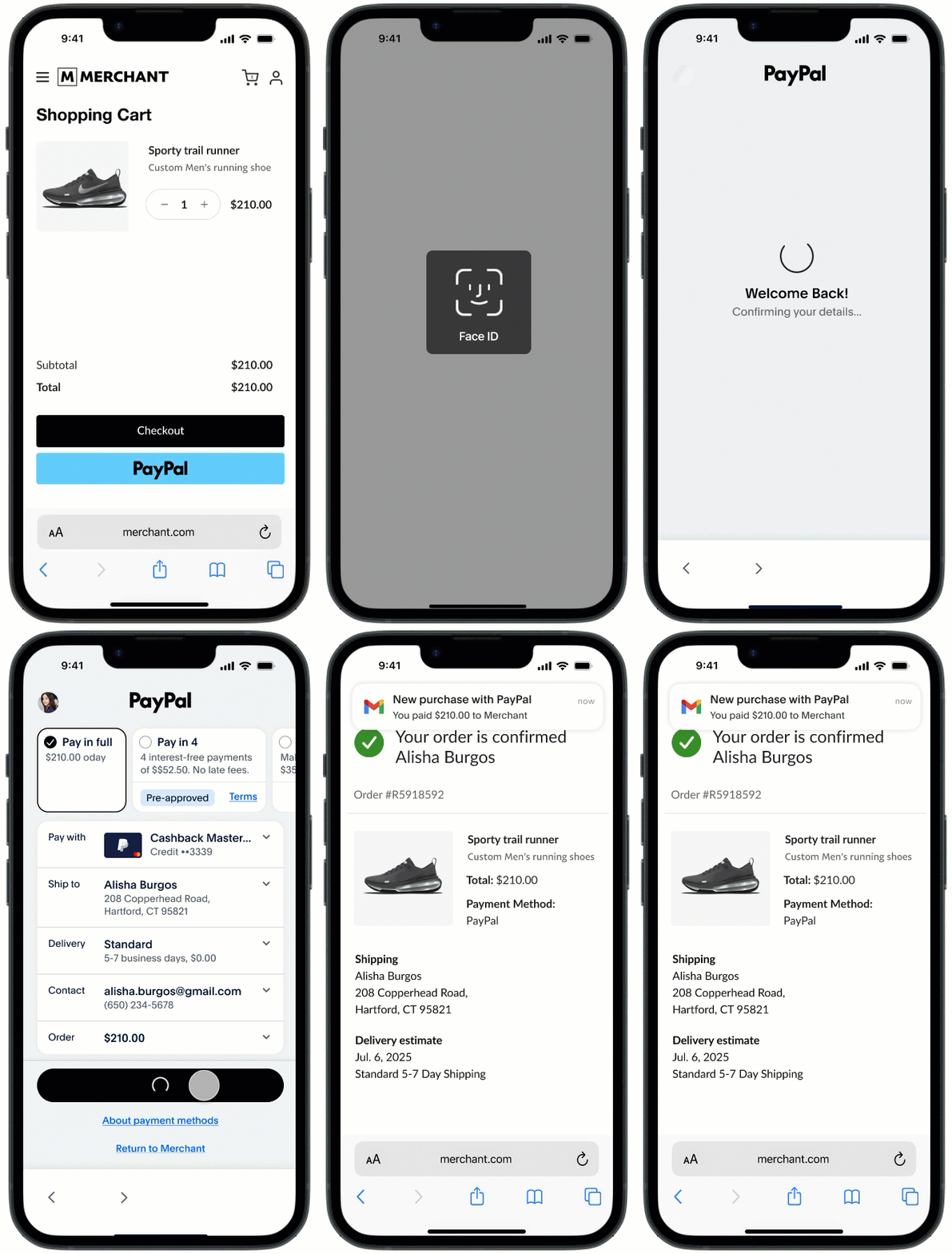 **
* A payer starts checkout on the merchant website in a native browser, such as Safari on iOS, and sets the native browser as the default. When the payer completes or cancels the transaction, the PayPal app automatically redirects the payer back to the same default browser.
* Use the `visibilitychange` event listener to handle scenarios where the payer abandons the checkout.
* Include a client-side event listener to identify this event. Use the hashchange listener, and the completion status will be included as additional hash parameters.
The following sample client-side code handles this request.
```javascript lineNumbers
document.addEventListener('hashchange', (e) => {
const params = parseHashParams(window.location.hash);
if(params.approved) {
// Buyer is returning from app switch with an approved order
// Verify the order approval, complete payment
// & redirect to confirmation page to complete flow
} else if (params.canceled) {
// Buyer canceled PayPal app switch
}
})
```
**App Switch from a non-default browser**
**
**
* A payer starts checkout on the merchant website in a native browser, such as Safari on iOS, and sets the native browser as the default. When the payer completes or cancels the transaction, the PayPal app automatically redirects the payer back to the same default browser.
* Use the `visibilitychange` event listener to handle scenarios where the payer abandons the checkout.
* Include a client-side event listener to identify this event. Use the hashchange listener, and the completion status will be included as additional hash parameters.
The following sample client-side code handles this request.
```javascript lineNumbers
document.addEventListener('hashchange', (e) => {
const params = parseHashParams(window.location.hash);
if(params.approved) {
// Buyer is returning from app switch with an approved order
// Verify the order approval, complete payment
// & redirect to confirmation page to complete flow
} else if (params.canceled) {
// Buyer canceled PayPal app switch
}
})
```
**App Switch from a non-default browser**
**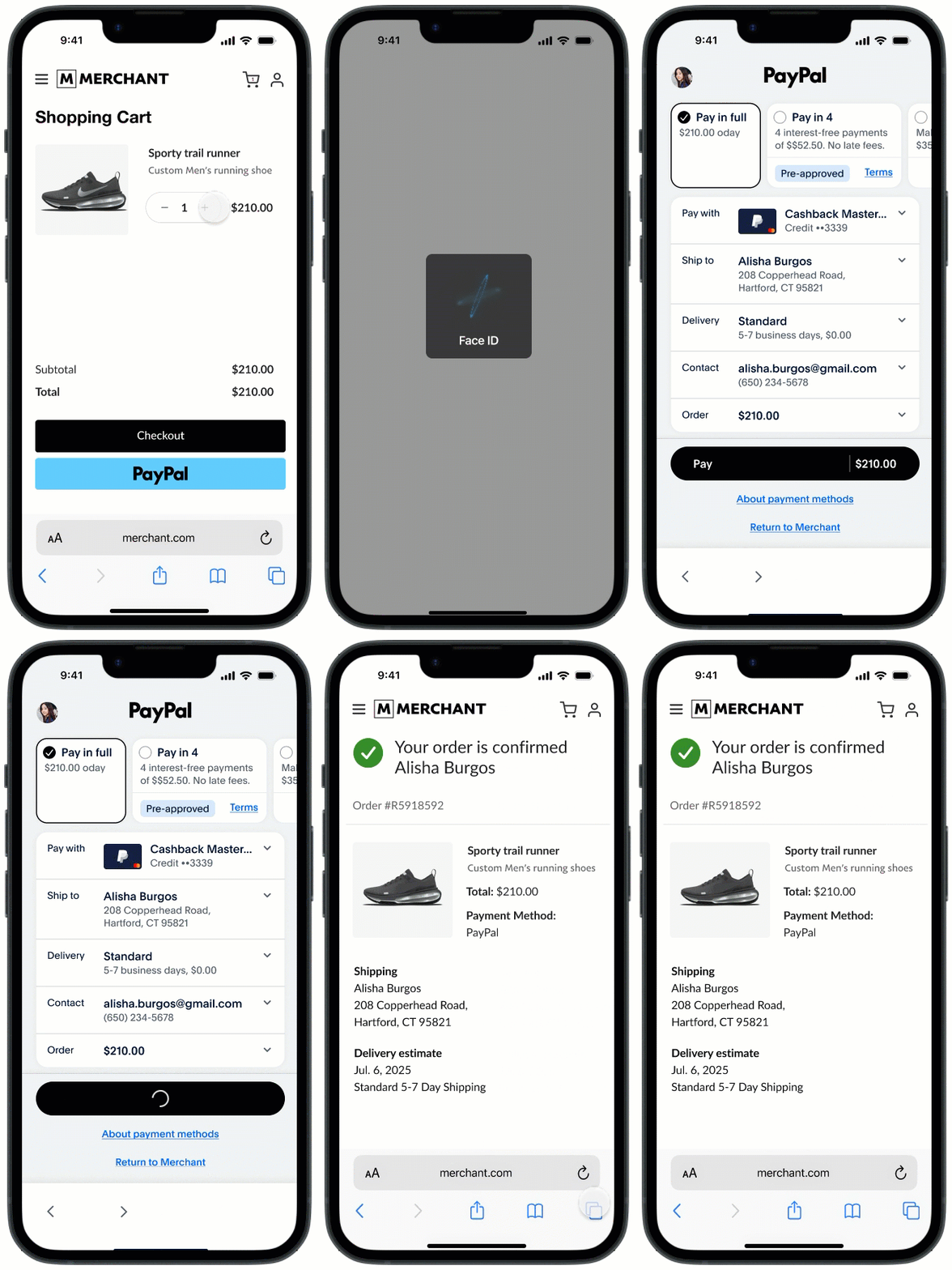 **
When a payer starts checkout on the merchant website in a browser, such as Safari on iOS, but has Chrome set as the default browser, PayPal redirects the payer back to the merchant's website in Chrome after they complete or cancel the transaction.
Use the `visibilitychange` event listener to handle cases when the payer abandons checkout.
In this scenario, the payer starts checkout in a non-default browser, completes an action in the PayPal app, and returns to the default browser. Because browsers do not share cookies, use the token that PayPal returns to look up the order, or include the original cart ID in the checkout URL to keep the session and complete the payment.
The PayPal app sends order approval or cancellation details as URL parameters during the redirect. Client-side code can read these parameters, but server-side routes cannot. When a transaction is approved, PayPal also returns `payer_id` as a URL parameter during the redirect.
The following code handles the redirects and processes approval data from the URL parameters on the client side.
```javascript lineNumbers
const onLoadHash = () => {
const hashParams = parseHashParams(window.location.hash);
if (hashParams.approved) {
// Buyer is returning from app switch
// Complete payment & redirect to confirmation page
} else if (hashParams.canceled) {
// Buyer has canceled app switch and returned
} else {
// No hash params, display standard checkout page
}
}
onLoadHash()
```
### Handle manual return flow [#handle-manual-return-flow]
**
When a payer starts checkout on the merchant website in a browser, such as Safari on iOS, but has Chrome set as the default browser, PayPal redirects the payer back to the merchant's website in Chrome after they complete or cancel the transaction.
Use the `visibilitychange` event listener to handle cases when the payer abandons checkout.
In this scenario, the payer starts checkout in a non-default browser, completes an action in the PayPal app, and returns to the default browser. Because browsers do not share cookies, use the token that PayPal returns to look up the order, or include the original cart ID in the checkout URL to keep the session and complete the payment.
The PayPal app sends order approval or cancellation details as URL parameters during the redirect. Client-side code can read these parameters, but server-side routes cannot. When a transaction is approved, PayPal also returns `payer_id` as a URL parameter during the redirect.
The following code handles the redirects and processes approval data from the URL parameters on the client side.
```javascript lineNumbers
const onLoadHash = () => {
const hashParams = parseHashParams(window.location.hash);
if (hashParams.approved) {
// Buyer is returning from app switch
// Complete payment & redirect to confirmation page
} else if (hashParams.canceled) {
// Buyer has canceled app switch and returned
} else {
// No hash params, display standard checkout page
}
}
onLoadHash()
```
### Handle manual return flow [#handle-manual-return-flow]
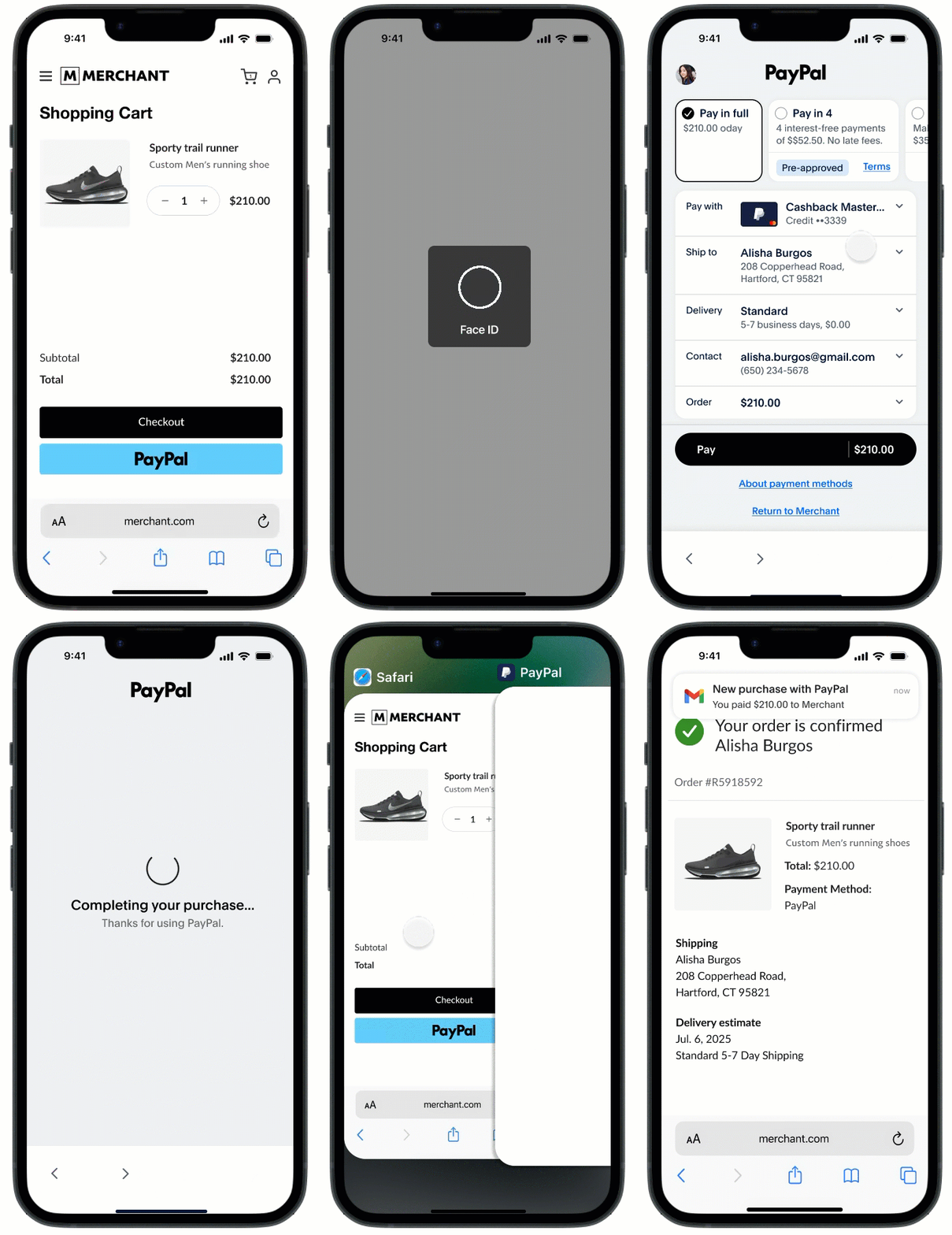 When the `return_flow` value is set to `MANUAL` and the payer completes or cancels the transaction in the PayPal app, the app prompts the payer to manually return to the merchant website.
Use the `visibilitychange` event listener to detect when the payer returns to the merchant website.
For additional visibility into payer actions in the PayPal app, check the experience\_status in the GET order response.
Once the transaction is approved, PayPal removes `experience_status` from the GET order response.
* The `visibilitychange` event listener also handles scenarios where the payer abandons checkout and the `return_flow` value is `AUTO`.
* If the payer abandons PayPal checkout and navigates back to the merchant website, it is not a terminal state. The payer can edit the cart and switch to PayPal again to review and approve the updated cart.
The following sample code shows how to handle the `visibilitychange` event listener.
```javascript lineNumbers
document.addEventListener('visibilitychange', (e) => {
// call your server API to make a request to PayPal to get the order status and buyer cancellation status (if applicable)
//If #change event was triggered then cancel this event (to avoid multiple payment/order calls from both the listeners)
const hashParams = parseHashParams(window.location.hash);
if (hashParams.approved || hashParams.cancelled) {
//Wil be handled by hashChange. Exit
return;
}
const orderResponse = getOrderResponse(orderId);
const orderStatus = orderResponse.status;
const cancelledActivity = orderResponse?.payment_source?.paypal?.experience_status;
//Order Approved
if (orderStatus === 'approved') {
// Capture payment & redirect to confirmation page
}
//Buyer cancels transaction
else if (orderStatus !== 'approved' && cancelledActivity == 'cancelled') {
// Buyer app switched to paypal but closed checkout before approving the transaction.
// Display Cart page again or take the appropriate "cancel" action
}
else {
// Display a modal to complete payment on the PayPal App
}
});
```
## Test App Switch [#test-app-switch]
Your merchant can test this feature in both the PayPal production app and sandbox environments. To test App Switch, make sure your merchant's integration meets these requirements:
* Your merchant completed the PayPal App Switch integration.
* Your merchant opted in for App Switch.
## Test your integration using PayPal's sandbox [#test-your-integration-using-paypals-sandbox]
This solution is available for your merchant's development team internationally.
### Preconditions [#preconditions]
* Long-lived session or remember me flow
* Face ID or Biometric
### Enable login methods [#enable-login-methods]
1. Log in to the PayPal app. On the home screen, select the avatar icon.
2. On the **Personal account** screen, select the **Login and security** option.
3. The **Login and security** screen should show the face ID or fingerprint and **Extend your login sessions** options disabled.
4. Select the toggle icon to enable each login method.
### Testable use cases [#testable-use-cases]
| | | |
| ------------------------- | --------------------------------------------------------------------------------------------------------------------------------------------------------------------------------- | ----------------------------------------------------------------------------------------------------------------------------------------------------------------------------------- |
| Flow | Scenario | Expected behavior |
| Native app | The user starts from the merchant's native app. | The user switches to the PayPal app and, after completing the checkout flow, is automatically redirected back to the merchant app. |
| Mobile web | The user starts from the native default browser, such as Safari on iOS or Chrome on Android. The user has the PayPal app installed. The merchant sets `return_flow` to `AUTO`. | The user switches to the PayPal app and, after completing the checkout flow, is automatically redirected back to the merchant website in the same browser tab. |
| Mobile web | The user starts from a non-native default browser, such as Chrome on iOS or Firefox on Android. The user has the PayPal app installed. The merchant sets `return_flow` to `AUTO`. | The user switches to the PayPal app and, after completing the checkout flow, is automatically redirected back to the merchant website in the default browser. |
| Mobile web | The merchant sets `return_flow` to `MANUAL`. The user has the PayPal app installed. | The user switches to the PayPal app and, after completing the checkout flow, the app prompts the payer to manually navigate back to the merchant website. |
| Mobile web | The user does not have the PayPal app installed, but the merchant has opted in for App Switch. | The user does not switch to the PayPal app and completes checkout using the existing non-App Switch API integration. |
| Native app and mobile web | After App Switch, the user changes the payment method on the pay sheet and completes the flow. | The user completes checkout with the new payment method they selected. |
| Native app and mobile web | After logging in, the user cancels the operation on the pay sheet screen in the PayPal app | The user is switched back to the merchant browser or merchant app after canceling the checkout flow. |
| Native app and mobile web | The user adds a new card. | When the user selects **Add Card**, they are prompted to log in again. After logging in, the new card form appears. Once the new card is added, the user can proceed with checkout. |
### Test on iOS [#test-on-ios]
1. Download [TestFlight](https://apps.apple.com/us/app/testflight/id899247664) from the App Store.
2. Open [Join the PayPal - Pay, Send, Save beta](https://testflight.apple.com/join/GtF5MEaY) on your device.
3. Select **View in TestFlight** and select **Open**.
4. Select **Install** or choose **Update** for an existing build. This build will become unavailable after 90 days.
> **Note:** If you have the production version of the PayPal app installed, you will get a prompt stating that you already have the app installed. Select **Install** to replace it with the TestFlight build.
### Test on Android [#test-on-android]
1. Open the [Firebase App Distribution](https://appdistribution.firebase.dev/i/76ccbaffb35a2586) site to join the tester program.
2. Enter your email address to receive an invite.
3. To confirm your access, open the invite email on a device.
4. Select **Get Started** on your device after opening the invite email.
5. Check the consent box to agree to Firebase testing and select **Accept Invitation**. You now have access to the tester portal.
6. Select **Download** next to the latest build in the list.
7. After the download is complete, open the build. You can also find the file in your device notifications or in your downloads folder in the Files app.
8. Select **Install** when prompted to download the PayPal app.
9. If you see **Update** instead of **Install**, the PayPal app is already installed on your device. Select **Cancel** and uninstall the PayPal app before proceeding.
10. Select **Open** to access the PayPal app.
11. Log in using the email address provided in the invite. Your device now has the sandbox version of the PayPal app.
> **Note:** Select the **Download App Tester** button to ensure you receive notifications when new versions of the sandbox app are available.
> **Note:** After you complete the integration, contact your PayPal support team to enable App Switch for production traffic.
When the `return_flow` value is set to `MANUAL` and the payer completes or cancels the transaction in the PayPal app, the app prompts the payer to manually return to the merchant website.
Use the `visibilitychange` event listener to detect when the payer returns to the merchant website.
For additional visibility into payer actions in the PayPal app, check the experience\_status in the GET order response.
Once the transaction is approved, PayPal removes `experience_status` from the GET order response.
* The `visibilitychange` event listener also handles scenarios where the payer abandons checkout and the `return_flow` value is `AUTO`.
* If the payer abandons PayPal checkout and navigates back to the merchant website, it is not a terminal state. The payer can edit the cart and switch to PayPal again to review and approve the updated cart.
The following sample code shows how to handle the `visibilitychange` event listener.
```javascript lineNumbers
document.addEventListener('visibilitychange', (e) => {
// call your server API to make a request to PayPal to get the order status and buyer cancellation status (if applicable)
//If #change event was triggered then cancel this event (to avoid multiple payment/order calls from both the listeners)
const hashParams = parseHashParams(window.location.hash);
if (hashParams.approved || hashParams.cancelled) {
//Wil be handled by hashChange. Exit
return;
}
const orderResponse = getOrderResponse(orderId);
const orderStatus = orderResponse.status;
const cancelledActivity = orderResponse?.payment_source?.paypal?.experience_status;
//Order Approved
if (orderStatus === 'approved') {
// Capture payment & redirect to confirmation page
}
//Buyer cancels transaction
else if (orderStatus !== 'approved' && cancelledActivity == 'cancelled') {
// Buyer app switched to paypal but closed checkout before approving the transaction.
// Display Cart page again or take the appropriate "cancel" action
}
else {
// Display a modal to complete payment on the PayPal App
}
});
```
## Test App Switch [#test-app-switch]
Your merchant can test this feature in both the PayPal production app and sandbox environments. To test App Switch, make sure your merchant's integration meets these requirements:
* Your merchant completed the PayPal App Switch integration.
* Your merchant opted in for App Switch.
## Test your integration using PayPal's sandbox [#test-your-integration-using-paypals-sandbox]
This solution is available for your merchant's development team internationally.
### Preconditions [#preconditions]
* Long-lived session or remember me flow
* Face ID or Biometric
### Enable login methods [#enable-login-methods]
1. Log in to the PayPal app. On the home screen, select the avatar icon.
2. On the **Personal account** screen, select the **Login and security** option.
3. The **Login and security** screen should show the face ID or fingerprint and **Extend your login sessions** options disabled.
4. Select the toggle icon to enable each login method.
### Testable use cases [#testable-use-cases]
| | | |
| ------------------------- | --------------------------------------------------------------------------------------------------------------------------------------------------------------------------------- | ----------------------------------------------------------------------------------------------------------------------------------------------------------------------------------- |
| Flow | Scenario | Expected behavior |
| Native app | The user starts from the merchant's native app. | The user switches to the PayPal app and, after completing the checkout flow, is automatically redirected back to the merchant app. |
| Mobile web | The user starts from the native default browser, such as Safari on iOS or Chrome on Android. The user has the PayPal app installed. The merchant sets `return_flow` to `AUTO`. | The user switches to the PayPal app and, after completing the checkout flow, is automatically redirected back to the merchant website in the same browser tab. |
| Mobile web | The user starts from a non-native default browser, such as Chrome on iOS or Firefox on Android. The user has the PayPal app installed. The merchant sets `return_flow` to `AUTO`. | The user switches to the PayPal app and, after completing the checkout flow, is automatically redirected back to the merchant website in the default browser. |
| Mobile web | The merchant sets `return_flow` to `MANUAL`. The user has the PayPal app installed. | The user switches to the PayPal app and, after completing the checkout flow, the app prompts the payer to manually navigate back to the merchant website. |
| Mobile web | The user does not have the PayPal app installed, but the merchant has opted in for App Switch. | The user does not switch to the PayPal app and completes checkout using the existing non-App Switch API integration. |
| Native app and mobile web | After App Switch, the user changes the payment method on the pay sheet and completes the flow. | The user completes checkout with the new payment method they selected. |
| Native app and mobile web | After logging in, the user cancels the operation on the pay sheet screen in the PayPal app | The user is switched back to the merchant browser or merchant app after canceling the checkout flow. |
| Native app and mobile web | The user adds a new card. | When the user selects **Add Card**, they are prompted to log in again. After logging in, the new card form appears. Once the new card is added, the user can proceed with checkout. |
### Test on iOS [#test-on-ios]
1. Download [TestFlight](https://apps.apple.com/us/app/testflight/id899247664) from the App Store.
2. Open [Join the PayPal - Pay, Send, Save beta](https://testflight.apple.com/join/GtF5MEaY) on your device.
3. Select **View in TestFlight** and select **Open**.
4. Select **Install** or choose **Update** for an existing build. This build will become unavailable after 90 days.
> **Note:** If you have the production version of the PayPal app installed, you will get a prompt stating that you already have the app installed. Select **Install** to replace it with the TestFlight build.
### Test on Android [#test-on-android]
1. Open the [Firebase App Distribution](https://appdistribution.firebase.dev/i/76ccbaffb35a2586) site to join the tester program.
2. Enter your email address to receive an invite.
3. To confirm your access, open the invite email on a device.
4. Select **Get Started** on your device after opening the invite email.
5. Check the consent box to agree to Firebase testing and select **Accept Invitation**. You now have access to the tester portal.
6. Select **Download** next to the latest build in the list.
7. After the download is complete, open the build. You can also find the file in your device notifications or in your downloads folder in the Files app.
8. Select **Install** when prompted to download the PayPal app.
9. If you see **Update** instead of **Install**, the PayPal app is already installed on your device. Select **Cancel** and uninstall the PayPal app before proceeding.
10. Select **Open** to access the PayPal app.
11. Log in using the email address provided in the invite. Your device now has the sandbox version of the PayPal app.
> **Note:** Select the **Download App Tester** button to ensure you receive notifications when new versions of the sandbox app are available.
> **Note:** After you complete the integration, contact your PayPal support team to enable App Switch for production traffic.