# Use Payouts to Venmo (/payouts/venmo)
You can use a mobile number or an email ID to send payments to a [Venmo](https://venmo.com/) recipient. If they don't have a Venmo account, it's easy to open one. Payouts to Venmo is available in the US only.
> **Info:** **Important:** Now you can send payouts to [Venmo handles](/payouts/venmo#payouts-to-venmo-handles).
## Payouts to Venmo features [#payouts-to-venmo-features]
* Access Venmo's active network of over 40 million users
* Customize brand messages in recipients' feeds
* Leverage the same Payouts integration as PayPal
* Send to any US mobile number
* Use a Venmo handle to send a payment to a Venmo account
## Recipient experience [#recipient-experience]
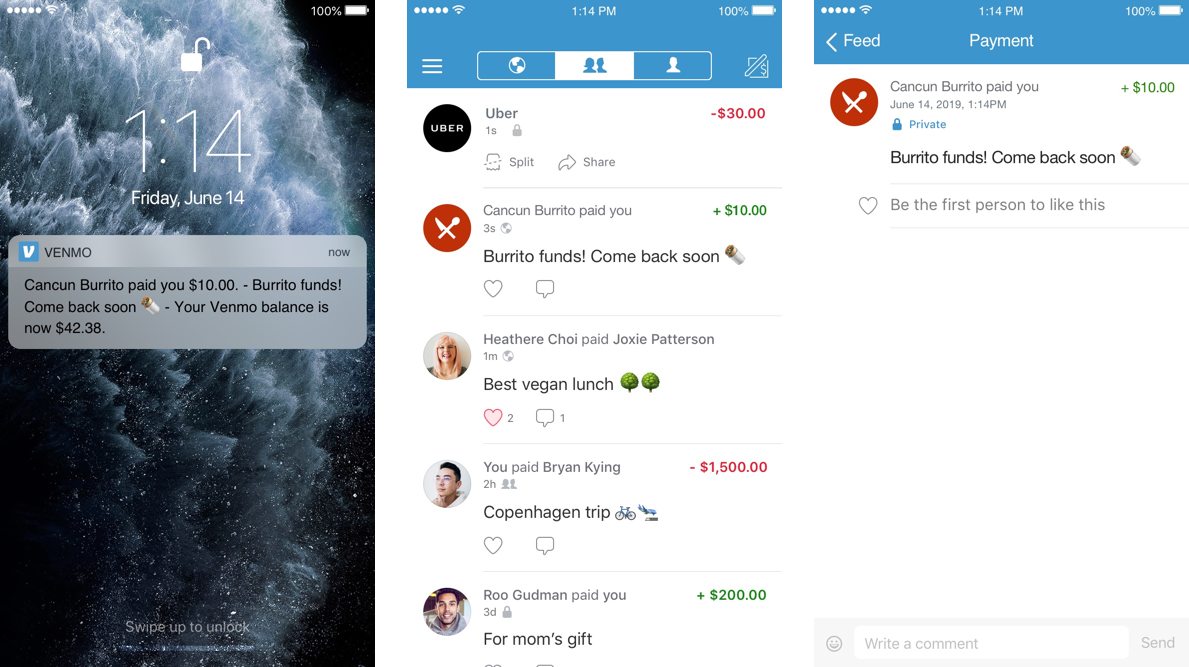
When you send the payout, the recipient's phone notifies them that the payment is in their Venmo account. If recipients don't have Venmo, they receive a text message to create an account and claim their payout. The notification includes the note you sent.
When the recipient selects the notification, their Venmo profile opens.
Your message shows up in the recipient's Venmo feed. The message inherits the recipient's privacy settings.
 ## Payouts to Venmo handles [#payouts-to-venmo-handles]
You can use a recipient's Venmo handle to send a payment. A Venmo handle is a unique username the customer chooses to send and receive payments.
Offering Venmo as a payout option may improve participation in rewards programs or social campaigns. You can encourage users to share their Venmo handles to receive payments.
You can direct payouts to a recipient's Venmo handle by setting `recipient_type` to `USER_HANDLE` and passing their handle using `receiver`, as described in the [Payouts API](/payouts/venmo#payouts-api) process.
## Enable payouts to Venmo [#enable-payouts-to-venmo]
You can use the Payouts API or Payouts Web to send payments to Venmo recipients.
### Payouts API [#payouts-api]
Here's how to send payouts to Venmo recipients through the Payouts API:
1. Complete the [prerequisites](/payouts/standard/overview#payouts-prerequisites) to send payouts.
2. Make sure you've [integrated the Payouts API](/api/payouts/v5/standard/).
3. Set `recipient_wallet` to `Venmo`.
4. Set `recipient_type` to `PHONE` for a mobile number, `EMAIL` for an email address, or `USER_HANDLE` for a [Venmo handle](/payouts/venmo#payouts-to-venmo-handles).
5. Set `receiver` to the recipient's mobile number, email address, or Venmo handle, as indicated in `recipient_type`.
6. Add a note to the recipient in `note`.
```text lineNumbers
{
"sender_batch_header": {
"sender_batch_id": "123B"
},
"items": [{
"recipient_type": "PHONE",
"amount": {
"value": "10.50",
"currency": "USD"
},
"note": "Thanks for your patronage!",
"receiver": "999-999-9999",
"sender_item_id": "1001",
"recipient_wallet": "Venmo"
}]
}
```
### Payouts Web [#payouts-web]
Here's how to send payouts to Venmo recipients through Payouts Web:
1. Complete the [prerequisites](/payouts/standard/overview#payouts-prerequisites) to send payouts.
2. Make sure you've [enabled Payouts Web](/payouts/web/overview#1-enable-payouts-web).
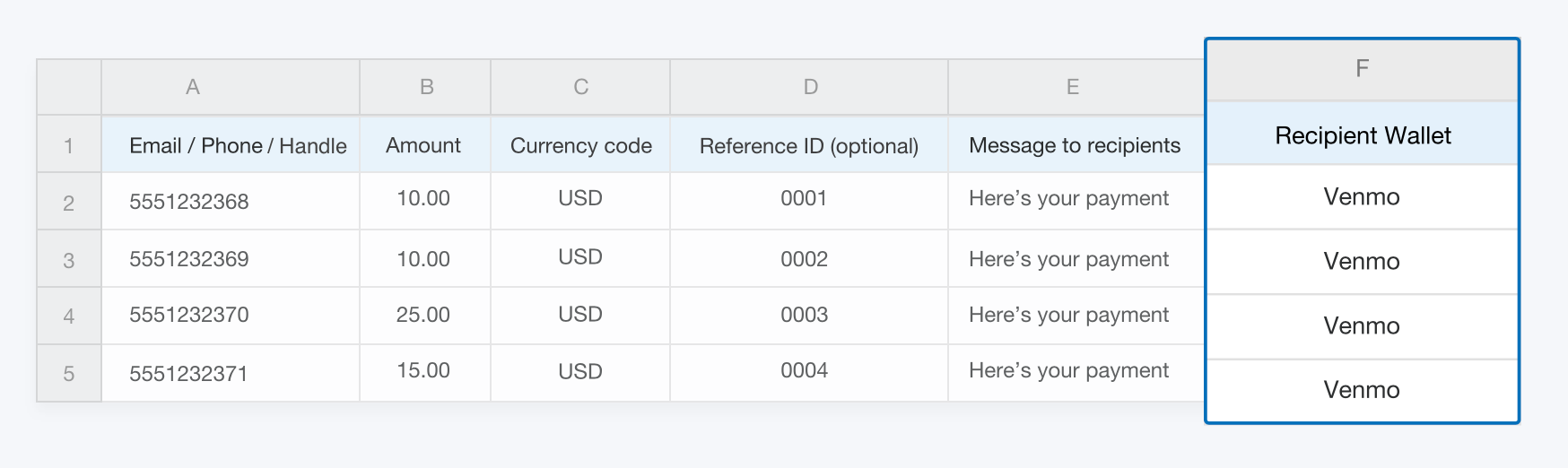
3. Add a **Recipient Wallet** column with **Venmo** to your payment file. Include a **Message to recipient** for Venmo recipients. If you leave a cell blank, **Recipient Wallet** defaults to PayPal.
## Payouts to Venmo handles [#payouts-to-venmo-handles]
You can use a recipient's Venmo handle to send a payment. A Venmo handle is a unique username the customer chooses to send and receive payments.
Offering Venmo as a payout option may improve participation in rewards programs or social campaigns. You can encourage users to share their Venmo handles to receive payments.
You can direct payouts to a recipient's Venmo handle by setting `recipient_type` to `USER_HANDLE` and passing their handle using `receiver`, as described in the [Payouts API](/payouts/venmo#payouts-api) process.
## Enable payouts to Venmo [#enable-payouts-to-venmo]
You can use the Payouts API or Payouts Web to send payments to Venmo recipients.
### Payouts API [#payouts-api]
Here's how to send payouts to Venmo recipients through the Payouts API:
1. Complete the [prerequisites](/payouts/standard/overview#payouts-prerequisites) to send payouts.
2. Make sure you've [integrated the Payouts API](/api/payouts/v5/standard/).
3. Set `recipient_wallet` to `Venmo`.
4. Set `recipient_type` to `PHONE` for a mobile number, `EMAIL` for an email address, or `USER_HANDLE` for a [Venmo handle](/payouts/venmo#payouts-to-venmo-handles).
5. Set `receiver` to the recipient's mobile number, email address, or Venmo handle, as indicated in `recipient_type`.
6. Add a note to the recipient in `note`.
```text lineNumbers
{
"sender_batch_header": {
"sender_batch_id": "123B"
},
"items": [{
"recipient_type": "PHONE",
"amount": {
"value": "10.50",
"currency": "USD"
},
"note": "Thanks for your patronage!",
"receiver": "999-999-9999",
"sender_item_id": "1001",
"recipient_wallet": "Venmo"
}]
}
```
### Payouts Web [#payouts-web]
Here's how to send payouts to Venmo recipients through Payouts Web:
1. Complete the [prerequisites](/payouts/standard/overview#payouts-prerequisites) to send payouts.
2. Make sure you've [enabled Payouts Web](/payouts/web/overview#1-enable-payouts-web).
3. Add a **Recipient Wallet** column with **Venmo** to your payment file. Include a **Message to recipient** for Venmo recipients. If you leave a cell blank, **Recipient Wallet** defaults to PayPal.
 See [Payouts Web](/payouts/web/overview/) for more on how to create and upload the payment file.
### Large Batch Payouts [#large-batch-payouts]
Here's how to send payouts to Venmo recipients through PayPal's DropZone secure FTP server:
1. Complete the [prerequisites](/payouts/standard/overview#payouts-prerequisites) to send payouts.
2. [Set up a DropZone account](/payouts/large-batch/).
3. Create a .csv input file with `PAYOUT_VENMO` items. The following sample sends a payout to three PayPal recipients and two Venmo recipients:
```text lineNumbers
{
PAYOUT_SUMMARY,17.9,USD,5,"You got paid",Payout for
PAYOUT,test-1@paypal.com,4.82,USD,REF_ID_1,NOTE_1
PAYOUT_VENMO,5551232368,4.93,USD,REF_ID_2,NOTE_2
PAYOUT_VENMO,5551232369,2.77,USD,REF_ID_3,NOTE_3
PAYOUT,test-4@paypal.com,3.51,USD,REF_ID_4,NOTE_4
PAYOUT,test-5paypal.com,1.87,USD,REF_ID_5,NOTE_5
}
```
See [Payouts Web](/payouts/web/overview/) for more on how to create and upload the payment file.
### Large Batch Payouts [#large-batch-payouts]
Here's how to send payouts to Venmo recipients through PayPal's DropZone secure FTP server:
1. Complete the [prerequisites](/payouts/standard/overview#payouts-prerequisites) to send payouts.
2. [Set up a DropZone account](/payouts/large-batch/).
3. Create a .csv input file with `PAYOUT_VENMO` items. The following sample sends a payout to three PayPal recipients and two Venmo recipients:
```text lineNumbers
{
PAYOUT_SUMMARY,17.9,USD,5,"You got paid",Payout for
PAYOUT,test-1@paypal.com,4.82,USD,REF_ID_1,NOTE_1
PAYOUT_VENMO,5551232368,4.93,USD,REF_ID_2,NOTE_2
PAYOUT_VENMO,5551232369,2.77,USD,REF_ID_3,NOTE_3
PAYOUT,test-4@paypal.com,3.51,USD,REF_ID_4,NOTE_4
PAYOUT,test-5paypal.com,1.87,USD,REF_ID_5,NOTE_5
}
```