---
title: Save payment methods for recurring payments
---
# Save payment methods for recurring payments (/platforms/checkout/standard/customize/save-payment-methods-for-recurring-payments)
Merchants initiate recurring payments based on a schedule or other criteria such as service usage. Common recurring payment examples include:
* Subscriptions such as streaming media or pet food delivery.
* Automatic bill payments, such as utilities or mobile phone services.
* Auto reloads, such as road tolls or prepaid cards.
The industry classifies recurring payments into specific types based on factors such as amount variation, frequency changes between payments, and whether the payment has a fixed duration or remains open-ended.
| | | | |
| ----------------------------- | ----------------- | ----------------- | ----------------- |
| Type | Amount | Billing frequency | Duration |
| Subscriptions | Fixed | Regular schedule | No fixed duration |
| Recurring | Variable | Regular schedule | No fixed duration |
| Unscheduled account on file | Fixed or variable | Variable | No fixed duration |
| Merchant-managed installments | Fixed | Defined schedule | No fixed duration |
## Know before you code [#know-before-you-code]
> **Info:** * First-time users should refer to [Get started with PayPal REST APIs](/api/rest/) Postman setup details, and the API suite configuration.
> * Configure your merchant's server to make [Orders v2 API](/api/orders/v2) calls. Do not call the APIs directly from the browser or client-side.
## Implement recurring payments [#implement-recurring-payments]
Recurring payments with PayPal use PayPal payment tokens, also known as vault tokens, for the vaulting with the purchase checkout flow. PayPal's vaulting with purchase checkout flow operates as a single-stage process. When merchants complete a purchase, PayPal saves a payment token and returns it to the merchant. This token is called the PayPal Vault ID. See the following steps to implement recurring payments.
1. **Create and save the payment token through Orders**: When customers choose to save their payment source in an application, use the [Orders v2 API](/api/orders/v2) to save their funding instrument in their PayPal wallet after customers complete checkout. PayPal returns a payment token that merchants should store against the customer's account. Use this token to initiate payments when needed.
2. **Initiate subsequent payments with the saved payment token**: When customers return to an application, merchants use the stored payment token to initiate payments against their PayPal account.
### Recurring payment during initial purchase [#recurring-payment-during-initial-purchase]
The following steps show the complete flow for setting up recurring payments during a customer's first purchase, including vault token creation and storage:
1. The payer selects PayPal Checkout, and chooses to save their payment method.
2. The merchant client starts the checkout process and includes recurring payment details.
3. The merchant server creates an order with the recurring payment information by calling the [Orders v2 API](/api/orders/v2/orders-create).
4. PayPal processes the order and creates a vault token for the payment method.
5. PayPal sends the order ID and the vault token to the merchant.
6. The merchant stores the order ID and vault token for future transactions.
### Process subsequent payments with stored tokens [#process-subsequent-payments-with-stored-tokens]
For subsequent transactions, the merchant server creates orders using the stored `vault_id` and credential information from the initial purchase. PayPal processes the payment and returns the completed transaction details.
## Create payment method tokens [#create-payment-method-tokens]
Initiate payment token creation during PayPal Checkout when customers sign up for services or add PayPal as a payment method for existing recurring arrangements. Include the following recurring payment information:
* Use recurring indicators. This flags the payment token for future recurring payments and customizes PayPal Checkout content to inform customers about the recurring nature of the payment.
* Recurring Billing Agreement (RBA) plan information. This provides customers with key summary information in PayPal Checkout about the recurring arrangement they are entering.
### Recurring indicator [#recurring-indicator]
Set the recurring indicator value that represents the most appropriate type of RBA. This information sets payment network indicators correctly and must accurately represent the customer agreement to ensure compliance with payment network regulations.
Set the recurring indicator through the Create Order API's `usage_pattern` value at `payment_source.paypal.usage_pattern` during payment token creation for initial or subsequent purchases. Additional required fields are outlined in separate sections.
> **Note:** During payment token creation, use `usage_pattern` in `payment_source.paypal.attributes.vault`. For subsequent transactions, use `usage_pattern` in `payment_source.paypal.stored_credential`.
| | | | |
| ------------ | ----------------------------------------------------------------------------------------------------------------- | ------------------------------------------------------------------------------------------------------------------------------------------------------------------------------------------------------------------------------------------------------------------------------------------------------------------------------------------------- | ----------------------------------------------------------------------- |
| RBA type | Description | Usage pattern values | Examples |
| Subscription | Represents agreements where customers are charged a fixed amount on a regular schedule with no end date. | Use `SUBSCRIPTION_PREPAID` when making the first payment request for that payment token or subsequent payment requests based on how the merchant charges their customer.Use `SUBSCRIPTION_POSTPAID` when making the first payment request for that payment token or subsequent payment requests based on how the merchant charges their customer. | A monthly streaming media subscription.A weekly food delivery service. |
| Recurring | Represents RBAs where customers are charged a variable amount on a regular schedule with no end date. | `Use RECURRING_PREPAID` when making the first payment request for that payment token or subsequent payment requests based on how the merchant charges their customer.Use `RECURRING_POSTPAID` when making the first payment request for that payment token or subsequent payment requests based on how the merchant charges the customer. | A monthly utility bill auto-payment. |
| Unscheduled | Represents RBAs where customers are charged a fixed or variable amount on an irregular schedule with no end date. | Use `UNSCHEDULED_PREPAID` when making the first payment request for that payment token or subsequent payment requests based on how the merchant charges the customer.Use `UNSCHEDULED_POSTPAID` when making the first payment request for that payment token or subsequent payment requests based on how the merchant charges the customer. | An auto-reload prepaid card when the balance drops below the threshold. |
| Installment | Represents RBAs where customers are charged a fixed amount on a fixed schedule with a defined end date. | Use `INSTALLMENT_PREPAID` when making the first payment request for that payment token or subsequent payment requests based on how the merchant charges the customer.Use `INSTALLMENT_POSTPAID` when making the first payment request for that payment token or subsequent payment requests based on how the merchant charges the customer. | A merchandise payment plan.A service installment billing. |
### RBA plan information [#rba-plan-information]
Set RBA plan information to present customers with a key information summary about their recurring billing agreement during PayPal Checkout. This increases conversion by maintaining customer confidence about the agreement terms.
## Integration requirements [#integration-requirements]
Pass RBA plan information only during payment token creation for customer visibility during PayPal Checkout.
Exclude RBA information in subsequent merchant-initiated payment requests.
PayPal's RBA plan information structure supports simple to complex multi-tier arrangements through the `purchase_units.items.billing_plan` object in the Create Order API call.
### Field description [#field-description]
The following table shows the parameters to pass to the Orders v2 API to configure the checkout experience for customers.
| | | | |
| ------------------------------------------------------------------------------------------------------------ | --------------------------------------------------------------------------------------------------------------------------------------------------------------------------------------------------------------------------------- | -------------------------------------------------------------------------------------------- | ------------------------------------------------------------------------------------- |
| What to pass | Payer experience | Ideal scenario | Example |
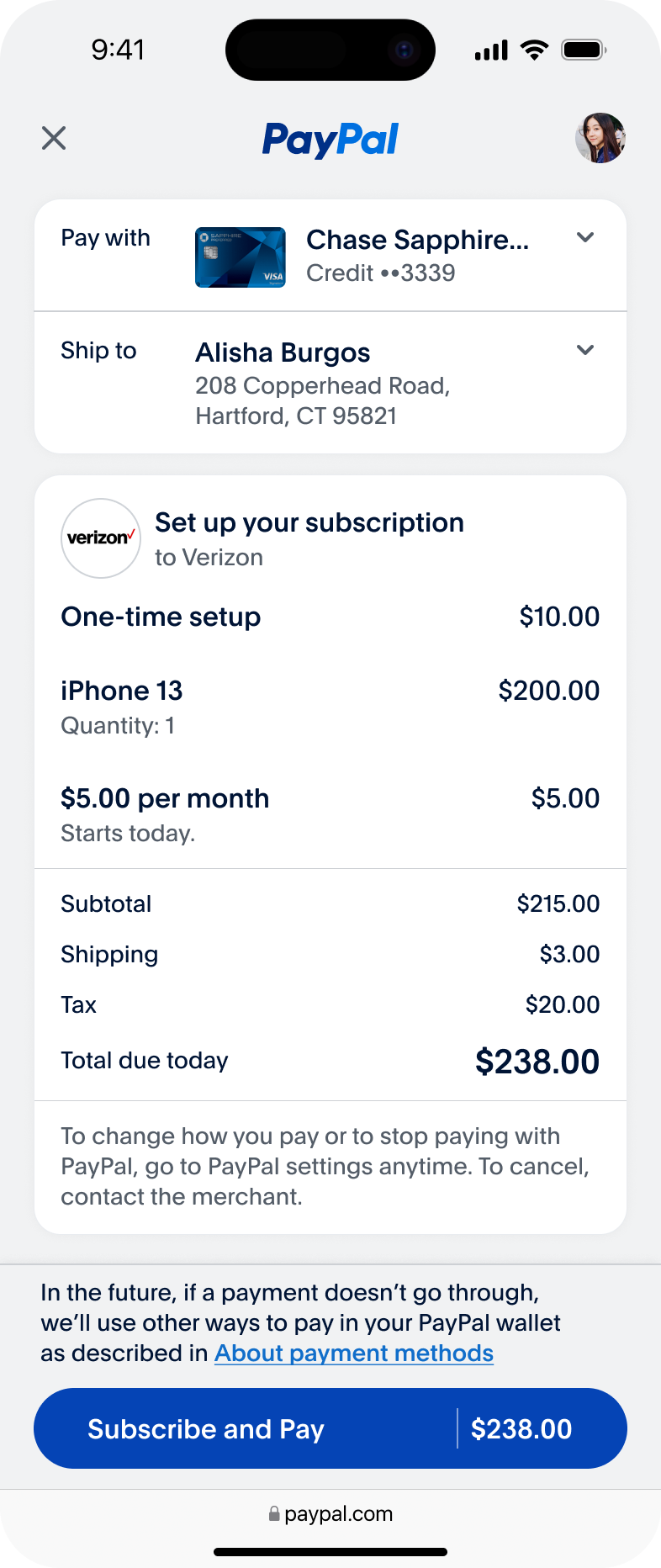
| `billing_plan` in `items[]``amount in purchase_units.amount``purchase_units.amount.breakdown``usage_pattern` | PayPal displays the new **Review Your Payment** layout showing plan details, billing cycles, plan name, item amount, amount breakdown including shipping and taxes, and recurring indicator during payment method token creation. | Use this to display plan information at checkout, especially in recurring billing scenarios. | Consumer purchases a phone and subscribes to a $8.99/month phone plan starting today. |
| `amount``usage_pattern` | Not supported because at least one billing cycle is required for RBA. | N/A | N/A |
| `amount` | PayPal displays the standard checkout experience without recurring payment indicators. | Use this configuration for one-time transactions only. Do not use it for recurring payments. | Consumer pays for their trip on a ride-share app. |
### RBA data structure [#rba-data-structure]
The RBA plan contains three components: plan name, billing cycle information, and one-time charges. Pass this data using `purchase_units.items[]`, `purchase_units.items[].billing_plan`, and `payment_source.paypal.attributes.vault` objects. See the following table for product field reference.
| | | |
| ---------------- | -------------------------------------------------------------------------------------------------------------------------------------------------------------------------------------------------------------------------------------------------------------------------------------------------------------------------------------------------------------------------------------------------------------------------------------------------------------------------------------------- | -------------------------------------------------------------------------------------------------------------------------------------------------------------------------------------------------------------------------------------------------------------------------------------------------------------------------------------------------------------------------------------------------------------------------------------------------------------------------------------------------------- |
| Field name | Description | Example |
| Plan name | Provide optional information about the service customers purchase as part of their RBA. Make this recognizable and understood by customers as it displays within PayPal Checkout.Use customer-friendly names. Avoid generic information, coded data, SKUs, or internal plan IDs. | VidStream offers a $10/month streaming service plan with internal reference US-HDMNTH. When initiating PayPal Checkout, VidStream sets `purchase_units.items.billing_plan.name` to HD Premium - Monthly Plan. |
| Billing cycles | Billing cycles define attributes for each phase of the customer's recurring payment arrangement.Billing cycles can be trial or regular cycles, and trial cycles can be chargeable or free.Recurring payments support up to 3 billing cycles. | VidStream payer signs up for a $10/month streaming service plan with a 14-day free trial. VidStream initiates PayPal Checkout with 2 billing cycles: a 14-day free trial and monthly cycle with no end date for $10.GymBunny payer signs up for a $100/month gym membership where the first 3 months are 50% off with a $25 joining fee. GymBunny initiates PayPal Checkout with 2 billing cycles: A monthly trial cycle that lasts 3 months for $50, and a monthly cycle that has no end date for $100. |
| One-time charges | Use one-time charges to communicate certain fees that don't form part of the ongoing recurring payment arrangement. Pass information about non-recurring charges that customers incur when they initiate their recurring payment arrangement. For example, use one-time charges to communicate:
Setup fees.Products ordered as part of a combined purchase and recurring payments, such as a mobile phone ordered when customers sign up for a wireless service plan. | SpeedyNet broadband setup: $10 setup fee, $50 router, $5 shipping, applicable taxes.GymBunny membership: $25 joining fee. GymBunny initiates the PayPal Checkout with information detailing the one-time joining fee. |
> **Note:** Pass all information using `paypal.attributes.vault`, `purchase_units.items[]`, `purchase_units.items[].billing_plan`, `purchase_units.amount`, and `purchase_units.amount.breakdown`.
## Implementation requirements [#implementation-requirements]
See the following requirements when implementing RBA plan information.
Data structure requirements:
* Use only one item with `billing_plan`. Multiple billing plans are not supported.
* Set item name to `Billing Plan` to differentiate from actual products.
Billing cycle requirements:
* Include at least 1 regular tenure type in billing cycles.
* Do not pass `start_date` in `billing_plan.billing_cycles` if your merchant wants the billing plan to start on the same day it was created.
Amount calculation:
* Add the plan price to the total order amount if the plan starts on the same day as the payment token creation.
### RBA plan data fields [#rba-plan-data-fields]
Use these fields to structure the recurring billing plan data and communicate plan details to customers during checkout.
### Plan name [#plan-name]
The plan name is an optional description of the product or service customers purchase using the plan name field.
Use the field `purchase_units.items.billing_plan.name` to set this value.
See the following table for product field reference.
| | | | | |
| ------------ | ------------------------------------------ | -------------- | ------ | --------- |
| Data element | Field name | Length | Type | Priority |
| Plane name | `purchase_units.items[].billing_plan.name` | 127 characters | string | Mandatory |
### Product details [#product-details]
Pair a product with your merchant's billing plan. For example, customers can purchase an iPhone and a Verizon phone plan together.
Add a new item in `purchase_units.items[]` to specify product details such as name, description, and quantity. Your merchant can also specify the product price by referring to the one-time charges section for pricing details.
See the following table for product field reference.
| | | | | | |
| ------------------- | --------------------------------------------------------------- | --------------------------------- | -------------- | ------ | ------------------------------------------------ |
| Data element | Description | Field name | Length | Type | Priority |
| Product description | Defines the description of the product associated with the RBA. | `purchase_units.items[].name` | 127 characters | string | Mandatory if the product is present in the cart. |
| Product quantity | Defines the quantity of the product associated with the RBA. | `purchase_units.items[].quantity` | 32 characters | string | Mandatory if the product is present in the cart. |
### Recurring billing cycle charges [#recurring-billing-cycle-charges]
Billing cycles define attributes for amount and duration in the recurring payment arrangement. Most arrangements use 1 or 2 billing cycles, but PayPal supports up to 3 billing cycles for complex arrangements.
Use the field `purchase_units.items.billing_plan.billing_cycles` to configure billing cycles.
Add `purchase_units.items.billing_plan.billing_cycles.pricing_scheme.price` to the total unit amount of the billing plan item when the plan starts on the same day as creation.
See the following table for billing cycle field reference:
| | | | | |
| ------------------------------------- | ----------------------------------------------------------------------------------------------------- | ----------------------------------------------------------------------------------------------------- | --------------------------------------------------------------------------- | ------------------------------------------------------------------------------------------------------------------------------------------------------------------- |
| Data element | Description | Field name | Type and values | Priority |
| Billing cycle sequence number | The unique sequence number for each billing cycle when the RBA includes multiple billing cycles. | `purchase_units.items[].billing_plan.billing_cycles.sequence` | integer
Max Length: 3 | Optional
Required only when the arrangement includes multiple billing cycles.
Pass a maximum of 3 billing cycle sequence numbers. |
| Billing cycle type | This indicates whether this is a trial cycle or a regular cycle. | `purchase_units.items[].billing_plan.billing_cycles.tenure_type` | enum
1 = Trial0 = Regular | Your merchant needs at least one tenure type. |
| Pricing scheme | Pricing parameters for the billing cycle. | `purchase_units.items[].billing_plan.billing_cycles.pricing_scheme` | enum
`FIXED``VARIABLE``AUTO_RELOAD` | Mandatory when `tenure_type` = `REGULAR`.Optional when `tenure_type` = `TRIAL`. |
| Pricing model | Price model for the billing cycle. | `purchase_units.items[].billing_plan.billing_cycles.pricing_scheme.pricing_model` | enum
`FIXED``VARIABLE``AUTO_RELOAD` | Mandatory |
| Price | Price amount for the billing cycle. | `purchase_units.items[].billing_plan.billing_cycles.pricing_scheme.pricing_model.price.value` | integer or decimal | Mandatory |
| Price currency code | Currency code for the price amount. | `purchase_units.items[].billing_plan.billing_cycles.pricing_scheme.pricing_model.price.currency_code` | string
[ISO-4217 currency code](/api/codes/currency) | Mandatory |
| Reload threshold amount | Threshold amount that triggers a reload for auto-reload Unscheduled Card on File (UCOF) arrangements. | `purchase_units.items[].billing_plan.billing_cycles.reload_threshold_amount.value` | integer or decimal | Optional
Use only when `pricing_model` = `AUTO_RELOAD`. |
| Reload threshold amount currency code | Currency code for the reload threshold amount in auto-reload UCOF arrangements. | `purchase_units.items[].billing_plan.billing_cycles.reload_threshold_amount.currency_code` | string
[ISO-4217 currency code](/api/codes/currency) | Optional
Use when `pricing_model` = `AUTO_RELOAD`. |
| Billing cycle frequency unit | Time unit for the frequency count. | `purchase_units.items[].billing_plan.billing_cycles.billing_frequency_unit` | enum
`Day``Week``Month``Year` | Mandatory for all usage patterns except `UNSCHEDULED_PREPAID` and `UNSCHEDULED_POSTPAID`.
|
| Billing cycle frequency count | Duration of the billing cycle using the frequency unit. | `purchase_units.items[].billing_plan.billing_cycles.billing_frequency` | integer
Frequency count: 1-365 | MandatoryOptional for `UNSCHEDULED_PREPAID` and `UNSCHEDULED_POSTPAID`. Maximum values:
Day = 365Week = 52Month = 12Year = 1 |
| Expected billing cycles count | Number of times the billing cycle runs. | `purchase_units.items[].billing_plan.billing_cycles.number_of_executions` | integer
Minimum: 0Maximum: 999 | Mandatory
Set to 0 for infinite executions when there is no defined end date. |
| Start date | Start date for the billing cycle. | `purchase_units.items[].billing_plan.billing_cycles.start_date` | string
YYYY-MM-DD | Optional
Do not provide if billing cycle starts at checkout.
Only one billing cycle with sequence = 1 can have null start date. |
## Setup fee configuration [#setup-fee-configuration]
One-time charges communicate information about non-recurring fees that customers pay when starting RBA. These might include setup costs or similar initial expenses.
Pass setup fee information using the field `purchase_units.shipping.items.billing_plan.setup_fee`. If the billing plan is `Item[0]`, add the setup fee to the total unit amount in `items[0].unit_amount.value`. See the following table for product field reference.
| | | | | |
| ----------------------- | ------------------------------------------------------------------------------------------------ | ------------------------------------------------------------- | --------------------------------------------------------------------------- | -------- |
| Data element | Description | Field name | Type and values | Priority |
| Setup fee | One-time fee charged to customers when they first establish their recurring billing arrangement. | `purchase_units.items[].billing_plan.setup_fee.value` | integer or decimal | Optional |
| Setup fee currency code | Currency code for the setup fee amount. | `purchase_units.items[].billing_plan.setup_fee.currency_code` | string
[ISO-4217 currency code](/api/codes/currency) | Optional |
### Product purchases [#product-purchases]
Include product information when customers purchase physical products alongside their recurring billing plan, such as buying a mobile phone while signing up for a wireless service plan.
Add products using the `items[]` in `purchase_unit` as a separate item from the billing plan. For example, if the billing plan item is `items[0]`, this should be `items[1]`.
Important limitations:
* Recurring billing supports only one product item.
* Do not use multiple product items.
* Include the `unit_amount` field in the total amount breakdown in `purchase_units.amount.breakdown` as `item_total`, including any billing plan amount fields such as setup fees or plan prices.
### Product purchase fields [#product-purchase-fields]
For detailed amount information, such as shipping and taxes, use `purchase_units.amount.breakdown.shipping` and `purchase_units.amount.breakdown.tax_total`.
See the following table for product field reference.
| | | | | |
| --------------------------- | ----------------------------------------------------------------------------------------------------------------------------------------------------------------------------------------------------------- | -------------------------------------------------- | ------------------------------------------------------------------------------------ | --------------------------------------------------- |
| Data element | Description | Field | Type and values | Priority |
| Product price | The price of the product that customers purchase alongside the billing plan, such as a phone bought with a wireless service plan. For multiple quantity products, specify `unit_amount` with item quantity. | `purchase_units.items[].unit_amount.value` | integer or decimal | Required if the merchant's cart contains a product. |
| Product price currency code | Currency code for the product price. | `purchase_units.items[].unit_amount.currency_code` | string
Use the [ISO-4217 currency code](/api/codes/currency). | Required if the merchant's cart contains a product. |
### Order amount breakdown [#order-amount-breakdown]
For detailed amount information such as shipping and taxes, use `purchase_units.amount.breakdown.shipping` and `purchase_units.amount.breakdown.tax_total`.
> **Note:** Amount breakdown fields such as `handling`, `insurance`, `discount`, and `shipping_discount` are not supported for recurring purchases.
| | | | | |
| -------------------------- | ---------------------------------------------------------------------------------------------------------------------------------------------------------------------------------------------------------------------------------------------------------------------------------------------- | --------------------------------------------------------- | ----------------------------------------------------------------- | -------------------------------------------------------------------------------------------------------------------------------------------------- |
| Data element | Description | Field name | Type and values | Priority |
| Shipping fee | The shipping fee for all items within a given `purchase_unit.shipping.value` can not be a negative number. | `purchase_units.amount.breakdown.shipping.value` | string
Minimum length: 0Maximum length: 32 | Optional |
| Shipping fee currency code | The [three-character ISO-4217 currency code](/api/codes/currency) that identifies the currency. | `purchase_units.amount.breakdown.shipping.currency_code` | string | Optional |
| Taxes | The total tax for all items. Required if the request includes purchase\_units.items.tax. Must equal the sum of (`items[].tax * items[].quantity`) for all items. The `tax_total.value` can not be a negative number. | `purchase_units.amount.breakdown.tax_total.value` | string | Optional |
| Tax currency code | The [three-character ISO-4217 currency code](/api/codes/currency)that identifies the currency. | `purchase_units.amount.breakdown.tax_total.currency_code` | string | Optional |
| Total amount | The value, which might be: An integer for currencies like `JPY` that are not typically fractional.A decimal fraction for currencies like `TND` that are subdivided into thousandths. For the required number of decimal places for a currency code, see [Currency Codes](/api/codes/currency). | `purchase_units.amount.value` | string | Mandatory
Merchants must calculate the total accurately. This with-purchase use case does not accept 0 as the total amount. |
| Total currency code | The [three-character ISO-4217 currency code](/api/codes/currency) that identifies the currency. | `purchase_units.amount.currency_code` | string | Mandatory |
## Payment token configuration [#payment-token-configuration]
Use the following attributes to create the payment token. This is a prerequisite for RBA plan metadata.
Object: `payment_source.paypal.attributes.vault`
The following sample code shows the required attributes for payment token vaulting.
```javascript lineNumbers
"store_in_vault": "ON_SUCCESS", //To create a vaulted token
"usage_type": "MERCHANT", //Merchant or Platform
"usage_pattern": "SUBSCRIPTION_POSTPAID", //Recurring Indicator
```
See the following table for payment token configuration field reference.
| | | | | |
| ---------------- | --------------------------------------------------------------------------------------------------------------------------------------------------------------------------------------------------------------------------------------------------------------------- | ------------------------------------------------------- | ------------------------------------------------------------------------------------------------------------------------------------------------------------------------------------------------------ | --------------------------------- |
| Data element | Description | Field name | Type and values | Priority |
| `store_in_vault` | Vaulting instruction that creates a payment token only when at least one authorization or capture using that `payment_source` succeeds. | `payment_source.paypal.attributes.vault.store_in_vault` | enum
`ON_SUCCESS` | Mandatory for vaulting use cases. |
| `usage_type` | Identifies the person or party who initiated the payment. Use `MERCHANT` if the payment token will be used by the merchant directly. Use `PLATFORM` for future transactions on a platform such as a marketplace where customers can purchase from multiple merchants. | `payment_source.paypal.attributes.vault.usage_type` | enum
`MERCHANT``PLATFORM` | Mandatory for vaulting use cases. |
| `usage_pattern` | Pricing model of the payment token that determines the recurring billing experience. | `paypal.attributes.vault.usage_pattern` | enum
`SUBSCRIPTION_PREPAID``SUBSCRIPTION_POSTPAID``RECURRING_PREPAID``RECURRING_POSTPAID``INSTALLMENT_PREPAID``INSTALLMENT_POSTPAID``UNSCHEDULED_PREPAID``UNSCHEDULED_POSTPAID` | Mandatory for a new RBA. |
## Common use cases [#common-use-cases]
The use cases show common recurring billing scenarios using the [Create Order API](/api/orders/v2/orders-create) with different use cases and configurations.
* Supported APIs: [Create Order API](/api/orders/v2/orders-create)
* Supported intents: `Capture` and `Authorize`
### Use case: Subscription [#use-case-subscription]
In this scenario, the consumer subscribes to a $5.00/month plan, starting today, and purchases an iPhone.
 #### Request payload
```bash lineNumbers
curl -v -X POST https://api-m.sandbox.paypal.com/v2/checkout/orders/
-H "Content-Type: application/json"
-H "Authorization: Bearer ACCESS_TOKEN"
-d '{
"intent": "CAPTURE",
"purchase_units": [
{
"amount": {
"currency_code": "USD",
"value": "238",
"breakdown": {
"item_total": {
"currency_code": "USD",
"value": "215"
},
"shipping": {
"currency_code": "USD",
"value": "3"
},
"tax_total": {
"currency_code": "USD",
"value": "20"
}
}
},
"items": [
{
"name": "iPhone 13",
"description": "iPhone 13 with Verizon plan",
"sku": "259483234816",
"unit_amount": {
"currency_code": "USD",
"value": "200"
},
"tax": {
"currency_code": "USD",
"value": "20"
},
"quantity": "1",
"category": "DIGITAL_GOODS"
},
{
"name": "Billing Plan",
"description": "Billing plan for subscriptions",
"unit_amount": {
"currency_code": "USD",
"value": "15"
},
"quantity": "1",
"billing_plan": {
"name": "Verizon",
"setup_fee": {
"value": "10",
"currency_code": "USD"
},
"billing_cycles": [
{
"tenure_type": "REGULAR",
"pricing_scheme": {
"price": {
"value": "5",
"currency_code": "USD"
},
"pricing_model": "FIXED"
},
"frequency": {
"interval_unit": "MONTH",
"interval_count": 1
},
"total_cycles": 0,
"sequence": 1
}
]
}
]
}
],
"payment_source": {
"paypal": {
"attributes": {
"vault": {
"store_in_vault": "ON_SUCCESS",
"usage_type": "MERCHANT",
"usage_pattern": "SUBSCRIPTION_PREPAID"
}
},
"experience_context": {
"return_url": "https://example.com/returnUrl",
"cancel_url": "https://example.com/cancelUrl"
}
}
}
}
}'
```
#### Response
```json lineNumbers
{
"id": "ORDER-ID",
"intent": "CAPTURE",
"status": "PAYER_ACTION_REQUIRED",
"payment_source": {
"paypal": {}
},
"purchase_units": [
{
"items": [
{
"name": "iPhone 13",
"description": "iPhone 13 with Verizon plan",
"sku": "259483234816",
"unit_amount": {
"currency_code": "USD",
"value": "200"
},
"tax": {
"currency_code": "USD",
"value": "20"
},
"quantity": "1",
"category": "PHYSICAL_GOODS"
},
{
"name": "Billing Plan",
"description": "Billing plan for subscriptions",
"unit_amount": {
"currency_code": "USD",
"value": "10"
},
"quantity": "1",
"billing_plan": {
"name": "Verizon",
"setup_fee": {
"value": "10",
"currency_code": "USD"
},
"billing_cycles": [
{
"tenure_type": "REGULAR",
"pricing_scheme": {
"price": {
"value": "5",
"currency_code": "USD"
},
"pricing_model": "FIXED"
},
"frequency": {
"interval_unit": "MONTH",
"interval_count": 1
},
"total_cycles": 0,
"sequence": 1
}
]
}
}
],
"amount": {
"currency_code": "USD",
"value": "238.00",
"breakdown": {
"item_total": {
"currency_code": "USD",
"value": "215.00"
},
"tax_total": {
"currency_code": "USD",
"value": "20.00"
},
"shipping": {
"currency_code": "USD",
"value": "3"
}
}
}
}
],
"links": [
{
"href": "https://api-m.paypal.com/v2/checkout/orders/aORDER-ID",
"rel": "self",
"method": "GET"
},
{
"href": "https://www.paypal.com/checkoutnow?token=ORDER-ID",
"rel": "payer-action",
"method": "GET"
}
]
}
```
### Use case: Subscription with trial [#use-case-subscription-with-trial]
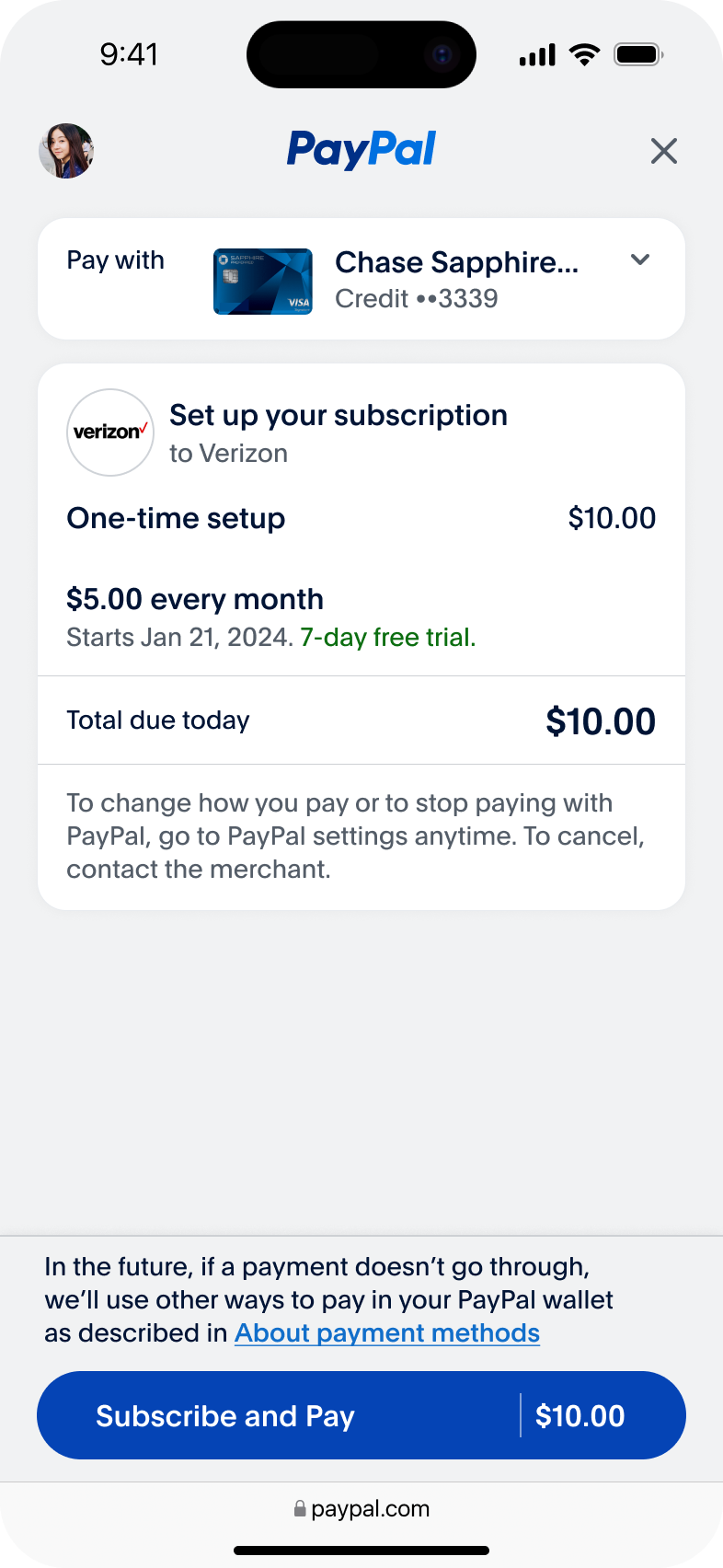
In this scenario, the consumer subscribes to a $10/month plan with a 7-day free trial.
 ```bash lineNumbers
curl -v -X POST https://api-m.sandbox.paypal.com/v2/checkout/orders/
-H "Content-Type: application/json"
-H "Authorization: Bearer ACCESS_TOKEN"
-d '{
"intent": "CAPTURE",
"purchase_units": [
{
"amount": {
"currency_code": "USD",
"value": "10"
},
"items": [
{
"name": "Billing Plan",
"description": "Billing plan for subscriptions",
"unit_amount": {
"currency_code": "USD",
"value": "10"
},
"quantity": "1",
"billing_plan": {
"name": "Verizon Subscription",
"setup_fee": {
"value": "10",
"currency_code": "USD"
},
"billing_cycles": [
{
"tenure_type": "TRIAL",
"pricing_scheme": {
"price": {
"value": "5",
"currency_code": "USD"
},
"pricing_model": "FIXED"
},
"frequency": {
"interval_unit": "DAY",
"interval_count": 7
},
"sequence": 1,
"start_date": "2024-01-21"
}
]
}
]
]
}
],
"payment_source": {
"paypal": {
"attributes": {
"vault": {
"store_in_vault": "ON_SUCCESS",
"usage_type": "MERCHANT",
"usage_pattern": "SUBSCRIPTION_PREPAID"
}
},
"experience_context": {
"return_url": "https://example.com/returnUrl",
"cancel_url": "https://example.com/cancelUrl"
}
}
}
}
}'
```
### Use case: Subscription start date and one-time setup fee [#use-case-subscription-start-date-and-one-time-setup-fee]
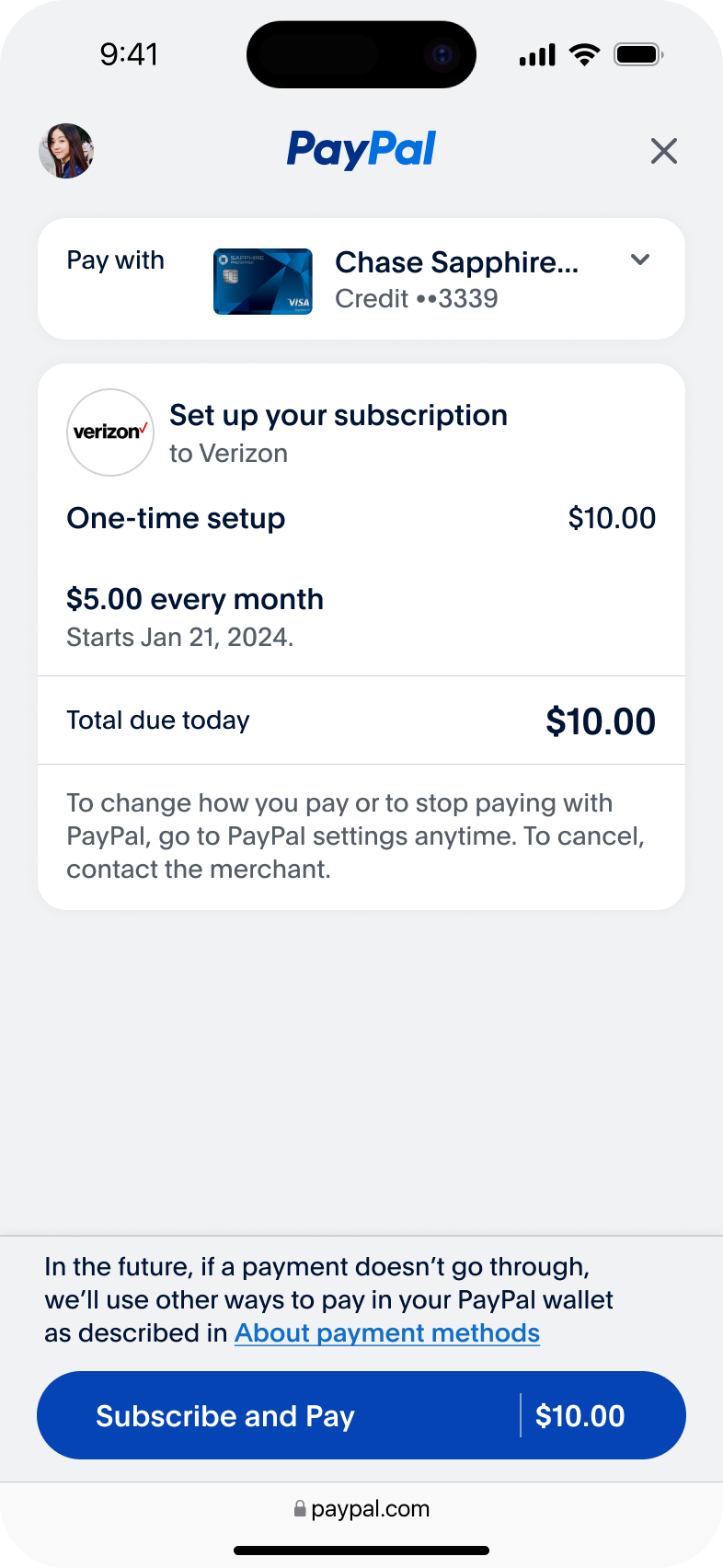
In this scenario, the consumer subscribes to a $5.00/month plan and a one-time setup charge of $10.00 with a future start date.
 ```bash lineNumbers
curl -v -X POST https://api-m.sandbox.paypal.com/v2/checkout/orders/
-H "Content-Type: application/json"
-H "Authorization: Bearer ACCESS_TOKEN"
-d '{
"intent": "CAPTURE",
"purchase_units": [
{
"amount": {
"currency_code": "USD",
"value": "10"
},
"items": [{
"unit_amount": {
"currency_code": "USD",
"value": "10"
},
"quantity": "1",
"billing_plan": {
"name": "Verizon Subscription",
"setup_fee": {
"value": "10",
"currency_code": "USD"
},
"billing_cycles": [
{
"tenure_type": "REGULAR",
"pricing_scheme": {
"price": {
"value": "5",
"currency_code": "USD"
},
"pricing_model": "FIXED"
},
"frequency": {
"interval_unit": "DAY",
"interval_count": 7
},
"sequence": 1,
"start_date": "2024-01-21"
}
]
}
]
]
}
],
"payment_source": {
"paypal": {
"attributes": {
"vault": {
"store_in_vault": "ON_SUCCESS", //To create a vaulted token
"usage_type": "MERCHANT", //Merchant or Customer
"usage_pattern": "SUBSCRIPTION_PREPAID", //Recurring Indicator
}
},
"experience_context": {
"return_url": "https://example.com/returnUrl",
"cancel_url": "https://example.com/cancelUrl"
}
}
}
}
}'
```
### Use case: Default subscription [#use-case-default-subscription]
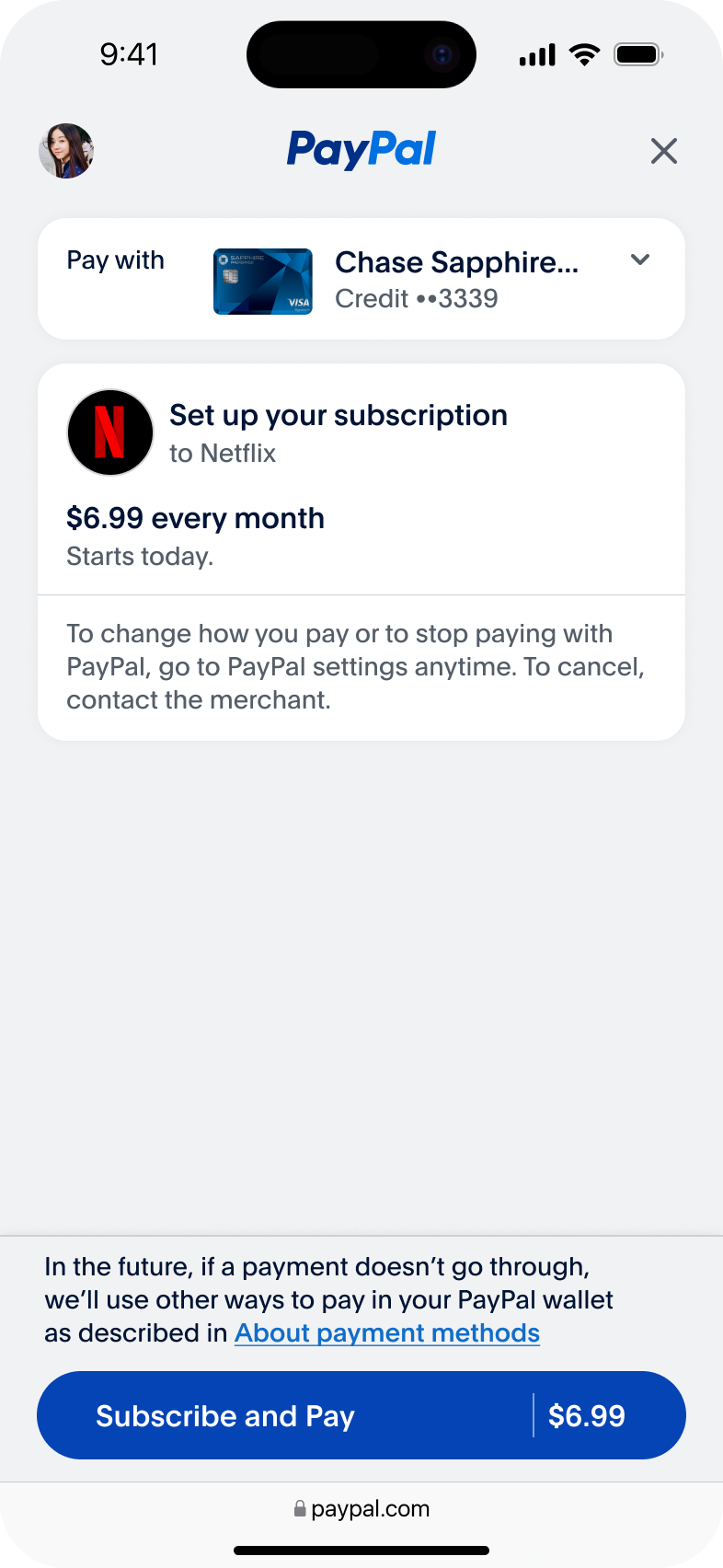
In this scenario, the consumer creates a subscription of $6.99 for their Netflix plan starting today.
 ```bash lineNumbers
curl -v -X POST https://api-m.sandbox.paypal.com/v2/checkout/orders/
-H "Content-Type: application/json"
-H "Authorization: Bearer ACCESS_TOKEN"
-d '{
"intent": "CAPTURE",
"payment_source": {
"paypal": {
"attributes": {
"vault": {
"store_in_vault": "ON_SUCCESS",
"usage_type": "MERCHANT",
"usage_pattern": "SUBSCRIPTION_PREPAID"
},
"experience_context": {
"landing_page": "LOGIN",
"user_action": "PAY_NOW",
"email_address": "buyer@example.com",
"return_url": "https://example.com/returnUrl",
"cancel_url": "https://example.com/cancelUrl"
}
}
}
},
"purchase_units": [
{
"items": [
{
"name": "Netflix subscription plan",
"description": "Netflix subscription plan. Paid Monthly",
"sku": "259483234816",
"unit_amount": {
"currency_code": "USD",
"value": "6.99"
},
"quantity": "1",
"category": "DIGITAL_GOODS",
"billing_plan": {
"billing_cycles": [
{
"tenure_type": "REGULAR",
"pricing_scheme": {
"price": {
"value": "6.99",
"currency_code": "USD"
},
"pricing_model": "FIXED"
},
"frequency": {
"interval_unit": "MONTH",
"interval_count": 1
},
"total_cycles": 0,
"sequence": 1
}
]
}
}
],
"amount": {
"currency_code": "USD",
"value": "6.99",
"breakdown": {
"item_total": {
"currency_code": "USD",
"value": "6.99"
}
}
}
}
]
}'
```
### Use case: Subscription with early cancellation fees [#use-case-subscription-with-early-cancellation-fees]
In this scenario, the customer receives a fee if they decide to cancel the subscription early.
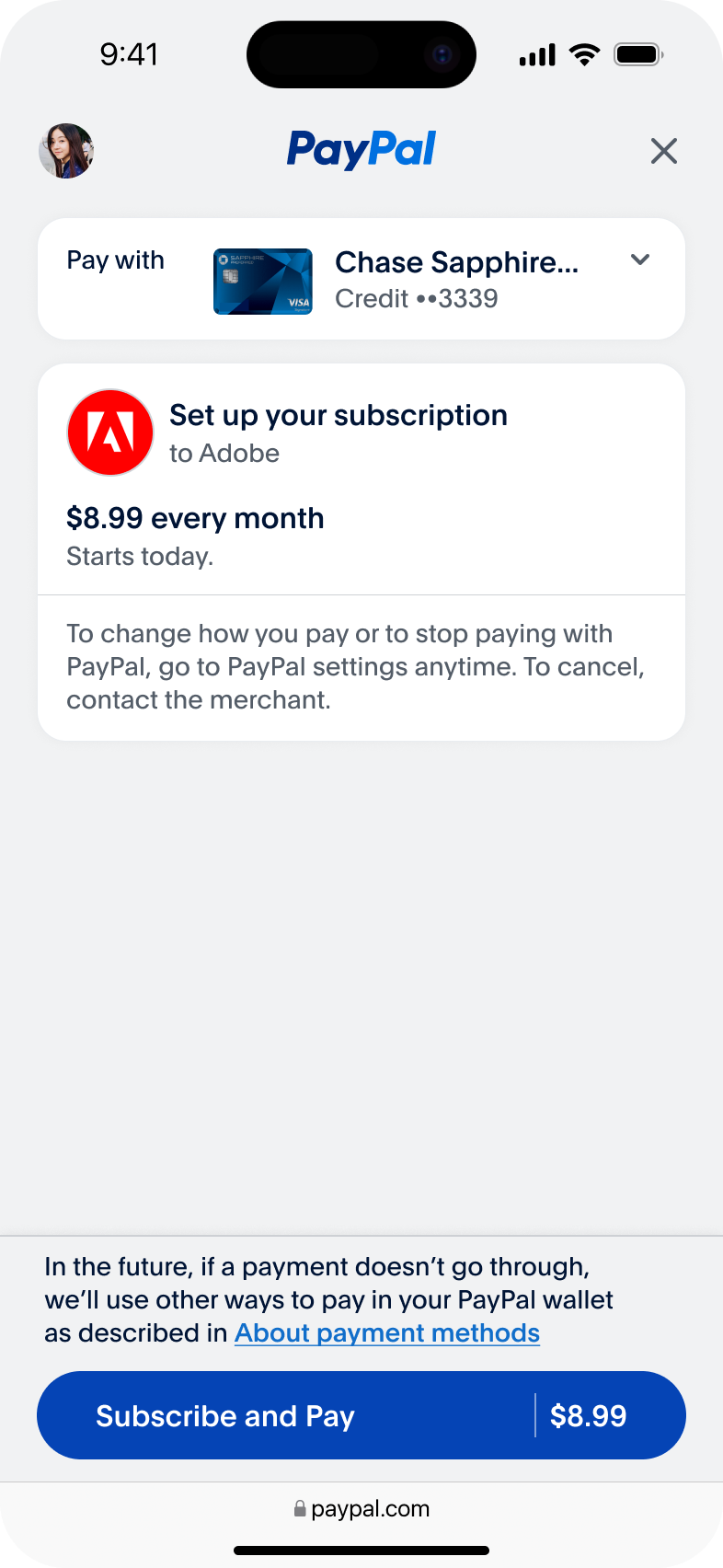 ```bash lineNumbers
curl -v -X POST https://api-m.sandbox.paypal.com/v2/checkout/orders/
-H "Content-Type: application/json"
-H "Authorization: Bearer ACCESS_TOKEN"
-d '{
"intent": "CAPTURE",
"payment_source": {
"paypal": {
"attributes": {
"vault": {
"store_in_vault": "ON_SUCCESS",
"usage_type": "MERCHANT",
"usage_pattern": "SUBSCRIPTION_POSTPAID"
},
"experience_context": {
"landing_page": "LOGIN",
"user_action": "PAY_NOW",
"email_address": "buyer@example.com",
"return_url": "https://example.com/returnUrl",
"cancel_url": "https://example.com/cancelUrl"
}
}
}
},
"purchase_units": [
{
"items": [
{
"name": "Adobe subscription plan",
"description": "Adobe postpaid subscription plan. Paid Monthly",
"sku": "259483234816",
"unit_amount": {
"currency_code": "USD",
"value": "6.99"
},
"quantity": "1",
"category": "DIGITAL_GOODS",
"billing_plan": {
"billing_cycles": [
{
"tenure_type": "REGULAR",
"pricing_scheme": {
"price": {
"value": "6.99",
"currency_code": "USD"
},
"pricing_model": "FIXED"
},
"frequency": {
"interval_unit": "MONTH",
"interval_count": 1
},
"total_cycles": 0,
"sequence": 1
}
]
}
}
],
"amount": {
"currency_code": "USD",
"value": "6.99",
"breakdown": {
"item_total": {
"currency_code": "USD",
"value": "6.99"
}
}
}
}
]
}
'
```
### Use case: Subscription with multiple rates [#use-case-subscription-with-multiple-rates]
In this scenario, the subscription price changes after a certain number of months.
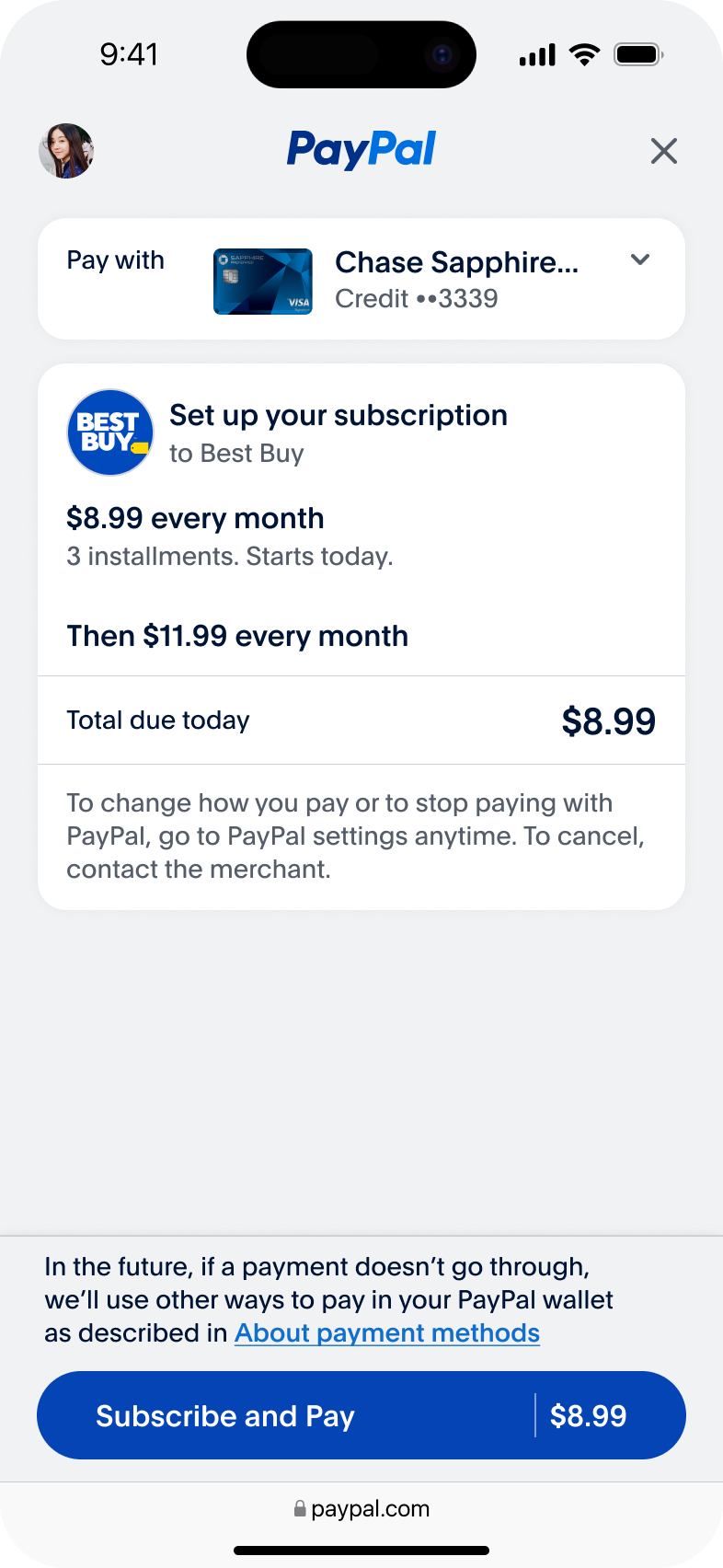 ```bash lineNumbers
curl -v -X POST https://api-m.sandbox.paypal.com/v2/checkout/orders/
-H "Content-Type: application/json"
-H "Authorization: Bearer ACCESS_TOKEN"
-d '{
"intent": "CAPTURE",
"payment_source": {
"paypal": {
"attributes": {
"vault": {
"store_in_vault": "ON_SUCCESS",
"usage_type": "MERCHANT",
"usage_pattern": "INSTALLMENT_PREPAID"
},
"experience_context": {
"landing_page": "LOGIN",
"user_action": "PAY_NOW",
"email_address": "buyer@example.com",
"return_url": "https://example.com/returnUrl",
"cancel_url": "https://example.com/cancelUrl"
}
}
}
},
"purchase_units": [
{
"items": [
{
"name": "Best Buy subscription plan",
"description": "Best Buy subscription plan with varied rates",
"sku": "2594832348",
"unit_amount": {
"currency_code": "USD",
"value": "8.99"
},
"quantity": "1",
"category": "DIGITAL_GOODS",
"billing_plan": {
"billing_cycles": [
{
"tenure_type": "TRIAL",
"pricing_scheme": {
"price": {
"value": "8.99",
"currency_code": "USD"
},
"pricing_model": "FIXED"
},
"frequency": {
"interval_unit": "MONTH",
"interval_count": 1
},
"total_cycles": 3,
"sequence": 1
},
{
"tenure_type": "REGULAR",
"pricing_scheme": {
"price": {
"value": "11.99",
"currency_code": "USD"
},
"pricing_model": "FIXED"
},
"frequency": {
"interval_unit": "MONTH",
"interval_count": 1
},
"total_cycles": 0,
"sequence": 2,
"start_date": "2024-07-16"
}
]
}
}
],
"amount": {
"currency_code": "USD",
"value": "8.99",
"breakdown": {
"item_total": {
"currency_code": "USD",
"value": "8.99"
}
}
}
}
]
}'
```
### Use case: Consumer creates auto-reload plan [#use-case-consumer-creates-auto-reload-plan]
In this scenario, the consumer creates an auto-reload plan for their coffee program prepaid card. The system reloads $25 every time their prepaid card balance drops below $10.
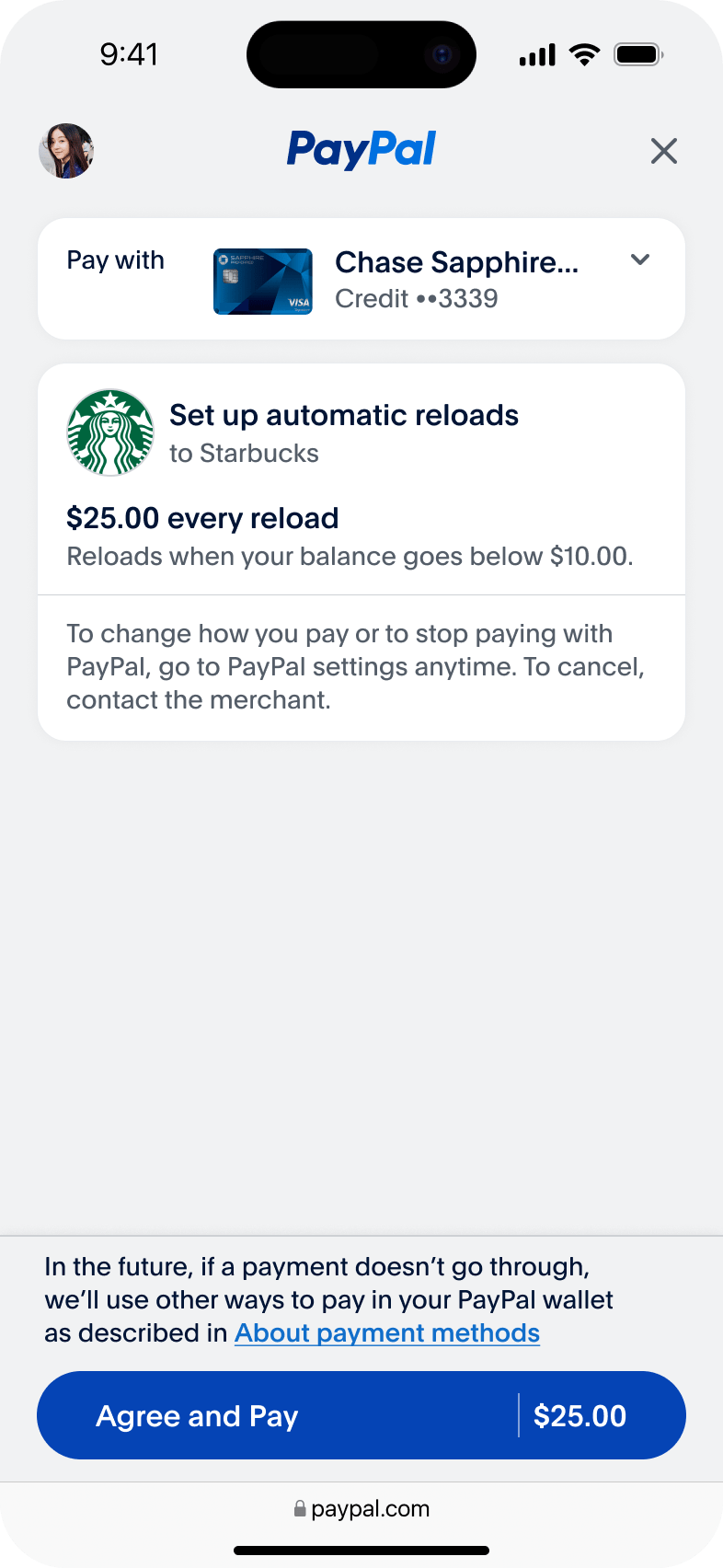 ```json lineNumbers
{
"intent": "CAPTURE",
"payment_source": {
"paypal": {
"attributes": {
"vault": {
"store_in_vault": "ON_SUCCESS",
"usage_type": "MERCHANT",
"usage_pattern": "UNSCHEDULED_PREPAID"
},
"experience_context": {
"landing_page": "LOGIN",
"user_action": "PAY_NOW",
"email_address": "buyer@example.com",
"return_url": "https://example.com/returnUrl",
"cancel_url": "https://example.com/cancelUrl"
}
}
}
},
"purchase_units": [
{
"items": [
{
"name": "Starbucks subscription plan",
"description": "Starbucks subscription plan with auto reload",
"sku": "259483234",
"unit_amount": {
"currency_code": "USD",
"value": "25"
},
"quantity": "1",
"category": "DIGITAL_GOODS",
"billing_plan": {
"billing_cycles": [
{
"tenure_type": "REGULAR",
"pricing_scheme": {
"price": {
"value": "25",
"currency_code": "USD"
},
"reload_threshold_amount": {
"currency_code": "USD",
"value": "10.0"
},
"pricing_model": "AUTO_RELOAD"
},
"frequency": {
"interval_unit": "MONTH",
"interval_count": 1
},
"total_cycles": 0,
"sequence": 1,
"start_date": "2024-04-16"
}
]
}
}
],
"amount": {
"currency_code": "USD",
"value": "25",
"breakdown": {
"item_total": {
"currency_code": "USD",
"value": "25"
}
}
}
}
]
}
```
## Process recurring payments [#process-recurring-payments]
Use the payment method token created as an output to charge customers for recurring payments.
Call the Order endpoint of the Orders v2 API with the `payment_source` = `paypal` object to process recurring charges. This API requires the following inputs:
* Intent: Indicates whether to capture payment immediately or authorize it for later capture. Use `CAPTURE` for sale transactions and `AUTHORIZE` for auth-capture.
* Vault ID: The PayPal-generated ID for the saved payment token.
* Amount: The total order amount.
* Stored credential: Provides additional details for recurring transactions when processing payments with PayPal wallet vaulted payment methods.
| | | |
| ------------------------------------- | -------------------------------------------------------------------------------------------------------------------------------------------------------------------------- | ------------------------------------------------------------------------------------------------------------------------------------------------------------------------------------------------------------------------------------------------------------------------------------------------------------------------------------------------------------------------------------- |
| Field name | Values | Description |
| `stored_credential.payment_initiator` | `MERCHANT``CUSTOMER` | The person or party who initiated or triggered the payment. Use `MERCHANT` for merchant-initiated transactions where the payer is not present and `CUSTOMER` for payer-present scenarios. (Mandatory) |
| `stored_credential.usage` | `DERIVED` (Default)`SUBSEQUENT` (Recommended)`FIRST` | The following values specify the payment sequence:
`DERIVED`: PayPal determines whether this is `FIRST` or `SUBSEQUENT` based on available data.`SUBSEQUENT`: Payment using a previously stored `payment_source`. Use for recurring transactions.`FIRST`: Initial payment that stores the payment source for future use. Use only for first-time transactions. |
| `stored_credential.usage_pattern` | `SUBSCRIPTION_PREPAID``SUBSCRIPTION_POSTPAID``RECURRING_PREPAID``RECURRING_POSTPAID``UNSCHEDULED_PREPAID``UNSCHEDULED_POSTPAID``INSTALLMENT_PREPAID``INSTALLMENT_POSTPAID` | Defines the billing pattern for stored payments. |
### Stored credential [#stored-credential]
Use the following structure to process recurring payments with stored payment methods.
```json lineNumbers
"stored_credential": {
"payment_initiator": "MERCHANT",
"usage": "SUBSEQUENT",
"usage_pattern": "SUBSCRIPTION_PREPAID"
}
```
### Complete request payload [#complete-request-payload]
Include the stored credential object in the Orders v2 API request to charge customers for recurring payments. The usage pattern is optional for subsequent transactions. Include it only if you want to change the pattern from when you originally created the subscription.
### Authorize prepaid subscription payments [#authorize-prepaid-subscription-payments]
Include the stored credential object in the Orders v2 API request to process recurring subscription payments.
#### Request
```bash lineNumbers
curl -v -X POST https://api-m.sandbox.paypal.com/v2/checkout/orders/
-H "Content-Type: application/json"
-H "Authorization: Bearer ACCESS_TOKEN"
-d '{
"intent": "CAPTURE",
"purchase_units": [
{
"description": "HD Premium Plan",
"invoice_id": "test-invoice-id",
"amount": {
"currency_code": "USD",
"value": "100.00"
}
}
],
"payment_source": {
"paypal": {
"vault_id": "VAULT-ID",
"stored_credential": {
"payment_initiator": "MERCHANT",
"usage": "SUBSEQUENT",
"usage_pattern": "SUBSCRIPTION_PREPAID"
}
}
}
}
}'
```
#### Response
```json lineNumbers
{
"id": "ORDER-ID",
"intent": "CAPTURE",
"status": "COMPLETED",
"payment_source": {
"paypal": {
"email_address": "payee@paypal.com",
"account_id": "BUYER-ACCOUNT",
"account_status": "UNVERIFIED",
"name": {
"given_name": "First_Name",
"surname": "Last_Name"
},
"address": {
"country_code": "US"
},
"stored_credential": {
"payment_initiator": "MERCHANT",
"usage_pattern": "SUBSCRIPTION_PREPAID",
"usage": "SUBSEQUENT"
}
}
},
"purchase_units": [
{
"reference_id": "default",
"amount": {
"currency_code": "USD",
"value": "100.00"
},
"payee": {
"email_address": "merchant@example.com",
"merchant_id": "TEST-MERCHANT-ID"
},
"description": "HD Premium Plan",
"invoice_id": "TEST-INVOICE-ID",
"soft_descriptor": "PAYPAL *TEST STORE",
"payments": {
"authorizations": [
{
"status": "CREATED",
"id": "AUTHORIZATION-ID",
"amount": {
"currency_code": "USD",
"value": "100.00"
},
"invoice_id": "TEST-INVOICE-ID",
"seller_protection": {
"status": "ELIGIBLE",
"dispute_categories": [
"ITEM_NOT_RECEIVED",
"UNAUTHORIZED_TRANSACTION"
]
},
"expiration_time": "2024-11-29T15:49:26Z",
"links": [
{
"href": "https://api.sandbox.paypal.com/v2/payments/authorizations/AUTHORIZATION-ID",
"rel": "self",
"method": "GET"
},
{
"href": "https://api.sandbox.paypal.com/v2/payments/authorizations/AUTHORIZATION-ID/capture",
"rel": "capture",
"method": "POST"
},
{
"href": "https://api.sandbox.paypal.com/v2/payments/authorizations/AUTHORIZATION-ID/void",
"rel": "void",
"method": "POST"
},
{
"href": "https://api.sandbox.paypal.com/v2/payments/authorizations/AUTHORIZATION-ID/reauthorize",
"rel": "reauthorize",
"method": "POST"
},
{
"href": "https://api.sandbox.paypal.com/v2/checkout/orders/ORDER-ID",
"rel": "up",
"method": "GET"
}
],
"create_time": "2024-10-31T15:49:26Z",
"update_time": "2024-10-31T15:49:26Z"
}
]
}
}
],
"payer": {
"name": {
"given_name": "First_Name",
"surname": "Last_Name"
},
"email_address": "payee@paypal.com",
"payer_id": "TEST-PAYER-ID",
"address": {
"country_code": "US"
}
},
"create_time": "2024-10-31T15:49:24Z",
"update_time": "2024-10-31T15:49:26Z",
"links": [
{
"href": "https://api.sandbox.paypal.com/v2/checkout/orders/ORDER-ID",
"rel": "self",
"method": "GET"
}
]
}
```
For multi-step Order API integrations, include `stored_credential` information in Capture, Authorize, and Confirm API calls.
## Error scenarios [#error-scenarios]
Handle all HTTP failure codes in your merchant's implementation, including `4xx` client errors and `5xx` server errors. PayPal also returns 422 status codes for custom business logic errors, as shown in the subsequent transactions section.
## Unsupported patterns [#unsupported-patterns]
Your merchant's implementation must avoid the following patterns:
* Do not pass multiple items in the `purchase_units.items[]` array.
* Do not pass multiple purchase units in a single order.
* Avoid `items[]` with billing plan quantities greater than 1.
* Use single-step order creation for recurring purchases.
* Multi-step processes are not supported.
* Include payment source information when creating orders.
* Do not use setup or product price fields in Confirm, Authorize, or Capture operations.
* Do not include billing plan data in patch operations.
### Amount-related errors [#amount-related-errors]
* Amount breakdown fields such as handling, discount, shipping discount, and insurance are not supported in `purchase_units.amount.breakdown`.
* When the billing plan start date matches the vaulted payment creation date and include setup fees or product prices in the request, add these amounts to `items[].unit_amount` and include the total in `purchase_units.amount.value`.
* PayPal validates that shipping, tax, and unit amounts add up to `purchase_units.amount.value`. Be sure to include separate values for these amounts in `purchase_units.amount.breakdown`.
PayPal does not support the following amount breakdown fields in `purchase_units.amount.breakdown`: handling, discount, shipping discount, and insurance.
* When the billing plan start date matches the vaulted payment creation date and include setup fees or product prices in the request, add these amounts to `items[].unit_amount` and include the total in `purchase_units.amount.value`.
* PayPal validates that shipping, tax, and unit amounts add up to `purchase_units.amount.value`. Be sure to include separate values for these amounts in `purchase_units.amount.breakdown`.
### API execution [#api-execution]
Use a single step order creation process to pass the payment source information with billing plan details in the create order request.
### Billing plan specifications [#billing-plan-specifications]
Review these billing plan requirements to ensure your merchant's integration handles recurring payments correctly and avoids common configuration errors.
| | | | | |
| ---------------------- | --------- | ------------------- | ------------------- | -------------------------------------------- |
| Usage pattern | Supported | Auto reload support | Trial billing cycle | Notes |
| `SUBSCRIPTION` | | | | Requires at least one regular billing cycle. |
| `RECURRING` | | | | Requires at least one regular billing cycle. |
| `INSTALLMENT` | | | | Requires at least one regular billing cycle. |
| `UNSCHEDULED_PREPAID` | | | | Supports auto reload. |
| `UNSCHEDULED_POSTPAID` | | | | Supports auto reload. |
Ensure that at least one billing cycle includes a start date, and use only one currency across all amount fields.
### Subsequent transactions [#subsequent-transactions]
The following sample code shows a common `422` error that occurs when required vault credentials are missing from a subsequent transaction request.
```json lineNumbers
{
"title": "Create Order - 422 Unprocessable Entity Error - Missing Required parameter - Billing_Agreement_Id or Vault_Id with PayPal wallet stored credentials",
"description": "This code sample attempts to create an order with PayPal wallet stored credentials but it does not contain a valid billing agreement id or a vault id. The request fails.",
"runnable": true,
"operationId": "orders.create",
"request": {
"method": "POST",
"path": "v2/checkout/orders",
"headers": {
"Content-Type": "application/json",
"Authorization": "Bearer ACCESS-TOKEN"
},
"body": {
"intent": "CAPTURE",
"purchase_units": [
{
"reference_id": "PUHF",
"amount": {
"currency_code": "USD",
"value": "10.00"
}
}
],
"payment_source": {
"paypal": {
"paypal": {
"stored_credential": {
"payment_initiator": "MERCHANT",
"usage": "SUBSEQUENT",
"usage_pattern": "SUBSCRIPTION_PREPAID"
}
}
}
}
}
},
"response": {
"status": "422 Unprocessable Entity",
"headers": {
"Content-Type": "application/json"
},
"body": {
"name": "UNPROCESSABLE_ENTITY",
"message": "Request is not well-formed, syntactically incorrect, or violates schema.",
"debug_id": "10398537340c8",
"details": [
{
"field": "/payment_source/paypal/vault_id",
"location": "body",
"issue": "PAYPAL_STORED_CREDENTIAL_MISSING_REQUIRED_PARAMETER",
"description": "A 'billing_agreement_id' or 'vault_id' is required for the recurring billing scenario when the merchant uses payment_source.paypal.stored_credential."
}
],
"links": [
{
"href": "https://developer.paypal.com/api/orders/v2/error-messages",
"rel": "information_link"
}
]
}
}
}
```