# Enable Pay Later messaging on Magento PayPal Express Checkout (/v5/pay-later/magento-2/paypal-gb)
Promote PayPal Pay Later products using messaging and buttons on your Magento store.
PayPal offers short-term, interest-free payments that buyers can use to buy now and pay later. You get paid up-front.
Pay Later messaging includes Pay in 3, which UK buyers can use to pay for purchases of £20 to £3,000 in three, interest-free payments. It also includes **Pay in 30 Days**, which UK buyers can use to pay the full amount in 30 days with no interest or fees, for purchases of £1 to £900.
## Know before you begin [#know-before-you-begin]
* Before you begin, learn more about [Pay Later products](/pay-later/overview).
* Pay Later messaging is enabled for new merchants. If you're an existing merchant, enable the messaging.
* UK-based consumers are eligible for Pay Later products across most of our integrations. As a merchant, you're eligible to promote these Pay Later products if you are a UK-based PayPal merchant with a UK-legal business entity, a UK-facing website, transacting in GBP, and a one-time payment integration. At this time, promoting Pay Later products is not available on PayPal vaulted payments or billing agreement integrations.
* Please note that while messaging can be displayed on your website to help promote Pay Later products to your customers, no additional content, wording, marketing, or other material should be created by you to encourage use of this product. PayPal reserves the right to take action in accordance with the User Agreement.
* Creating your own Pay in 3 or Pay in 30 Days content or using the JS SDK outside of the terms of the User Agreement may result in you communicating an unauthorized financial promotion, which can involve criminal sanctions under S21 Financial Services and Markets Act 2000.
> **Note:** **Note**: Ensure that you are using Magento 2.4.3 or higher.
## How it works [#how-it-works]
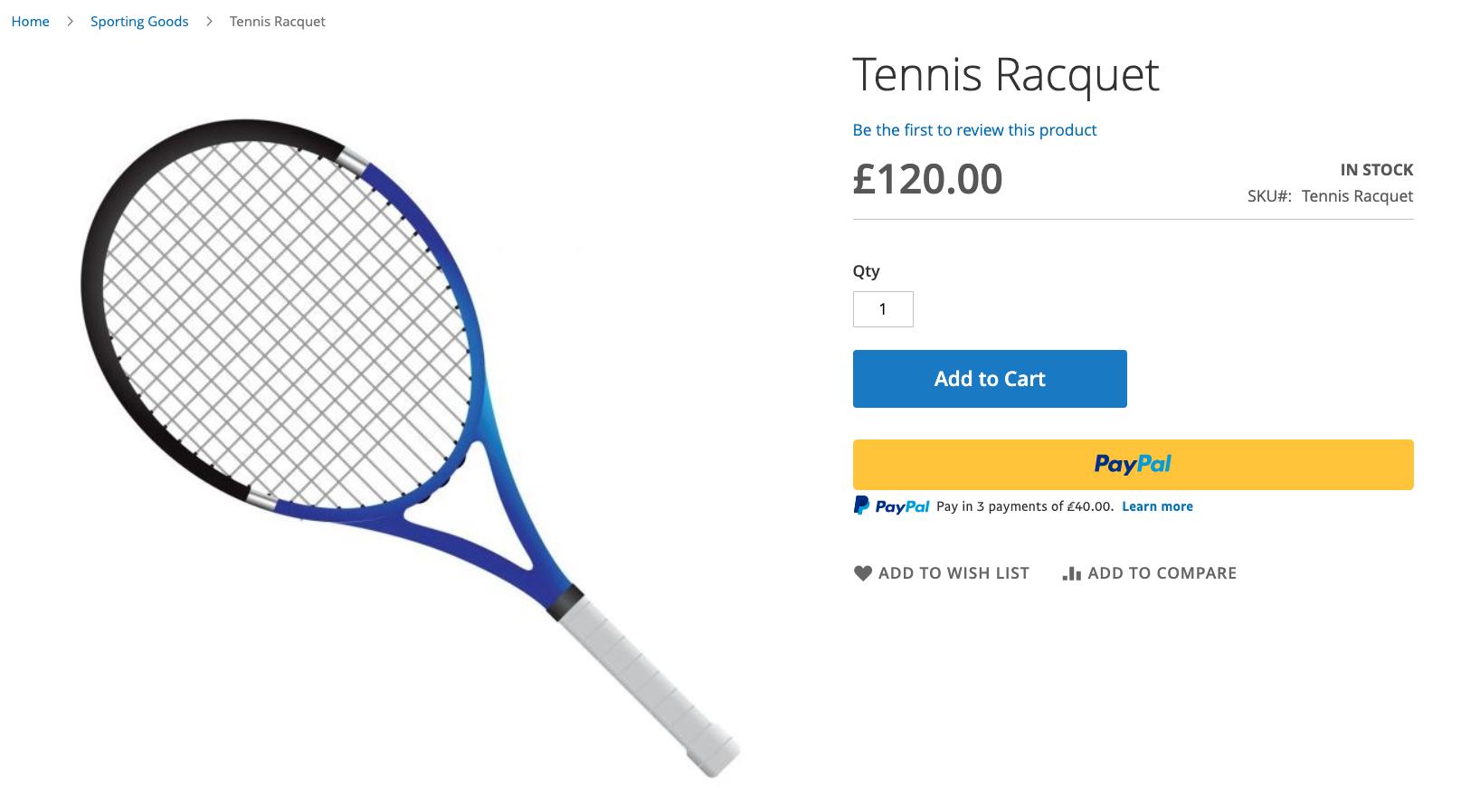
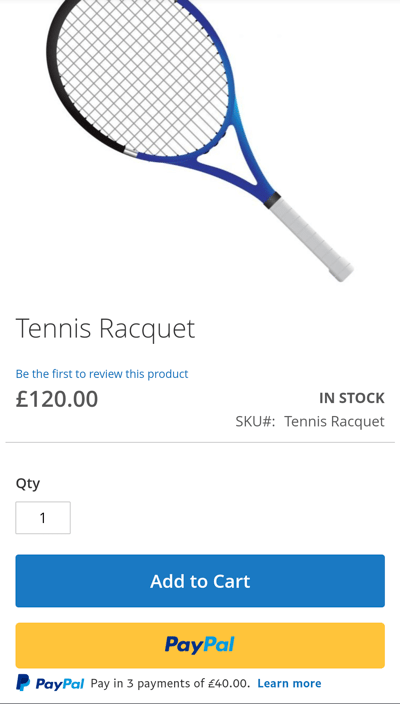
These are sample checkout pages with Pay Later messaging and button enabled for webpages and mobile devices.
### Pay Later messaging and button on a webpage [#pay-later-messaging-and-button-on-a-webpage]
 ### Pay Later messaging and button on a mobile device [#pay-later-messaging-and-button-on-a-mobile-device]
 ## Enable the messaging and button [#enable-the-messaging-and-button]
To enable the Pay Later messaging and button, complete the following:
### Access the settings [#access-the-settings]
1. Login to the Magento admin portal.
2. Go to **Stores** > **Configuration**.
3. Go to **Sales** > **Payment Methods**.
4. Select **Configure** next to **PayPal Express Checkout**.
### Configure the plugin [#configure-the-plugin]
1. Click the **Connect with PayPal** button. To test in Sandbox, click the **Sandbox Credentials** button.
## Enable the messaging and button [#enable-the-messaging-and-button]
To enable the Pay Later messaging and button, complete the following:
### Access the settings [#access-the-settings]
1. Login to the Magento admin portal.
2. Go to **Stores** > **Configuration**.
3. Go to **Sales** > **Payment Methods**.
4. Select **Configure** next to **PayPal Express Checkout**.
### Configure the plugin [#configure-the-plugin]
1. Click the **Connect with PayPal** button. To test in Sandbox, click the **Sandbox Credentials** button. 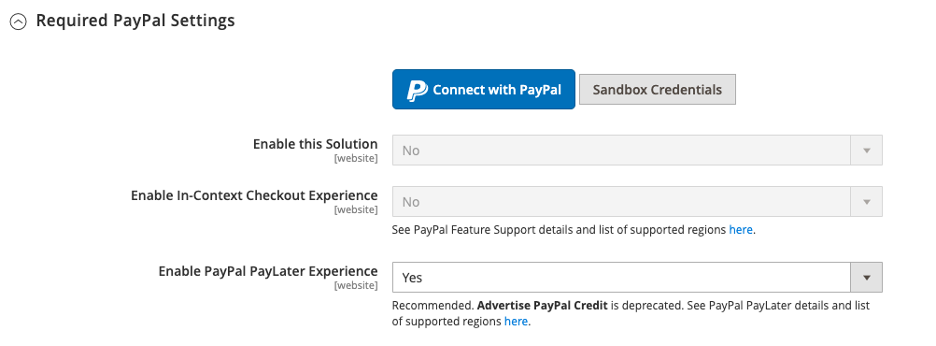 Log in with your PayPal credentials. After agreeing to share your credentials with Magento you will need to login to your Magento admin panel again.
2. Enable PayPal Pay Later Experience: Select **Yes** from the dropdown menu to activate Pay Later messaging and buttons. Only US **Pay Later** button is available.
3. Advertise PayPal Pay Later: Customize Pay Later products in various areas on the store.
Log in with your PayPal credentials. After agreeing to share your credentials with Magento you will need to login to your Magento admin panel again.
2. Enable PayPal Pay Later Experience: Select **Yes** from the dropdown menu to activate Pay Later messaging and buttons. Only US **Pay Later** button is available.
3. Advertise PayPal Pay Later: Customize Pay Later products in various areas on the store. 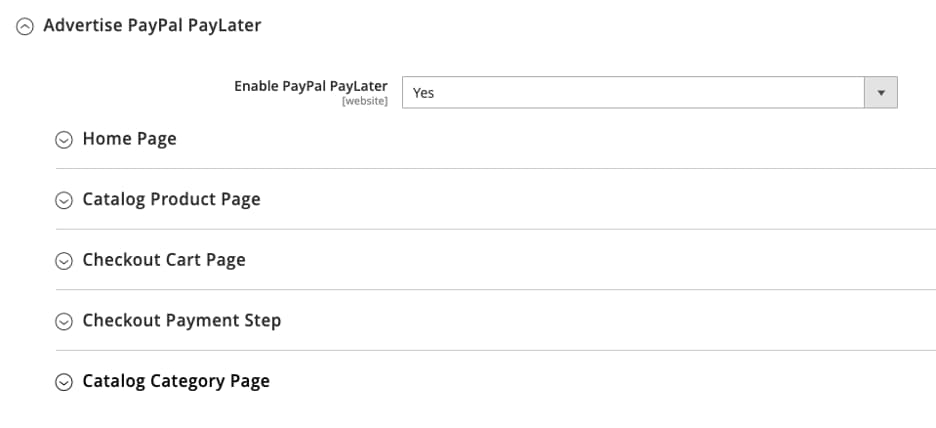 4. Payment Action: Choose between **Authorize** (authorize payment only, then delayed capture), **Sale** (immediate capture), or **Order**.
5. Display on Product Details Page: Add PayPal button to the Product page.
6. Display on Shopping Cart: Display PayPal button on the shopping cart. PayPal recommends setting to **Yes**.
## See also [#see-also]
[See the Magento documentation](https://docs.magento.com/user-guide/payment/paypal-express-checkout.html) to learn about eligibility and technical specifications for Pay Later products through PayPal Express Checkout.
[Return to Commerce Platforms](/v5/pay-later/commerce-platforms)
4. Payment Action: Choose between **Authorize** (authorize payment only, then delayed capture), **Sale** (immediate capture), or **Order**.
5. Display on Product Details Page: Add PayPal button to the Product page.
6. Display on Shopping Cart: Display PayPal button on the shopping cart. PayPal recommends setting to **Yes**.
## See also [#see-also]
[See the Magento documentation](https://docs.magento.com/user-guide/payment/paypal-express-checkout.html) to learn about eligibility and technical specifications for Pay Later products through PayPal Express Checkout.
[Return to Commerce Platforms](/v5/pay-later/commerce-platforms)