Card testing
Last updated: June 25, 2026
API
CURRENT
Copy / Export
Test your card integration in the sandbox environment by simulating:
- Successful payments for Expanded Checkout integrations using test card numbers.
- Card error scenarios by using rejection triggers.
- 3D Secure authentication scenarios.
- Recommended use cases for Expanded Checkout integration.
Tip: Use the credit card generator to generate test credit cards for sandbox testing.
Simulate successful payments
To simulate a successful card capture with Expanded Checkout integration in sandbox:
- Ensure the integration is in sandbox mode, with a sandbox client ID, and connected to
api-m.sandbox.paypal.comendpoints. - Use a test card number with a future expiration date and a 3-digit CVV, or a 4-digit CVV for American Express.
Test static card numbers
Test card numbers
Test Expanded Checkout payments and saved payment method use cases with these test card numbers:
Tip: Enter a future expiration date and a 3-digit CVV, or 4-digit CVV for American Express, to proceed.
| Test number | Card type |
|---|---|
| 371449635398431 | American Express |
| 376680816376961 | American Express |
| 36461510000039 | Diners Club |
| 36461510000013 | Diners Club |
| 6304000000000000 | Maestro |
| 5063516945005047 | Maestro |
| 2223000048400011 | Mastercard |
| 4005519200000004 | Visa |
| 4012000033330026 | Visa |
| 4012000077777777 | Visa |
| 4012888888881881 | Visa |
| 4217651111111119 | Visa |
| 4500600000000061 | Visa |
| 4772129056533503 | Visa |
| 4915805038587737 | Visa |
| 6200680000000004 | CUP |
| 6200680000000038 | CUP |
| 3636500000000260 | JCB |
| 3636500000000989 | JCB |
Test generated card numbers
Credit card generator
Generate additional credit cards for sandbox testing and PayPal Checkout. You can add generated credit cards to a PayPal sandbox account or use them to test credit card payments.
Input
Generated credit card details
Simulate card error scenarios
Enter a rejection trigger in the First Name or Name on Card to simulate credit card error scenarios in Expanded Checkout integrations.
Note: Test using a Visa card number, such as 4012 8888 8888 1881, with a future expiration date and any 3-digit CVV.
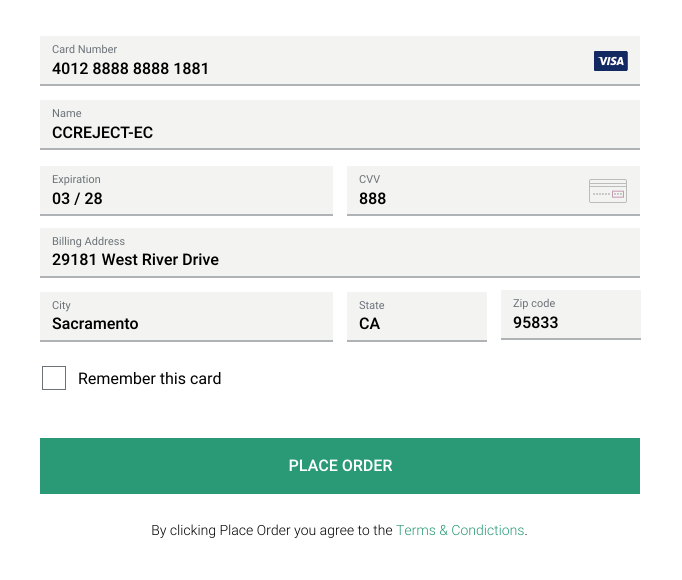
Rejection triggers
Rejection test simulations show a response_code that changes based on the test trigger you use. Rejection trigger values are case-sensitive.
Note: All rejection scenarios return the AVS code as globally unavailable and the CVV code as not processed.
| Test name | Trigger | Processor response code | Code description |
|---|---|---|---|
| Card refused | CCREJECT-REFUSED | 0500 | DO_NOT_HONOR |
| Fraudulent card | CCREJECT-SF | 9500 | SUSPECTED_FRAUD. Try using another card. Do not retry the same card. |
| Card expired | CCREJECT-EC | 5400 | EXPIRED_CARD |
| Luhn Check fails | CCREJECT-IRC | 5180 | INVALID_OR_RESTRICTED_CARD. Try using another card. Do not retry the same card. |
| Insufficient funds | CCREJECT-IF | 5120 | INSUFFICIENT_FUNDS |
| Card lost, stolen | CCREJECT-LS | 9520 | LOST_OR_STOLEN. Try using another card. Do not retry the same card. |
| Card not valid | CCREJECT-IA | 1330 | INVALID_ACCOUNT |
| Card is declined | CCREJECT-BANK_ERROR | 5100 | GENERIC_DECLINE |
| CVC check fails | CCREJECT-CVV_F | 00N7 | CVV2_FAILURE_POSSIBLE_RETRY_WITH_CVV |
Sample response
The response shows that the order is successfully created, but because a refusal was passed, the card payment status is DECLINED:
- Line 18 shows
status=DECLINED. The card was refused. - Line 51 shows
avs_code=G. The card is globally unavailable. - Line 52 shows
cvv_code=P. The card wasn't processed. - Line 53 shows
response_code=5400. The card is expired.
{
  "id": "3M049991JF5624929",
  "status": "COMPLETED",
  "payment_source": {
    "card": {
      "last_digits": "6889",
      "brand": "VISA",
      "type": "CREDIT"
    }
  },
  "purchase_units": [
    {
      "reference_id": "default",
      "payments": {
        "captures": [
          {
            "id": "2FB04508RA686960W",
            "status": "DECLINED",
            "amount": {
              "currency_code": "USD",
              "value": "500.00"
            },
            "final_capture": true,
            "disbursement_mode": "INSTANT",
            "seller_protection": { "status": "NOT_ELIGIBLE" },
            "seller_receivable_breakdown": {
              "gross_amount": { "currency_code": "USD", "value": "500.00" },
              "paypal_fee": { "currency_code": "USD", "value": "13.44" },
              "net_amount": { "currency_code": "USD", "value": "486.56" }
            },
            "links": [
              {
                "href": "https://api-m.sandbox.paypal.com/v2/payments/captures/2FB04508RA686960W",
                "rel": "self",
                "method": "GET"
              },
              {
                "href": "https://api-m.sandbox.paypal.com/v2/payments/captures/2FB04508RA686960W/refund",
                "rel": "refund",
                "method": "POST"
              },
              {
                "href": "https://api-m.sandbox.paypal.com/v2/checkout/orders/3M049991JF5624929",
                "rel": "up",
                "method": "GET"
              }
            ],
            "create_time": "2022-08-09T22:20:05Z",
            "update_time": "2022-08-09T22:20:05Z",
            "processor_response": {
              "avs_code": "G",
              "cvv_code": "P",
              "response_code": "5400"
            }
          }
        ]
      }
    }
  ],
  "links": [
    {
      "href": "https://api-m.sandbox.paypal.com/v2/checkout/orders/3M049991JF5624929",
      "rel": "self",
      "method": "GET"
    }
  ]
}
Processor response and error codes
To understand why a card payment was declined, review the Orders v2 processor response object in the Orders API response.
For more information about card payment decline reasons and possible values, see:
- Card decline errors.
- Error responses for CVV and AVS.
- Processor response codes for non-PayPal payment processors.
Simulate 3D Secure card payments
Use 3D Secure to authenticate cardholders through card issuers. When your customer submits their card details on your website for processing, you can trigger 3D Secure. When triggered, customers are prompted by their card-issuing bank to complete an additional verification step to enter a one-time or static password, depending on the issuer's method.
For more information about including 3D Secure authentication in your payment flow, see:
- Learn more about 3D Secure for Expanded Checkout using the Orders API.
- Simulate 3D Secure-supported scenarios using 3D Secure test cards to verify your card integration.
Test integration
Test the recommended use cases for Expanded Checkout integration before you go live.
Accept payment
Test a successful card payment:
- Go to the checkout page for your integration.
- Choose a test card from this list.
- Enter the card details in the hosted field, including the name on the card, billing address, and 2-character country code. Then submit the order.
- Confirm that the order was processed.
- Log in to your merchant sandbox account and navigate to the activity page to ensure the payment amount shows up in the account.
Decline payment
Decline a test card payment from the checkout page:
- Go to the checkout page for your integration.
- Choose a test card from this list.
- Select a rejection trigger from this list and enter it in the card's name field.
- Enter the other card details in the card fields, including the card number, billing address, and a 2-character country code.
- Submit the order.
- Verify that the declined payment error message shows up.
Authorize payment
Test authorization and capture of a card payment:
- Make a create order call with intent as
AUTHORIZEthat includes apayment_sourceobject with a valid card number. - Authorize the order.
- Complete the authorized order using capture authorized payment call.
- Confirm that the capture status is
COMPLETEDin the authorization response.
See also
- Postman Collection — Test additional positive and
4xxerror conditions. - Simulate negative responses — Use API request headers to trigger negative responses.
- Error messages — Explore error messages supported by the Orders API.