On this page
No Headings
Last updated: June 4, 2026
This product is deprecated and should not be used for new integrations. Use Payment Links and Buttons instead. For information about migrating, visit the Upgrade Hub.
PayPal authorization and capture is a settlement solution that provides increased flexibility in obtaining payments from buyers. During a traditional sale, the authorization and capture occurs at the same time as the sale. However, you use an explicit authorization and capture call to separate the payment authorization from the capture of the authorized payment.
PayPal authorization and capture is a settlement solution that provides increased flexibility in obtaining payments from buyers. During a traditional sale, the authorization and capture occurs at the same time as the sale. However, you use an explicit authorization and capture call to separate the payment authorization from the capture of the authorized payment.
With authorization and capture, you typically take a $1 USD authorization at checkout and delay the order fulfillment process. If the amount due for the order changes due to taxes, shipping costs, or item availability, you can modify the original authorization amount.
Note: Not all funding sources support authorization and capture models. PayPal Risk reserves the right to block successful capture transactions against authorizations. You cannot capture funds if a buyer's account is restricted or locked, a fraudulent case occurs, or your account has a high restriction level.
Note: Not all funding sources support authorization and capture models. PayPal Risk reserves the right to block successful capture transactions against authorizations. You cannot capture funds if a buyer's account is restricted or locked, a fraudulent case occurs, or your account has a high restriction level.PayPal User Agreement.
Authorization and capture starts when your buyer authorizes a payment amount during checkout. For example:
You send your buyer through the payment flow and pass the paymentaction variable, which you set to authorization or order.
After your buyer completes checkout, use the payment's transaction ID with authorization and capture in the PayPal website. From the website, you can:
Within a 29-day authorization period, you can issue multiple reauthorizations after the initial three-day honor period expires.
| Day | Action | Authorization period | Honor period |
|---|---|---|---|
| 1 | Authorization-1 | Begins 29-day authorization period | Days 1 through 3 |
| 4 | Reauthorization-1 on Authorization-1 | Within 29-day authorization period | Days 4 through 7 |
| 8 | Reauthorization-2 on Authorization-1 | Within 29-day authorization period | Days 8 through 11 |
For any payment type, you can capture less than or the full original authorized amount. You can also capture up to 115% of or $75 USD more than the original authorized amount, whichever is less.
For any payment type, you can capture less than or the full original authorized amount. You can also capture up to 115% of or $75 USD more than the original authorized amount, whichever is less.
Note:
Note: To issue multiple reauthorizations, use the DoAuthorization NVP/SOAP and DoCapture NVP/SOAP API calls.
You can use authorization and capture with these PayPal products:
By default, these products assume that a transaction is a final sale. You must explicitly set paymentaction to specify a basic or order authorization.
If you have authorized a transaction, you need to capture the funds in order to receive payment.
Note: PayPal recommends that you capture payments within three days of the original authorization.
To initiate a capture:
Log in to your PayPal account.
Click the History sub-tab.
The History page appears.
Find the payment transaction you want to capture and click the Capture button associated with the transaction. The Capture Funds page appears.
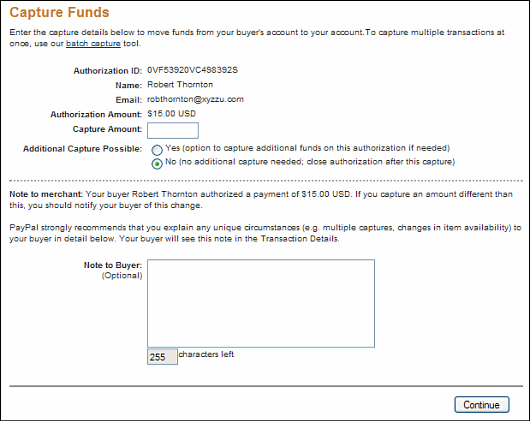
Review the information, enter the amount to capture, and then click the Capture Funds button. The funds are transferred to your account.
You can initiate the capture of an entire group of authorized transactions at the same time. This feature is known as batch capture.
You can initiate the capture of an entire group of authorized transactions at the same time. This feature is known as
Log in to your PayPal account.
Click the History sub-tab.
The History page appears.
Click the Capture button associated with any transaction.
The Capture Funds page appears.
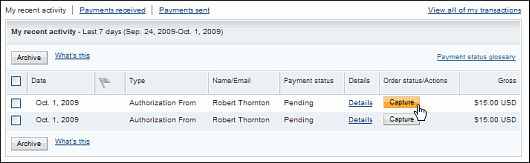
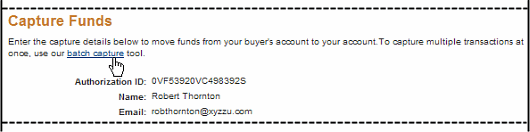
Click the Batch Capture link that is located in the introductory paragraph.
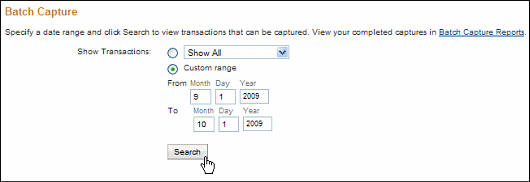
On the displayed page, either use the drop-down menu to choose a defined date or date range, or enter a specific date range in the provided fields.
On the displayed page, check the authorizations you want to capture, set their capture amount, choose whether to make an additional capture later, and optionally enter a note to the buyer.
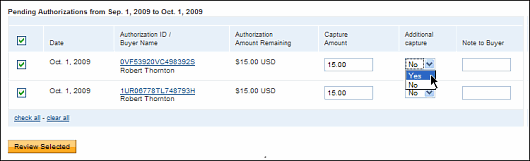
Review the capture transactions, make any desired changes, and submit them for processing.
If you initiated an authorization and now want to refund the buyer, you need to void the authorization. Once you void an authorization, you cannot capture any funds associated with the authorization, and the funds are returned to the buyer.
Note: Voiding an authorization cancels the entire open amount.
You can initiate a void in the following cases:
To void an authorization:
Click the Void button associated with the authorization.
Confirm the void details on the Void Authorization page, and then click the Void button.
Note: PayPal recommends that you explain any unique circumstance to your buyer in the Note field.
PayPal sends the buyer an email with the details of the voided authorization.
Your buyer orders a camera from your website.
Your buyer enters payment information and authorizes payment.
Send your buyer to PayPal using a hosted flow, specifying the variable paymentaction=authorization.
PayPal initiates the authorization.
On day three, capture funds and ship the camera.
After you have captured funds, your Transaction Details shows the transaction with a Completed status.
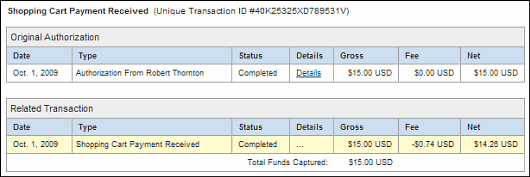
Your buyer orders a DVD player from your website.
Send your buyer to PayPal using a hosted flow, specifying the variable paymentaction=authorization.
Your buyer enters payment information and authorizes payment.
PayPal initiates the authorization.
The DVD player is discontinued. You order a different DVD player from your vendor and notify your buyer of the change.
On day 14, the DVD player arrives from your vendor. Because the honor period has expired, reauthorize the funds. On successful reauthorization, perform a capture and ship the DVD player.
Your Transaction Details shows that the transaction has been completed.
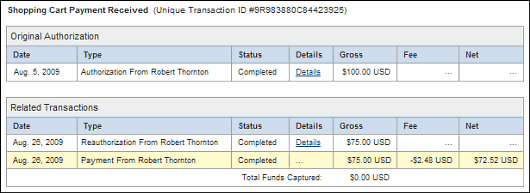
Your buyer orders two textbooks and a keyboard from your website.
Your buyer enters payment information and authorizes payment.
Send your buyer to PayPal using a hosted flow, specifying the variable paymentaction=authorization.
PayPal initiates the authorization.
One textbook and the keyboard are out of stock. You order additional inventory from your vendors. Complete the first partial capture and ship the in-stock textbook on day six.
You receive the second textbook from the vendor. Perform the second partial capture and ship the textbook on day 11.
You receive the keyboard from the vendor. You reauthorize for payment on day 19.
Your buyer files a complaint that the textbook from the first shipment is damaged. You issue a partial refund for the first capture.
Your Transaction Details shows the following:
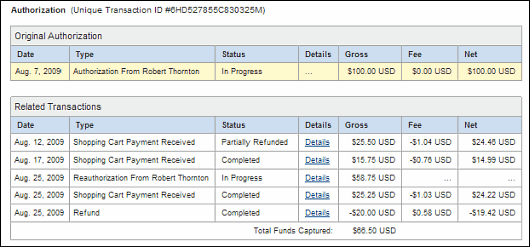
Your buyer orders a laser printer and a USB cable from your website.
Your buyer enters payment information and authorizes payment.
Send your buyer to PayPal using a hosted flow, specifying the variable paymentaction=authorization.
PayPal initiates the authorization.
Before you process the transaction, your buyer contacts you and requests to cancel the USB cable from the order.
On day six, complete a partial capture for the specific amount against the authorization and ship the laser printer.
You complete a void on the funds remaining on the authorization.
Your Transaction Details shows the following:

Your buyer places an order from your website.
Your buyer enters payment information and authorizes payment.
Send your buyer to PayPal using a hosted flow, specifying the variable paymentaction=authorization.
PayPal initiates the authorization.
You add shipping charges to the order and capture funds on day one.
Your Transaction Details shows the completed transaction. The capture results in a total not greater than 115% of the original authorization.
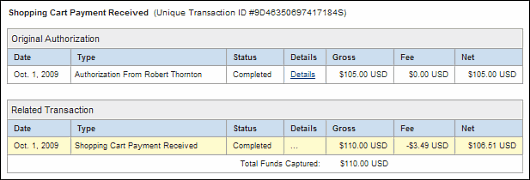
Your buyer orders a desktop computer from your website.
Your buyer enters payment information and authorizes payment.
Send your buyer to PayPal using a hosted flow, specifying the variable paymentaction=authorization.
PayPal initiates the authorization.
Before you process the transaction, your buyer contacts you to cancel the order.
You do not capture funds for the transaction.
The authorization expires.
Your Transaction Details shows the authorization with an Expired status.

Your buyer orders a stereo system from your website.
Your buyer enters payment information and authorizes payment.
Send your buyer to PayPal using a hosted flow, specifying the variable paymentaction=authorization.
PayPal initiates the authorization.
Before you process the transaction, your buyer contacts you to cancel the order.
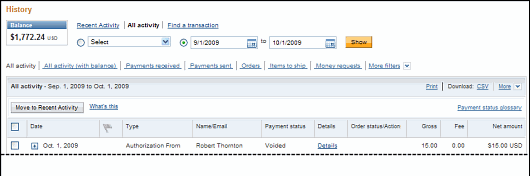
You void the transaction.
Your History shows the transaction with a Voided status.
Your buyer orders two sweatshirts from your website.
Your buyer enters payment information and authorizes payment.
Send your buyer to PayPal using a hosted flow, specifying the variable paymentaction=authorization.
PayPal initiates the authorization.
On day three, you attempt to capture funds, but the capture fails. You receive an error message similar to the following:
We are sorry, we cannot process the settlement at this time.There was a restriction on the buyer's account.
You contact the buyer to resolve the problem.
Your buyer resolves the account problem.
You reattempt and successfully capture funds. You ship the order to your buyer.
Note: The reauthorization scenario is similar to the Reattempted Capture scenario, as detailed above.
You should ship your buyer's order immediately after the capture.
A buyer-initiated authorization allows you to capture funds from the buyer's account up to 115% of the originally authorized amount (not to exceed an increase of $75 USD) and up to $10,000 USD.
Important: If you want to update any details of the purchase that change the original authorization amount, PayPal requires that you obtain consent from the buyer at the time of purchase or at the time of capture.
You should void an authorization if the authorization or reauthorization is not used. Voiding the authorization unlocks the temporary hold placed on your buyer's funding sources.