Accelerated Checkout
docscurrentLast updated: October 3rd 2022, @ 5:42:53 pm
Accelerated checkout provides a card on file experience for the entire PayPal Network. Speed consumers through checkout with a hosted checkout experience.
How it works
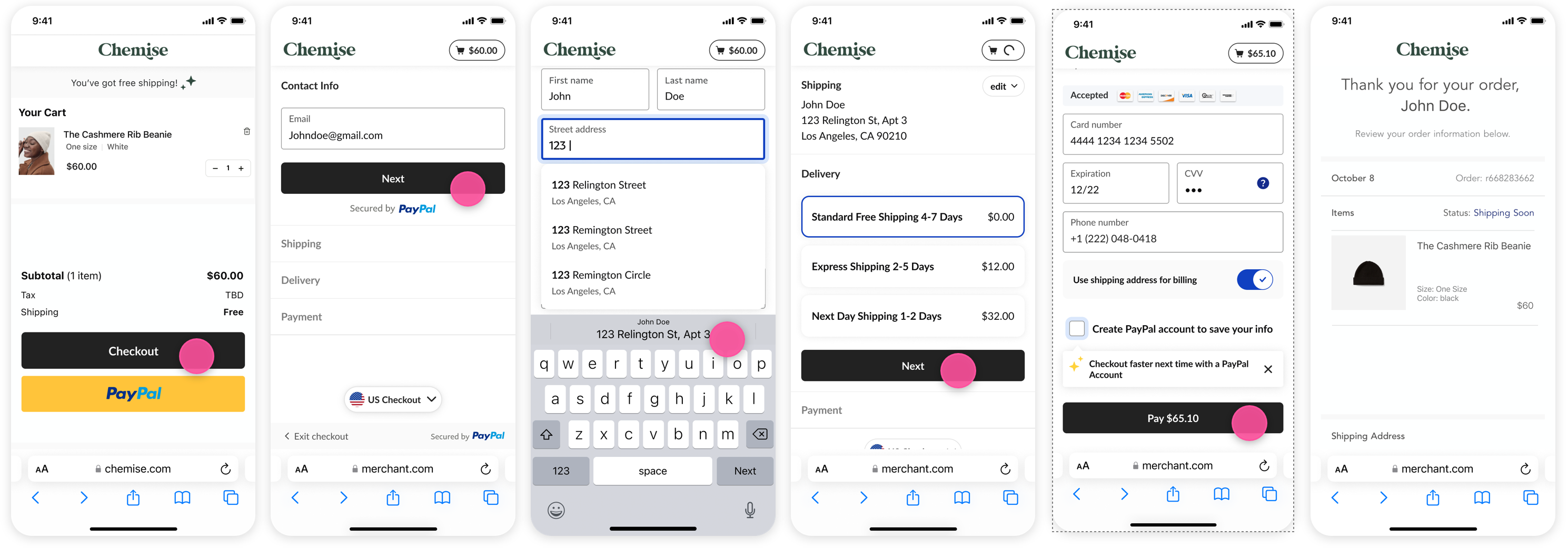
Eligibility
Accelerated Checkout is available for all PayPal Business accounts that meet the following requirements:
Requirements:
- You transact in USD only
- You are using sale or Auth/Capture transactions
- You are not using Subscriptions or Merchant-Initiated Transactions
- You do not require Buy Online Pickup In-store
- You do not accept discount codes in the checkout flow
Example Applications
Integration
Accelerated Checkout can be integrated using the PayPal JS SDK along with an Orders v2 integration.
Include the JS SDK
1<div>2 <div id="inline-checkout-container"></div>3 </div>4 <script src="https://www.paypal.com/sdk/js?client-id=sb"></script>
Script Parameters
| Parameter | Condition | Value |
|---|---|---|
| commit | equal | true |
| disable-funding | not equal | card |
| intent | equal | authorize, capture |
| vault | equal | false |
| locale | equal | en_US |
Render the button
1paypal.Buttons({2 style: {3 custom: {4 label: 'checkout',5 css: {6 border: '1px solid #333',7 "border-radius": '8px',8 "max-height": '44px',9 "line-height":'44px',10 "padding":'10px'11 }12 },13 },14 createOrder, // Defined Later15 onShippingAddressChange, // Defined Later16 onShippingOptionsChange, // Defined Later17 onApprove, // Defined Later18 onComplete, // Defined Later19 onError: (data, actions) => {}20 })21 .render('#inline-checkout-container');
Labels
You can change the text of the checkout button by changing label: to any of the following:
'buy''checkout''pay''buy now''pay now''checkout now''proceed to checkout'
createOrder Callback
The create order callback must return a PayPal Orders v2 id. This can be accomplished on the server or client.
- Client side
- Server side
1function createOrder(data, actions) {2 return actions.order.create({3 intent: "CAPTURE",4 purchase_units: [5 {6 amount: {7 currency_code: "USD",8 value: "1.00",9 breakdown: {10 item_total: {11 currency_code: "USD",12 value: ".80"13 },14 shipping: {15 currency_code: "USD",16 value: "0.00"17 },18 shipping_discount: {19 currency_code: "USD",20 value: "0.00"21 },22 handling: {23 currency_code: "USD",24 value: "0.00"25 },26 tax_total: {27 currency_code: "USD",28 value: "0.20"29 }30 }31 },32 items: [33 {34 name: "T-Shirt",35 description: "Green XL",36 sku: "sku01",37 unit_amount: {38 currency_code: "USD",39 value: "0.60"40 },41 quantity: "1",42 category: "PHYSICAL_GOODS"43 },44 {45 name: "Shoes",46 description: "Running, Size 10.5",47 sku: "sku02",48 unit_amount: {49 currency_code: "USD",50 value: "0.20"51 },52 quantity: "1",53 category: "PHYSICAL_GOODS"54 }55 ]56 }57 ]58 });59 }
onShippingAddressChange callback
The onShippingAddressChange will be executed when the address is completed or changed in the hosted experiences. The actions object contains helper methods.
- Client side
- Server side
1async function onShippingAddressChange(data, actions) {2 console.log("onShippingAddressChange", data, actions);3 await actions.updateShippingOptions({4 options: [5 {6 id: "1",7 type: "SHIPPING",8 label: "7 Day Shipping",9 selected: true,10 amount: {11 currency_code: "USD",12 value: "0.00"13 }14 },15 {16 id: "2",17 type: "SHIPPING",18 label: "3 Day Shipping",19 selected: false,20 amount: {21 currency_code: "USD",22 value: "5.00"23 }24 },25 {26 id: "3",27 type: "SHIPPING",28 label: "Overnight Shipping",29 selected: false,30 amount: {31 currency_code: "USD",32 value: "25.00"33 }34 }35 ]36 });37 await actions.updateTax({ tax: "1.00" });38 return await actions.patch();39 }
Errors
You can use the reject function to display errors to the user.
1onShippingAddressChange: (data, actions) => {2 return actions.reject(data.errors.ADDRESS_ERROR);3 }
| Parameter | Value |
|---|---|
| ADDRESS_ERROR | Your order can't be shipped to this address |
| COUNTRY_ERROR | Your order can't be shipped to this country |
| STATE_ERROR | Your order can't be shipped to this state |
| ZIP_ERROR | Your order can't be shipped to this zip code |
onShippingOptionsChange Callback
This callback executes any time the user selects a new shipping option in the hosted experiences.
- Client side
- Server side
1async function onShippingOptionsChange(data, actions) {2 console.log("onShippingOptionsChange", data, actions);3 await actions.updateShippingOption({4 option: data.selectedShippingOption5 });6 await actions.updateShippingDiscount({ discount: "2.00" });7 return await actions.patch();8 }
onApprove Callback
The onApprove Callback is executed when the user selects Pay in the hosted experience. This callback must resolve in order to proceed with the payment. You can run additional logic here and throw an error to the onError Callback to prevent the payment from executing.
1async function onApprove(data, actions) {2 console.log("onApprove", data, actions);3 if (!data.accelerated) {4 // Not accelerated checkout5 await actions.order.capture();6 let order = await actions.order.get();7 // Save order information8 window.location.href = "http://www.merchant.com/thankyou"9 } else {10 // Accelerated Checkout11 // throw new Error("Prevent Payment");12 return true;13 }14 }
onComplete Callback
The onComplete callback is a new callback for the Accelerated Checkout product. This callback is executed after completion of Accelerated Checkout and the payment is either authorized or captured depending on the intent of the order. You will likely want to fetch the order details and save them to your system.
1async function onComplete(data, actions) {2 console.log("onComplete", data, actions);3 let order = await actions.order.get();4 // Save Order Information5 window.location.href = "http://www.merchant.com/thankyou";6 }