Digital goods for Express Checkout
Last updated: September 14, 2026
Copy / Export
Important: This integration method is deprecated as of January 1, 2017. PayPal continues to support existing merchants using this method, but please be advised new features and enhancements will not be applied to these integrations. For new integrations, see the PayPal Checkout Integration Guide.
Digital goods payments combine JavaScript with the Express Checkout API to streamline the checkout process for buyers of digital goods and keep buyers on your website.
Digital goods are items such as e-books, music files, and digital images distributed in electronic format. The buyer can conveniently purchase digital goods during checkout with a minimum of clicks without leaving your website or interrupting their online activities.
Enabling your PayPal account for digital goods
Please contact your sales representative to enable your account for digital goods. Merchants in the US or Canada can contact 1-855-477-5673 or 1-888-818-3922 to activate digital goods.
Introducing digital goods payments
This figure encapsulates digital goods payments:
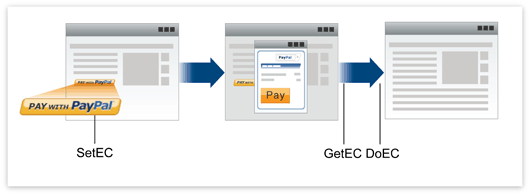
To make a payment for a digital goods item, the buyer:
-
Clicks Pay With PayPal. The button click triggers the call to the
SetExpressCheckoutAPI operation. PayPal redirects the buyer to a lightbox overlaying your website. -
Clicks Pay to accept the order. The button click triggers JavaScript code that closes the lightbox.
-
Confirms the order on your page after the lightbox closes.
-
Resumes activity on your page.
Express Checkout buttons
The button you place on your web page to initiate PayPal digital goods transactions is available at the following URL:
https://www.paypal.com/en_US/i/btn/btn_dg_pay_w_paypal.gif


Note: Do not host copies of the PayPal images locally on your servers. Outdated PayPal images reduce buyer confidence in your site.
Digital goods payments in more detail
To the buyer, the digital goods payment process appears to be built into your website. The digital goods payment process occurs in a lightbox that temporarily overlays your website.
Your buyer's digital goods payment experience depends upon these factors:
-
The value you set for the experience type variable on your web page. You determine how the digital goods flow appears to your buyers by setting (or not setting) the experience type variable (
expType) on your web page. Includedg.json any page that invokes or terminates the digital goods payments flow. The JavaScript functions indg.jsset up and control the PayPal lightbox and mini-browser. -
Whether the buyer is remembered from a previous transaction. Your buyers partially determine the digital goods flow by choosing whether to check the "remember me" box on the login page. (Checking the box creates a "remember me cookie" on the buyer's machine that lets them skip the login page on subsequent visits.)
This table describes the possible digital goods flows that the combination of expType and "Remember Me Cookie" present to a buyer:
| expType | Remember Me Cookie | DG Flow Experience |
|---|---|---|
instant | No | The login page opens in a mini-browser. |
| Yes | The merchant review page opens in a lightbox, and a mask is applied over the underlying web page. | |
mini | No | The login page opens in a mini-browser, and a mask is applied over the underlying web page. |
| Yes | The merchant review page opens in a mini-browser, and a mask is applied over the underlying web page. | |
popup | No | The login page opens in a mini-browser, and a mask is not applied to the underlying web page. |
| Yes | The merchant review page opens in a mini-browser, and a mask is not applied to the underlying web page. | |
(not set) | No | A launch page opens in a lightbox. From here the buyer can log in (the flow then proceeds to the login page in a mini-browser) or sign up with PayPal, or pay as a guest. |
| Yes | DG opens the merchant review page in a lightbox, and a mask is applied over the underlying web page. |
Note:
New merchants: Set expType to "instant" for the best performance.
Existing merchants: You can bypass the legacy flow's lightbox launch page by setting expType, or leave your web page unchanged to maintain the current behavior.
Other supported features
You can use digital goods with the following payments features:
- Recurring payments.
Some Express Checkout fields are not relevant to digital goods flows. See Non-supported features for details.
Additional transactions
After performing digital goods payments transactions, you can use PayPal API operations to perform the following tasks:
-
Issue refunds
-
Get transaction details
-
Search transactions
Non-supported features
Digital goods does not support the following Express Checkout features:
-
Physical goods Digital goods are digital media that the buyer downloads or accesses online.
-
Shipping addresses Downloading electronic media only does not involve shipping addresses.
-
Instant Update API The PayPal server calls your callback server to instantly update the PayPal pages based on shipping options changes the buyer selects.
-
Parallel payments Parameter fields describe the details of up to 10 payments. Digital goods supports passing a value for one payment only.
-
Immediate Payment Immediate Payment checks that you receive payment at the time the buyer commits to a purchase (instant payment methods only).
-
Authorization and Capture API
-
SetCustomerBillingAgreementAPI -
Giropay (Legacy) 1
-
Incentives
1: Important: giropay was sunset on June 30, 2024. PayPal will not support giropay payments starting July 1, 2024. Offer your users PayPal wallet and other alternative payment methods. Learn more.
Several fields in the recurring payments and reference transaction API calls are not relevant for digital goods transactions.
Non-supported fields
These fields are not supported in the recurring payments and reference transaction Name/Value Pair (NVP) APIs:
-
SHIPTONAME -
SHIPTOSTREET -
SHIPTOSTREET2 -
SHIPTOCITY -
SHIPTOSTATE -
SHIPTOZIP -
SHIPTOCOUNTRY -
SHIPTOCOUNTRYCODE -
SHIPTOPHONENUM -
SHIPPINGAMT -
REGULARSHIPINGAMT
These fields are not supported in the recurring payments and reference transaction SOAP APIs:
-
Name -
Street1 -
Street2 -
CityName -
StateOrProvince -
PostalCode -
Country -
Phone -
ShippingAmount
Other digital goods caveats
Observe the following notes when integrating digital goods:
-
Your website requires a P3P header if it is not directly integrating digital goods. If your site uses a hosted cart embedded in another merchant's site, you need a P3P header. For details about P3P, see Platform for Privacy Preferences (P3P) Project.
-
Pass all the required Express Checkout API parameter fields in digital goods transactions. For details, see Integrating Digital Goods Payments With Express Checkout.