Set up reference transactions
Last updated: September 14, 2026
Copy / Export
Important: This integration method is deprecated as of January 1, 2017. PayPal continues to support existing merchants using this method, but please be advised new features and enhancements will not be applied to these integrations. For new integrations, see the PayPal Checkout Integration Guide.
Learn how to set up billing agreements and use reference transactions for recurring payments of varying amounts of money on a varying schedule.
Note: To set up recurring payments for a fixed amount on a fixed schedule, see Set up a recurring payments profile.
For conceptual and high-level flow information related to agreements and reference transactions, see reference transactions.
Implementation options
Use one or both of these options to set up billing agreements and use reference transactions to capture recurring payments:
| Option | See |
|---|---|
| Option 1 | Set up a billing agreement during a purchase. |
| Option 2 | Set up a billing agreement before initiating a payment. |
Set up a billing agreement during purchase
| 1. | Required | Set up the payment authorization. |
| 2. | Required | Redirect the buyer to PayPal for authorization. |
| 3. | Required | Create the billing agreement. |
| 4. | Required | Capture the current purchase. |
| 5. | Required | Use the billing agreement or reference transaction ID to capture future payments. |
| 6. | Optional | Obtain the most recent billing address. |
| 7. | Optional | Cancel a billing agreement. |
Set up the payment authorization
When the buyer is ready to check out, call SetExpressCheckout with these parameters:
| Parameter | Description |
|---|---|
L_BILLINGTYPE0 | The billing agreement type. Note: For one billing agreement between you and the buyer, use MerchantInitiatedBillingSingleAgreement. To create a billing agreement between you and the buyer each time you call DoExpressCheckoutPayment, use MerchantInitiatedBilling. |
L_BILLINGAGREEMENTDESCRIPTION0 | The billing agreement description. For example, ClubUsage. |
For details, see the SetExpressCheckout API operation.
Request
Endpoint URL: https://api-3t.sandbox.paypal.com/nvp
HTTP method: POST
POST data:
USER=insert_merchant_user_name_here
&PWD=insert_merchant_password_here
&SIGNATURE=insert_merchant_signature_value_here
&METHOD=SetExpressCheckout
&VERSION=86
&PAYMENTREQUEST_0_PAYMENTACTION=AUTHORIZATION    #Payment authorization
&PAYMENTREQUEST_0_AMT=25.00    #The amount authorized
&PAYMENTREQUEST_0_CURRENCYCODE=USD    #The currency, e.g. US dollars
&L_BILLINGTYPE0=MerchantInitiatedBilling    #The type of billing agreement
&L_BILLINGAGREEMENTDESCRIPTION0=ClubUsage    #The description of the billing agreement
&cancelUrl=https://example.com/cancel    #For use if the consumer decides not to proceed with payment
&returnUrl=https://example.com/success    #For use if the consumer proceeds with payment
Response
A successful response returns a token that you use in subsequent calls.
TOKEN=EC%2d2B984685J43051234
&ACK=Success
...
Next, redirect the buyer to PayPal.
Redirect the buyer to PayPal
Redirect the buyer to the PayPal authorization URL and append the token returned by SetExpressCheckout:
https://www.sandbox.paypal.com/cgi-bin/webscr?cmd=_express-checkout&token=InsertTokenHereIf the buyer does not provide authorization, he or she is redirected to the cancel URL that was specified in the SetExpressCheckout call. You can then provide a way to re-initiate checkout.
Next, create the billing agreement.
Create the billing agreement
If the buyer authorizes the payment, he or she is redirected to the return URL specified in the SetExpressCheckout call with the appended token.
In a CreateBillingAgreement call, specify the URL-decoded token.
The CreateBillingAgreement returns a billing agreement ID, BILLINGAGREEMENTID, which you use to capture payment. Save the billing agreement ID for future payments based on this billing agreement. The buyer does not need to log in to PayPal to authorize future payments.
For details, see the CreateBillingAgreement API operation.
Request
Endpoint URL: https://api-3t.sandbox.paypal.com/nvp
HTTP method: POST
POST data:
USER=insert_merchant_user_name_here
&PWD=insert_merchant_password_here
&SIGNATURE=insert_merchant_signature_value_here
&METHOD=CreateBillingAgreement
&VERSION=86
&TOKEN=insert_token_value_here
Response
The response returns the billing agreement ID:
BILLINGAGREEMENTID=B%2d7FB31251F28061234
&ACK=Success
...
Capture the current purchase
Call DoExpressCheckoutPayment to capture the current purchase. At a minimum specify these input parameters:
| Parameter | Description |
|---|---|
PAYERID | The secure merchant account ID. |
PAYMENTREQUEST_n_PAYMENTACTION | The type of payment, such as sale. |
PAYMENTREQUEST_n_AMOUNT | The total cost of the transaction to the buyer. |
For additional payment detail fields, see DoExpressCheckout API operation.
Request
Endpoint URL: https://api-3t.sandbox.paypal.com/nvp
HTTP method: POST
POST data:
USER=insert_merchant_user_name_here
&PWD=insert_merchant_password_here
&SIGNATURE=insert_merchant_signature_value_here
&METHOD=DoExpressCheckoutPayment
&VERSION=86
&TOKEN=insert_token_value_here
&PAYMENTREQUEST_0_PAYMENTACTION=SALE
&PAYERID=insert_payer_id
&PAYMENTREQUEST_0_AMT=25.00
Response
A successful response returns ACK=Success, PAYMENTINFO_0_PAYMENTSTATUS=Completed, and other details.
Next, capture future payments.
Capture future payments
To capture future payments, call DoReferenceTransaction with these input parameters:
| Parameter | Description |
|---|---|
REFERENCEID | The URL-decoded billing agreement ID from the BILLINGAGREEMENTID output field. |
AMT | An amount for the payment. |
PAYMENTACTION | The type of payment, such as sale. |
For details, see DoReferenceTransaction API operation.
Request
Endpoint URL: https://api-3t.sandbox.paypal.com/nvp
HTTP method: POST
POST data:
USER=insert_merchant_user_name_here
&PWD=insert_merchant_password_here
&SIGNATURE=insert_merchant_signature_value_here
&METHOD=DoReferenceTransaction
&VERSION=86
&AMT=50    #The amount the buyer will pay in a payment period
&CURRENCYCODE=USD    #The currency, such as US dollars
&PAYMENTACTION=SALE    #The type of payment
&REFERENCEID=B-7FB31251F28061234    #Billing agreement ID received in the DoExpressCheckoutPayment call
Response
BILLINGAGREEMENTID=B%2d7FB31251F28061234
&ACK=Success
&TRANSACTIONID=98A13946GS4491234
&TRANSACTIONTYPE=merchtpmt
&PAYMENTTYPE=instant
&AMT=50%2e00
&PAYMENTSTATUS=Completed
...
The purchase is complete and the billing agreement is set up for future payments with the BILLINGAGREEMENTID.
To get the most recent billing address or cancel a billing agreement, use the BAUpdate API operation.
Set up a billing agreement before initiating a payment
Follow the steps for Set up a billing agreement during purchase with these modifications:
| 1. | Required | Set up the payment authorization and specify AMT as 0 because a current purchase is not involved. |
| 2. | Required | Redirect the buyer to PayPal for authorization. Note: Do not call GetExpressCheckoutDetails |
| 3. | Required | Create the billing agreement to obtain the billing ID number. Note: Do not call DoExpressCheckoutPayment because a current purchase is not involved. |
| 4. | Required | Capture future payments. |
For details, see:
Optional billing agreement tasks
After a billing agreement is set up, you can obtain the buyer's most recent billing address or cancel the billing agreement.
Get the most recent billing address
To get the most recent billing address, call BAUpdate with these input fields:
| Parameter | Description |
|---|---|
METHOD | Set to BillAgreementUpdate. |
BillingAgreementStatus | Do not set a value for this field. |
The BAUpdate response returns the billing address.
Note: This feature applies to all new and existing reference transaction-based billing agreements and pre-approved payment-originated agreements.
For details, see BAUpdate API operation.
Cancel a billing agreement
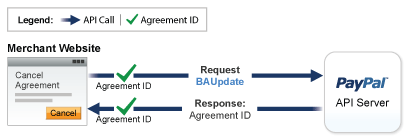
Although a buyer can log in to PayPal to manage agreements, the BAUpdate API operation enables the buyer to cancel the agreement from your site without logging in to PayPal. You can provide your own page for maintaining agreements with the buyer.
To enable a buyer to cancel a billing agreement while on your site, call BAUpdate with these input fields:
| Parameter | Description |
|---|---|
METHOD | Set to BillAgreementUpdate. |
REFERENCEID | A reference ID that associates the buyer to a billing agreement. Typically, the ID is the billing agreement ID. You can also use an ID from a reference transaction. |
BILLINGAGREEMENTSTATUS | Set to Canceled. |
For details, see BAUdate API operation.
PayPal responds with the billing agreement ID and other information about the buyer whose agreement was canceled.
This diagram shows the message flow to cancel a billing agreement from your page: