Test your integration
Last updated: September 14, 2026
Copy / Export
Important: This integration method is deprecated as of January 1, 2017. PayPal continues to support existing merchants using this method, but please be advised new features and enhancements will not be applied to these integrations. For new integrations, see the PayPal Checkout Integration Guide.
Before you deploy your integration, use the PayPal sandbox to perform end-to-end testing. The sandbox replicates the live PayPal environment and lets you use mock transactions to test your integration. For complete details, see the PayPal sandbox Testing Guide.
To test your Express Checkout integration:
-
Create merchant and buyer sandbox accounts with these settings:
-
Select the Business account type and enter an email address and password.
-
Select the Personal account type and enter a high PayPal balance, such as
5000.
-
Simulate Express Checkout transactions
This diagram shows the Express Checkout flow using the sandbox as the API server:
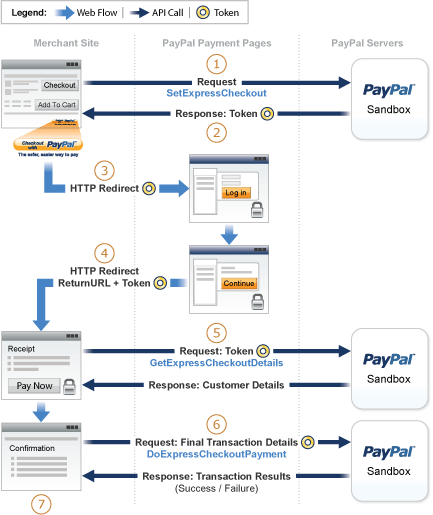
In the diagram:
-
The web pages on the left are your website pages.
-
The numbers correspond to the simulation test steps.
Note: For initial tests, supply the API values in these example forms to simulate your web pages using HTTP forms. For final tests, replace these forms with your actual web pages and code.
To simulate Express Checkout transactions:
-
Invoke a form on your site that calls
SetExpressCheckout.To invoke the API, specify the value of the NVP name fields you want to set, and then post the form to a PayPal sandbox server:
<form method=post action=https://api-3t.sandbox.paypal.com/nvp>
  <input type=hidden name=USER value=<API_username>>
  <input type=hidden name=PWD value=<API_password>>
  <input type=hidden name=SIGNATURE value=<API_signature>>
  <input type=hidden name=VERSION value=<XX>.0>
  <input type=hidden name=PAYMENTREQUEST_0_PAYMENTACTION value=Sale>
  <input name=PAYMENTREQUEST_0_AMT value=19.95>
  <input type=hidden name=RETURNURL value=https://example.com>
  <input type=hidden name=CANCELURL value=https://www.YourCancelURL.com>
  <input type=submit name=METHOD value=SetExpressCheckout>
</form>
Note: Use an API user name with a signature from your sandbox business account. See the Test Certificates tab of the sandbox to obtain a signature. If you are not using a signature, you must use a different sandbox server.
Important: This example does not establish a secure connection and should not be used live on paypal.com. You must protect the values for
USER,PWD, andSIGNATUREin your implementation. Consider storing these values in a secure location other than your web server document root and setting the file permissions so that only the system user that executes your e-commerce application can access it. -
A successful response shows
ACKset toSuccessand a token. Use the token in subsequent steps.TIMESTAMP=2007%2d04%2d05T23%3a23%3a07Z CORRELATIONID=63cdac0b67b50 ACK=Success VERSION=<XX>%2e000000 BUILD=1%2e0006 TOKEN=EC%2d1NK66318YB717835M -
If the operation succeeds, use the token and redirect your browser to the log in for the sandbox:
https://www.sandbox.paypal.com/cgi-bin/webscr?cmd=_express-checkout
&token=EC-1NK66318YB717835M
You might need to decode the URL by replacing hexadecimal codes with ASCII codes. For example, you might need to replace
%2din the token with a hyphen (-).You must log in to the Developer dashboard before you log in to a sandbox account. Then, log in to the sandbox account that represents the buyer and not the account that represents the merchant.
-
Log in to the buyer sandbox account and confirm the details.
The sandbox redirects your browser to the return URL that you specified when in
SetExpressCheckout:https://example.com/?token=EC-1NK66318YB717835M&PayerID=7AKUSARZ7SAT8Note: PayPal appends the Express Checkout
tokenand uniquePayer IDasGETparameters to yourRETURN URL. -
Invoke a form on your website that calls
GetExpressCheckoutDetails:<form method=post action=https://api-3t.sandbox.paypal.com/nvp> <input type=hidden name=USER value=<API_username>> <input type=hidden name=PWD value=<API_password>> <input type=hidden name=SIGNATURE value=<API_signature>> <input type=hidden name=VERSION value=<XX>.0> <input name=TOKEN value=EC-1NK66318YB717835M> <input type=submit name=METHOD value=GetExpressCheckoutDetails> </form>A successful call returns payer information:
TIMESTAMP=2007%2d04%2d05T23%3a44%3a11Z CORRELATIONID=6b174e9bac3b3 ACK=Success VERSION=<XX>%2e000000 BUILD=1%2e0006 TOKEN=EC%2d1NK66318YB717835M EMAIL=<YourSandboxBuyerAccountEmail> PAYERID=7AKUSARZ7SAT8 PAYERSTATUS=verified FIRSTNAME=... LASTNAME=... COUNTRYCODE=US BUSINESS=... PAYMENTREQUEST_0_SHIPTONAME=... PAYMENTREQUEST_0_SHIPTOSTREET=... PAYMENTREQUEST_0_SHIPTOCITY=... PAYMENTREQUEST_0_SHIPTOSTATE=CA PAYMENTREQUEST_0_SHIPTOCOUNTRYCODE=US PAYMENTREQUEST_0_SHIPTOCOUNTRYNAME=United%20States PAYMENTREQUEST_0_SHIPTOZIP=94666 PAYMENTREQUEST_0_ADDRESSID=... PAYMENTREQUEST_0_ADDRESSSTATUS=Confirmed -
Invoke a form on your website that calls
DoExpressCheckoutPayment:<form method=post action=https://api-3t.sandbox.paypal.com/nvp> <input type=hidden name=USER value=<API_username>> <input type=hidden name=PWD value=<API_password>> <input type=hidden name=SIGNATURE value=<API_signature>> <input type=hidden name=VERSION value=<XX>.0> <input type=hidden name=PAYMENTREQUEST_0_PAYMENTACTION value=Sale> <input type=hidden name=PAYERID value=7AKUSARZ7SAT8> <input type=hidden name=TOKEN value= EC%2d1NK66318YB717835M> <input type=hidden name=PAYMENTREQUEST_0_AMT value= 19.95> <input type=submit name=METHOD value=DoExpressCheckoutPayment> </form> -
Review the response string returned from
DoExpressCheckoutPayment.If the call succeeds,
ACKis set toSuccess:TIMESTAMP=2007%2d04%2d05T23%3a30%3a16Z CORRELATIONID=333fb808bb23 ACK=Success VERSION=<XX>%2e000000 BUILD=1%2e0006 TOKEN=EC%2d1NK66318YB717835M PAYMENTREQUEST_0_TRANSACTIONID=043144440L487742J PAYMENTREQUEST_0_TRANSACTIONTYPE=expresscheckout PAYMENTREQUEST_0_PAYMENTTYPE=instant PAYMENTREQUEST_0_ORDERTIME=2007%2d04%2d05T23%3a30%3a14Z PAYMENTREQUEST_0_AMT=19%2e95 PAYMENTREQUEST_0_CURRENCYCODE=USD PAYMENTREQUEST_0_TAXAMT=0%2e00 PAYMENTREQUEST_0_PAYMENTSTATUS=Pending PAYMENTREQUEST_0_PENDINGREASON=authorization PAYMENTREQUEST_0_REASONCODE=None