Immediate payment
Last updated: September 14, 2026
Copy / Export
Important: This integration method is deprecated as of January 1, 2017. PayPal continues to support existing merchants using this method, but please be advised new features and enhancements will not be applied to these integrations. For new integrations, see the PayPal Checkout Integration Guide.
Immediate Payment ensures a buyer pays for a purchase immediately after committing to it.
Overview of Immediate Payment
Immediate Payment supports instant funding sources only, ensuring that you receive payment at the time the buyer commits to a purchase.
Immediate Payment supports instant funding sources only, ensuring that you receive payment at the time the buyer commits to a purchase.
- Immediate Payment for third-party checkout — For third parties who sell items on eBay and host Express Checkout on their website.
- Immediate Payment for Express Checkout — For any merchant who integrates Express Checkout.
Contents
About Immediate Payment for third-party checkout
Immediate Payment for third-party checkout ensures that the buyer pays for an item you are selling on eBay at the time the buyer commits to it. You add a few Express Checkout parameters to your integration and use your own off-eBay checkout flow.
Immediate Payment for third-party checkout ensures that the buyer pays for an item you are selling on eBay at the time the buyer commits to it. You add a few Express Checkout parameters to your integration and use your own off-eBay checkout flow.
Note: This feature is available with API version 60.0 and higher.
SetExpressCheckout request parameters ensure the eBay item is available to ship to the buyer when you call DoExpressCheckoutPayment. The successful transaction returns the eBay transaction ID as an additional parameter value in the DoExpressCheckoutPayment response.
Note: PayPal recommends that you do not mix eBay and non-eBay items in an immediate payment transaction.
The
- By design, it does not support non-instant funds, such as Electronic Funds Transfer, or eCheck.
- It is limited to Express Checkout for eBay auctions only.
- It is limited to processing a single payment per transaction; the buyer can check out with only one item at a time.
- Sale is the only payment action supported.
- It does inventory checking at eBay and attempts to purchase the item.
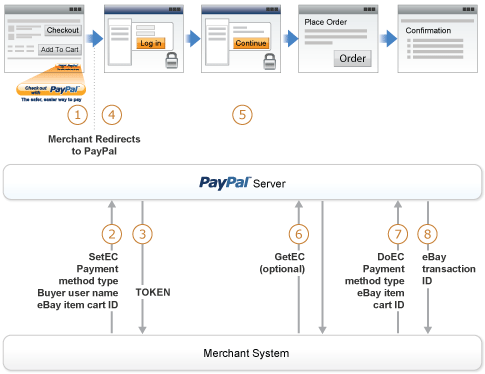
Immediate Payment for third-party checkout has the following caveats:
- The eBay flow for third-party checkout redirects the buyer from an eBay payment review page to your shopping cart page. On your shopping cart page, the buyer initiates Express Checkout by clicking the Checkout with PayPal button.
- In the call to the SetExpressCheckout API operation, you must pass Immediate Payment information.
- The
SetExpressCheckoutresponse returns aTOKEN. - The buyer is redirected to PayPal.
- The buyer reviews the payment and clicks Continue.
- (Optional) Call
GetExpressCheckoutDetails. TheGetExpressCheckoutDetailsresponse returns information about the buyer. - In the call to DoExpressCheckoutPayment, you must pass Immediate Payment information. At this time, PayPal checks the availability of the eBay item.
- If the item is available and payment is successful, the
DoExpressCheckoutPaymentresponse returns the eBay transaction ID (PAYMENTREQUEST_n_EBAYITEMAUCTIONTXNID).
Integrating Immediate Payment for third-party checkout
To integrate Immediate Payment for third-party checkout into your Express Checkout implementation, you add a few new fields to SetExpressCheckout and DoExpressCheckoutPayment (NVP/SOAP API References - Express Checkout APIs).
The call to SetExpressCheckout
You must have Express Checkout integrated into your payment solution. PayPal recommends that you sell one eBay item in a transaction or a quantity of the same item (considered a single eBay listing).
To integrate Immediate Payment into the SetExpressCheckout call:
-
Set
PAYMENTREQUEST_n_ALLOWEDPAYMENTMETHODtoInstantPaymentOnly. This blocks all pending funding sources and transactions in a pending state. -
Pass
BUYERUSERNAMEandLPAYMENTREQUESTn_EBAYITEMCARTIDm. eBay provides you with these two values. -
Set
CHANNELTYPEtoeBayItem. -
Set
LPAYMENTREQUESTn_EBAYITEMNUMBERmto the number of the eBay item. -
Specify the buyer's shipping address.
-
Be prepared to handle Immediate Payment errors.
For errors you choose to handle, you need to send the buyer error messages appropriate to the situations generating the errors. For example, a buyer may have a mixed cart of eBay and non-eBay items. To allow the buyer to check out only the non-Immediate Payment items, you must provide an appropriate message instructing the buyer to remove the Immediate Payment item and retry the transaction.
The SetExpressCheckout response returns a TOKEN.
You must have Express Checkout integrated into your payment solution. PayPal recommends that you sell one eBay item in a transaction or a quantity of the same item (considered a Continue).
To integrate Immediate Payment into the SetExpressCheckout call:
The call to DoExpressCheckoutPayment
The SetExpressCheckout response returns a
-
Set
PAYMENTREQUEST_n_ALLOWEDPAYMENTMETHODtoInstantPaymentOnly. This blocks all pending funding sources and transactions in a pending state. -
Pass the
LPAYMENTREQUESTn_EBAYITEMCARTIDm— eBay provides you with this value. -
Be prepared to handle Immediate Payment errors.
For errors you choose to handle, you need to send the buyer error messages appropriate to the situations generating the errors. For example, you determine that the buyer has a mixed cart of eBay and non-eBay items. To allow the buyer to check out only the non-Immediate Payment items, you must provide an appropriate message to the buyer, remove the Immediate Payment item, and retry the transaction.
Optionally, call GetExpressCheckoutDetails, which returns information about the buyer.PAYMENTREQUEST_n_EBAYITEMAUCTIONTXNID).
About Immediate Payment for Express Checkout
To integrate Immediate Payment into the
Note: This feature is available with API version 63.0 and higher.
If the payment is successful, the
- By design, it does not support non-instant funds, such as Electronic Funds Transfer, or eCheck.
- It is open for use by all merchants, whether or not they are selling on eBay.
- Sale is the only payment action supported.
Integrating Immediate Payment for Express Checkout
ALLOWEDPAYMENTMETHOD in the Express Checkout API.
- In the call to the
SetExpressCheckoutAPI operation, you setPAYMENTREQUEST_n_ALLOWEDPAYMENTMETHODtoInstantPaymentOnly. - (Optional) You can call
GetExpressCheckoutDetailsto obtain information about the buyer. - In the call to
DoExpressCheckoutPayment, you setPAYMENTREQUEST_n_ALLOWEDPAYMENTMETHODtoInstantPaymentOnly.