On this page
No Headings
Last updated: June 8, 2026
ACH, or Automated Clearing House, is a network that allows for electronic funds transfers between banks in the United States. PayPal now allows merchants to use ACH direct debit payments to accept payments from a payer by debiting directly from their bank account. For example, government agencies may use this feature for one-time payments for taxes, citations, or permit fees.
ACH direct debit can be used for one-time and recurring payments. ACH can only be transacted in USD.
The Pay by Bank button shows up on your website when a customer uses a browser for checkout.
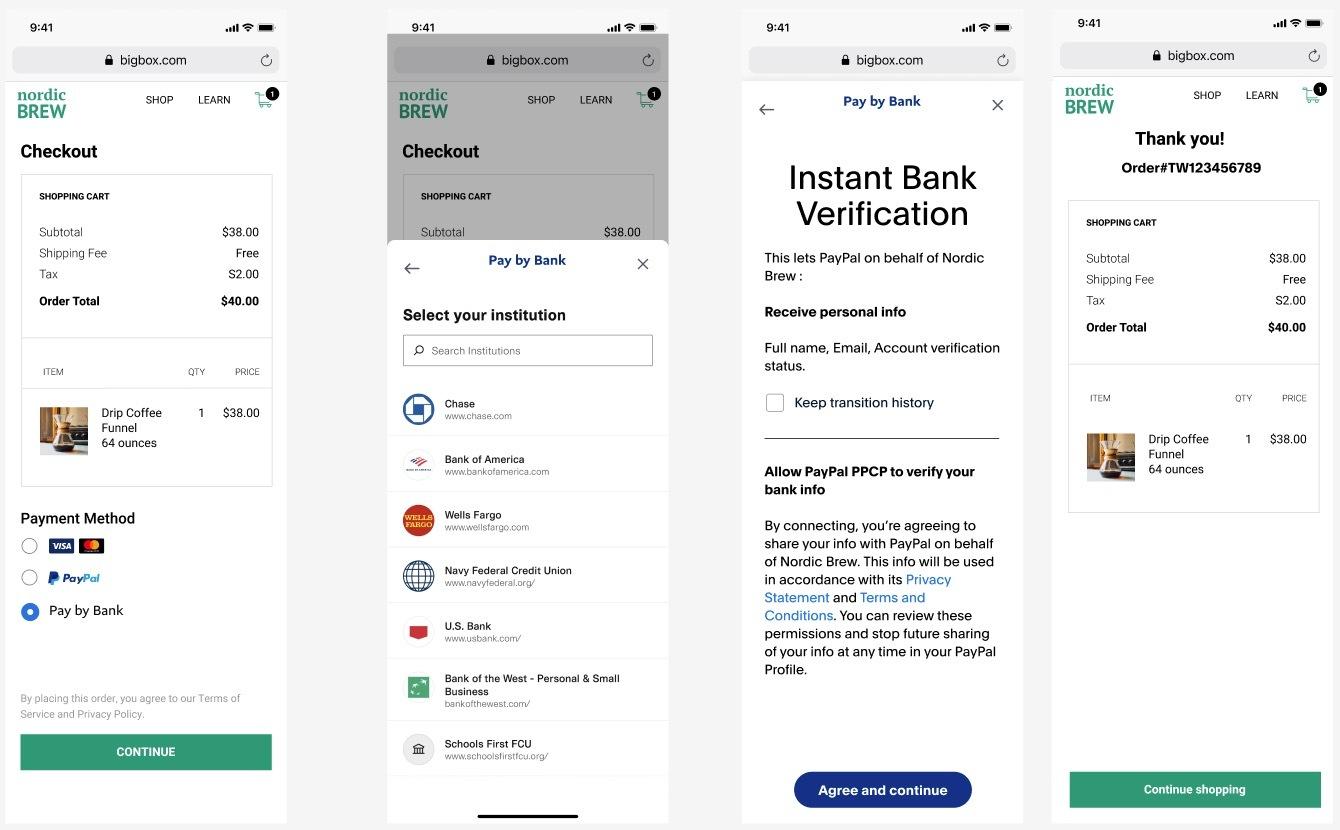
When your payer selects the Pay by Bank button and if bank verification is required:
intent: capture in the create order call for this feature to work.If an ACH payment is returned by your payer's bank, you are liable for the transaction amount PayPal might have already moved to your account and the return fees. These charges are reflected in the PayPal account set up during onboarding.
Understand the differences between unauthorized returns and the remaining type of returns to evaluate and control your exposure to any losses and manage your refund process. At a high level, the differences are as follows:
You might be unnecessarily crediting your payer if you are issuing a refund to your payer, but the transaction gets returned from your payer's bank as a result of insufficient funds. To prevent any fraud or double-crediting your payers we recommend you:
This integration requires a standard entry class (SEC) code. The following codes are available:
Default: Internet Initiated Entry (WEB)CCD)TEL)PPD)Select a tab for more information about each SEC option:
WEB entries are direct debit payments initiated online. You must collect the authorization from your customer online. Refer to section on Authorization for a sample authorization you can use for WEB transactions. To remain in compliance with NACHA regulations, we recommend you store the full text of the authorization and following information as proof of consent:
Partners and merchants follow different steps to integrate with ACH using API integration on the PayPal Commerce Platform.
Company ID is a 10-digit identifier used by banks and NACHA (governing and processing entity for ACH transactions), which uniquely identifies the entity collecting payments (aka Originator) via ACH.
Company ID is responsible for ensuring unique identification for entities and isolating transaction processing for these entities. These are in place to avoid any incorrect / fraudulent transactions and to isolate processing for each entity and which may be used to monitor and filter debits to unknown entities.
Note: Reach out to your Account Manager to initiate the Company ID Setup.
ACH as a payment method will be available to turn on for merchants on their PayPal Payment Settings page. Merchants will then be redirected to complete the remainder of the onboarding process. Depending on whether a merchant has previously onboarded for PPCP Advanced, merchants will experience a simplified one-click onboarding process. For new merchants, the onboarding process will require input of a series of short questions about a merchant's business information.
ACH in the products array for merchant onboarding.Before you can accept ACH on your website, verify that your sandbox business account supports ACH. Merchants can use the PayPal Developer Dashboard to set up their sandbox accounts to accept ACH. The integration for partner accounts includes creating a sandbox business account through sandbox.paypal.com. If the ACH status for the account shows as disabled, complete the sandbox onboarding steps to enable ACH.
If you created a sandbox business account through sandbox.paypal.com, and the ACH status for the account shows as disabled, complete the sandbox onboarding steps to enable ACH.
Tip: When your integration is ready to go live, read the Go live section for details about the additional steps needed for ACH onboarding.
Follow this integration process to add ACH as a checkout option, customize the payment experience, and process payments.
To create an order for standard ACH direct debit payments, copy the following code and modify it:
curl -v -X POST https://api-m.sandbox.paypal.com/v2/checkout/orders
 -H 'Content-Type: application/json'
 -H 'Authorization: Bearer ACCESS-TOKEN'
 -d '{
        "intent": "CAPTURE",
        "purchase_units": [
            {
                "amount": {
                    "currency_code": "USD",
                    "value": "100.00"
                },
                "payee": {
                    "email_address": "merchant@example.com"
                }
            }
        ]
}'After you copy the code in the sample request, modify the following:
Change ACCESS-TOKEN to your access token.
Set intent to capture.
Change the standard_entry_class_code. Options are WEB,CCD, TEL, and PPD.
Optional: Change the purchase_unit/payment_instruction/platform_fees array to specify fees for the order.
Tip: To help prevent chargebacks and unauthorized disputes, use the soft_descriptor in the Orders API so that your payers can recognize the transaction when it posts to their account.
A successful request results in the following:
201 Created.curl -v -X POST https://api-m.sandbox.paypal.com/v2/checkout/orders
-H 'Content-Type: application/json'
-H 'PayPal-Request-Id: REQUEST-ID' -H 'Authorization: Bearer ACCESS-TOKEN'
-d '{
"intent": "CAPTURE",
"purchase_units": [
{
"amount": {
"currency_code": "USD",
"value": "100.00"
},
"payee": {
"email_address": "merchant@example.com"
}
}
],
"payment_source": {
"bank": {
"ach_debit": {
"billing_address": {
"country_code": "US"
},
"attributes": {
"verification": {
"paypal": {
"method": "INSTANT_ACCOUNT_VERIFICATION"
}
}
},
"experience_context": {
"locale": "en-US",
"return_url": "https://example.com/return",
"cancel_url": "https://example.com/cancel"
}
}
}
}
}'ACCESS-TOKEN to your access token.return_url and cancel_url. This is required to redirect the payer back to your site.This allows you to verify the user bank account through PayPal offered Instant Account Verification service or you can provide the customer bank account details as a payment source and call confirm payment source. The response result guides you next steps with regards to account verification.
WEB, TEL, CCD, and PPD SEC codes. The default is WEB.verification.external.status as VERIFIED and PayPal will acknowledge this status.merchant_customer_id. The id is used to track accounts and their verification status for the customer.To verify the payer bank account through PayPal instant account verification service, copy the following code and modify it:
curl -v -k -X POST https://api-m.sandbox.paypal.com/v2/checkout/orders/5O190127TN36475T/confirm-payment-source
 -H 'Content-Type: application/json'
 -H 'Authorization: Bearer ACCESS-TOKEN'
 -d '{
        "payment_source": {
            "bank": {
                "ach_debit": {
                    "billing_address": {
                        "country_code": "US"
                    },
                    "attributes": {
                        "verification": {
                            "paypal": {
                                "method": "INSTANT_ACCOUNT_VERIFICATION"
                            }
                        }
                    },
                    "payment_context": {
                        "standard_entry_class_code": "WEB"
                    },
                    "experience_context": {
                        "locale": "en-US",
                        "return_url": "https://example.com/return",
                        "cancel_url": "https://example.com/cancel"
                    }
                }
            }
        }
}'ACCESS-TOKEN to your access token.return_url and cancel_url. This is required to redirect the payer back to your site.200 OK.verification.external.status field.merchant_customer_id is recommended.standard_entry_class_code. Options are WEB, CCD, TEL, and PPD.curl -v -k -X POST https://api-m.sandbox.paypal.com/v2/checkout/orders/5O190127TN36475T/confirm-payment-source
-H 'Content-Type: application/json'
-H 'Authorization: Bearer ACCESS-TOKEN'
-d '{
"payment_source": {
"bank": {
"ach_debit": {
"account_number": "ACCOUNT-NUMBER",
"routing_number": "ROUTING-NUMBER",
"account_holder_name": "ACCOUNT-HOLDER-NAME",
"account_type": "ACCOUNT-TYPE",
"ownership_type": "OWNERSHIP-TYPE",
"billing_address": {
"country_code": "US"
},
"attributes": {
"verification": {
"external": {
"status": "VERIFIED"
}
}
},
"payment_context": {
"standard_entry_class_code": "WEB"
}
}
}
}
}'After you copy the code in the sample request, modify the following:
Access-Token to your access token.ACCOUNT-NUMBERROUTING-NUMBERACCOUNT-HOLDER-NAMEACCOUNT-TYPE- (CHECKING or SAVINGS)OWNERSHIP-TYPE - (PERSONAL or BUSINESS)CCD transactions, always set "standard_entry_class_code": "CCD" and "ownership_type": "BUSINESS" in the body of ach_debit.A successful request results:
200 OK.APPROVED.Confirmation is required by the payer on the finalization of the transaction before the order can be captured.
curl -v -X GET https://api-m.sandbox.paypal.com/v2/checkout/orders/5O190127TN364715T
 -H 'Content-Type: application/json'
-H 'Authorization: Bearer ACCESS-TOKEN'For all ACH transactions, you are required to collect an authorization from the customer indicating that you have their explicit permission to debit their bank account. To remain in compliance with NACHA regulations, we recommend you store the full text of the authorization with amount of transaction, bank details and timestamp of authorization. You may be required to provide proof of the authorization when requested by PayPal, customer's bank or by NACHA.
A reference authorization text is provided below. Include this text or a variation in your checkout flow, at or near the final "buy" (checkout, complete, submit etc.) button.
"I authorize [Merchant business name] to initiate a one-time ACH/electronic debit to my account as follows: Amount: [insert amount], Authorization Date: [insert date], Account holder: [insert full name], Bank: [insert bank name], [Checking / Savings] Account Number: [insert account number], Routing Number: [insert routing number]. I agree that ACH transactions I authorize comply with all applicable laws." [CTA: Agree and Continue]
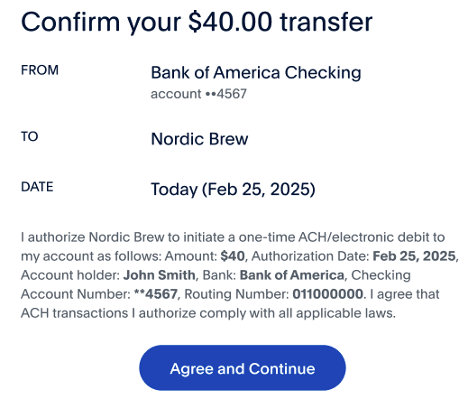
Before you can capture an order using ACH direct debit, the status of the order must be APPROVED. The order status is set to APPROVED when the payer successfully completes the checkout flow.
After the bank account is verified and the payer authorizes the direct debit, you can call capture order to capture the payer's funds.
Copy the following code and modify it:
curl -v -X GET https://api-m.sandbox.paypal.com/v2/checkout/orders/5O190127TN364715T/capture
 -H 'Content-Type: application/json'
 -H 'Authorization: Bearer ACCESS-TOKEN'
-d '{}'Access-Token to your access token.A successful result for a standard ACH direct debit returns the following:
PAYMENT.CAPTURE.PENDING. This status changes in 5 calendar days to either PAYMENT.CAPTURE.COMPLETED or PAYMENT.CAPTURE.DECLINED.PAYMENT.CAPTURE.COMPLETED. This payment can be returned in certain situations, such as with an unauthorized return.PAYMENT.CAPTURE.DECLINED. A payment may be declined for incorrect routing or account numbers or for other reasons.Important: Make sure you are subscribed to the following webhook events:
CHECKOUT.ORDER.APPROVED webhook in order to retrieve order details.PAYMENT.CAPTURE.PENDING,PAYMENT.CAPTURE.COMPLETED, and PAYMENT.CAPTURE.DECLINED webhooks, which indicate payment capture status.curl -v -X GET https://api-m.sandbox.paypal.com/v2/checkout/orders/5O190127TN364715T
-H 'Content-Type: application/json'
-H 'Authorization: Bearer ACCESS-TOKEN'Make ACH available to payers using your website or app.
Important: Before going live, complete production onboarding to process ACH payments with your live PayPal account.
When testing a purchase in production, consider:
Refer to the daily reports to reconcile all returns you received on that day. Then, you can work with any payer on the steps they should take to resubmit the payment. Use the following reports:
The Decline Analysis Report contains all returned/declined standard ACH debit transactions including the reason codes received from the ACH network.
The Financial Summary Report contains the liability charges posted on your account as a result of returned ACH debit transactions. Instant ACH transactions that resulted in bank returns are also included in this daily report. The report includes the original transaction that was returned and what fees you incurred from returned transactions.
If an ACH transaction is returned by your payer's bank, a reason code for the returned transaction is included. Depending on the reason code, the transaction can be corrected and re-submitted for processing.
The table below provides return reason codes and explains what steps you can take if an ACH transaction was not processed and returned to you:
| Reason Code | Description | What it means | What you should do |
|---|---|---|---|
| R01 | Insufficient Funds | The bank account you submitted to PayPal for payment does not have sufficient balance to cover the amount on the transaction. | Contact your payer immediately to avoid any disruption in the service or the delivery of your product, and let them know you were not able to charge their bank account as a result of insufficient funds. You can ask them to add funds to their bank account and have them go through the payment experience again, or present them an option to pay with a different bank account or a different payment method and submit a new transaction. |
| R02 | Account Closed | The bank account you submitted for payment has been closed. | Contact the payer to update payment method or payment account. Stop any recurring payments from this account. If the transaction you received this code on is a prenote, don't process any further transactions on this account. |
| R03 | No Account/Unable to Locate Account | The bank account you submitted for payment is invalid. | Contact the payer to update payment method or payment account. Stop any recurring payments from this account. If the transaction you received this code on is a prenote, don't process any further transactions on this account. |
| R04 | Invalid Account Number Structure | The bank account you submitted for payment is invalid. | Contact the payer to update payment method or payment account. Stop any recurring payments from this account. If the transaction you received this code on is a prenote, don't process any further transactions on this account. |
| R05 | Unauthorized Debit to Consumer Account Using Corporate SEC Code | Payment has been submitted on a corporate account using a consumer SEC code. | Correct the payment SEC code and resubmit. |
| R06 | Returned per ODFI's Request | Payment stopped as required by PayPal. | Resubmit the transaction. If PayPal has stopped payment on your behalf, contact PayPal. |
| R07 | Authorization Revoked by Customer | Payment has been marked as unauthorized by payer. Payment has been reversed by payer by revoking authorization. | Contact payer to resolve the issue. |
| R08 | Payment Stopped | Stop payment issued by payer on account for PayPal Payment has been stopped by payer. | Contact payer to resolve the issue. |
| R09 | Uncollected Funds | Collected funds are not sufficient for payment of the debit entry | Contact the payer to inform them of insufficient funds. As per your procedures you may resubmit the transaction or request the payer to update payment method or payment account. |
| R10 | Customer Advises Unauthorized, Improper, Ineligible, or part of an Incomplete Transaction | Payment has been marked as unauthorized by payer. Payment has been reversed by payer by revoking authorization. | Contact payer to resolve the issue. |
| R12 | Account Sold to another DFI | RDFI is unable to post entry destined for a bank account maintained at a branch sold to another financial institution. | Contact the payer to update payment method or payment account. Stop any recurring payments from this account. If the transaction you received this code on is a prenote, don't process any further transactions on this account. |
| R13 | Invalid ACH Routing Number | Financial institution does not receive commercial ACH entries. | Contact the payer to update payment method or payment account. Stop any recurring payments from this account. If the transaction you received this code on is a prenote, don't process any further transactions on this account. |
| R14 | Representative Payee Deceased or Unable to Continue in that capacity | The representative payee authorized to accept entries on behalf of a beneficiary is either deceased or unable to continue in that capacity. | Contact the payer to update payment method or payment account. Stop any recurring payments from this account. If the transaction you received this code on is a prenote, don't process any further transactions on this account. |
| R15 | Beneficiary of Account Holder Deceased | The beneficiary entitled to payments is deceased and/or the bank account holder other than a representative payee is deceased. | Contact the payer to update payment method or payment account. Stop any recurring payments from this account. If the transaction you received this code on is a prenote, don't process any further transactions on this account. |
| R16 | Account Frozen/Entry Returned per OFAC Instruction | Funds in bank account are unavailable due to action by RDFI or legal order. | Contact the payer to update payment method or payment account. Stop any recurring payments from this account. If the transaction you received this code on is a prenote, don't process any further transactions on this account. |
| R17 | File Record Edit Criteria | Certain payment fields rejected by RDFI processing (identified in return addenda) | Correct the payment fields and resubmit. |
| R20 | Non Transaction Account | The ACH entry is sent to a non-transaction account. | Contact the payer to update payment method or payment account. Stop any recurring payments from this account. If the transaction you received this code on is a prenote, don't process any further transactions on this account. |
| R24 | Duplicate Entry | RDFI has received a duplicate entry. | Check if this transaction was a duplicate or has already completed, before resending the payment. |
| R29 | Corporate Customer Advises not authorized | Payment has been marked as unauthorized by payer. | Payment has been reversed by payer by revoking authorization. Contact payer to resolve the issue. |
| R34 | Limited Participation DFI | RDFI participation has been limited by a federal or state supervisor | Contact the payer to update payment method or payment account. Stop any recurring payments from this account. If the transaction you received this code on is a prenote, don't process any further transactions on this account. |
| Usecase | Login Credential (Sandbox) | Bank Name |
|---|---|---|
| Single CHECKING Account | pyplopenbankingubsb.site16441.1 site16441.1 | DEMO BANK |
| Multiple CHECKING/SAVINGS Account | pyplopenbankingubsb.site16441.2 site16441.2 | DEMO BANK |
| One Checking and One CD | pyplopenbankingubsb.site16441.5 site16441.5 | DEMO BANK |
| No CHECKING/SAVING Account | pyplopenbankingub.site16441.4 site16441.4 | DEMO BANK |
| Multiple Holders | pyplopenbankingubsb.site16441.3 site16441.3 | DEMO BANK |
| Business Account | pyplopenbankingubsb.site16441.2 site16441.2 Account last 4: 7753 | |
| Oauth Bank | pyplopenbankingubsb.site19335.1 site19335.1 | DEMO BANK - Dag Oauth Site |
| ACCOUNT_LOCKED | Username: error_407 Password: error_407 | |
| INCORRECT_CREDENTIALS | Username: error_402 Password: error_402 | |
| INVALID_ADDL_INFO_PROVIDED | Site: Dag Site Multilevel Username: agg.site16442.1 Password: site16442.1 Note: Enter Security Token answer incorrectly | |
| ADDL_AUTHENTICATION_REQUIRED | Username: error_518 Password: error_518 | |
| CREDENTIALS_UPDATE_NEEDED | Username: error_410 Password: error_410 | |
| NEW_AUTHENTICATION_REQUIRED | Username: error_506 Password: error_506 | |
| SITE_UNAVAILABLE | Username: error_409 Password: error_409 | |
| SITE_BLOCKING_ERROR | Username: error_426 Password: error_426 | |
| USER_ACTION_NEEDED_AT_SITE | Username: error_406 Password: error_406 | |
| TECH_ERROR | Username: error_403 Password: error_403 |