On this page
No Headings
Last updated: June 18, 2026
The Single Euro Payments Area (SEPA) is a payment-integration initiative of the European Union for simplifying bank transfers denominated in euros between member countries. SEPA helps customers make cashless euro payments to any account located anywhere in the area using a single bank account. To debit from SEPA bank accounts, account holders must accept a mandate authorizing the debtor to debit the account.
SEPA Direct Debit is a PayPal Direct Banking solution that supports you to offer SEPA banks as a payment option to your customers.
EUR onlySEPA Direct Debit allows you to access funds immediately if you opt for instant settlements. The delayed settlement option will make funds available within the standard SEPA settlement timeframe of 2-3 days.
In your checkout flow, you can offer SEPA Direct Debit as a payment choice. Customers choosing to pay with SEPA Direct Debit will provide an IBAN. PayPal validates the IBAN and provides a link to a mandate page. The customer authorizes you and PayPal to debit their SEPA account by agreeing to the mandate. PayPal stores and manages mandates on your behalf. Funds can be debited after the customer accepts the mandate. Mandates can be specified as one-time or recurrent.
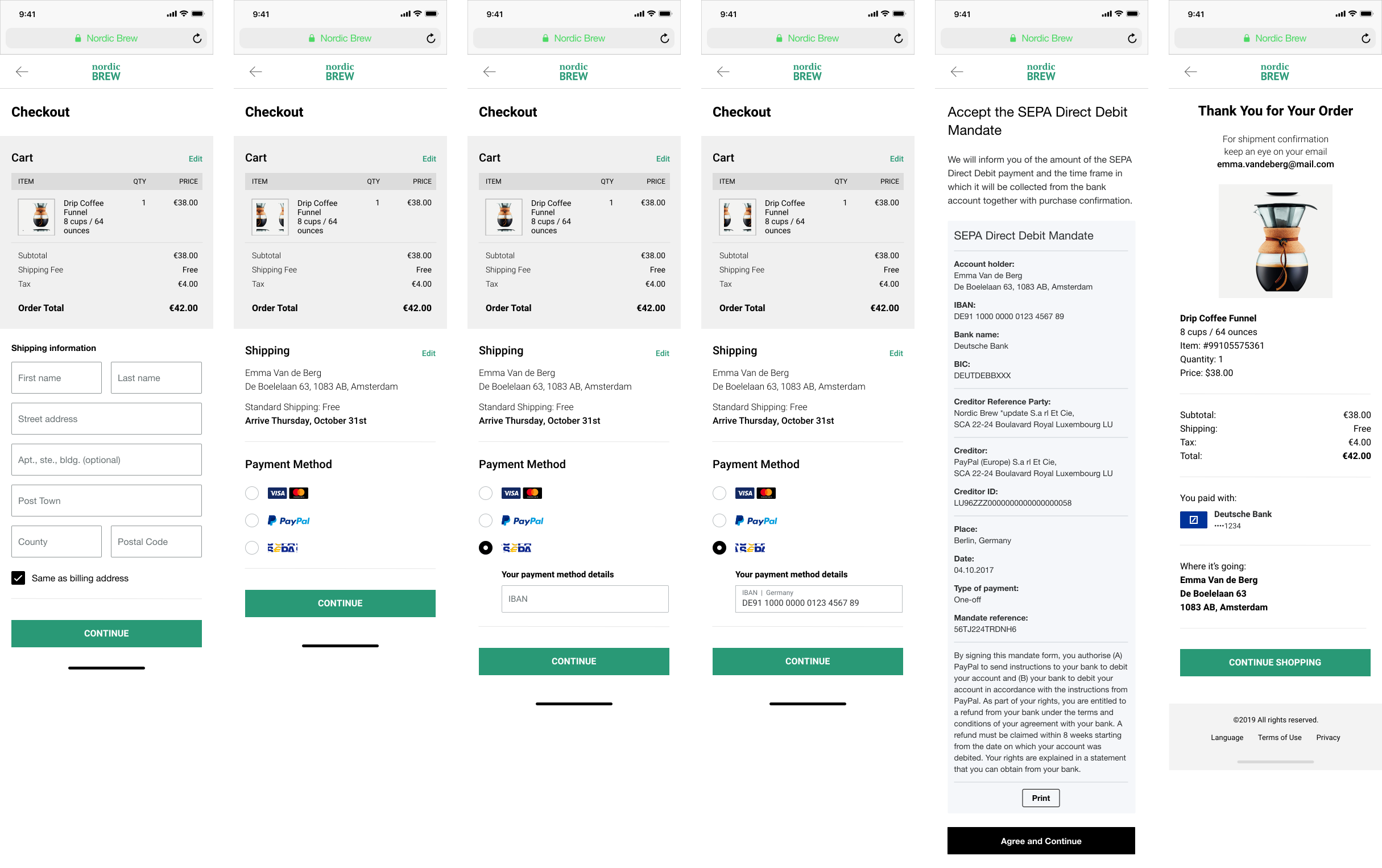
The mandate acceptance flow displays mandates, obtains customer authorization, and stores it.
Transactions usually take 2-3 business days to settle, but with instant settlement, funds should be available immediately after a transaction is completed. The timeframe and details of the settlement process vary between instant and delayed settlement. Currently, only instant settlement is available, but delayed settlement will be available in future product releases.
Customers can dispute any transaction with their bank. Disputes raised within eight weeks of the transaction are automatically honored in alignment with SEPA guidelines. Customers can dispute a transaction as unauthorized after eight weeks, but only up to 13 months.
PayPal Direct Banking Platform's SEPA Direct Debit solution is supported for bank accounts in the following countries
| Austria | Belgium | Cyprus | Estonia |
| France | Germany | Greece | Italy |
| Latvia | Luxembourg | Malta | Netherlands |
| Portugal | Slovakia | Slovenia | Spain |
EUR is the only supported currency.
Merchants can enable SEPA as a payment method in their PayPal Payment Settings. Merchants who have previously onboarded for PPCP Advanced will experience a simplified one-click onboarding process. For other merchants, onboarding will require answering of short questions about their business information.
You'll need to onboard your sellers to use this product.
curl -v -X POST https://api-m.sandbox.paypal.com/v2/customer/partner-referrals \
        -H 'Content-Type: application/json' \
        -H 'Authorization: Bearer ACCESS-TOKEN' \
        -H 'PayPal-Partner-Attribution-ID: BN-CODE' \
        -d '{
          "operations": [
            {
              "operation": "API_INTEGRATION",
              "api_integration_preference": {
                "rest_api_integration": {
                  "integration_method": "PAYPAL",
                  "integration_type": "THIRD_PARTY",
                  "third_party_details": {
                    "features": [
                      "PAYMENT",
                      "REFUND"
                    ]
                  }
                }
              }
            }
          ],
          "products": [
            "PPCP",
            "SEPA"
          ],
          "legal_consents": [
            {
              "type": "SHARE_DATA_CONSENT",
              "granted": true
            }
          ]
}'Before accepting SEPA on your website, verify that your sandbox business account supports it.
Merchants can use the PayPal Developer Dashboard to set up their sandbox accounts to accept SEPA. Partner account integration involves creating a sandbox business account through sandbox.paypal.com. If SEPA is disabled for the account, complete the sandbox onboarding steps to enable it.
If you created a sandbox business account through sandbox.paypal.com and SEPA is disabled, complete the sandbox onboarding steps to enable it.
When your integration is ready to go live, review the Go Live section for additional SEPA onboarding steps.
soft_descriptor.experience_context.locale to set the locale for your customer.INVALID_PARAM_SYNTAX error.To create an order, copy and modify the following code.
API endpoint used: Create Order
curl -v -X POST https://api-m.sandbox.paypal.com/v2/checkout/orders \
        -H 'Content-Type: application/json' \
        -H 'Authorization: Bearer ACCESS-TOKEN' \
        -d '{
          "intent": "CAPTURE",
          "purchase_units": [
            {
              "amount": {
                "currency_code": "EUR",
                "value": "100.00"
              },
              "payee": {
                "email_address": "[email protected]"
              }
            }
          ]
}'After copying the code, modify the following:
ACCESS-TOKEN with your access token.intent to CAPTURE.platform_fees array within the purchase_units to specify fees for the order.To help prevent unauthorized disputes, use the soft_descriptor in the Orders API so payers can recognize the transaction on their statements.
A successful request results in the following:
201 Created status code.Confirm the order by providing the SEPA payment source using IBAN details.
Limited-release API endpoint used: Confirm Payment Source
curl -v -X POST 'https://api-m.sandbox.paypal.com/v2/checkout/orders/6EN97188M64374140/confirm-payment-source' \
        --header 'Content-Type: application/json' \
        --header 'Authorization: Bearer ACCESS-TOKEN' \
        --data '{
          "payment_source": {
            "bank": {
              "sepa_debit": {
                "iban": "FR7618106000321234566666610",
                "account_holder_name": "John Doe",
                "billing_address": {
                  "address_line_1": "23 Rue du Roi de Sicile",
                  "admin_area_1": "Paris",
                  "admin_area_2": "Paris",
                  "postal_code": "75004",
                  "country_code": "FR"
                },
                "attributes": {
                  "mandate": {
                    "type": "ONE_OFF"
                  },
                  "customer": {
                    "merchant_customer_id": "[email protected]"
                  }
                },
                "experience_context": {
                  "locale": "en-FR",
                  "return_url": "https://example.com/returnUrl",
                  "cancel_url": "https://example.com/cancelUrl"
                }
              }
            }
          }
}'A successful request results in the following:
201 Created status code.payment_source as bank.sepa_debit, and payer-action URL in links.payer-action URL to redirect the customer for mandate approval.Redirect the customer to the payer-action URL obtained in the Confirm payment source API response to get the mandate approved.

Upon successful mandate approval, the customer is redirected to the return_url provided in the confirm-payment-source request under experience_context. After successful mandate approval, you can capture the order.
Set up your server to call the Capture Order API:
intent as CAPTURE.PayPal-Partner-Attribution-Id header for reporting and tracking.curl -v -X POST 'https://api-m.sandbox.paypal.com/v2/checkout/orders/6EN97188M64374140/capture' \
--header 'Content-Type: application/json' \
--header 'Authorization: Bearer ACCESS-TOKEN' \
--header 'PayPal-Partner-Attribution-Id: BN-CODE' \
--data '{}'A successful request results in the following:
201 Created status code.SEPA Return Reason Codes - PDF
Any failures to the mandate acceptance (including non-acceptance by the buyer, system errors, or timeouts) will take the customer to the cancel_url provided in the confirm-payment-source request under experience_context. At the cancel URL, a new mandate URL must be requested using the confirm-payment-source API.
Test your SEPA integration in the PayPal sandbox and production environment to ensure your app works correctly.
Use your sandbox login information during checkout to complete a payment using SEPA. Then, log into the sandbox site sandbox.paypal.com to see that the money has moved into your account.
SEPA transactions, fees, and returns data are included in relevant PayPal reports.
SEPA Return reason codes - PDF
The SEPA Direct Debit scheme doesn't guarantee funds, as your customer or their bank can initiate disputes.