On this page
No Headings
Last updated: June 4, 2026
Important: Bill Pay is a limited release product, available only to merchants in the US who have completed an approval process.
To onboard billers to your platform, use the PayPal intake data dictionary. See the sample file for more information.
The onboarding process returns a merchant account ID for each biller. Each transaction must reference the correct merchant account ID for each biller in the transactionInput.
Note: PayPal conducts due diligence on all billers onboarded as MOR per contractual obligations with bank partners. The level of due diligence required depends on several factors, including vertical, legal entity type, and total requested processing volume. A series of automated compliance and underwriting checks run to verify the biller data. Billers who do not pass these automated checks require manual vetting.
For more information about onboarding, refer to the onboarding guide.
You may need to pull funds from a biller's bank account to collect fees due to you or to recoup funds for gross settlement billers. To do so, you need to vault your biller's bank account information. You can use this vaulted bank information to debit a biller through ACH.
Go to ACH Direct Debit Overview to set up vaulting for your biller's bank account.
Follow this flow to set up payment processing:
You can set up payment processing with the following convenience fee models:
| Fee Model 1: Absorbed Fee | Fee Model 2: Convenience Fee in a Split Transaction | Fee Model 3: Convenience Fee in Separate Transactions |
|---|---|---|
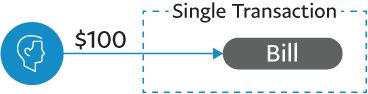 | 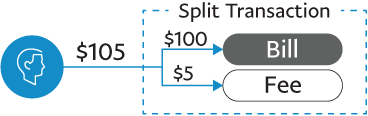 | 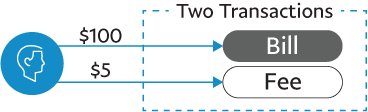 |
| Absorb the fee into the total of a single transaction and collect the fee from the biller through another means. | Recommended Present the fee in a single transaction as a separate line item. The bill settles to the biller account, and the fee settles to your account. | Present two transactions to the consumer: a bill transaction and a fee transaction. The bill transaction moves from the consumer to the biller. The second transaction moves from the consumer to you for the fee amount. |
Use Braintree to set up payment integrations for the payment types your platform supports.
To integrate the branded solution, set up the following:
To integrate the full-stack solution, set up the following:
Note: For both one-time checkout and vaulted payments for PayPal, use the chargePaymentMethod mutation to pass the vault token or the payment nonce.
chargePayPalAccount mutation.Note: For both one-time checkout and vaulted payments for Venmo, use the chargePaymentMethod mutation to pass the vault token or the payment nonce.
chargeVenmoAccount mutation.chargePaymentMethod mutation.For Level 2 data, set the following:
For Level 3 data, set the following:
chargeUsBankAccount mutation.Dynamic descriptors set at the time of transaction are not supported for direct debit transactions. The way banks choose to display soft descriptors varies. Use the following fields to set up descriptions:
| Field | Character limit | Description | Instructions | Example |
|---|---|---|---|---|
| Company name | 16 | Use this descriptor to show the biller name (the company that the payment is processed for). | Set up this field at the time of biller onboarding using NACHA.CompanyName. | My Telephone Co |
| Soft descriptor | 15 | Use this descriptor to add extra detail, such as an account number, to the customer's statement. How banks process information varies, so this information is not guaranteed to appear on the customer's statement. | Set this description at the time of intake using NACHA.SoftDescriptor. | 867-5309 |
| Tax | 10 | Use this field as a short description for the type of bill payment. | Set this field at the time of intake using Nacha.Entry. If the MAID accepts more than one type of payment, use "billpay" as a generic entry code value. | phone bill or billpay |
chargePaymentMethod mutation.To send funds to your billers, set up payouts with HyperWallet.
You can make payments to your biller's bank account by uploading two request files to your SFTP folder. Each day, one federal wires request file and one ACH transactions request file is made for all your billers. Any files uploaded to the folder must follow the proper naming convention.
ReverseTransaction mutation.RefundTransaction mutation.Voids cancel transactions and prevent money from being sent to the ACH network. This ensures that a placed transaction can be reversed without money movement.
Refunds are when the money is processed through ACH like any other transaction. This takes 1-3 days to settle.
The extended ACH voids enhancement maximizes the void window so transactions remain voidable.
For a transaction before 9:15 p.m. ET:
AUTHORIZED or SUBMITTED_FOR_SETTLEMENTSETTLEMENT_PENDING state at 10:00 p.m. ET same daySETTLED state after 12:00 a.m. ET next business day
SETTLEDFor a transaction between 9:15 p.m. and 9:45 p.m. ET:
SETTLEMENT_PENDING state at 10:00 p.m. ET any daySETTLED state after 12:00 a.m. ET next business day
SETTLEDFor transactions on any day after 9:45pm ET:
AUTHORIZED or SUBMITTED_FOR_SETTLEMENTSETTLEMENT_PENDING state at 10:00 p.m. ET the following daySETTLED state after 12:00 a.m. ET next business day
SETTLEDNOTE: You can not void or refund a transaction in SETTLEMENT_PENDING.
Business day and holiday definitions:
In ACH network terms, a business day refers to any weekday that is not a federal holiday as defined by the Federal Reserve. It's the time when the Federal Service settlement is open and actively processing financial transactions.
You can manage disputes with the API.
To get notifications about money-moving disputes, subscribe to the dispute webhooks and the transaction webhooks.