On this page
No Headings
Last updated: June 3, 2026
Once PayPal is enrolled as a valid tender in the wallet, completing a payment using it requires a slightly different process than a standard payment. The app must first retrieve the clientMetadataID directly from Braintree and pass the value in the transaction call to secure payment approval.
Note: For iOS devices, the app must also parse the serialized CMID object returned by Braintree to isolate the correlation_id value before submitting with the payment call.
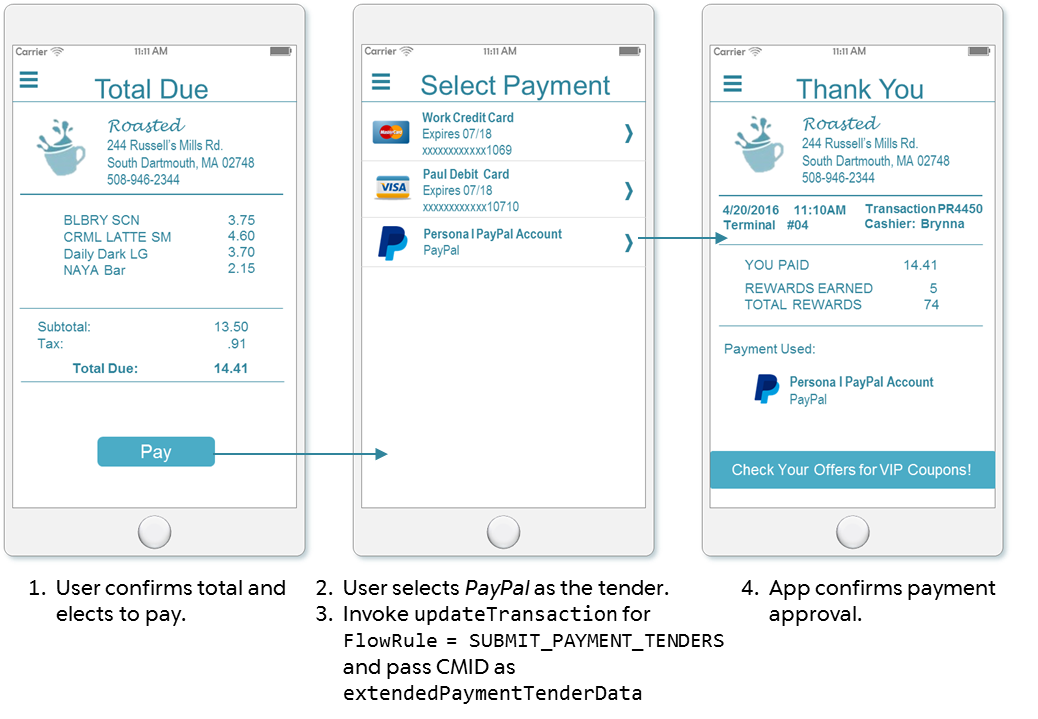
Figure 5: Payment screen flow
As Figure 5 illustrates, the screen flow in the app for a payment made using PayPal is unaffected by the additional processing step. Figure 6 shows the specific points of integration for this flow.
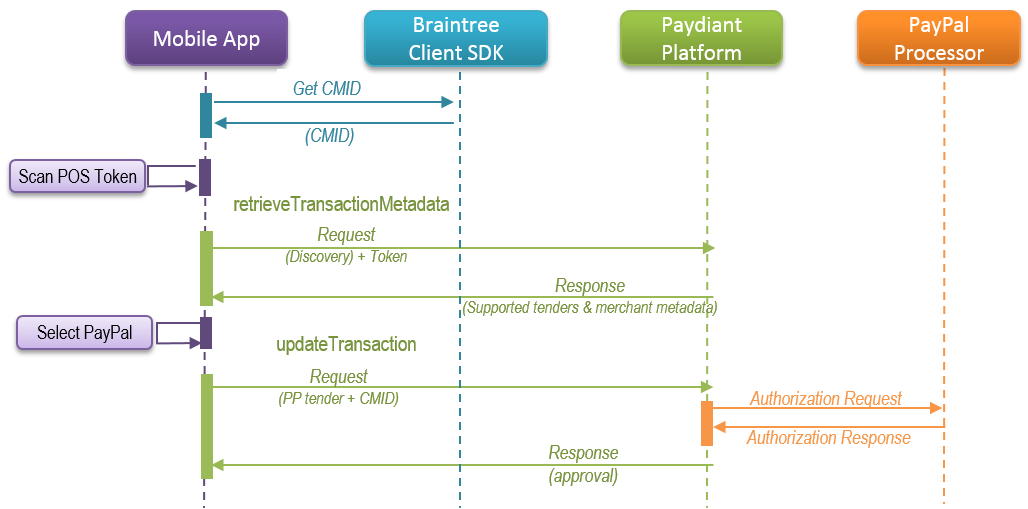
Figure 6: Payment sequence diagram
Follow your usual transaction flow up to the point when the app user selects PayPal as the tender for the transaction. Then invoke the following process to submit a payment request using PayPal as the tender.
Retrieve the clientMetadataID value for use in the payment call by including the following definition in your payment processing fragment:
| OS | Command |
|---|---|
| iOS | NSString *CMID = [PPDataCollector collectPayPalDeviceData]; |
| Android | String clientToken = DataCollector.getPayPalClientMetadataId(getActivity()); |
Note: The call to the Braintree SDK to obtain the CMID can be invoked at any time. Securing the CMID at the beginning of the transaction (as shown in Figure 6) may benefit performance during the transaction, while waiting until after discovery (as in this procedure) may save obtaining the value unnecessarily should the user not select PayPal as the tender.
iOS ONLY Parse the returned string to extract only the value portion of the correlation_id element contained in the string.
NSDictionary *jsonDict = [NSJSONSerialization JSONObjectWithData:[CMID_Json dataUsingEncoding:NSUTF8StringEncoding] options:0 error:&error];
NSString *CMID = jsonDict[@"correlation_id"];| OS | Command |
|---|---|
| iOS | updateTransaction:(PDUpdateTransactionRequest *)request |
| Android | updateTransaction(TransactionParameters transactionParameters) |
Within each of the parameter objects, the following data must be passed:
| Property | Description |
|---|---|
checkoutToken | Required String The decoded value of the scanned QRCode, which uniquely identifies the transaction in the platform. |
transactionKey | Required String WLW's unique identifier for the transaction. |
executingTransactionFlowRule | Required Enum An enum value that specifies the current step of the transaction. Set the value to PROCESS_PAYMENT for this instance. |
extendedPaymentInstruments | Object The PDExtendedPaymentInstrument instance that represents the user's registered PayPal tender in the wallet. This instance MUST include the following PDExtendedPaymentTenderData key-value attribute: key = "CLIENT_METADATA_ID" value = the previously collected CMID ( correlation_id for iOS) value. |
Note: Do NOT include the paymentAccounts attribute in the PDUpdateTransactionRequest instance when extendedPaymentInstruments attribute is populated. The two attributes are mutually exclusive and if paymentAccounts exists, extendedPaymentInstruments data will be ignored and the CMID will not be passed, causing the payment to fail.
Implement the device OS-specific WLW SDK callback to handle the success response.
| OS | Command |
|---|---|
| iOS | updateTransactionCompletionBlock:(PDUpdateTransactionResponse *)response |
| Android | onUpdateTransactionSuccess (TransactionResponse transactionResponse) |
The success response will contain information related to the processing of the payment and the final transaction details, including the relevant payment status information from PayPal, if applicable.
Implement the device OS-specific WLW SDK callback to handle the failure response.
| OS | Command |
|---|---|
| iOS | updateTransactionFailureBlock:(PDPaydiantError *transactionError); |
| Android | onTransactionFlowManagementError (PaydiantException exception) |
The failure response returns the status code and message indicating the high-level cause of failure, such as 400 BAD_REQUEST. If applicable, the response will include supplemental error information tailored to the relevant domain, such as 416 – Transaction canceled by POS.
Note: Refer to WLW's OS-specific SDK guides for complete error information related to this call.
// Filter payment account display to show only valid tender for the merchant.
if (self.eligiblePaymentAccounts.count > 0) {
    if(response.nextExecutingTransactionFlowRule == kPDTransactionFlowRuleProcessPayment || response.nextExecutingTransactionFlowRule == kPDTransactionFlowRuleSubmitPaymentTenders) {
        self.currentUpdateTransactionRequest.executingTransactionFlowRule = response.nextExecutingTransactionFlowRule;
        if(response.nextTransactionFlowRuleSpecification.expectsPaymentTenders) {
            [self displayEligiblePaymentAccounts];
        }

        // When PayPal is selected, get the CMID, extract the correlation_id, and populate the
        // extendedPaymentInstrument instance.
        - (void)continueTransactionWithPayPal:(PDPaymentAccount *)payPalAccount {
            NSString *CMID_Json = [PPDataCollector collectPayPalDeviceData];
            NSError *error;
            NSDictionary *jsonDict = [NSJSONSerialization JSONObjectWithData:[CMID_Json dataUsingEncoding:NSUTF8StringEncoding] options:0 error:&error];
            NSString *CMID = jsonDict[@"correlation_id"];
            PDExtendedPaymentInstrument *extendedPaymentInstrument = [PDExtendedPaymentInstrument new];
            extendedPaymentInstrument.paymentAccountUri = payPalAccount.accountIdentifier.accountUri;
            PDExtendedPaymentTenderData *extendedPaymentTenderData = [PDExtendedPaymentTenderData new];
            extendedPaymentTenderData.extendedPaymentTenderDataKey = @"CLIENT_METADATA_ID";
            extendedPaymentTenderData.extendedPaymentTenderDataValue = CMID;
            extendedPaymentInstrument.extendedPaymentTenderData = [NSArray arrayWithObject:extendedPaymentTenderData];
            NSArray *paymentInstruments = [NSArray arrayWithObject:extendedPaymentInstrument];
            self.currentUpdateTransactionRequest.extendedPaymentInstruments = paymentInstruments;
            [self updateTransaction];
        }

        // Complete the transaction and get the receipt details.
        PDTransactionCoordinator *transactionCoordinator = [[PDTransactionCoordinator alloc] init];
        [transactionCoordinator updateTransaction:self.currentUpdateTransactionRequest completionBlock:^(PDUpdateTransactionResponse *response) {
                [CommonUtil hideProgressIndicatorOnView:self];
                [self getLastTransactionReceipt];
                self.displayCodeView.hidden = YES;
                self.scanView.hidden = YES;
                self.releaseTokenBTN.hidden = YES;
            }
        }
    }
}if (transactionMetaDataResponse.getNextExecutingFlowRule().equals(TransactionFlowRule.PROCESS_PAYMENT)) {
TransactionParameters transactionParameters = new TransactionParameters();
for (TransactionFlowRuleSpecification flowRuleSpecification: transactionMetaDataResponse.getTransactionFlowRuleSpecifications()) {
if (flowRuleSpecification.getTransactionFlowRule().equals(transactionMetaDataResponse.getNextExecutingFlowRule())) {
// Some offers and loyalty logic omitted.
if (flowRuleSpecification.isExpectsPaymentTenders()) {
if (extendedPaymentInstrumentsList != null && extendedPaymentInstrumentsList.size() > 0) {
final String clientToken = DataCollector.getPayPalClientMetadataId(getActivity());
List <
AdditionalData >
additionalDatas = new ArrayList < >
();
AdditionalData additionalData = new AdditionalData();
additionalData.setKey("CLIENT_METADATA_ID");
additionalData.setValue(clientToken);
additionalDatas.add(additionalData);
Log.v(TAG, "CLIENT_METADATA_ID: " + clientToken);
ExtendedPaymentInstrument extendedInstrument = new ExtendedPaymentInstrument();
extendedInstrument.setExtendedPaymentTenderData(additionalDatas);
extendedInstrument.setPaymentAccountUri(paymentAccountMap.get(data.getStringExtra("tender")));
List <
ExtendedPaymentInstrument >
extendedInstrumentList = new ArrayList <
ExtendedPaymentInstrument >
();
extendedInstrumentList.add(extendedInstrument);
}
}
}
transactionParameters.setExtendedPaymentInstruments(extendedInstrumentList);
transactionParameters.setCheckoutToken(transactionMetaDataResponse.getCheckoutToken());
transactionParameters.setTransactionKey(transactionMetaDataResponse.getTransactionKey());
transactionParameters.setExecutingFlowRule(TransactionFlowRule.PROCESS_PAYMENT);
transactionParameters.setCustomerConfirmationForPOSRequestedPayments(false);
transactionFlowManagementService.updateTransaction(transactionParameters);
}
// Configure the response callbacks and complete the transaction.
if (transactionResponse.getTransactionStatus().equals(TransactionStatus.CLOSED)) {
AlertDialog.Builder alert = new AlertDialog.Builder(getActivity());
alert.setPositiveButton(getString(R.string.button_label_ok), new DialogInterface.OnClickListener() {
@Override
public void onClick(DialogInterface dialog, int which) {
Intent receiptIntent = new Intent(getActivity(), PaymentReceiptActivity.class);
Bundle bundle = new Bundle();
bundle.putString(PaymentReceiptActivity.ARG_REF_ID, transactionResponse.getTransactionKey().getPaydiantReferenceId());
receiptIntent.putExtras(bundle);
startActivity(receiptIntent);
}
});
alert.setTitle("Success");
alert.setMessage("You paid" + transactionResponse.getTransactionDetail().getCurrentPaymentResult().getCurrencyCode() +
" " + transactionResponse.getTransactionDetail().getCurrentPaymentResult().getPaidOrRefundAmount());
alert.show();
} else {
AlertDialog.Builder alert = new AlertDialog.Builder(getActivity());
alert.setPositiveButton(getString(R.string.button_label_ok), null);
alert.setTitle("Error");
alert.setMessage("payment error");
alert.show();
}
}When the PayPal tender is used as the payment source for a purchase, PayPal requires merchants issuing email notifications, printed receipts, or e-receipts to include the following information on the receipt for all purchases, returns, and voids:
Adhere to the minimum PayPal receipt requirements. WLW best practice also recommends that you include the unmasked user identifier and the PayPal customer email on all printed receipts, mobile transaction summary screens, and history screens.
To obtain the property values returned by PayPal upon payment authorization on a printed receipt:
Review the updateTransaction:SUBMIT_TICKET response at the completion of the transaction to determine whether PayPal was used as a tender. If any of the transactionDetails » processedPaymentResults » paymentInstrumentUri values include the suffix #PayPal, the receipt must show the authorization ID.
In the same updateTransaction:SUBMIT_TICKET response, capture the following custom property values passed in the transactionDetails » processedPaymentResults » posReceivedMetaData:
EXTERNAL_TRANSACTION_ID is the authorization ID.CUSTOMER_PAYER_ID is the PayPal user identifier.CUSTOMER_PAYER_EMAIL is the PayPal user account.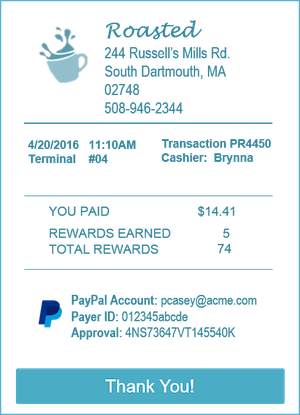
To obtain the PayPal details for inclusion on the payment confirmation and history screens for transactions where PayPal is a tender:
Review the updateTransaction (PROCESS_PAYMENT) response at the completion of the transaction to determine whether PayPal was used as a tender. If any of the transactionDetails » paymentResults » paymentInstrument » paymentAccountUri values include the suffix #PayPal, add the approval data to the receipt.
In the same updateTransaction (PROCESS_PAYMENT) response, capture the following custom property values passed in the transactionDetails » paymentResult » receiptMetadata:
EXTERNAL_TRANSACTION_ID is the authorization ID.CUSTOMER_PAYER_ID is the PayPal user identifier.CUSTOMER_PAYER_EMAIL is the PayPal user account.Note: For fuel transactions, these required property values are returned in the transactionMetaDataResponse.transactionDetail.currentPaymentRessult.receiptMetaData object.