MB WAY
Last updated: September 14, 2026
BETA
Copy / Export
MB WAY is a local payment method that a customer can use to place an order and then complete the payment with their MB WAY mobile digital wallet app.
| Countries | Payment type | Payment flow | Currencies | Maximum amount | Refunds |
|---|---|---|---|---|---|
Portugal (PT) | wallet | redirect | EUR | N/A | Within 395 days |
How it works
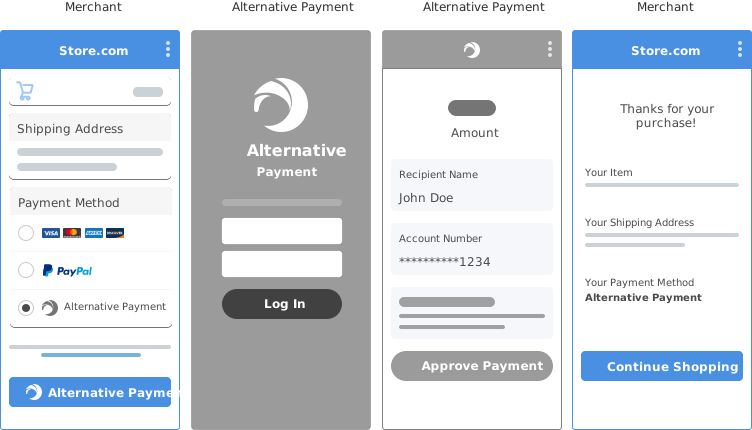
- Your checkout page offers alternative payment methods.
- Buyer provides their personal details and selects an alternative payment method from your checkout page.
- Buyer is transferred from your checkout page to the third-party bank to confirm the purchase.
- Buyer authorizes and confirms payment.
- Buyer returns to your site to see confirmation of purchase.
- Merchant initiates completion of payment. PayPal moves the funds to the merchant. Transaction shows in your PayPal account with the payment method the buyer used.
Eligibility
- Available to merchants globally, except in Russia, Japan, and Brazil.
- Billing agreements, multiple seller payments, and shipping callback aren't supported.
- Support for order capture only (order authorize is not supported). See authorized and captured payments.
- Chargebacks aren't supported.
- Transaction must be an online purchase (buy online, pay in store is not supported).
Know before you code
-
Request approval to enable MB WAY by visiting these Sandbox and Live links:
- Sandbox: https://www.sandbox.paypal.com/bizsignup/entry?product=mb_way&capabilities=MB_WAY&country.x=<merchants' country>
- Live: https://www.paypal.com/bizsignup/entry?&country.x=<merchants' country>
-
For Partners: Be sure to onboard your merchants before they accept payments (upfront). Onboarding after making payments, specifically Progressive Onboarding, is not supported for APMs.
-
The steps to implementing all alternative payment methods using the Orders V2 REST API are similar. If you've implemented an alternative payment method previously, you can likely use that code and adjust it for the specific differences for MB WAY.
-
Make sure you're subscribed to the following webhook events:
- The
PAYMENT.CAPTURE.COMPLETEDwebhook event indicates a successful order capture. - The
PAYMENT.CAPTURE.DENIEDwebhook event indicates a failed order capture.
- The
Upon receiving each webhook, fetch the latest order details using Show order details. The up HATEOAS link in the webhook payload indicates the order associated with the capture.
- When processing MB WAY payments, capture payment for order is not required.
1. Offer MB WAY on your checkout page
You'll need to create the user interface to offer MB WAY and collect the buyer's full name and phone number. Then you'll use the API calls described in the remainder of this topic to:
- Create the order with MB WAY as the payment method and the buyer's
full name,country_code, andphone. - The buyer receives a notification in the MB WAY mobile app to complete the payment.
- (Optional)
brand_nameis supported in create order.
Refer to Payment method icons for available icons and download locations.
2. Create an order with MB WAY as the payment source
Use the buyer information you captured from your user interface to create an order with MB WAY as the payment source.
Sample request
API endpoint used: Create order
curl --location --request POST 'https://api-m.sandbox.paypal.com/v2/checkout/orders' \
--header 'Content-Type: application/json' \
--header 'Authorization: Bearer <Access-Token>' \
--header 'PayPal-Request-Id: <PayPal-RequestId>' \
--data-raw '{
    "intent": "CAPTURE",
    "payment_source": {
        "mbway": {
            "country_code": "PT",
            "name": "Firstname Lastname",
            "phone": {
              "national_number": "1234567890",
              "country_code": "351"
            },
            "experience_context": {
              "brand_name": "brand name override"
            }
        }
    },
    "processing_instruction": "ORDER_COMPLETE_ON_PAYMENT_APPROVAL",
    "purchase_units": [
        {
            "reference_id": "d9f80740-38f0-11e8-b467-0ed5f89f718b",
            "amount": {
                "currency_code": "EUR",
                "value": "100.00"
            }
        }
    ]
}'
Modify the code
After you copy the code in the sample request, modify the following:
Access-Token- Your access token.PayPal-Request-Id- Replace the sample ID with a unique ID you generate. This ID helps prevent duplicate authorizations in the event that the API call is disrupted. See also: API idempotency.intent- This parameter must be set toCAPTUREas it is in this sample code.payment_source- Specify the following:mbwayas thepayment_sourceand include thecountry_code.- buyer's full name in the
namefield. - buyer's phone number associated with MB WAY in the
national_numberfield and country code in thecountry_codefield. experience_context- Specify the brand name in thebrand_namefield.
processing_instruction- Set this value toORDER_COMPLETE_ON_PAYMENT_APPROVALas it is in this sample code.purchase_units: amount- Pass the amount of the order and the currency code.reference_id- Provide the ID for the purchase unit.
Note: Change or add other parameters in the Create order request body to create an order that reflects the actual order details.
Step result
A successful request results in the following:
- A return status code of HTTP
200 OK. - A JSON response body that contains the order ID. You'll use the order ID and
payer-actionHATEOAS URL in the next step. See also: HATEOAS links.
Sample response
{
    "id": "5V159329PV571861D",
    "status": "PAYER_ACTION_REQUIRED",
    "payment_source": {
        "mbway": {
            "name": "Firstname Lastname",
            "country_code": "PT"
        }
    },
    "links": [
        {
            "href": "https://api-m.sandbox.paypal.com/v2/checkout/orders/5V159329PV571861D",
            "rel": "self",
            "method": "GET"
        }
    ]
}
3. No redirection of buyer to approve purchase
MB Way sends a push notification directly to the buyer's mobile app. The buyer stays on your website while approving the transaction in the mobile app, and no redirection action is required. After the buyer approves the purchase, the payment is automatically captured.
4. Listen to webhooks to get the result of payment status
Listen to the following webhooks to get the result of order capture:
- The
PAYMENT.CAPTURE.COMPLETEDwebhook event indicates a successful order capture. - The
PAYMENT.CAPTURE.DENIEDandCHECKOUT.PAYMENT-APPROVAL.REVERSEDwebhook events indicate a failed order capture. - Optional: Use the Show order details endpoint to determine the status of an order.
- The
upHATEOAS link indicates the order associated with this capture.
- The
See Subscribe to checkout webhooks for more information.
Here are some additional resources as you create webhook handler code:
- Webhook Management API - Manage webhooks, list event notifications, and more.
- Webhook events
- Checkout webhook events - Checkout buyer approval-related webhooks.
- Order webhook events - Other order-related webhooks.
- Show order details endpoint - Determine the status of an order.
Sample PAYMENT.CAPTURE.COMPLETED webhook
{
  "id": "WH-9LK14475MF9937440-9EG47645TP521822L",
  "event_version": "1.0",
  "create_time": "2022-05-10T06:04:12.533Z",
  "resource_type": "capture",
  "resource_version": "2.0",
  "event_type": "PAYMENT.CAPTURE.COMPLETED",
  "summary": "Payment completed for EUR 100.0 EUR",
  "resource": {
    "amount": {
      "value": "100.00",
      "currency_code": "EUR"
    },
    "supplementary_data": {
      "related_ids": {
        "order_id": "5V159329PV571861D"
      }
    },
    "update_time": "2022-01-19T06:04:08Z",
    "create_time": "2022-01-19T06:04:08Z",
    "final_capture": true,
    "seller_receivable_breakdown": {
      "paypal_fee": {
        "value": "3.80",
        "currency_code": "EUR"
      },
      "gross_amount": {
        "value": "100.00",
        "currency_code": "EUR"
      },
      "net_amount": {
        "value": "96.20",
        "currency_code": "EUR"
      }
    },
    "custom_id": "Custom-1234",
    "invoice_id": "Invoice-12345",
    "links": [
      {
        "method": "GET",
        "rel": "self",
        "href": "https://api-m.sandbox.paypal.com/v2/payments/captures/5R102774VL663561J"
      },
      {
        "method": "POST",
        "rel": "refund",
        "href": "https://api-m.sandbox.paypal.com/v2/payments/captures/5R102774VL663561J/refund"
      },
      {
        "method": "GET",
        "rel": "up",
        "href": "https://api-m.sandbox.paypal.com/v2/checkout/orders/5V159329PV571861D"
      }
    ],
    "id": "5R102774VL663561J",
    "status": "COMPLETED"
  },
  "links": [
    {
      "href": "https://api-m.sandbox.paypal.com/v1/notifications/webhooks-events/WH-9LK14475MF9937440-9EG47645TP521822L",
      "rel": "self",
      "method": "GET"
    },
    {
      "href": "https://api-m.sandbox.paypal.com/v1/notifications/webhooks-events/WH-9LK14475MF9937440-9EG47645TP521822L/resend",
      "rel": "resend",
      "method": "POST"
    }
  ]
}
Note: The order ID from Step 2 should match the resource.supplementary_data.related_ids.order_id parameter in the webhook payload.
Sample PAYMENT.CAPTURE.DENIED webhook
{
  "id": "WH-9LK14475MF9937440-9EG47645TP521822L",
  "event_version": "1.0",
  "create_time": "2022-05-10T06:04:12.533Z",
  "resource_type": "capture",
  "resource_version": "2.0",
  "event_type": "PAYMENT.CAPTURE.DENIED",
  "summary": "Payment denied for EUR 100.0 EUR",
  "resource": {
    "amount": {
      "value": "100.00",
      "currency_code": "EUR"
    },
    "supplementary_data": {
      "related_ids": {
        "order_id": "5V159329PV571861D"
      }
    },
    "update_time": "2022-05-10T06:04:08Z",
    "create_time": "2022-05-10T06:04:08Z",
    "final_capture": true,
    "seller_receivable_breakdown": {
      "paypal_fee": {
        "value": "3.80",
        "currency_code": "EUR"
      },
      "gross_amount": {
        "value": "100.00",
        "currency_code": "EUR"
      },
      "net_amount": {
        "value": "96.20",
        "currency_code": "EUR"
      }
    },
    "links": [
      {
        "method": "GET",
        "rel": "self",
        "href": "https://api-m.sandbox.paypal.com/v2/payments/captures/5R102774VL663561J"
      },
      {
        "method": "POST",
        "rel": "refund",
        "href": "https://api-m.sandbox.paypal.com/v2/payments/captures/5R102774VL663561J/refund"
      },
      {
        "method": "GET",
        "rel": "up",
        "href": "https://api-m.sandbox.paypal.com/v2/checkout/orders/5V159329PV571861D"
      }
    ],
    "id": "5R102774VL663561J",
    "status": "DECLINED"
  },
  "links": [
    {
      "href": "https://api-m.sandbox.paypal.com/v1/notifications/webhooks-events/WH-9LK14475MF9937440-9EG47645TP521822L",
      "rel": "self",
      "method": "GET"
    },
    {
      "href": "https://api-m.sandbox.paypal.com/v1/notifications/webhooks-events/WH-9LK14475MF9937440-9EG47645TP521822L/resend",
      "rel": "resend",
      "method": "POST"
    }
  ]
}
Note: The order ID from Step 2 should match the resource.supplementary_data.related_ids.order_id parameter in the webhook payload.
Alternatively, you can get the order capture result from the Show order details endpoint.
Important: Exercise caution when polling for order capture result using the Show order details endpoint. PayPal enforces rate limits on API requests.
Sample request
curl -v -X GET https://api-m.sandbox.paypal.com/v2/checkout/orders/5V159329PV571861D \
 -H "Content-Type: application/json" \
 -H "Authorization: Bearer <Access-Token>"
Sample response
{
  "id": "5V159329PV571861D",
  "intent": "CAPTURE",
  "status": "COMPLETED",
  "payment_source": {
    "mbway": {
      "name": "Firstname Lastname",
      "country_code": "PT"
    }
  },
  "processing_instruction": "ORDER_COMPLETE_ON_PAYMENT_APPROVAL",
  "purchase_units": [
    {
      "reference_id": "default",
      "amount": {
        "currency_code": "EUR",
        "value": "100.00"
      },
      "payments": {
        "captures": [
          {
            "id": "5R102774VL663561J",
            "status": "COMPLETED",
            "amount": {
              "currency_code": "EUR",
              "value": "100.00"
            },
            "final_capture": true,
            "seller_receivable_breakdown": {
              "gross_amount": {
                "currency_code": "EUR",
                "value": "100.00"
              },
              "paypal_fee": {
                "currency_code": "EUR",
                "value": "3.80"
              },
              "net_amount": {
                "currency_code": "EUR",
                "value": "96.20"
              }
            },
            "links": [
              {
                "href": "https://api-m.sandbox.paypal.com/v2/payments/captures/5R102774VL663561J",
                "rel": "self",
                "method": "GET"
              },
              {
                "href": "https://api-m.sandbox.paypal.com/v2/payments/captures/5R102774VL663561J/refund",
                "rel": "refund",
                "method": "POST"
              },
              {
                "href": "https://api-m.sandbox.paypal.com/v2/checkout/orders/5V159329PV571861D",
                "rel": "up",
                "method": "GET"
              }
            ]
          }
        ]
      }
    }
  ],
  "links": [
    {
      "href": "https://api-m.sandbox.paypal.com/v2/checkout/orders/5V159329PV571861D",
      "rel": "self",
      "method": "GET"
    }
  ]
}
Step result
A successful request returns the HTTP 200 OK status code with a JSON response body that returns a COMPLETED status.
A successfully captured order has the following:
- The order status as
COMPLETED, which means the order was captured successfully. - A capture with
COMPLETEDstatus is present in the response parameterpurchase_units[0].payments.captures[0]. - The
upHATEOAS link indicates the order associated with this capture.
4. Notify buyer of success
After a successful payment, notify the buyer of a successful transaction. You can do this by sending a confirmation email.
Next steps
Use these buyer phone numbers to simulate the failure scenarios in the PayPal sandbox environment.
| Scenario | Buyer phone national_number |
|---|---|
The phone number provided is not associated with MB WAY | 111111111 |
The buyer has canceled/denied the payment | 222222222 |
Any buyer phone number not listed in the table will simulate a successful scenario in the PayPal sandbox environment.