Pass line-item details
Last updated: October 14, 2026
Copy / Export
You can pass the details of the items a buyer purchases, to PayPal, through the Create order request. When a buyer checks out their purchase, PayPal displays these invoice-line-item details, such as the item name, quantity, detailed description, price, for buyer verification.
Buyer experience
The details you pass to PayPal are presented to the buyer:
- On the PayPal review page during the Pay with PayPal flow.
- In the post-purchase email sent to the buyer about their payment transaction.
- In the buyer's PayPal account Activity > Transactions > All transactions section.
Displaying the purchase details:
- Enhances buyer experience.
- Provides greater transparency and increases conversion.
- Minimizes disputes as buyers can verify the specifics of their purchase.
- Enhances dispute management by providing merchants with specifics about the disputed item.
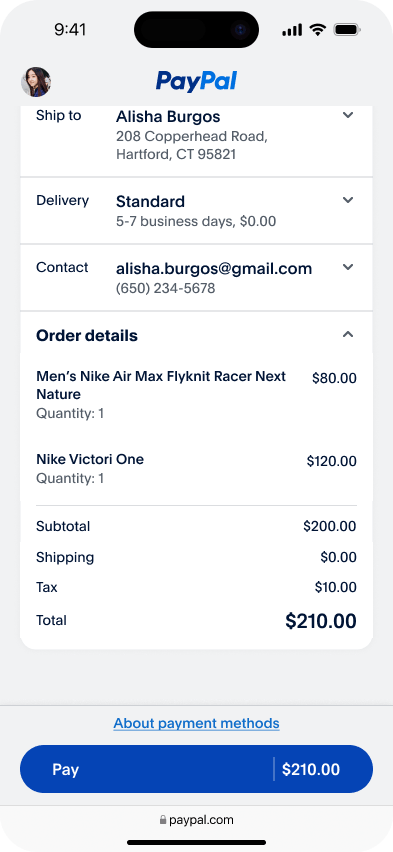
The following image shows a PayPal review page with the line-item details.
How it works
- Pass the buyer's purchase details to PayPal. PayPal displays these details on the PayPal review page for buyer verification.
- [Optional] Confirm whether the PayPal review page details match the details in your system.
- Handle buyer updates to the shipping addresses or options that modify line-items.
- Handle buyer updates to the purchases before you capture the order and complete payment processing.
1. Create an order and pass line-item details
In your app code, when you Create an Order, as part of the request body,
- Send the line-item details in the
purchase_units[].items[]array. If multiple line items exist, send multipleitemobjects in the array. Use the following attributes:-
name(Required): Name of the purchased item. The number of characters allowed for this attribute is between 1 and 127. -
quantity(Required): Quantity of the item, specified as a whole number. -
unit_amount(Required): Price or rate for a single unit of item, specified as an object with two keys -currency_codeandvalue.Note: Ensure to enter a valid value for
purchase_units[].amount.breakdown.item_total. -
description: Detailed item description. The maximum number of characters allowed for this attribute is 2048. -
sku: Stock keeping unit (SKU) for the item. -
url: URL to the purchased item. Visible to buyer and used in buyer experiences. -
category: Item category type. Possible values: DIGITAL_GOODS, PHYSICAL_GOODS, DONATION -
image_url: URL of the item's image. File type and size restrictions apply. An image that violates these restrictions will not be honored. -
tax: The item tax for each unit, specified as an object.Note: If
taxis specified, ensure to enter a valid value forpurchase_units[].amount.breakdown.tax_total. The value oftax_totalmust be the sum ofitems[].tax * items[].quantityfor all items.
-
- Send additional details, such as the total amount breakdown in
purchase_units[].amount.breakdown.
After a successful processing of the Create order request and subsequent buyer log-in, PayPal displays the line-item details on a PayPal review page for buyer verification.
Sample request
curl -v -X POST https://api-m.sandbox.paypal.com/v2/checkout/orders \
-H 'Content-Type: application/json' \
-H 'PayPal-Request-Id: REQUEST-ID' \
-H 'Authorization: Bearer ACCESS-TOKEN' \
-d '{
  "intent": "CAPTURE",
  "purchase_units": [
    {
      "invoice_id": "90210",
      "items": [
        {
          "name": "T-Shirt",
          "description": "Super Fresh Shirt",
          "unit_amount": {
            "currency_code": "USD",
            "value": "20.00"
          },
          "quantity": "1",
          "category": "PHYSICAL_GOODS",
          "sku": "sku01",
          "image_url": "https://example.com/static/images/items/1/tshirt_green.jpg",
          "url": "https://example.com/url-to-the-item-being-purchased-1",
          "upc": {
            "type": "UPC-A",
            "code": "123456789012"
          },
          "tax": {
            "currency_code": "USD",
            "value": "10.00"
            }
        },
        {
          "name": "Shoes",
          "description": "Running, Size 10.5",
          "sku": "sku02",
          "unit_amount": {
            "currency_code": "USD",
            "value": "100.00"
          },
          "quantity": "2",
          "category": "PHYSICAL_GOODS",
          "image_url": "https://example.com/static/images/items/1/shoes_running.jpg",
          "url": "https://example.com/url-to-the-item-being-purchased-2",
          "upc": {
            "type": "UPC-A",
            "code": "987654321012"
          },
          "tax": {
            "currency_code": "USD",
            "value": "5.00"
          }
        }
      ],
      "amount": {
            "currency_code": "USD",
            "value": "230.00",
            "breakdown": {
                "item_total": {
                  "currency_code": "USD",
                  "value": "220.00"
                },
                "shipping": {
                  "currency_code": "USD",
                  "value": "10.00"
                },
               "tax_total": {
          	   "currency_code": "USD",
          	   "value": "20.00"
        	 }
              }
           }
        }
     ]
  }'
2. [Optional] Retrieve line-item details
To confirm whether the line-item(s) details with PayPal match the details in your system, you can use the Show order details API request to retrieve the details in an order and verify them.
Note: In the request, ensure to specify the order ID of the order (whose details you want to retrieve), as the path parameter.
curl -v -X GET https://api-m.sandbox.paypal.com/v2/checkout/orders/ORDER-ID \
-H 'Authorization: Bearer ACCESS-TOKEN'
3. Handle shipping updates that modify line-items
Note: This step is valid only if you implement Shipping callback.
During the Pay with PayPal flow, if the buyer modifies the shipping address or shipping options and if these changes impact the items that can be delivered to the buyer, use the Shipping callback update to update the line items in the order.
4. Handle buyer updates to line-items
After payment approval from the buyer, the line-items may require modification, due to:
- Purchase changes that the buyer makes after verifying the paysheet.
- Changes on your website before capturing the order.
To update the line-item details, in your app code, use the Update order details API request.
In the request, be sure to:
- Specify the order ID of the order (whose details you want to update), as the path parameter.
- Pass the following attribute values:
op: Operation to be performed on the line item. Possible values: add, remove, replace.value: Value of the item to be added or replaced. Required ifopisaddorreplace.
Sample request
curl -v -X PATCH https://api-m.sandbox.paypal.com/v2/checkout/orders/ORDER-ID \
-H 'Content-Type: application/json' \
-H 'Authorization: Bearer ACCESS-TOKEN' \
-d '[
  {
    "op": "replace",
    "path": "/purchase_units/@reference_id=='default'/items/quantity ",
    "value": 2
  }
]'