Browser support
Last updated: October 14, 2026
JavaScript SDK v5
Copy / Export
This topic lists browsers and browser features that provide the best payment experience with the JavaScript SDK. For browsers not listed, the payment buttons could continue work, but compatibility is not guaranteed.
Supported browsers by platform
| Desktop | Mobile |
|---|---|
| Chrome version 41 and later | Chrome version 41 and later |
| Firefox version 43 and later | Firefox version 15 and later |
| Safari version 8 and later | Safari version 9 and later |
| Opera version 12 and later | Samsung Internet Browser 8.2 and later |
| Edge version 14 and later | Silk Browser 72 and later |
See additional considerations for Internet Explorer and Edge.
Browser features and polyfills
The JavaScript SDK works as a standalone script, with no strict requirement for installing polyfills. However, if you use features such as fetch or Promise in your integration to call your server or run asynchronous tasks, you might need to install a polyfill to allow your app to work in older browsers.
Content security policy rules
The payment buttons rely on rendering style and script tags on the page inside the button iframe. These tags might be blocked by your Content Security Policy rules. To avoid this:
-
Send a nonce for both script-src and style-src directives:
Content-Security-Policy: script-src 'nonce-xyz123'; style-src 'nonce-xyz123'; -
Pass the nonce to the JavaScript SDK:
<script src="https://www.paypal.com/sdk/js?client-id=test" data-csp-nonce="xyz-123">
Web views
- If your site loads in a third-party web view, for example, if a buyer views your store after clicking a link on a social media mobile app, the payment buttons continue to work.
- PayPal recommends against loading your own site in a web view. This integration style is unsupported.
Popup blockers
The checkout experience is designed to launch in a popup window. The payment buttons continue to work if popup blockers are active. However, PayPal recommends that you do not use popup blockers with this integration.
Internet Explorer and Edge
A payment integration won't function correctly in the intranet or trusted modes of Internet Explorer or Edge. These modes prevent the script from interfacing with iframes and popup windows, central components of the JavaScript SDK.
Will intranet/trusted mode affect me?
If you are a customer browsing an online store in Internet Explorer or Edge, intranet or trusted mode is normally not enabled.
The only time intranet or trusted mode is enabled and causes problems is when all of the following are true:
- You are an employee of a company.
- You are browsing on a domain owned by that company.
- You are browsing on Internet Explorer or Edge.
- You are using a corporate device.
- Your company has a policy which automatically adds the site to intranet or trusted mode.
The most effective way to test whether intranet mode affects your customers is to try using the PayPal button on a non-corporate laptop or computer, or a personal device.
Step 1. Check for intranet mode
In Internet Explorer, open your developer tools and check for the following error in the console:

This error message is not available on Edge; however, intranet or trusted mode might still be active.
In both browsers, you might see issues when clicking the button or completing a checkout, including unresponsive buttons and error pages.
Step 2. Disable intranet and trusted mode
Follow these steps to disable intranet and trusted mode:
- Open your start menu and search for 'Internet Options' and load the menu.
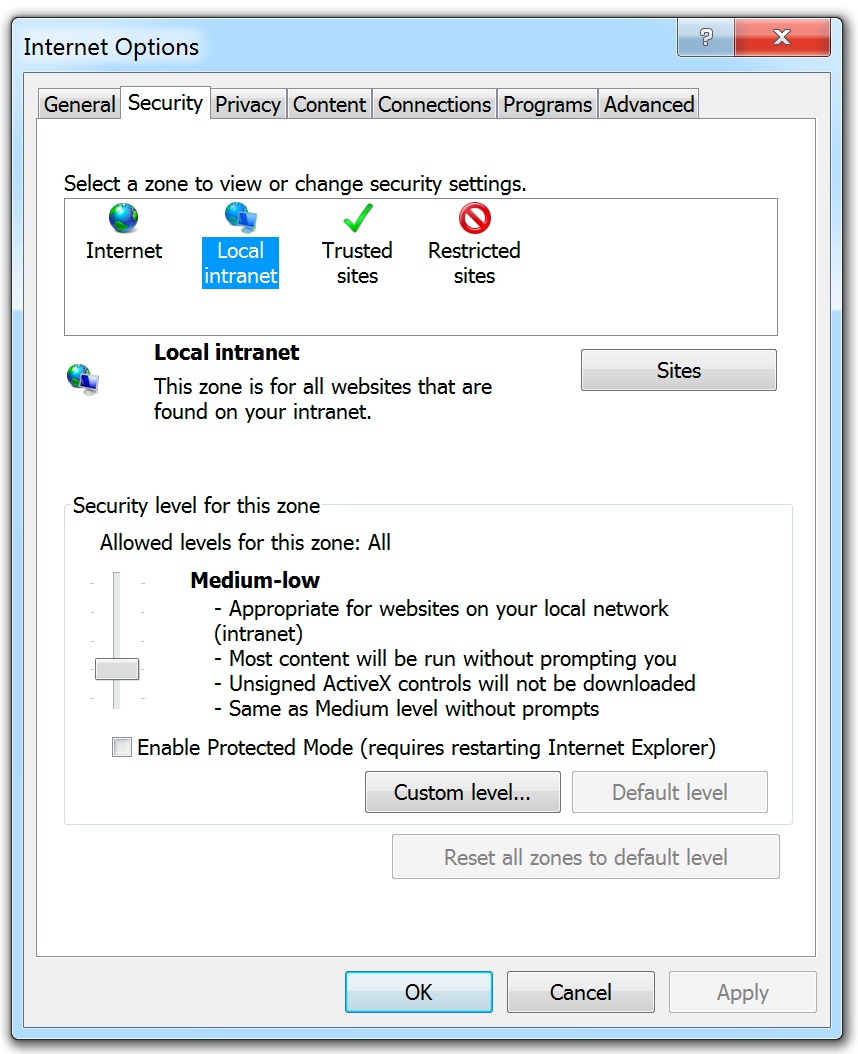
- Navigate to the security panel and make sure Enable Protected Mode is disabled. Select Local intranet, then click Sites:
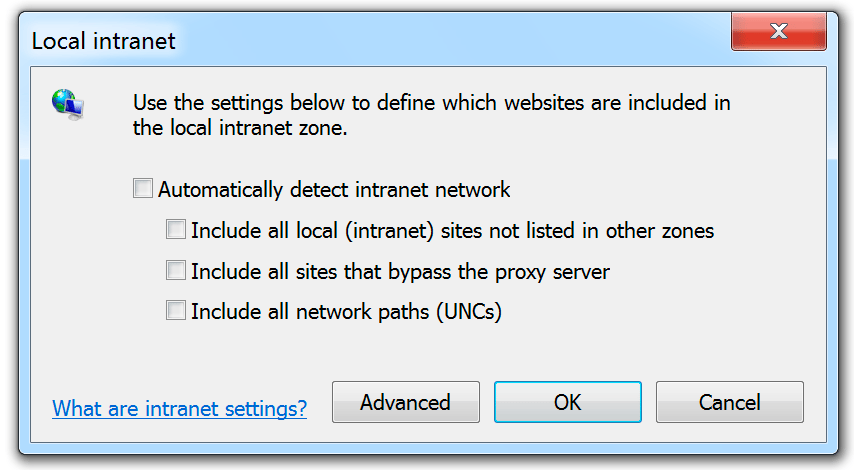
- Make sure all of the options on this panel are disabled, then click Advanced.
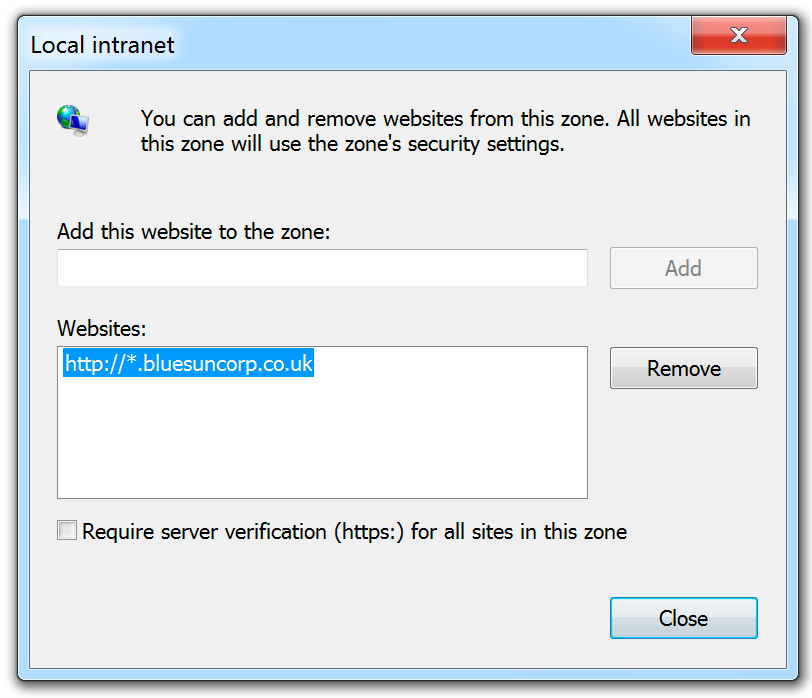
- Remove any websites from the list:
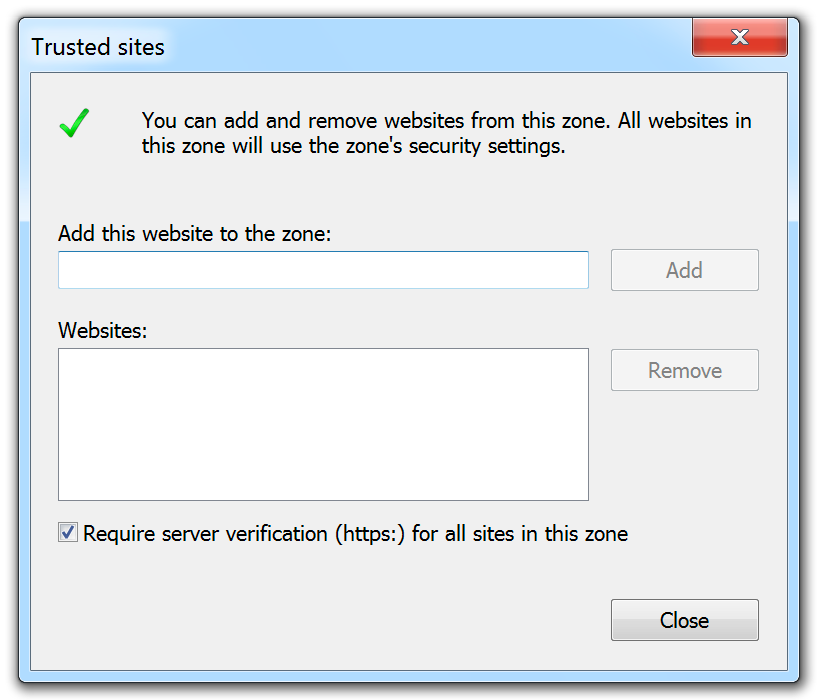
- Repeat for trusted sites: