Save PayPal with the JavaScript SDK v5
Turn a checkout into a reusable PayPal Wallet with the JavaScript SDK v5.
Last updated: October 1, 2026
Copy / Export
After customers save their PayPal Wallet, they can select it for faster checkout. Customers won't have to enter payment details for future transactions.
To save PayPal Wallets, payers need to log into your site, make a purchase, and remain on your site when transactions take place.
Customers with a PayPal Wallet can:
- Review PayPal transactions and transaction history
- Review, add, or remove funding sources
- Review and cancel recurring payments
- Hold a balance in their PayPal account
- Use PayPal to send and receive money
- Withdraw money to a linked bank account
- Use PayPal to transact with sellers
Important: Don't save PayPal as a payment method during purchase. For more information about securely saving payment methods and optimizing the buyer experience, see our Best practices guide.
Availability
This integration is available in the following countries:
- Australia
- Austria
- Belgium
- Bulgaria
- Canada
- China
- Cyprus
- Czech Republic
- Denmark
- Estonia
- Finland
- France
- Germany
- Hong Kong
- Hungary
- Ireland
- Italy
- Japan
- Latvia
- Liechtenstein
- Lithuania
- Luxembourg
- Malta
- Netherlands
- Norway
- Poland
- Portugal
- Romania
- Singapore
- Slovakia
- Slovenia
- Spain
- Sweden
- United Kingdom
- United States
Know before you code
- This integration requires a PayPal Developer account.
- This procedure modifies an existing standard payments or advanced credit and debit card payments integration.
- Your payments integration must have a server-side capture call or a server-side authorization and capture call.
- To save payment methods, you must be able to uniquely identify payers. For example, payers create an account and log into your site.
- Complete the steps in Get started to get the following sandbox account information from the Developer Dashboard:
- Your sandbox account login information
- Your access token
Get up and running in GitHub Codespaces
GitHub Codespaces are cloud-based development environments where you can code and test your PayPal integrations. Learn more
How it works
PayPal encrypts payment method information and stores it in a digital vault for that customer.
- The payer saves their payment method.
- For a first-time payer, PayPal creates a customer ID. Store this within your system for future use.
- When the customer returns to your website and is ready to check out, pass their PayPal-generated customer ID to the JavaScript SDK. The customer ID tells the JavaScript SDK to save or reuse a saved payment method.
- The payer completes a billing agreement.
- The JavaScript SDK populates the checkout page with each saved payment method. Each payment method appears as a one-click button next to other ways to pay.
The checkout process is now shorter because it uses saved payment information.
Return payer experience
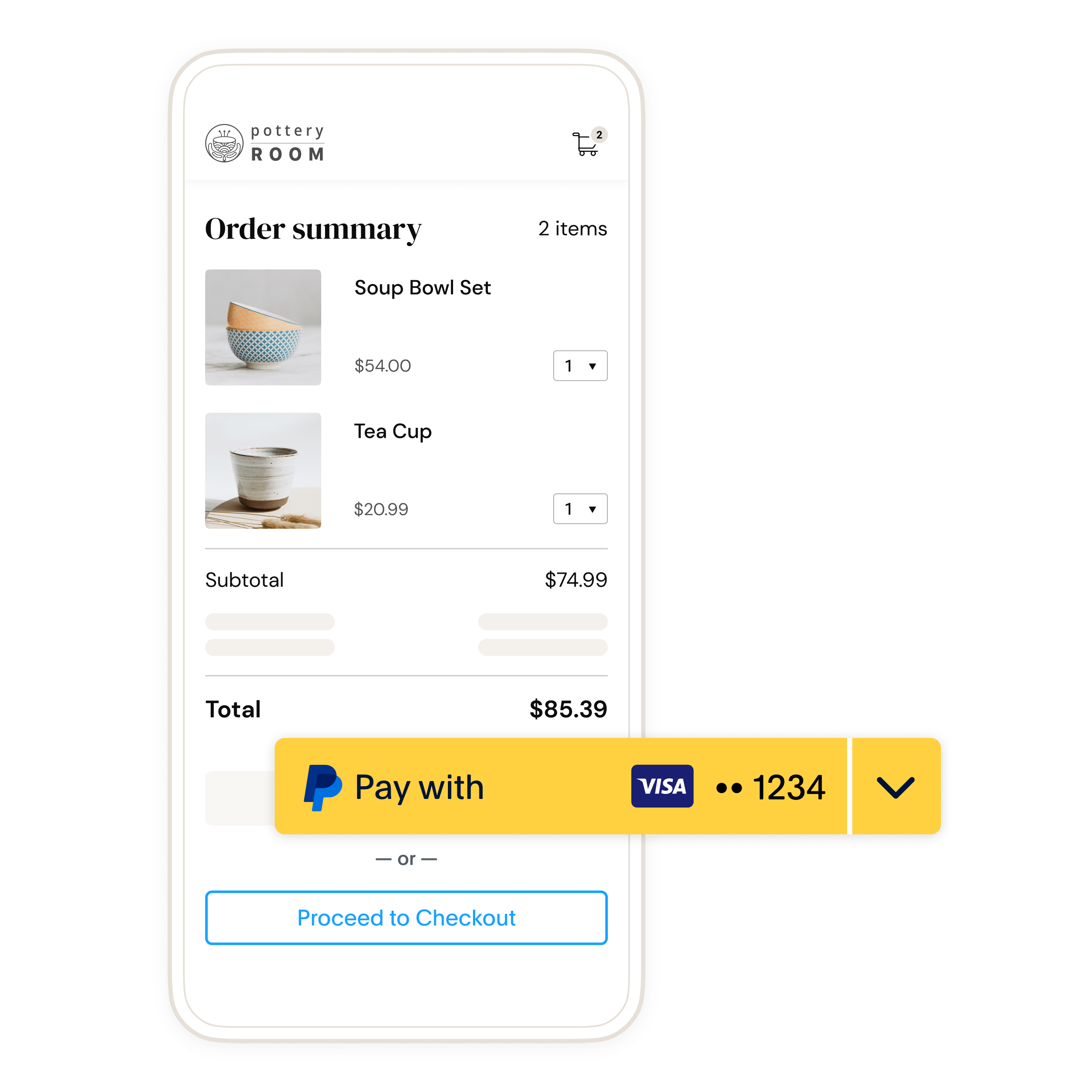
The following is an example of what a payer sees after they save their PayPal Wallet on your site. Returning payers can select their saved payment method at checkout to pay faster.
The payer uses a credit card in their PayPal Wallet in the following example:
Use cases
Businesses save payment methods if they want customers to:
- Check out without re-entering a payment method
- Pay after use, for example, ride-sharing and food delivery
Check eligibility
- Go to paypal.com and sign in with your business account.
- Go to Account Settings > Payment Preferences > Save PayPal and Venmo payment methods.
- In the Save PayPal and Venmo payment methods section, select Get Started.
- When you submit profile details, PayPal reviews your eligibility to save PayPal Wallets and Venmo accounts.
- After PayPal reviews your eligibility, you'll see a status of Success, Need more information, or Denied.
1. Set up your account to save payment methods
Enable PayPal vaulting in your Developer Dashboard for sandbox testing and production.
Sandbox
Set up your sandbox business account to save payment methods:
- Log into the Developer Dashboard.
- Under REST API apps, select your app name.
- Under Sandbox App Settings > App Feature Options, check Accept payments.
- Expand Advanced options. Confirm that Vault is selected.
To go live, you'll need to be vetted for PayPal Wallet. You can start the vetting process from the Merchant Servicing Dashboard.
- Your sandbox account is now ready to save payment methods. To enable this feature for your live account, complete the steps in Production.
Note: When prompted for data such as a phone number for the sandbox business request, enter any number that fits the required format. Because this is a sandbox request, the data doesn't have to be factual.
Production
Set up your live business account to save payment methods:
- Log into the PayPal Developer Dashboard.
- In the navigation menu, use the Sandbox | Live toggle to select Live.
- Access Apps & Credentials.
- Select the production REST API app name.
- To enable vaulting for your account:
- Go to Features > Payment capabilities.
- In the Payment capabilities menu, select the Save payment methods toggle to enable vaulting.
- To add the ability to save PayPal and Venmo payment methods:
- Go to Features > Payment methods.
- In the Payment methods menu, select the PayPal and Venmo toggle so you can save PayPal and Venmo payment options.
PayPal requires Risk Data Acquisition (RDA) to reduce fraud. You must implement risk data collection for all customer-initiated transactions (CIT) that use PayPal and Venmo Payment Tokens. Payment attempts that are missing RDA data are likely to be declined due to insufficient risk identifiers. Use the PayPal FraudNet and Magnes libraries to collect and pass RDA data during payment processing.
2. Generate a user ID token for the payer
The OAuth 2.0 API to retrieve an access_token has an additional parameter, response_type, that can be set to id_token. Include the id_token and access_token in the response.
A payer wants to save a payment method for the first time. Modify the following code to generate a user ID token for the payer:
Sample server-side user ID token request
curl -s -X POST "https://api-m.sandbox.paypal.com/v1/oauth2/token"\
  -u CLIENT_ID:CLIENT_SECRET \
 -H "Content-Type: application/x-www-form-urlencoded"\
 -d "grant_type=client_credentials"\
 -d "response_type=id_token"
Modify the code
- Copy the sample request code.
- Change
CLIENT_IDto your client ID. - Change
CLIENT_SECRETto your client secret.
Sample response
{
     "access_token" : "A21AAJ--LVQmYlaxd_TDFOqVs4C3Xa7kPfa0Es7O35_9TEWaWRCMw7-NBJuBWqXZhb3eOolNnMtxwhoMP3NqHOJm1rvPDehfQ",
     "app_id" : "APP-80W284485P519543T",
     "expires_in" : 32400,
     "id_token" : "eyJraWQiOiJjMmVjMmZiYjIzMGU0ZDkzOTNhMGFmZjEzZTY4MjFjMSIsInR5cCI6IkpXVCIsImFsZyI6IkVTMjU2In0.eyJpc3MiOiJodHRwczovL2FwaS5zYW5kYm94LnBheXBhbC5jb20iLCJzdWIiOiJQQ0haQ1RMMjVSNllXIiwiYWNyIjpbImNsaWVudCJdLCJzY29wZSI6WyJCcmFpbnRyZWU6VmF1bHQiXSwib3B0aW9ucyI6eyJjdXN0b21lcl9pZCI6IjIxMzM3NTk5MiJ9LCJheiI6ImdjcC5zbGMiLCJleHRlcm5hbF9pZCI6WyJQYXlQYWw6UENIWkNUTDI1UjZZVyIsIkJyYWludHJlZTo2ZDNtY3pqN2h3cHE4Y2cyIl0sImV4cCI6MTY2NDIzOTA1MCwiaWF0IjoxNjY0MjM4MTUwLCJqdGkiOiJVMkFBSVNTRkozbVlJUE8wdGYwTF93NFVmTHpfeGFCNHhYRndkTnRibTNXOVhtQ2xoU2NuWGZtMmRxbjU5QjY2akRVbzNhd1Y0ODlsbFpZOVBuV2RFTVN4ZlpZVDZKTS1mUi1rdEotcV9pdkZKMHlCWXdpdU1HaldPR2psZWktUSJ9.PSDUMcZxsEEUlKNqKHgFhrmAcKeCeJMIMhzMrVV5PpTftlB_Xmgzwl1Fir0H0OYSjmopcVPNfXyXl55jxaqJdQ",
     "nonce" : "2022-09-27T00:22:30ZxsLQJVSYoAx7jqj1JJgr3onjVSPVL5juzZbId-Z-bwQ",
     "scope" : "https://uri.paypal.com/services/invoicing https://uri.paypal.com/services/vault/payment-tokens/read https://uri.paypal.com/services/disputes/read-buyer https://uri.paypal.com/services/payments/realtimepayment https://uri.paypal.com/services/disputes/update-seller https://uri.paypal.com/services/paypalhere openid https://uri.paypal.com/services/payments/payment/authcapture https://uri.paypal.com/services/disputes/read-seller Braintree:Vault https://uri.paypal.com/services/payments/refund https://uri.paypal.com/services/identity/activities https://api-m.sandbox.paypal.com/v1/vault/credit-card https://api-m.sandbox.paypal.com/v1/payments/.* https://uri.paypal.com/services/reporting/search/read https://uri.paypal.com/payments/payouts https://uri.paypal.com/services/vault/payment-tokens/readwrite https://api-m.sandbox.paypal.com/v1/vault/credit-card/.* https://uri.paypal.com/services/shipping/trackers/readwrite https://uri.paypal.com/services/subscriptions https://uri.paypal.com/services/applications/webhooks https://api-m.sandbox.paypal.com/v1/payments/refund https://api-m.sandbox.paypal.com/v1/payments/sale/.*/refund",
     "token_type" : "Bearer"
  }
A successful request returns fields including an access_token, id_token, and the number of seconds the access_token is valid.
The id_token:
- Uniquely identifies each payer.
- Expires in a few minutes because it's meant to be used during checkout. Generate new tokens if the current tokens expire.
Note: Each buyer session is unique. Set up your server to generate a new client token each time payment fields render on your page.
3. Pass user ID token to JavaScript SDK
Pass the id_token from your server into the JavaScript SDK using the data-user-id-token.
<script src="https://www.paypal.com/sdk/js?client-id=YOUR_CLIENT_ID" data-user-id-token="YOUR-ID-TOKEN"></script>5. Create an order
Risk data collection is still required at this step. See Set up your account to save payment methods for the Risk Data Acquisition (RDA) requirement.
Include client-side callbacks to:
- Manage interactions with APIs
- Manage payer approval flows
- Handle any events that lead to cancellation or error during payer approval
Client-side code snippet
<script>
  paypal.Buttons({
      // Call your server to set up the transaction
      createOrder: function(data, actions) {
        return fetch('/yourserver.com/createOrder', {
          method: 'post',
          body: JSON.stringify({
            source: data.paymentSource, // paypal, venmo, and so on
          }),
          // Here for product info
        }).then(function(res) {
          return res.json();
        }).then(function(orderData) {
          return orderData.id;
        });
      },
      // Authorize or capture the transaction after payer approves
      onApprove: (data, actions) => {
        return fetch('/yourserver.com/order/' + data.orderID + '/capture/', {
          method: 'post'
        });
      },
      onCancel(data, actions) {
        console.log(`Order Canceled - ID: ${data.orderID}`);
      },
      onError(err) {
        console.error(err);
      }
  }).render('#paypal-button-container');
</script>
Server-side code snippet
Set up your server to call the Create Order API. The button that the payer selects determines the payment_source sent in the following sample.
This SDK uses the Orders v2 API to save payment methods in the background. Use the following request to add attributes needed to save a PayPal Wallet.
Request
In the following request, the payment_source.paypal.attributes.vault.store_in_vault with the value ON_SUCCESS means the PayPal button is saved with a successful authorization or capture.
Pass the payment_source.paypal.experience_context and include the return_url and cancel_url to redirect the payer after they approve or cancel the order.
Create an order with PayPal as a payment source and store the PayPal Wallet in vault:
curl -v -X POST https://api-m.sandbox.paypal.com/v2/checkout/orders/ \
 -H "Content-Type: application/json" \
 -H "Authorization: Bearer ACCESS-TOKEN" \
 -H "PayPal-Request-Id: REQUEST-ID" \
 -d '{
    "intent": "CAPTURE",
    "purchase_units": [{
      "amount": {
        "currency_code": "USD",
        "value": "100.00"
      }
    }],
    "payment_source": {
      "paypal": {
        "attributes": {
          "vault": {
            "store_in_vault": "ON_SUCCESS",
            "usage_type": "MERCHANT",
            "customer_type": "CONSUMER"
          }
        },
      }
    }
  }'
Response
Return the id to your client to call the payer approval flow if the payment_source needs payer approval.
Note: The request to save the PayPal button is made when the order is created through payment_source.attributes.vault.store_in_vault. Vault details are available only after an order is authorized or captured.
{
    "id": "5O190127TN364715T",
    "status": "PAYER_ACTION_REQUIRED",
    "payment_source": {
      "paypal": {}
    },
    "links": [{
        "href": "https://api-m.sandbox.paypal.com/v2/checkout/orders/5O190127TN364715T",
        "rel": "self",
        "method": "GET"
      },
      {
        "href": "https://www.paypal.com/checkoutnow?token=5O190127TN364715T",
        "rel": "payer-action",
        "method": "GET"
      }
    ]
  }
6. The payer approves the payment
If payer approval is required, the client SDK calls the payer approval flow. The approval flow takes the payer through PayPal Checkout.
Capture order request
curl -v -X POST https://api-m.sandbox.paypal.com/v2/checkout/orders/5O190127TN364715T/capture \
 -H "Content-Type: application/json" \
 -H "Authorization: Bearer ACCESS-TOKEN" \
 -d '{}'
Capture order response
The HTTP response codes HTTP 2xx or HTTP 200 are returned for a successful request.
The capture is successful if the purchase_units[0].payments.captures.status is COMPLETED. You can confirm with the payer that the payment has been captured.
In the response from the authorize or capture request, the Orders v2 API interacts with the Payment Method Tokens v3 API, which saves the PayPal Wallet. The response from the Orders v2 API contains the:
vault.idcustomer.idvault.statuslinksfor the payment token of a recently saved PayPal Wallet.
Capture order
{
   "id": "5O190127TN364715T",
   "status": "COMPLETED",
   "payment_source": {
     "paypal": {
       "attribute": {
         "vault": {
           "id": "3nqvjt3n",
           "customer": {
               "id": "208743798"
           },
           "status": "VAULTED",
           "links": [{
               "href": "https://api-m.sandbox.paypal.com/v3/vault/payment-tokens/3nqvjt3n",
               "rel": "self",
               "method": "GET"
             },
             {
               "href": "https://api-m.sandbox.paypal.com/v3/vault/payment-tokens/3nqvjt3n",
               "rel": "delete",
               "method": "DELETE"
             },
             {
               "href": "https://api-m.sandbox.paypal.com/v2/checkout/orders/5O190127TN364715T",
               "rel": "up",
               "method": "GET"
             }
           ]
         }
       },
       "name": {
         "given_name": "Firstname",
         "surname": "Lastname"
       },
       "email_address": "[email protected]",
       "phone_number": {
         "national_number": "2025212022"
       },
       "account_id": "QYR5Z8XDVJNXQ",
       "address": {
         "country_code": "US"
       },
     }
   },
   "payer": {
     "name": {
       "given_name": "Firstname",
       "surname": "Lastname"
     },
     "email_address": "[email protected]",
     "phone_number": {
       "national_number": "2025212022"
     },
     "payer_id": "QYR5Z8XDVJNXQ",
     "address": {
       "country_code": "US"
     }
   }
   "purchase_units": [{
     "reference_id": "d9f80740-38f0-11e8-b467-0ed5f89f718b",
     "payments": {
       "captures": [{
         "id": "3C679366HH908993F",
         "status": "COMPLETED",
         "amount": {
           "currency_code": "USD",
           "value": "100.00"
         },
         "seller_protection": {
           "status": "ELIGIBLE",
           "dispute_categories": [
             "ITEM_NOT_RECEIVED",
             "UNAUTHORIZED_TRANSACTION"
           ]
         },
         "final_capture": true,
         "seller_receivable_breakdown": {
           "gross_amount": {
             "currency_code": "USD",
             "value": "100.00"
           },
           "paypal_fee": {
             "currency_code": "USD",
             "value": "3.00"
           },
           "net_amount": {
             "currency_code": "USD",
             "value": "97.00"
           }
         },
         "create_time": "2022-01-01T21:20:49Z",
         "update_time": "2022-01-01T21:20:49Z",
         "links": [{
             "href": "https://api-m.sandbox.paypal.com/v2/payments/captures/3C679366HH908993F",
             "rel": "self",
             "method": "GET"
           },
           {
             "href": "https://api-m.sandbox.paypal.com/v2/payments/captures/3C679366HH908993F/refund",
             "rel": "refund",
             "method": "POST"
           }
         ]
       }]
     }
   }],
   "links": [{
     "href": "https://api-m.sandbox.paypal.com/v2/checkout/orders/5O190127TN364715T",
     "rel": "self",
     "method": "GET"
   }]
 }
Save approved payment source
If the payment has been authorized or captured, the payer does not need to be present to save a payment_source. To keep checkout times as short as possible, the Orders API responds as soon as payment is captured.
If the attributes.vault.status returned after payment is APPROVED, you won't have a vault.id yet. An example of the attributes object from this scenario is in the following sample:
"attributes": {
        "vault": {
          "status": "APPROVED",
          "links": [
            {
              "href": "https://api-m.sandbox.paypal.com/v2/checkout/orders/5O190127TN364715T",
              "rel": "up",
              "method": "GET"
            }
          ]
        }
      }
The Payment Method Tokens API still saves the payment source even after the Orders API returns its response and sends a webhook after the payment source is saved.
In order to retrieve a vault_id when an APPROVED status is returned, you'll need to subscribe to the VAULT.PAYMENT-TOKEN.CREATED webhook.
The Payment Method Tokens API sends a webhook after the payment source is saved. An example of the VAULT.PAYMENT-TOKEN.CREATED webhook payload is shown in the following sample:
{
  "id": "WH-72S4353495632143A-68K769747M133873M",
  "event_version": "1.0",
  "create_time": "2022-08-27T01:25:57.462Z",
  "resource_type": "payment_token",
  "resource_version": "3.0",
  "event_type": "VAULT.PAYMENT-TOKEN.CREATED",
  "summary": "A payment token has been created.",
  "resource": {
    "time_created": "2022-08-26T18:25:57.449PDT",
    "links": [
      {
        "href": "https://api-m.sandbox.paypal.com/v3/vault/payment-tokens/7vrxmrw",
        "rel": "self",
        "method": "GET",
        "encType": "application/json"
      },
      {
        "href": "https://api-m.sandbox.paypal.com/v3/vault/payment-tokens/7vrxmrw",
        "rel": "delete",
        "method": "DELETE",
        "encType": "application/json"
      }
    ],
    "id": "3nqvjt3n",
    "payment_source": {
      "paypal": {
        "permit_multiple_payment_tokens": false,
        "usage_type": "MERCHANT",
        "customer_type": "CONSUMER",
        "email_address": "[email protected]",
        "payer_id": "VTR4JYK7STE7J"
      }
    },
    "customer": {
      "id": "208743798"
    }
  },
  "links": [
    {
      "href": "https://api-m.sandbox.paypal.com/v1/notifications/webhooks-events/WH-72S4353495632143A-68K769747M133873M",
      "rel": "self",
      "method": "GET"
    },
    {
      "href": "https://api-m.sandbox.paypal.com/v1/notifications/webhooks-events/WH-72S4353495632143A-68K769747M133873M/resend",
      "rel": "resend",
      "method": "POST"
    }
  ]
}
In the previous example, the resource.id field is the vault ID. The resource.customer.id is the PayPal-generated customer ID.
8. Test your integration
Run the following tests in the PayPal sandbox to ensure you can save PayPal Wallets.
Save payment method
- On your checkout page, select the PayPal button.
- Log into the payer account and approve the payment and billing agreement.
- Capture the transaction.
- Store the PayPal-generated customer ID in your system.
- Log into sandbox with your seller account and verify the transaction.
- Refresh the page that contains the PayPal button. Ensure the JavaScript SDK is initialized with the PayPal-generated customer ID.
- Ensure the PayPal button displays the payer's preferred payment method.
- Ensure that the payment method you just saved is visible with the other buttons.
- Select the PayPal button again to test the return payer flow.
Sample integration
See a sample Save Payment Method integration in the PayPal GitHub repository.
Next steps
- Test and go live with this integration.
- Change the credentials and API URLs from
api-m.sandbox.paypal.comtoapi-m.paypal.comwhen going live with your integration. - You can create orders without the
payment_source.paypal.attributes.vaultfor subsequent or recurring transactions. - You can get a payment token, list all payment tokens, delete a payment token, and more with the Payment Method Tokens API.