MCP server quickstart guide
Last updated: June 30, 2026
Copy / Export
Model Context Protocol (MCP) makes it easier to manage and send information to models. This helps models work better in specific contexts. PayPal built an MCP server that lets merchants use natural language with their favorite MCP clients. This helps users complete business tasks more easily.
PayPal provides two ways for merchants to set up the MCP server:
- Running the MCP server locally. This option enables developers to download, install, and run the MCP server locally.
- Using the MCP server remotely. With remote MCP server, users can continue their tasks across devices with a single login after authentication.
Examples in this content use Claude as the MCP client, but you can use any MCP client that you prefer, such as Cursor or Cline.
Local MCP server
To run the MCP server locally, you need Node.js v18 or later. Download and install it from the Node.js website if you don't have it yet.
- To update the configuration settings for your MCP client, locate the external tools or connectors section in the client's configuration, and add the PayPal connector configuration. In Claude, for example, you add the following configuration to
~/Claude/claude_desktop_config.json.
{
   "mcpServers": {
     "paypal": {
       "command": "npx",
       "args": [
         "-y",
         "@paypal/mcp",
         "--tools=all"
       ],
       "env": {
         "PAYPAL_ACCESS_TOKEN": "YOUR_PAYPAL_ACCESS_TOKEN",
         "PAYPAL_ENVIRONMENT": "SANDBOX"
       }
     }
   }
}-
In the new entry, replace
YOUR_PAYPAL_ACCESS_TOKENwith your actual PayPal access token, and set thePAYPAL_ENVIRONMENTtoSANDBOXfor testing orPRODUCTIONfor your production environment. Alternatively, you can set thePAYPAL_ACCESS_TOKENas an environment variable. You also can pass it as an argument using--access-tokeninargs. -
Test your integration:
- Quit and restart the MCP client to apply your changes.
- Ask the MCP client to perform one of the supported tasks. For example, ask the MCP client to list your PayPal invoices for the last month.
Remote MCP server
If you don't want to install MCP server locally, the other option is to use the remotely hosted MCP server.
Tip: You can use your preferred MCP client for this procedure.
Environment variables
When you develop and test, use the sandbox environment variable. For a live site, use production.
| Environment | Endpoint |
|---|---|
| Sandbox | https://mcp.sandbox.paypal.com |
| Production | https://mcp.paypal.com |
You must point to the sandbox endpoint (
https://mcp.sandbox.paypal.com) when you work in the PayPal sandbox environment.Set up token authorization
PayPal supports using your PayPal client credentials to connect to the remote MCP server. With this type of authorization, you use your PayPal account's client ID and secret from PayPal Developer Dashboard.
{
  "mcpServers": {
    "paypal-mcp-server": {
      "command": "npx",
      "args": [
        "mcp-remote",
        "https://mcp.sandbox.paypal.com/sse",
        "--header",
        "Authorization: Bearer <auth_header>"
      ]
    }
  }
}
Configure your transport method
The remote MCP server supports two types of transport.
Server-sent events (SSE)
To use SSE for testing in the sandbox, open the configuration file for your MCP client in a text editor, and replace the configuration with the following one.
{
  "mcpServers": {
    "paypal-mcp-server": {
      "command": "npx",
      "args": [
        "mcp-remote",
        "https://mcp.sandbox.paypal.com/sse"
      ]
    }
  }
}
In a production environment for a live site, replace the sandbox URL with this URL: https://mcp.paypal.com/sse.
Streamable HTTP
With streamable HTTP, servers send data to clients in chunks instead of waiting to compile a complete response. Customers can receive a response immediately when they use streamable HTTP transport. Modern applications can display results as they become available, avoiding spinners and long delays.
To use streamable HTTP for testing in the sandbox, open the configuration file for your MCP client in a text editor, and replace the configuration with the following one.
{
  "mcpServers": {
    "paypal-mcp-server": {
      "command": "npx",
      "args": [
        "mcp-remote",
        "https://mcp.sandbox.paypal.com/http"
      ]
    }
  }
}
In a production environment for a live site, replace the sandbox URL with this URL: https://mcp.paypal.com/http.
Connect to MCP server
- Save the file, and restart your MCP client. The MCP client sends you to the PayPal login page.
- Provide your consent for the client to work with the MCP server:
- Log into PayPal when the login page appears.
- Authorize the client to work with the MCP server.
- Quit and reopen your MCP client.
- To test your integration, ask the MCP client to perform one of the supported tasks. For example, ask it to create an invoice for landscaping services for Green Lawns for $200 with a date of last Friday.
Tip: If you have trouble connecting after completing this procedure, try clearing the files that the integration adds to
~/.mcp-authby running:
rm -rf ~/.mcp-authAlso be aware that emerging technology, like MCP and MCP clients, can come with performance issues or other challenges initially. For example, Windows users with Cursor might encounter a known issue when connecting to the MCP server remotely.
MCP server tools
PayPal's MCP server offers a variety of helpful tools for performing many jobs. The complete catalog of tools is available in both local and remote MCP server.
The following example shows how you might use these tools.
Example: Create an invoice using MCP server tools
Using your favorite MCP client with the MCP server to create invoices offers several advantages over creating invoices in a more traditional way. For example, a merchant can use natural language with an MCP client to process multiple invoice requests by using a drive-system connector or a file-system connector. With this connection, users can ask the MCP client to perform a PayPal-related task, which allows the clients to access their records for data and then send PayPal invoices to multiple customers in bulk.
For example, a user asks the MCP client to create an invoice with PayPal.

The user supplies the necessary information, as the MCP client indicates. Then, the MCP client accesses the necessary data, creates the invoice using the MCP server, and sends it to PayPal as shown in the following illustration.

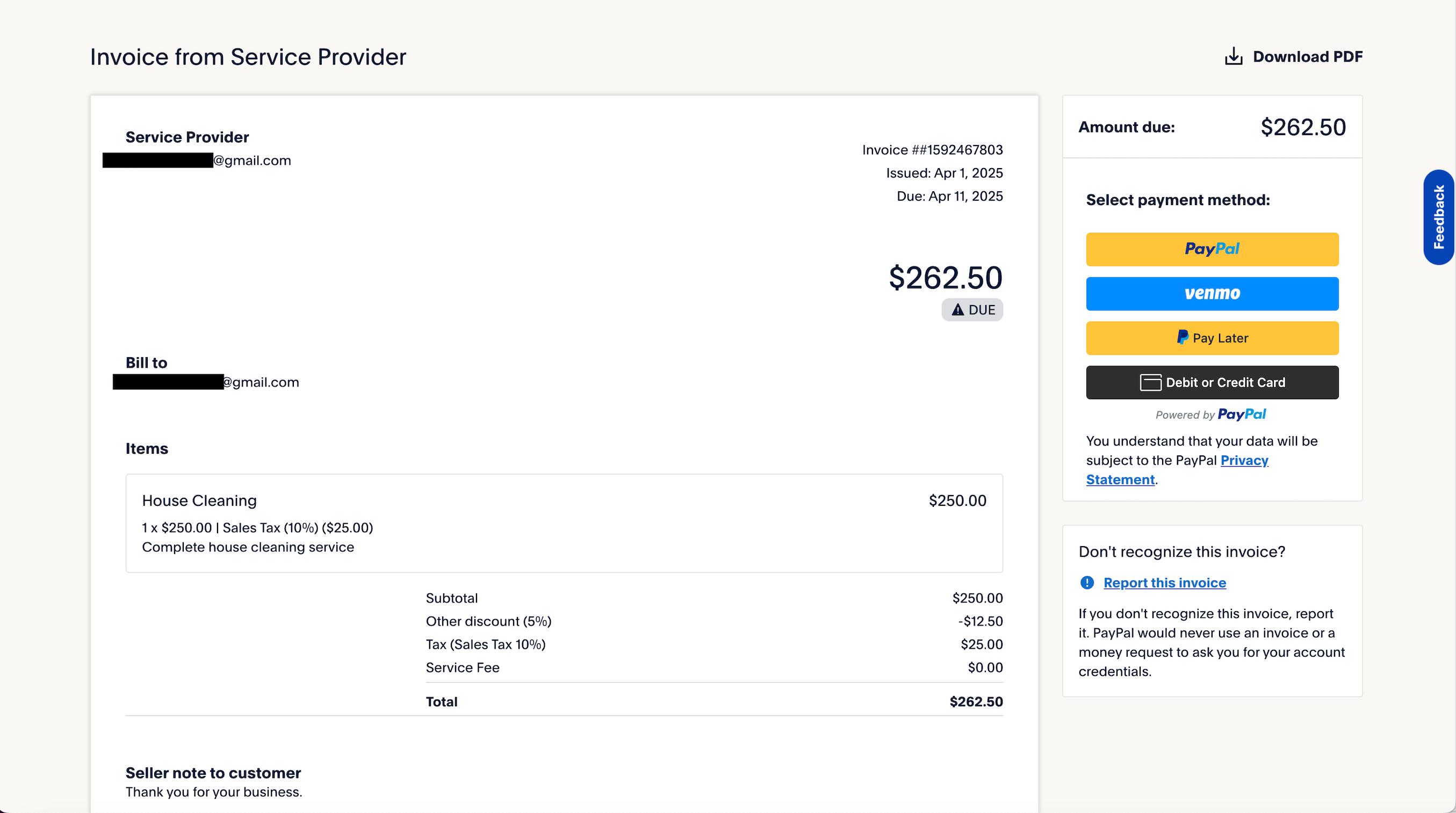
The following example shows a sample of the invoice that a customer receives.