Add real-time account updater
Last updated: August 11, 2026
Copy / Export
Use real-time account updates to reduce declined card payments. Real-time account updater increases payment success by asking the card issuer for updates about the buyer's card, and applying any changes to the current card.
Use this integration guide if you are a merchant and have a direct integration with PayPal.
Only cards that the customer has saved on PayPal's Commerce Platform for future payments are eligible for real-time updates. When triggered, real-time account updater obtains the updated card information to use for the payment. The API response includes data about the card used to complete the payment. For details on how to save a card for future payments, visit Save payment methods.
Examples of payments using a card on file include recurring payments on a subscription for a service or a product, and online or mobile checkout using a previously saved credit or debit card.
Real-time account updater doesn't apply to mobile payments from a digital wallet, such as Apple Pay, Google Pay, and Samsung Pay.
Even cards that qualify for real-time updates may not be updated during a transaction. Read PayPal's Online Card Payment Services Agreement for details.
Eligibility
Real-time account updater is a limited early access program for all merchants with the following integrations enabled:
Real-time account updates only occur on subsequent card payments using a card on file. For examples of subsequent payment scenarios, see the Strong Customer Authentication payment indicators page.
Real-time account updater works when issuers agree to share card updates via card networks. PayPal can't provide a card update when the card issuer or cardholder opts out of automatic updates. When a card account doesn't support real-time account updates, request a card update directly from the cardholder.
If you're interested in using real-time account updater, go to our article about Real-Time Account Updater and integration.
Supported countries
The following table shows the card types and countries that real-time account updater supports.
- Issuing country: The country of the bank that issues the card.
- Merchant country: The country where the merchant receives the payment.
| Card network | Card type | Issuing country | Merchant country |
|---|---|---|---|
| Mastercard | Credit and debit cards | AT, AU, BE, BG, CA, CY, CZ, DE, DK, EE, ES, FI, FR, GR, HU, IE, IT, LI, LT, LU, LV, MT, NL, NO, PL, PT, RO, SE, SI, SK, UK, US | AT, AU, BE, BG, CA, CN, CY, CZ, DE, DK, EE, ES, FI, FR, GR, HU, IE, IT, LI, LT, LU, LV, MT, NL, NO, PL, PT, RO, SE, SI, SK, UK, US |
| Visa | Credit and debit cards | AT, AU, BE, BG, CH, CY, CZ, DE, DK, EE, ES, FI, FR, GR, HK, HU, IE, IT, LT, LU, LV, MT, NL, NO, PL, PT, RO, SE, SG, SI, SK, UK, US | AT, AU, BE, BG, CA, CN, CY, CZ, DE, DK, EE, ES, FI, FR, GR, HU, IE, IT, LI, LT, LU, LV, MT, NL, NO, PL, PT, RO, SE, SI, SK, UK, US |
How it works
PayPal works with Mastercard and Visa to reduce declined payments using real-time account updates.
Mastercard
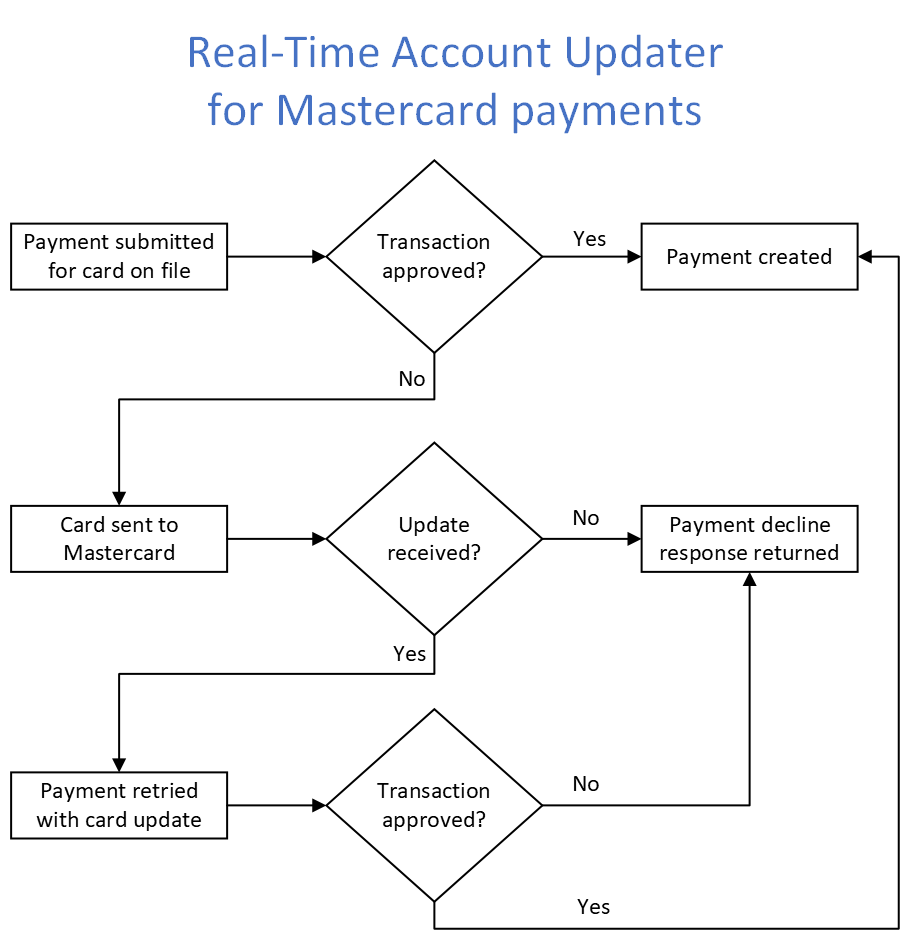
When a partner or direct merchant has real-time account updater enabled for their account, PayPal checks if the card information is current and eligible for updates.
- A merchant has a card on file that was saved for future payments with the customer's consent.
- The buyer makes a purchase using the saved card on file, or the merchant uses the card on file for a recurring payment.
- PayPal processes the payment as an advanced credit or debit transaction.
- Mastercard sends the payment to the card issuer, but the card on file has expired, has been cancelled, or is otherwise not available for payment.
- Mastercard notifies PayPal that the issuer declined the card.
- PayPal checks to see if the card on file is eligible for real-time account updater.
- PayPal sends a request to Mastercard to check whether the card's information is current.
- Mastercard confirms that the card has changed, and sends the updated card information.
- PayPal resubmits the payment on the merchant's behalf using the updated card information.
- PayPal returns the updated card information to the merchant. If the card on file was a vaulted token, PayPal updates the card on file in the PayPal Complete Payments Platform vault.
Visa
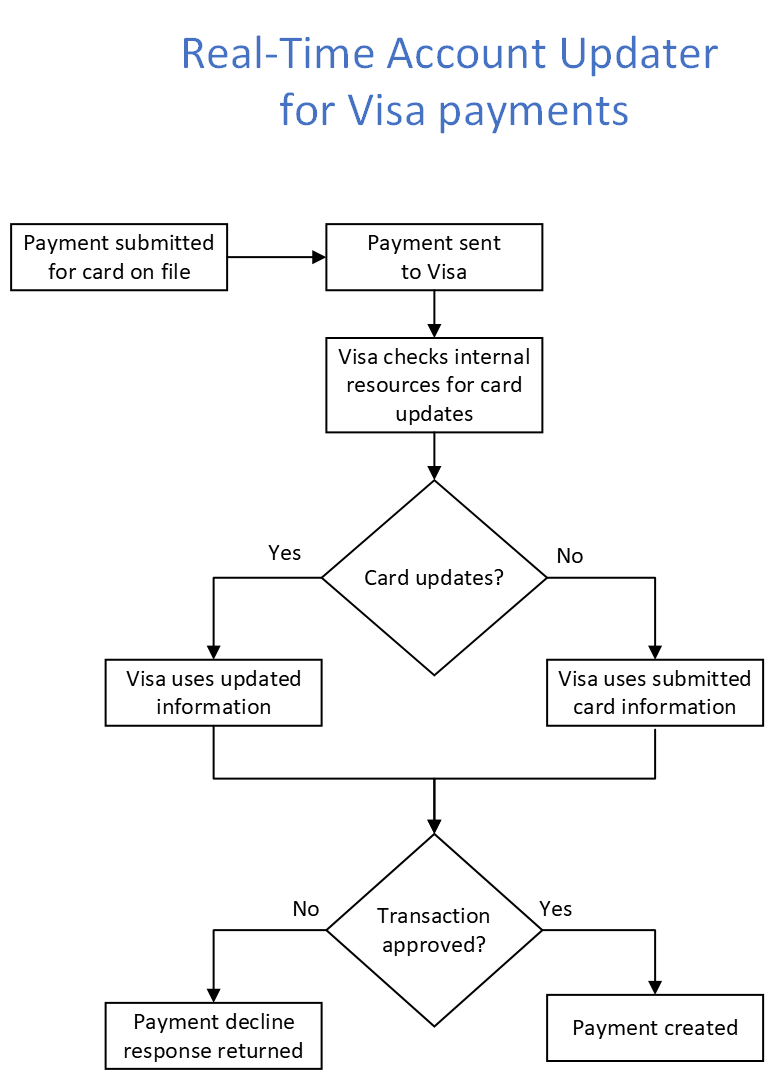
When real-time account updater is enabled, PayPal flags the card for Visa to verify and update card information before the issuer processes the payment.
- The buyer makes a purchase using a saved card on file, or the merchant uses the card for a recurring payment.
- PayPal processes the payment as an advanced credit or debit card transaction.
- PayPal checks if the card is eligible for real-time account updater.
- PayPal flags the payment so Visa checks for card updates.
- If the card has expired, been cancelled, or is otherwise unavailable, and an update is available, Visa submits the payment to the issuer using the updated card information.
- After the issuer approves the payment, Visa returns the updated card information to PayPal.
- PayPal returns the updated card information to the merchant. If the card was a vaulted token, PayPal updates the card in the vault.
If no update is available, Visa submits the payment using the original card information. The issuer approves or declines the payment.
API responses for real-time account updater
Real-time account updates use specific fields and error codes that could impact your existing integration.
Payments with a token
Payment requests that use a payment token return 2 additional parameters: expiry and last_digits.
When PayPal completes a payment using an updated expiration or primary account number:
- The response fields pass the new values instead of the old values stored in the payment method in PayPal's vault.
- PayPal updates the vaulted payment method with the new values.
The expiry response field is included in the card object and returns the expiration date of the card used for payment.
The last_digits response field is included in the card object and returns the last 4 digits of the card number used for payment.
{
  "payment_source": {
    "card": {
        "last_digits": "2557",
        "expiry": "2040-12",
        "from_request": {
            "expiry": "2028-01",
            "last_digits": "1234"
        },
        "brand": "MASTER_CARD",
        "type": "CREDIT"
    }
  }
}
Closed card error
The HTTP 422 error response is returned when a card on file that is marked as closed is used for payment.
{
    "name": "UNPROCESSABLE_ENTITY",
    "details": [
            {
                "field": "payment_source/card",
                "location": "body",
                "issue": "CARD_CLOSED",
                "description": "The card is closed."
            }
    ],
    "message": "The requested action could not be performed, semantically incorrect, or failed business validation.",
    "debug_id": "6a20810eaecc5",
    "links": [
            {
                "href": "https://developer.paypal.com/api/orders/v2/error-messages",
                "rel": "information_link",
                "method": "GET"
            }
    ]
}
Test in sandbox
Use sandbox trigger values to simulate real-time account updater scenarios. Pass these values in the card.name field when creating an order with POST /v2/checkout/orders.
| Trigger value | Scenario | Behavior |
|---|---|---|
CCREJECT-RTAU-EU | Expired card replaced with updated card | Returns updated card expiration |
CCREJECT-RTAU-PEU | Lost or stolen card replaced with new card | Returns updated card number and expiration |
CCREJECT-RTAU-AC | Card closed | Returns CARD_CLOSED error and declines the transaction |
CCREJECT-RTAU-NU | No update available or cardholder opted out | No updates returned; declines if card is expired |
The payment token
id values in the token scenarios below are placeholders. Generate and use your own payment tokens.Download the Postman collection to test making updates to cards.
This section shows how real-time account updater responds to 3 different card changes.