On this page
No Headings
Last updated: August 3, 2026
Promote PayPal Pay Later products using messaging on your PinnacleCart store.
PayPal offers short-term, interest-free payments that buyers can use to buy now and pay later. You get paid up-front.
Pay Later messaging includes Pay in 3, which UK buyers can use to pay for purchases of £20 to £3,000 in three, interest-free payments. It also includes Pay in 30 Days, which UK buyers can use to pay the full amount in 30 days with no interest or fees, for purchases of £1 to £900.
Messaging is enabled by default after you integrate your PayPal account with the PinnacleCart shopping cart. Once you onboard and log into the PinnacleCart admin panel, you can customize the messaging layout.
To customize the messaging layout, complete the following:
Log in to your PinnacleCart admin portal.
Select Settings > Payment & taxes > Payment methods.
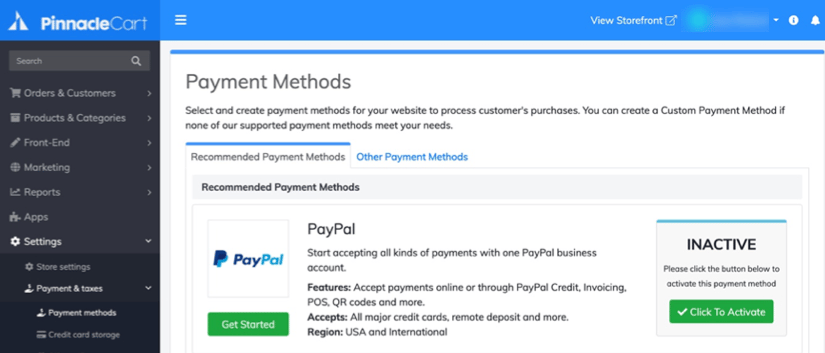
Connect to your PayPal account by selecting Click to Activate next to the PayPal logo.
Complete the signup flow by completing the pre-requisites for onboarding, such as confirming your email address. The Payment Methods page displays the Change Settings button.
Select Change Settings to open the PayPal payment settings page. If you're an existing user, select Yes for PayPal Credit Messaging. This enables Pay in 3 messaging.
Use this page to customize your messaging layout, such as style and size. You can also customize different pages, such as the Home Page, Product Page, Cart page, and Checkout page.

See the PinnacleCart documentation page to learn more about customizing Pay Later offers on PinnacleCart.