Save payment methods
Learn about the Save payment method workflow and use cases for the Orders v2 API.
What is a Save payment method flow?
Save payment methods so buyers don't have to enter details for future transactions. Buyers can check out faster or pay without being present after they agree to save a payment method.
Use the JavaScript SDK to save a payer's card if you aren't aren’t compliant with the Payment Card Industry (PCI) Standard Self-Assessment Questionnaire A (SAQ A) but want to save credit or debit cards during checkout.
A payment method is saved and exchanged for a unique token through a process called tokenization. The token is stored securely and used instead of the original account number.
The benefits of using saved payment tokens include:
- Increased security by reducing opportunities for data theft.
- Simplified payment processing.
- Helps maintain PCI Data Security Standard compliance.
Note: Both PayPal Checkout and Expanded Checkout payment methods can be saved for future transactions.
For more information, refer to the Save payment methods page.
Save payment methods flow using the Orders v2 API

Saving a payment method flow is a 2-step process:
- Buyer makes a first-time purchase and saves the payment method.
- Buyer uses the saved payment method for subsequent purchases.
First-time purchase
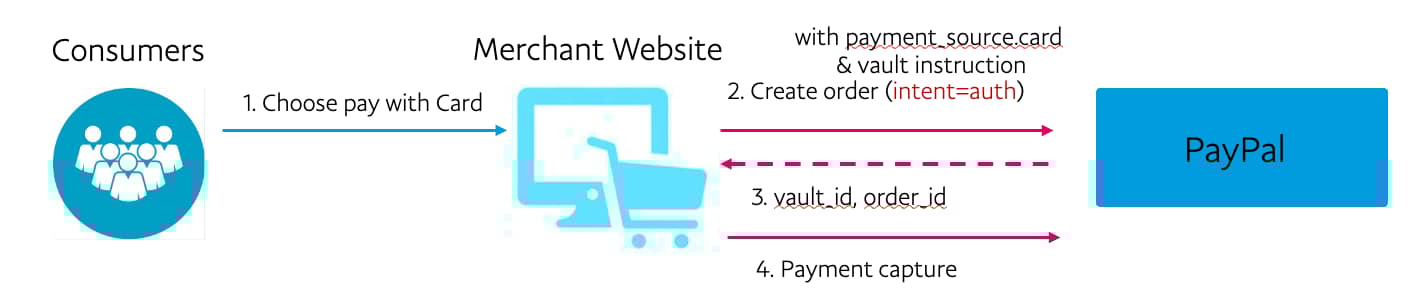
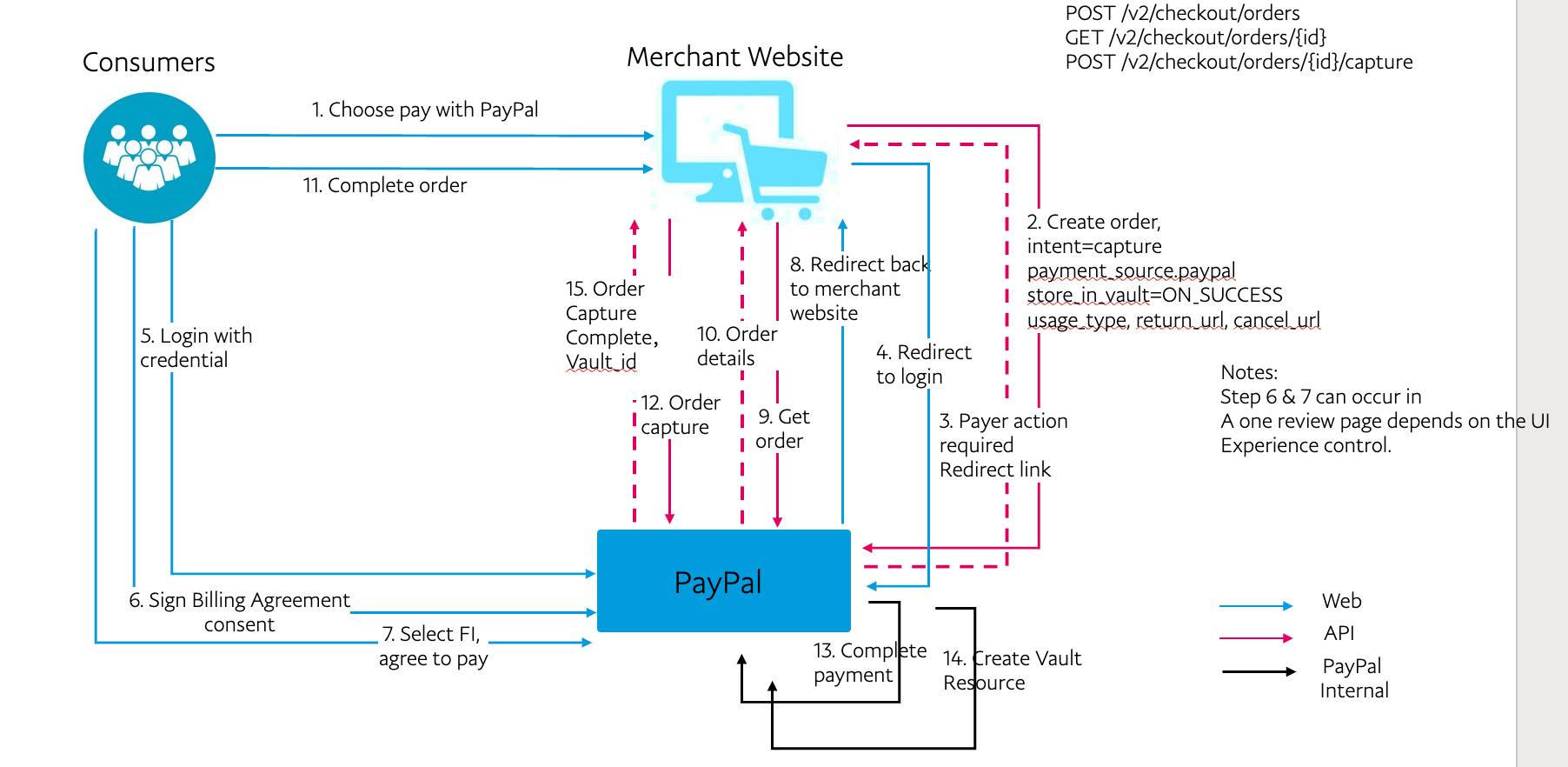
The buyer begins the checkout experience and chooses to save their payment method, such as a card, after the initial transaction is successful. For a first-time buyer, PayPal creates a vault ID and a customer ID. Store these within your system for future use.
Saving a card payment source during single-shot order creation
Return customer paying with saved payment method
For subsequent transactions, the buyer can pay with the saved payment method instead of entering their payment details again. Pass their vault.id when creating the order to process the payment.
Using the saved payment method to pay for subsequent transactions

Billing agreements
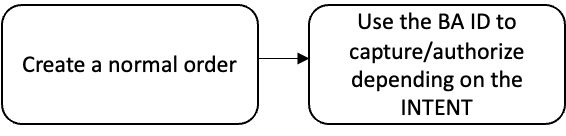
Like saving a payment method, billing agreements also enable buyers to use a saved payment token to pay for an order. The flow is similar to saving a payment method during an order. You can use an existing billing agreement ID to complete a payment.
The following flowchart shows the process for creating and using a billing agreement in the Orders v2 API:
Save payment method with billing agreement
Know before you code
- The Orders v2 API supports saving PayPal and card payment methods only.
- Passing card data to the Orders v2 API requires you to be PCI Compliant - SAQ D.
- You'll need to have an existing Expanded Checkout integration. PayPal needs to approve your account to process advanced credit and debit card payments.
Note: Set up your server to make the Order API calls instead of calling them directly from the browser or the client side.
Sample 1: Save payment methods
You can store the payment source based on the status of the order, such as when the payment is successful.
Step 1: Create an order that saves the payment method
This sample shows how to create an order with PayPal as the payment source and save the payment method.
Set the intent to AUTHORIZE. Set the store_in_vault parameter to ON_SUCCESS in the payment_source.paypal.attributes.vault object.
A successful response returns an HTTPS 200 OK status code and a payer_action HATEOAS link.
Sample create order request that saves the payment method
curl -v -X POST https://api-m.sandbox.paypal.com/v2/checkout/orders/ \
-H 'Content-Type: application/json' \
-H 'Authorization: Bearer ACCESS_TOKEN' \
-d '{
    "intent": "AUTHORIZE",
    "payment_source": {
        "paypal":{
            "attributes": {
                "vault": {
                    "store_in_vault": "ON_SUCCESS",
                    "usage_type": "MERCHANT"
                }
            },
            "experience_context": {
              "return_url": "https://example.com/returnUrl",
              "cancel_url": "https://example.com/cancelUrl"
           }
        }
    },
    "purchase_units": [
        {
            "amount": {
                "currency_code": "USD",
                "value": "101.00"
            }
        }
    ]
}'
Sample create order response that saves the payment method
{
    "id": "ORDER_ID",
    "intent": "AUTHORIZE",
    "status": "PAYER_ACTION_REQUIRED",
    "payment_source": {
        "paypal": {}
    },
    "purchase_units": [
        {
            "reference_id": "default",
            "amount": {
                "currency_code": "USD",
                "value": "101.00"
            },
            "payee": {
                "email_address": "[email protected]",
                "merchant_id": "MERCHANT_ID"
            }
        }
    ],
    "links": [
        {
            "href": "https://api.sandbox.paypal.com/v2/checkout/orders/ORDER_ID",
            "rel": "self",
            "method": "GET"
        },
        {
            "href": "https://www.sandbox.paypal.com/checkoutnow?token=ORDER_ID",
            "rel": "payer-action",
            "method": "GET"
        }
    ]
}
Step 2: Buyer approval
Direct the buyer to the payer_action HATEOS link from the response in Step 1: Create an order that saves the payment method.
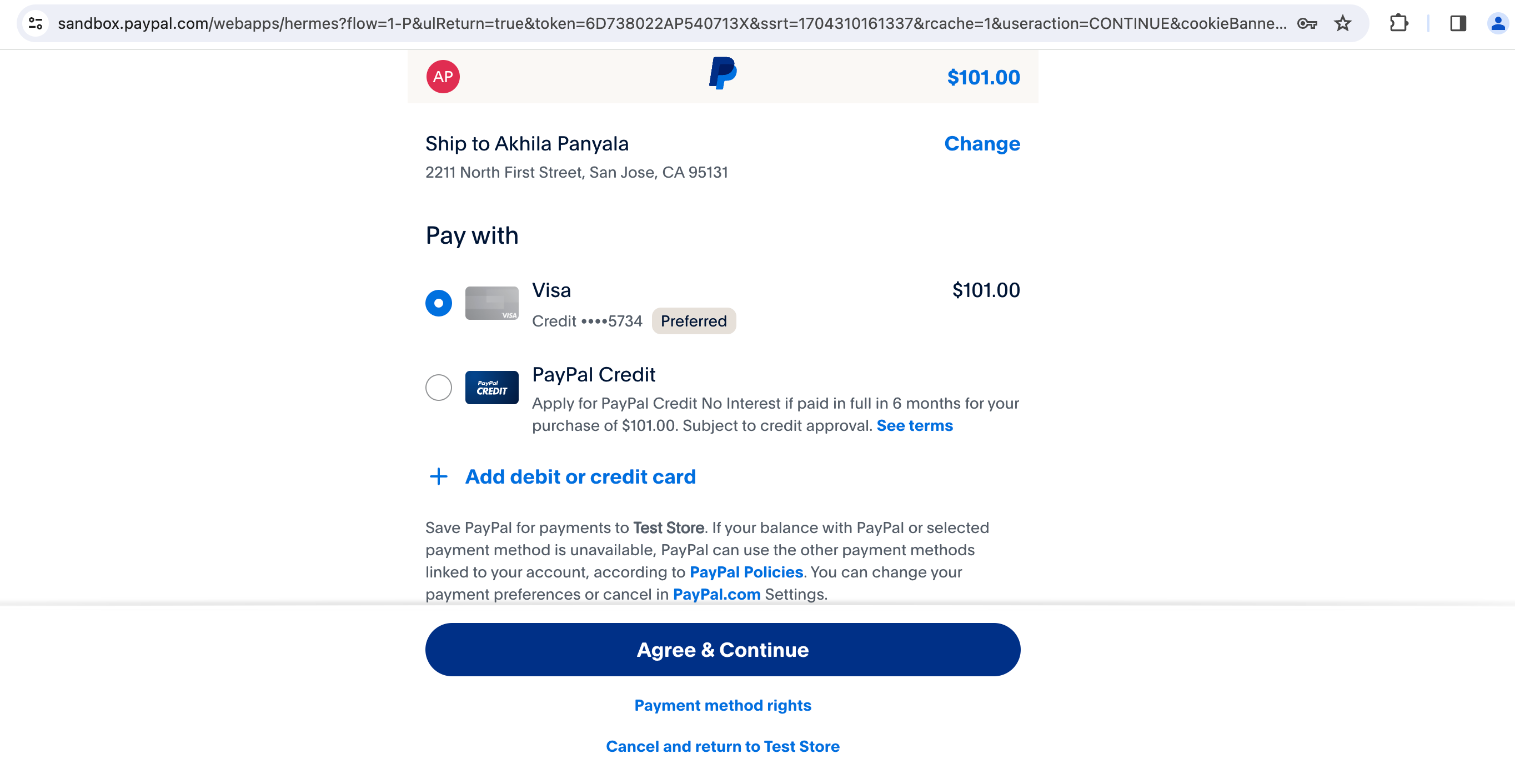
After the buyer approves the transaction, redirect them to the return_url passed in paypal.experience_context.return_url.
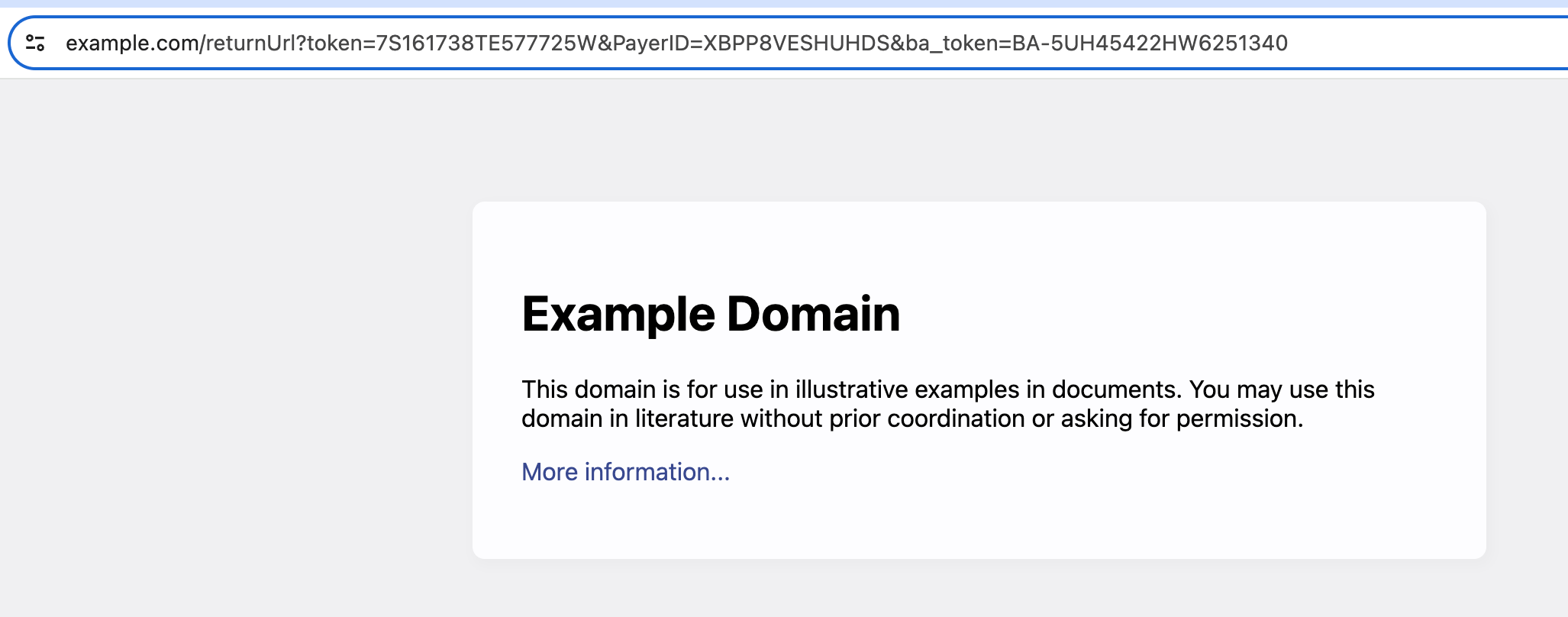
The order changes to an approved state.
Step 3: Authorize or capture order
Both authorize and capture API requests accept payment_source as an input, but it's optional. See the preceding Sample create order request that saves the payment method payload for the payment source. Learn more about Authorize and capture.
Sample authorize order request
Because the intent for the preceding Sample create order request that saves the payment method is AUTHORIZE, you need to use the Authorize payment for order endpoint of the Orders v2 API to capture or authorize the payment.
curl -v -X POST https://api-m.sandbox.paypal.com/v2/checkout/orders/ORDER_ID/authorize \
-H 'Content-Type: application/json' \
-H 'Authorization: Bearer ACCESS_TOKEN' \
-d '{}'
Sample authorize order response
{
    "id": "ORDER_ID",
    "intent": "AUTHORIZE",
    "status": "COMPLETED",
    "payment_source": {
        "paypal": {
            "email_address": "[email protected]",
            "account_id": "PAYER_ID",
            "account_status": "UNVERIFIED",
            "name": {
                "given_name": "Firstname",
                "surname": "Lastname"
            },
            "address": {
                "country_code": "US"
            },
            "attributes": {
                "vault": {
                    "id": "VAULT_ID",
                    "status": "VAULTED",
                    "customer": {
                        "id": "sZvlIPycvu"
                    },
                    "links": [
                        {
                            "href": "https://api.sandbox.paypal.com/v3/vault/payment-tokens/VAULT_ID",
                            "rel": "self",
                            "method": "GET"
                        },
                        {
                            "href": "https://api.sandbox.paypal.com/v3/vault/payment-tokens/VAULT_ID",
                            "rel": "delete",
                            "method": "DELETE"
                        },
                        {
                            "href": "https://api.sandbox.paypal.com/v2/checkout/orders/ORDER_ID",
                            "rel": "up",
                            "method": "GET"
                        }
                    ]
                }
            }
        }
    },
    "purchase_units": [
        {
            "reference_id": "default",
            "amount": {
                "currency_code": "USD",
                "value": "101.00"
            },
            "payee": {
                "email_address": "[email protected]",
                "merchant_id": "MERCHANT_ID"
            },
            "soft_descriptor": "PAYPAL *TEST STORE",
            "shipping": {
                "name": {
                    "full_name": "Firstname Lastname"
                },
                "address": {
                    "address_line_1": "123 Main St.",
                    "admin_area_1": "CA",
                    "admin_area_2": "Anytown",
                    "postal_code": "12345",
                    "country_code": "US"
                }
            },
            "payments": {
                "authorizations": [
                    {
                        "status": "CREATED",
                        "id": "AUTHORIZATION_ID",
                        "amount": {
                            "currency_code": "USD",
                            "value": "101.00"
                        },
                        "seller_protection": {
                            "status": "ELIGIBLE",
                            "dispute_categories": [
                                "ITEM_NOT_RECEIVED",
                                "UNAUTHORIZED_TRANSACTION"
                            ]
                        },
                        "expiration_time": "2024-05-07T22:41:59Z",
                        "links": [
                            {
                                "href": "https://api.sandbox.paypal.com/v2/payments/authorizations/AUTHORIZATION_ID",
                                "rel": "self",
                                "method": "GET"
                            },
                            {
                                "href": "https://api.sandbox.paypal.com/v2/payments/authorizations/AUTHORIZATION_ID/capture",
                                "rel": "capture",
                                "method": "POST"
                            },
                            {
                                "href": "https://api.sandbox.paypal.com/v2/payments/authorizations/AUTHORIZATION_ID/void",
                                "rel": "void",
                                "method": "POST"
                            },
                            {
                                "href": "https://api.sandbox.paypal.com/v2/payments/authorizations/AUTHORIZATION_ID/reauthorize",
                                "rel": "reauthorize",
                                "method": "POST"
                            },
                            {
                                "href": "https://api.sandbox.paypal.com/v2/checkout/orders/ORDER_ID",
                                "rel": "up",
                                "method": "GET"
                            }
                        ],
                        "create_time": "2024-04-08T22:41:59Z",
                        "update_time": "2024-04-08T22:41:59Z"
                    }
                ]
            }
        }
    ],
    "payer": {
        "name": {
            "given_name": "Firstname",
            "surname": "Lastname"
        },
        "email_address": "[email protected]",
        "payer_id": "PAYER_ID",
        "address": {
            "country_code": "US"
        }
    },
    "create_time": "2024-04-08T22:30:56Z",
    "update_time": "2024-04-08T22:41:59Z",
    "links": [
        {
            "href": "https://api.sandbox.paypal.com/v2/checkout/orders/ORDER_ID",
            "rel": "self",
            "method": "GET"
        }
    ]
}
Capture payment
After the order has been created and the payer approves the purchase, capture the payment by sending a POST request and the order ID to the Capture payment endpoint of the Payments v2 API.
The following sample request and response show the result of sending a capture payment request without a request body.
Sample capture payment request
Because the intent is AUTHORIZE, use the authorization_id obtained in Step 3: Authorize or capture order to call the Capture authorized payment endpoint of the Payments v2 API. This completes the order flow for saving a payment method.
curl -v -X POST https://api-m.sandbox.paypal.com/v2/payments/authorizations/AUTHORIZATION_ID/capture \
-H 'Content-Type: application/json' \
-H 'Authorization: Bearer ACCESS_TOKEN' \
-d '{}'
Sample capture payment response
{
    "id": "AUTHORIZATION_ID",
    "amount": {
        "currency_code": "USD",
        "value": "100.00"
    },
    "final_capture": true,
    "seller_protection": {
        "status": "ELIGIBLE",
        "dispute_categories": [
            "ITEM_NOT_RECEIVED",
            "UNAUTHORIZED_TRANSACTION"
        ]
    },
    "seller_receivable_breakdown": {
        "gross_amount": {
            "currency_code": "USD",
            "value": "100.00"
        },
        "paypal_fee": {
            "currency_code": "USD",
            "value": "3.98"
        },
        "net_amount": {
            "currency_code": "USD",
            "value": "96.02"
        },
        "exchange_rate": {}
    },
    "status": "COMPLETED",
    "create_time": "2024-03-15T20:59:52Z",
    "update_time": "2024-03-15T20:59:52Z",
    "links": [
        {
            "href": "https://api.sandbox.paypal.com/v2/payments/captures/CAPTURE_ID",
            "rel": "self",
            "method": "GET"
        },
        {
            "href": "https://api.sandbox.paypal.com/v2/payments/captures/CAPTURE_ID/refund",
            "rel": "refund",
            "method": "POST"
        },
        {
            "href": "https://api.sandbox.paypal.com/v2/payments/authorizations/AUTHORIZATION_ID",
            "rel": "up",
            "method": "GET"
        }
    ]
}
Note: You can authorize the total amount or a part of it. To authorize a partial payment, pass the amount in the request payload. For more information about the payments authorization endpoint, refer to the Payments v2 API.
Step 4: Show the order details
You can get the details of an order at any stage by sending a GET call to the Show order details endpoint of the Orders v2 API. You can use the vault ID and customer ID passed by the paypal.attributes.vault.id and paypal.attributes.vault.customer.id objects in the response for future transactions.
This code sample includes an authorization token:
Sample show order details request with authorization
curl -v -X GET https://api-m.sandbox.paypal.com/v2/checkout/orders/ORDER_ID \
-H 'Authorization: Bearer ACCESS_TOKEN'
Sample show order details response with authorization
{
    "id": "ORDER_ID",
    "intent": "AUTHORIZE",
    "status": "COMPLETED",
    "payment_source": {
        "paypal": {
            "attributes": {
                "vault": {
                    "id": "VAULT_ID",
                    "status": "VAULTED",
                    "customer": {
                        "id": "sZvlIPycvu"
                    },
                    "links": [
                        {
                            "href": "https://api.sandbox.paypal.com/v3/vault/payment-tokens/VAULT_ID",
                            "rel": "self",
                            "method": "GET"
                        },
                        {
                            "href": "https://api.sandbox.paypal.com/v3/vault/payment-tokens/VAULT_ID",
                            "rel": "delete",
                            "method": "DELETE"
                        },
                        {
                            "href": "https://api.sandbox.paypal.com/v2/checkout/orders/ORDER_ID",
                            "rel": "up",
                            "method": "GET"
                        }
                    ]
                }
            }
        }
    },
    "purchase_units": [
        {
            "reference_id": "default",
            "amount": {
                "currency_code": "USD",
                "value": "101.00"
            },
            "payee": {
                "email_address": "[email protected]",
                "merchant_id": "MERCHANT_ID"
            },
            "soft_descriptor": "PAYPAL *TEST STORE",
            "shipping": {
                "name": {
                    "full_name": "Firstname Lastname"
                },
                "address": {
                    "address_line_1": "123 Main St.",
                    "admin_area_1": "CA",
                    "admin_area_2": "Anytown",
                    "postal_code": "12345",
                    "country_code": "US"
                }
            },
            "payments": {
                "authorizations": [
                    {
                        "status": "CAPTURED",
                        "id": "AUTHORIZATION_ID",
                        "amount": {
                            "currency_code": "USD",
                            "value": "101.00"
                        },
                        "seller_protection": {
                            "status": "ELIGIBLE",
                            "dispute_categories": [
                                "ITEM_NOT_RECEIVED",
                                "UNAUTHORIZED_TRANSACTION"
                            ]
                        },
                        "expiration_time": "2024-05-07T22:41:59Z",
                        "links": [
                            {
                                "href": "https://api.sandbox.paypal.com/v2/payments/authorizations/AUTHORIZATION_ID",
                                "rel": "self",
                                "method": "GET"
                            },
                            {
                                "href": "https://api.sandbox.paypal.com/v2/payments/authorizations/AUTHORIZATION_ID/capture",
                                "rel": "capture",
                                "method": "POST"
                            },
                            {
                                "href": "https://api.sandbox.paypal.com/v2/payments/authorizations/AUTHORIZATION_ID/void",
                                "rel": "void",
                                "method": "POST"
                            },
                            {
                                "href": "https://api.sandbox.paypal.com/v2/payments/authorizations/AUTHORIZATION_ID/reauthorize",
                                "rel": "reauthorize",
                                "method": "POST"
                            },
                            {
                                "href": "https://api.sandbox.paypal.com/v2/checkout/orders/ORDER_ID",
                                "rel": "up",
                                "method": "GET"
                            }
                        ],
                        "create_time": "2024-04-08T22:41:59Z",
                        "update_time": "2024-04-08T22:59:40Z"
                    }
                ],
                "captures": [
                    {
                        "id": "CAPTURE_ID",
                        "status": "COMPLETED",
                        "amount": {
                            "currency_code": "USD",
                            "value": "101.00"
                        },
                        "final_capture": true,
                        "disbursement_mode": "INSTANT",
                        "seller_protection": {
                            "status": "ELIGIBLE",
                            "dispute_categories": [
                                "ITEM_NOT_RECEIVED",
                                "UNAUTHORIZED_TRANSACTION"
                            ]
                        },
                        "seller_receivable_breakdown": {
                            "gross_amount": {
                                "currency_code": "USD",
                                "value": "101.00"
                            },
                            "paypal_fee": {
                                "currency_code": "USD",
                                "value": "4.01"
                            },
                            "net_amount": {
                                "currency_code": "USD",
                                "value": "96.99"
                            }
                        },
                        "links": [
                            {
                                "href": "https://api.sandbox.paypal.com/v2/payments/captures/CAPTURE_ID",
                                "rel": "self",
                                "method": "GET"
                            },
                            {
                                "href": "https://api.sandbox.paypal.com/v2/payments/captures/CAPTURE_ID/refund",
                                "rel": "refund",
                                "method": "POST"
                            },
                            {
                                "href": "https://api.sandbox.paypal.com/v2/payments/authorizations/AUTHORIZATION_ID",
                                "rel": "up",
                                "method": "GET"
                            }
                        ],
                        "create_time": "2024-04-08T22:59:40Z",
                        "update_time": "2024-04-08T22:59:40Z"
                    }
                ]
            }
        }
    ],
    "create_time": "2024-04-08T22:30:56Z",
    "update_time": "2024-04-08T22:59:40Z",
    "links": [
        {
            "href": "https://api.sandbox.paypal.com/v2/checkout/orders/ORDER_ID",
            "rel": "self",
            "method": "GET"
        }
    ]
}
Sample 2: Saved payment methods with billing agreements
You can use a saved payment method for single-step and multi-step order creation with a billing agreement.
Option 1: Single-step
You can use an existing billing agreement ID to create a single-step order. Send a POST request to the Create order endpoint of the Orders v2 API, and pass the billing agreement using the payment_source.paypal.billing_agreement_id object in the request body.
Sample single-step create order request with billing agreement
This sample sets the intent to CAPTURE:
curl -v -X POST https://api-m.sandbox.paypal.com/v2/checkout/orders/ \
-H 'Content-Type: application/json' \
-H 'Authorization: Bearer ACCESS_TOKEN' \
-d '{
    "intent": "CAPTURE",
    "purchase_units": [
        {
            "reference_id": "REFID-000-1001",
            "amount": {
                "currency_code": "USD",
                "value": "100.00"
            }
        }
    ],
    "payment_source": {
        "paypal": {
            "billing_agreement_id": "Test-BA-ID",
            "experience_context": {
                "landing_page": "LOGIN",
                "user_action": "PAY_NOW",
                "return_url": "https://example.com/returnUrl",
                "cancel_url": "https://example.com/cancelUrl"
            }
        }
    }'
Sample single-step create order response with billing agreement
{
    "id": "ORDER_ID",
    "status": "COMPLETED",
    "payment_source": {
        "paypal": {
            "email_address": "[email protected]",
            "account_id": "PAYER_ID",
            "account_status": "UNVERIFIED",
            "name": {
                "given_name": "Firstname",
                "surname": "Lastname"
            },
            "address": {
                "country_code": "US"
            }
        }
    },
    "purchase_units": [
        {
            "reference_id": "default",
            "payments": {
                "captures": [
                    {
                        "id": "CAPTURE_ID",
                        "status": "COMPLETED",
                        "amount": {
                            "currency_code": "USD",
                            "value": "220.00"
                        },
                        "final_capture": true,
                        "seller_protection": {
                            "status": "ELIGIBLE",
                            "dispute_categories": [
                                "ITEM_NOT_RECEIVED",
                                "UNAUTHORIZED_TRANSACTION"
                            ]
                        },
                        "seller_receivable_breakdown": {
                            "gross_amount": {
                                "currency_code": "USD",
                                "value": "220.00"
                            },
                            "paypal_fee": {
                                "currency_code": "USD",
                                "value": "8.17"
                            },
                            "net_amount": {
                                "currency_code": "USD",
                                "value": "211.83"
                            }
                        },
                        "links": [
                            {
                                "href": "https://api.sandbox.paypal.com/v2/payments/captures/CAPTURE_ID",
                                "rel": "self",
                                "method": "GET"
                            },
                            {
                                "href": "https://api.sandbox.paypal.com/v2/payments/captures/CAPTURE_ID/refund",
                                "rel": "refund",
                                "method": "POST"
                            },
                            {
                                "href": "https://api.sandbox.paypal.com/v2/checkout/orders/ORDER_ID",
                                "rel": "up",
                                "method": "GET"
                            }
                        ],
                        "create_time": "2024-06-24T17:04:41Z",
                        "update_time": "2024-06-24T17:04:41Z"
                    }
                ]
            }
        }
    ],
    "payer": {
        "name": {
            "given_name": "Firstname",
            "surname": "Lastname"
        },
        "email_address": "[email protected]",
        "payer_id": "PAYER_ID",
        "address": {
            "country_code": "US"
        }
    },
    "links": [
        {
            "href": "https://api.sandbox.paypal.com/v2/checkout/orders/ORDER_ID",
            "rel": "self",
            "method": "GET"
        }
    ]
}
Option 2: Multi-step
Alternatively, you can create the order without any payment source and pass the payment_source.paypal.billing_agreement_id to capture/authorize or confirm payment using the Orders v2 or Payments v2 APIs.
Step 1: Create order
Set the order intent to CAPTURE. A successful capture order request returns an HTTPS 201 Created status code.
Sample multi-step create order request with billing agreement
curl -v -X POST https://api-m.sandbox.paypal.com/v2/checkout/orders/ \
-H 'Content-Type: application/json' \
-H 'Authorization: Bearer ACCESS_TOKEN' \
-d '{
    "intent": "CAPTURE",
    "purchase_units": [
        {
            "items": [
                {
                    "name": "T-Shirt",
                    "description": "Green XL",
                    "quantity": "1",
                    "unit_amount": {
                        "currency_code": "USD",
                        "value": "100.00"
                    }
                }
            ],
            "amount": {
                "currency_code": "USD",
                "value": "100.00",
                "breakdown": {
                    "item_total": {
                        "currency_code": "USD",
                        "value": "100.00"
                    }
                }
            }
        }
    ]
}'
Sample multi-step create order response with billing agreement
{
    "id": "ORDER_ID",
    "status": "CREATED",
    "create_time": "2024-03-20T16:38:38Z",
    "links": [
        {
            "href": "https://api.sandbox.paypal.com/v2/checkout/orders/ORDER_ID",
            "rel": "self",
            "method": "GET"
        },
        {
            "href": "https://www.sandbox.paypal.com/checkoutnow?token=ORDER_ID",
            "rel": "approve",
            "method": "GET"
        },
        {
            "href": "https://api.sandbox.paypal.com/v2/checkout/orders/ORDER_ID",
            "rel": "update",
            "method": "PATCH"
        },
        {
            "href": "https://api.sandbox.paypal.com/v2/checkout/orders/ORDER_ID/capture",
            "rel": "capture",
            "method": "POST"
        }
    ]
}
Step 2: Capture order
After the order has been created, capture the order by sending a POST request to the /v2/checkout/orders/ORDER_ID/capture endpoint. Pass the billing_agreement_id in the payment_source.paypal.billing_agreement_id parameter and the order ID in the URL.
Sample multi-step capture order request with billing agreement
curl -v -X POST https://api-m.sandbox.paypal.com/v2/checkout/orders/ORDER_ID/capture \
-H 'Content-Type: application/json' \
-H 'Authorization: Bearer ACCESS_TOKEN' \
-d '{
      "payment_source": {
           "paypal": {
              "billing_agreement_id": "Test-BA-ID"
         }
      }
}'
Sample multi-step capture order request with billing agreement
{
    "id": "ORDER_ID",
    "intent": "CAPTURE",
    "status": "COMPLETED",
    "payment_source": {
        "paypal": {
            "email_address": "[email protected]",
            "account_id": "PAYER_ID",
            "account_status": "UNVERIFIED",
            "name": {
                "given_name": "Firstname",
                "surname": "Lastname"
            },
            "address": {
                "country_code": "US"
            }
        }
    },
    "purchase_units": [
        {
            "reference_id": "REFID-000-1001",
            "amount": {
                "currency_code": "USD",
                "value": "100.00"
            },
            "payee": {
                "email_address": "[email protected]",
                "merchant_id": "MERCHANT_ID"
            },
            "soft_descriptor": "PAYPAL *TEST STORE",
            "payments": {
                "captures": [
                    {
                        "id": "CAPTURE_ID",
                        "status": "COMPLETED",
                        "amount": {
                            "currency_code": "USD",
                            "value": "100.00"
                        },
                        "final_capture": true,
                        "seller_protection": {
                            "status": "ELIGIBLE",
                            "dispute_categories": [
                                "ITEM_NOT_RECEIVED",
                                "UNAUTHORIZED_TRANSACTION"
                            ]
                        },
                        "seller_receivable_breakdown": {
                            "gross_amount": {
                                "currency_code": "USD",
                                "value": "100.00"
                            },
                            "paypal_fee": {
                                "currency_code": "USD",
                                "value": "3.98"
                            },
                            "net_amount": {
                                "currency_code": "USD",
                                "value": "96.02"
                            }
                        },
                        "links": [
                            {
                                "href": "https://api.sandbox.paypal.com/v2/payments/captures/CAPTURE_ID",
                                "rel": "self",
                                "method": "GET"
                            },
                            {
                                "href": "https://api.sandbox.paypal.com/v2/payments/captures/CAPTURE_ID/refund",
                                "rel": "refund",
                                "method": "POST"
                            },
                            {
                                "href": "https://api.sandbox.paypal.com/v2/checkout/orders/ORDER_ID",
                                "rel": "up",
                                "method": "GET"
                            }
                        ],
                        "create_time": "2024-02-29T18:37:16Z",
                        "update_time": "2024-02-29T18:37:16Z"
                    }
                ]
            }
        }
    ],
    "payer": {
        "name": {
            "given_name": "Firstname",
            "surname": "Lastname"
        },
        "email_address": "[email protected]",
        "payer_id": "PAYER_ID",
        "address": {
            "country_code": "US"
        }
    },
    "create_time": "2024-02-29T18:37:00Z",
    "update_time": "2024-02-29T18:37:16Z",
    "links": [
        {
            "href": "https://api.sandbox.paypal.com/v2/checkout/orders/ORDER_ID",
            "rel": "self",
            "method": "GET"
        }
    ]
}