On this page
No Headings
Last updated: June 12, 2026
Important: Change payment methods is a legacy product. We accept new integrations and support existing integrations, but there are new solutions.
Give your buyers the option to change the payment method for a specific transaction. For example, buyers might choose a credit card with more points or a bank account with more funds.
This page is for merchants who have a PayPal NVP/SOAP billing agreement with their buyer. When changing the payment method, the buyer can select an existing payment method or add a new one.
Note: Changing the payment method doesn't replace the buyer's original payment method.
Warning: To continue providing a Pay Later option at checkout, it is essential that you integrate Billing With Purchase. This solution offers the same functionalities as Billing Agreement and is compatible with your existing payment options.
Before you can create the option to change the payment method, integrate the PayPal NVP/Soap billing agreement API with reference transactions.
The buyer must already have a billing agreement with the merchant before they can change their payment method. The billing agreement ID should be in your records.
The buyer can change the payment option only if they're present to complete the transaction.
This integration works for instant sale and authorization and capture transactions.
This integration uses NVP/SOAP (version 215 or higher).
The following is a sample workflow:
Call the SetExpressCheckout object and pass a new parameter called BILLING_AGREEMENT_ID along the other request parameters.
Use the token from the response of the SetExpressCheckout call to create the redirect URL.
On the checkout page, add an Options link next to the vaulted PayPal email address.
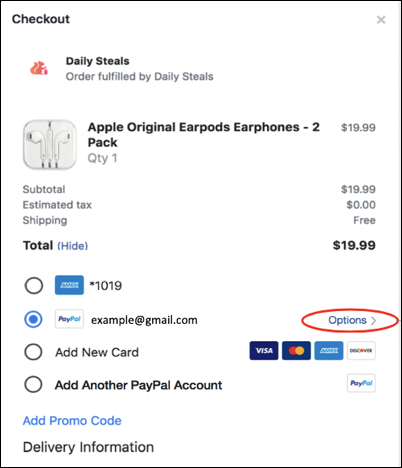 Figure 1: Checkout page with the option to change the payment method.
When the buyer selects the Options link, the buyer is redirected to a page and chooses a different payment method. After the buyer chooses a payment method, the redirect URL takes them back to the merchant website.
If the buyer chooses to change the payment method, first call the GetExpressCheckoutDetails object to get the PayerID, then call the DoExpressCheckoutPayment object.
Otherwise, if the buyer chooses not to use the Options link to change the payment method, call the DoReferenceTransaction object.
After setting up a billing agreement, help the buyer change the payment method that's associated with their billing agreement. Start by calling the PayPal SetExpressCheckout object.
Request
-------
Endpoint URL: https://api-3t.sandbox.paypal.com/nvp
HTTP method: POST
POST data:
USER=insert_merchant_user_name_here
&PWD=insert_merchant_password_here
&SIGNATURE=insert_merchant_signature_value_here
&METHOD=SetExpressCheckout
&VERSION=215
&PAYMENTREQUEST_0_PAYMENTACTION=SALE
&PAYMENTREQUEST_0_AMT=25.00
&PAYMENTREQUEST_0_CURRENCYCODE=USD
&BILLING_AGREEMENT_ID=B-8SX93041AH336464H
&cancelUrl=https://example.com/cancel
&returnUrl=https://example.com/success

Response
--------
TOKEN=EC%2d2B984685J43051234
&ACK=Success
...After you copy the code in the sample request, modify the following:
(Required) Change cancelUrl to the URL where the buyer is redirected after choosing not to pay with PayPal.
(Required) Change returnUrl to the URL where the buyer is redirected after choosing to pay with PayPal.
Change PAYMENTREQUEST_0_PAYMENTACTION to your desired payment action, such as an authorization or a final sale.
Change PAYMENTREQUEST_0_AMT to the total cost of the transaction.
Change PAYMENTREQUEST_0_CURRENCYCODE to the country currency of your choice.
Change L_BILLINGTYPE0 to your type of billing agreement, such as MerchantInitiatedBilling.
Change BILLING_AGREEMENT_ID to the billing agreement ID that associates the buyer to a billing agreement or reference transaction.
A successful request returns:
A &ACK=Success message
A token ID in the format EC%<id-number>
Use the token from the response of the SetExpressCheckout call to create the redirect URL.
Example: https://www.paypal.com/webapps/hermes?token=EC%<id-number>On your checkout page, add an edit link or button using the redirect URL from step 2. When buyers select this option, they're redirected to the buyer approval page.
The buyer sees a page displaying a list of payment methods associated with the buyer. The buyer can select any payment method for this transaction.
If the buyer didn't authorize changing the payment method, the API redirects them to the cancel URL that the SetExpressCheckout call specified. This means the buyer didn't approve paying with the new payment method.
You can capture future payments by calling the DoReferenceTransaction API on behalf of the buyer.
However, a DoReferenceTransaction call moves the money from the payment method that's initially associated with existing billing agreement.
Learn more about capturing future payments.
If the buyer approves the payment, call the GetExpressCheckoutDetails object to get the PayerID (which uniquely identifies the customer) and other details you might need to process the transaction.
Request
-------
Endpoint URL: https://api-3t.sandbox.paypal.com/nvp
HTTP method: GET
USER=insert_merchant_user_name_here
&PWD=insert_merchant_password_here
&SIGNATURE=insert_merchant_signature_value_here
&METHOD=GetExpressCheckoutDetails
&VERSION=215
&TOKEN=EC-XXXXXXXThe API response returns:
A &ACK=Success message
A PayerID
The EC token
Call the DoExpressCheckoutPayment object to capture the payment against the new payment method chosen by the buyer.
Request
----date: 2021-09-08T18:25:59Z
date: 2022-02-14T20:13:37Z
---
Endpoint URL: https://api-3t.sandbox.paypal.com/nvp
HTTP method: POST
POST data:
USER=insert_merchant_user_name_here
&PWD=insert_merchant_password_here
&SIGNATURE=insert_merchant_signature_value_here
&METHOD=DoExpressCheckoutPayment
&VERSION=215
&PAYERID=payerID
&TOKEN=EC-XXXXXXXXThe API response returns:
A &ACK=Success message
A PayerID
The EC token
PayPal processes the DoExpressCheckoutPayment object. During the process, PayPal captures the payment by transferring the funds from the buyer account to the merchant account. PayPal then sends a confirmation e-mail to the buyer.