What We Learned Building PayPal's MCP Gateway

Oct 08, 2026
11 min read
Authored by: Faiz Mohammed, Amy Wang & Suraj Kumar
One enterprise connection for people, agents, and approved partners, with identity and policy applied to every request.
When we started in July 2025, the requirement sounded simple: give AI clients one place to connect to PayPal's MCP servers. Today, the production catalog includes close to 200 active MCP servers and 3,318 callable tools. In the past month alone, the gateway handled more than 3.6 million MCP tool calls. At that scale, the gateway had to do much more than forward requests.
Why we needed an MCP Gateway
Without a gateway, every client would need to know every server address, transport, authentication flow, and tool schema. Every server team would also need to solve the same client compatibility and security problems. That may work for a small pilot. It does not work for an enterprise catalog that changes every week.
Protocol support should not wait for every client
MCP is evolving quickly. New transports and protocol capabilities can arrive faster than desktop clients or enterprise agents can adopt them. The gateway gives us one place to add compatibility and present a stable connection to clients. A client can continue using the interface it understands while the gateway handles differences behind it.
One gateway does not mean one identity
A user can come through enterprise SSO. An agent can use a more fine-grained identity and access policy. An approved external client can enter through additional identity and safety controls. All of them can use the same gateway, but they do not receive the same access.
The gateway should simplify connectivity without flattening identity. The caller's identity has to remain attached to discovery, authorization, execution, and audit.
Server teams can keep their language and framework
The gateway standardizes the contract, not the implementation language. Teams can build MCP servers using the language and framework that fit their service, while following the same authentication and registration patterns.
The same route can serve internal and external clients
Employees, internal agents, Claude Desktop, ChatGPT, and approved vendors need access to enterprise capabilities. The gateway provides a common route while applying the appropriate identity and safety checks for each caller. It can also route traffic to approved third-party MCP servers under their applicable controls.
Some desktop clients use an approved connection path to reach internal services. We keep those connection details out of this overview.
We wanted one connection for clients, while still preserving the identity and policy of every request.
Centralizing authentication without centralizing every decision
The client authenticates once with the gateway. From there, the gateway establishes the request identity and carries it forward. Users can authenticate with SSO, while agents can operate with more narrowly scoped access. The same entry point supports both patterns.
Central IAM provides the roles and entitlements. The Auth SDK gives MCP server developers a consistent way to enforce those roles at the server level or on individual sensitive tools. Identity is handled the same way everywhere. A server team can still lock down its own sensitive tools.
The identity rule
- The gateway establishes who or what is calling.
- Discovery only considers capabilities available to that identity.
- The Auth SDK lets developers enforce IAM roles on a server or sensitive tool.
- Authorization is checked again before a selected tool is executed.
Two journeys happen behind the same connection
The first journey happens before a tool is available. A server is built, registered, inspected, reviewed when required, and added to the searchable catalog. The second journey happens when a client makes a request. The gateway identifies the caller, locates the right tool, validates access, routes the request, and records the outcome.
We call these the capability journey and the request journey.
How the gateway carries the complexity
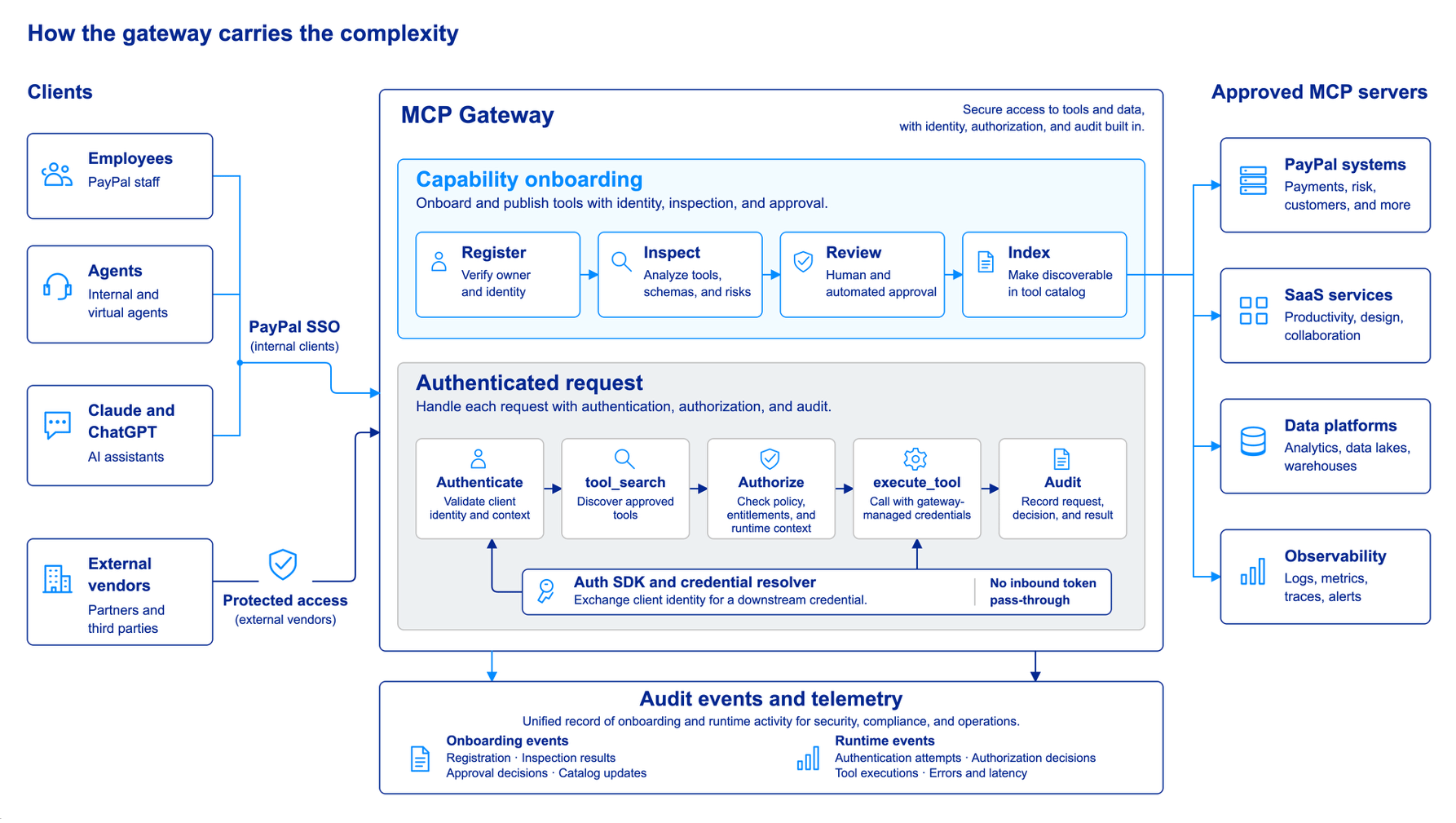
The engineering view: onboarding, identity, discovery, authorization, execution, and audit remain part of one governed path.
Making MCP server development ordinary
Most developers should not have to become experts in gateway authentication or agent security before they can expose a useful capability. We provide reusable SDKs, ready-to-use prompts and examples, and common registration paths so that teams can focus on the tool itself.
A team can package a custom MCP server as a Docker image. Existing services can also be brought in through their API contract and a platform-provided adapter. Once registered, the deployment path is consistent.
- Build the MCP server or describe the existing service using the supported path.
- Use the Auth SDK to apply central IAM roles at the server or tool level.
- Package and register the capability.
- Run the required source, dependency, and delivery checks.
- Review findings, with manual review for sensitive MCP servers.
- Publish approved tools into the catalog for authorized discovery.
The platform handles repeatable parts. The server team continues to own the business capability, its data contract, operational health, and the correctness of the action it performs.
Guardrails before publication and during use
The first guardrail moment is during onboarding. Source and dependency checks look for insecure code, exposed secrets, and known vulnerable packages. Tool metadata is also inspected for risks such as misleading instructions, hidden characters, obfuscated content, and descriptions that do not match the expected behavior. The findings are collected into a reviewable report. Sensitive servers receive an additional manual review before publication.
The second moment is around a tool call. Checks can examine the selected tool and its arguments, then inspect the response before it returns to the agent. These checks also provide monitoring and audit evidence for review.
Detailed view of guardrails
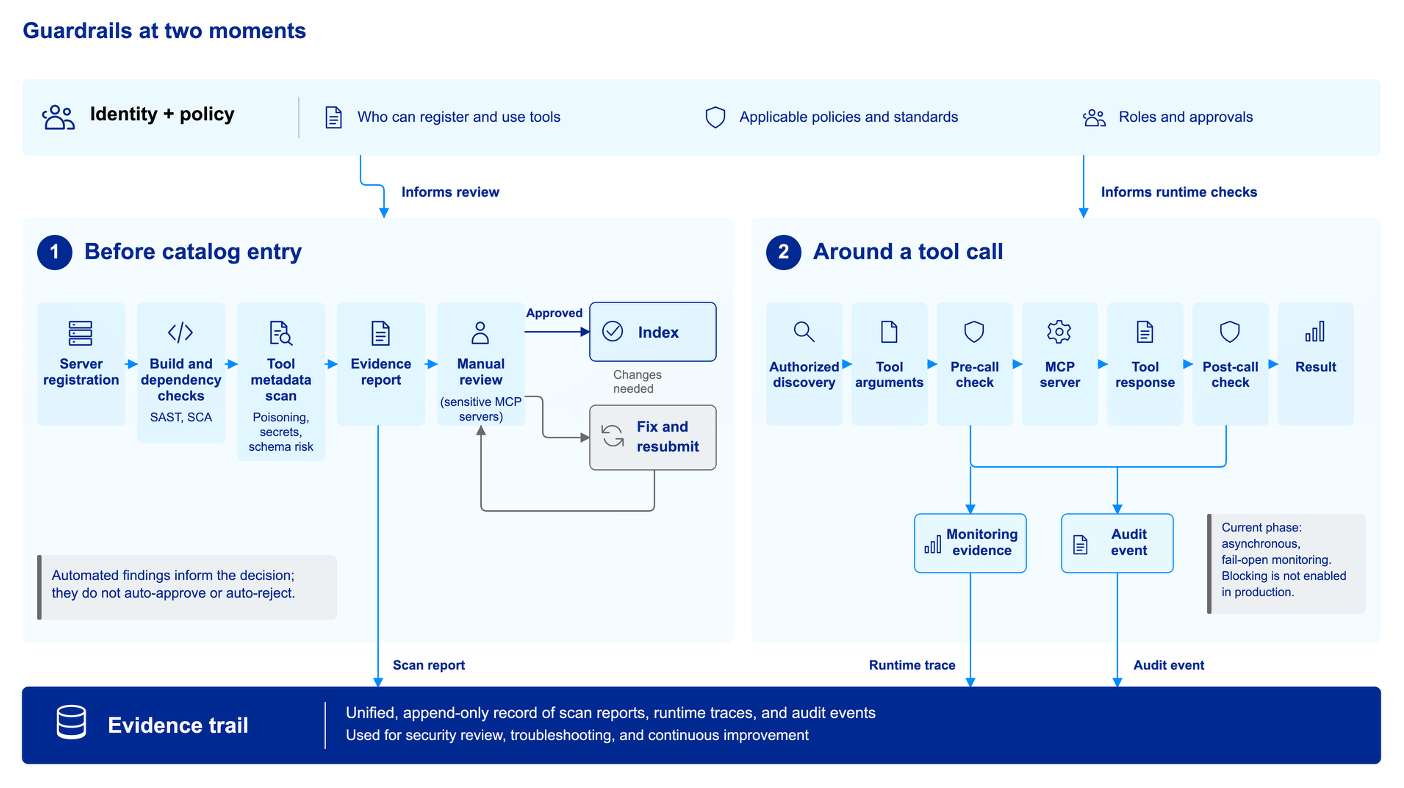
Automated findings, review decisions, runtime traces, and audit events remain distinct.
What happens when a tool is called
Tool calling looks simple from the client, but there are several checks behind it. At a high level, the request follows this sequence:
- The gateway authenticates the user, agent, or approved client.
- The request is matched to a tool that the caller is allowed to discover.
- Authorization is checked again for the selected server and tool.
- The gateway maps the tool to the correct MCP server and prepares the approved downstream authentication for that destination.
- The call is executed, and the response follows the return path through the gateway.
- Relevant request, response, and audit checks are recorded.
We won't cover token handling here. The gateway does not treat one incoming credential as valid everywhere. It uses the established identity and the destination's approved authentication path to prepare the request for the selected MCP server.
Connecting from AI clients should take one step
For Claude Desktop and other clients that support connectors, the intended experience is a one-click, one-time installation of the gateway followed by enterprise sign-in. The user should not have to install and maintain a separate connection for every MCP server.
After that first sign-in, new approved tools just show up. Nobody reinstalls anything.
Reducing context bloat with semantic tool discovery
A catalog with thousands of tool definitions creates another problem. If every schema is sent to the model at the beginning of every conversation, a large part of the context window is consumed before the user has asked for anything. More tools can also make selection less precise because the model has to compare many similar descriptions.
Instead, the client starts with two stable meta-tools. tool_search searches the authorized catalog using the user's request and returns a small set of relevant candidates with the schemas needed for the next step. execute_tool then calls the exact tool on the exact MCP server after authorization is validated again.
This approach keeps the initial context small and makes discovery practical as the catalog grows. It does add a search step, so we measure the complete interaction rather than claiming that search is free. The useful outcome is better tool selection with less catalog content carried in every prompt.
Why the two-step pattern helps
- The model begins with two stable tools instead of the full catalog.
- Semantic search narrows the request to relevant, authorized candidates.
- Only the selected schema and arguments move into execution.
- Discovery never replaces the final authorization check.
What we learned
- Forwarding requests was the easy part. Identity, authorization, and onboarding took most of our time.
- A common gateway must preserve individual identity. Users, agents, and external clients can share a route without sharing the same permissions.
- Good onboarding is part of security. Reusable SDKs and standard checks make the safe path easier for developers to follow.
- The client experience should remain simple. One connector is useful only because the complexity is handled consistently behind it.
Where we are heading
Our next work is about improving the quality of the complete path: better semantic discovery, clearer policy outcomes, stronger onboarding evidence, and carefully expanding enforcement where the risk requires it.
The goal remains simple to state. An authorized user or agent should be able to find and run the right enterprise tool without carrying the full catalog, while developers get a straightforward way to build and protect MCP servers.
The team behind MCP Gateway
Building MCP Gateway has been a large and ongoing team effort. These are the people who have shaped the platform, its developer experience, and the identity and authentication foundations behind it.
- Amy Wang, Engineering Manager
- Srinivasan Manoharan, Director, Software Engineering
- Faiz Mohammed, Staff GenAI Engineer
- Suraj Kumar, Senior Machine Learning Engineer
- Simon Xu, Senior Staff Engineer
- Digvijay Singh, Generative AI and Machine Learning Engineer
- Olympia Saha, Staff Software Engineer
- Huan Li, Staff Software Engineer, Auth SDK
- Divya BH, Senior Software Engineer
- Shangyuan Jia, Senior Software Engineer
- Ankit Kumar Singh, Senior Machine Learning Engineer
- Chanchal Singhal, Senior Software Engineer
Related reading
Model Context Protocol explains the public protocol and ecosystem.
Recommended
How PayPal is governing agent skills at enterprise scale
8 min read