Save Venmo with the JavaScript SDK
Last updated: May 14th, 4:15pm
After customers save their Venmo account, they can select it for faster checkout. Customers won't have to enter payment details for future transactions.
Availability
Venmo is available in the US only.
Know before you code
This integration requires a PayPal Developer account.
Note: The API URLs shown in the following examples point to a live environment. Venmo is not fully supported in the sandbox environment. For more information, refer to the Venmo testing guidelines.
How it works
PayPal encrypts payment method information and stores it in a digital vault for that customer.
- The payer saves their payment method.
- For a first-time payer, PayPal creates a customer ID. Store this within your system for future use.
- When the customer returns to your website and is ready to check out, pass their PayPal-generated customer ID to the JavaScript SDK. The customer ID tells the JavaScript SDK to save or reuse a saved payment method.
- The payer completes a billing agreement.
- The JavaScript SDK populates the checkout page with each saved payment method. Each payment method appears as a one-click button next to other ways to pay.
The checkout process is now shorter because it uses saved payment information.
First-time payer experience
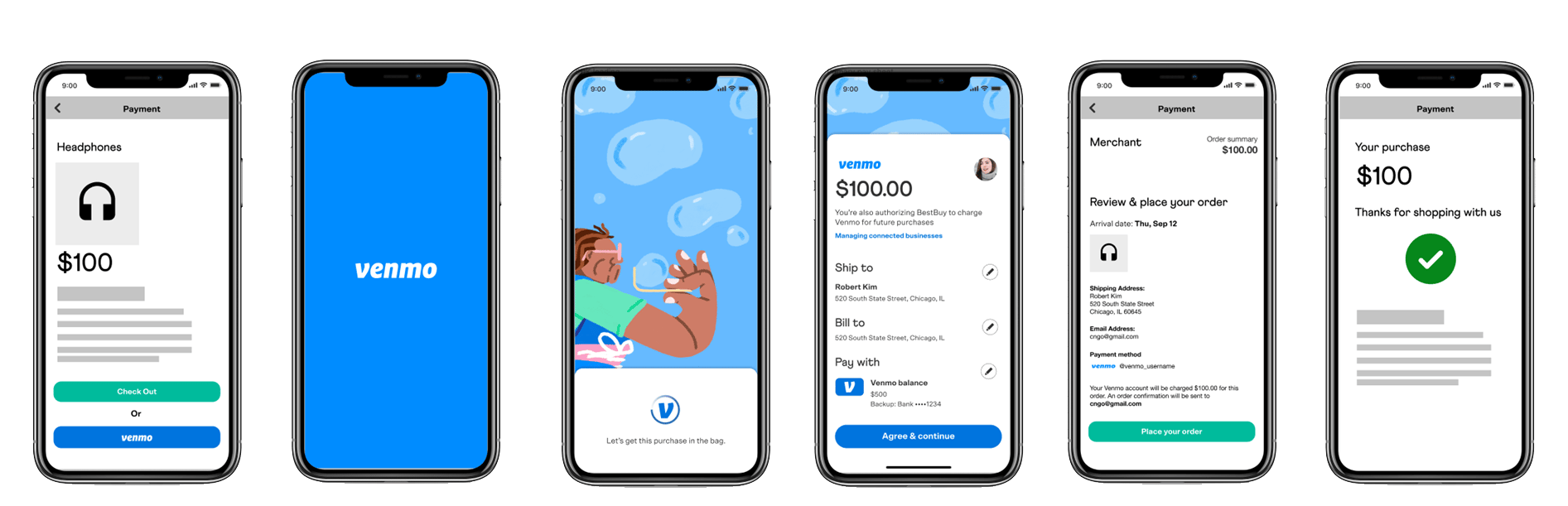
- The payer chooses Venmo as a payment method.
- The payer is directed to the Venmo app and agrees to save their Venmo.
- The payer returns to the merchant app or site and completes their purchase.
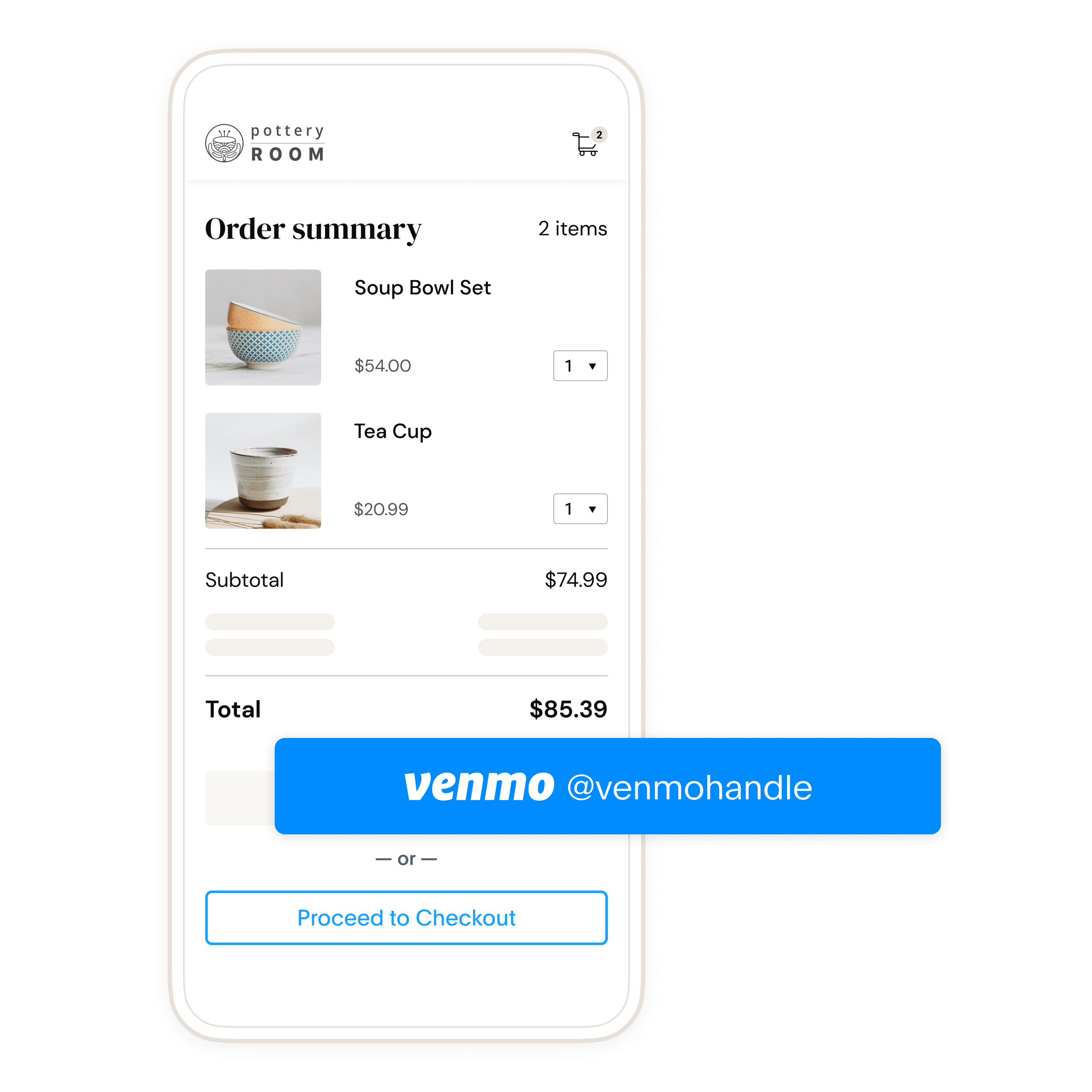
Return payer experience
The following is an example of what a payer sees after they save their Venmo account on your site. Returning payers can select their saved payment method at checkout to pay faster.
Use cases
Businesses save payment methods if they want customers to:
- Check out without re-entering a payment method
- Pay after use, for example, ride-sharing and food delivery
Check eligibility
- Go to paypal.com and sign in with your business account.
- Go to Account Settings > Payment Preferences > Save PayPal and Venmo payment methods.
- In the Save PayPal and Venmo payment methods section, select Get Started.
- When you submit profile details, PayPal reviews your eligibility to save PayPal Wallets and Venmo accounts.
- After PayPal reviews your eligibility, you'll see a status of Success, Need more information, or Denied.
Set up your account to save payment methods
Enable PayPal vaulting in your Developer Dashboard for sandbox testing and production.
- Log in to the PayPal Developer Dashboard.
- In the navigation menu, use the Sandbox | Live toggle to select Live.
- Access Apps & Credentials.
- Select the production REST API app name.
- To enable vaulting:
- Go to Features > Payment capabilities.
- Toggle on Save payment methods.
- To enable PayPal and Venmo vaulting:
- Go to Features > Payment methods.
- Toggle on PayPal and Venmo.
Warning: PayPal requires Risk Data Acquisition (RDA) to reduce fraud. You must implement risk data collection for all customer-initiated transactions (CIT) that use PayPal and Venmo Payment Tokens. Payment attempts that are missing RDA data are likely to be declined due to insufficient risk identifiers. Use the PayPal FraudNet and Magnes libraries to collect and pass RDA data during payment processing.
Generate user ID token for payer
The OAuth 2.0 API to retrieve an access_token has an additional parameter, response_type, that can be set to id_token. Include the id_token and access_token in the response.
First-time payer
A payer wants to save a payment method for the first time. Modify the following code to generate a user ID token for the payer:
Sample server-side user id token request
1curl -s -X POST "https://api-m.paypal.com/v1/oauth2/token"\2 -u CLIENT_ID:CLIENT_SECRET \3 -H "Content-Type: application/x-www-form-urlencoded"\4 -d "grant_type=client_credentials"\5 -d "response_type=id_token"
Modify the code
- Copy the sample request code.
- Change
CLIENT_IDto your client ID. - Change
CLIENT_SECRETto your client secret.
Return payer
A payer wants to use a saved payment method. Use the saved PayPal-generated customer ID in the POST body parameter target_customer_id. The target_customer_id is:
- a unique ID for a customer generated when the
payment_sourceis saved to the vault - available when capturing the order or retrieving saved payment information.
Note: Use the customer identifier generated by PayPal and not the identifier that you use to identify the customer in your system.
Sample server-side user ID token request with a PayPal customer ID
1curl -s -X POST "https://api-m.paypal.com/v1/oauth2/token"\2 -u CLIENT_ID:CLIENT_SECRET \3 -H "Content-Type: application/x-www-form-urlencoded"\4 -d "grant_type=client_credentials"\5 -d "response_type=id_token"\6 -d "target_customer_id=PayPal-generated customer id"
Modify the code
- Copy the sample request code.
- Change
CLIENT_IDto your client ID. - Change
CLIENT_SECRETto your client secret. - Replace the
PayPal-generated customer IDwith the actual one that was stored in your system.
Sample response
1{2 "access_token" : "A21AALfqL90lNr8kExf9CI8cQIP19XkpBfdyFf3nPdTc0XbXCNXdrrK92QaywEZ2jqNIyumP_fezAwMOibDaOWqGONVfyob5g",3 "app_id" : "APP-80W284485P519543T",4 "expires_in" : 32400,5 "id_token" : "eyJraWQiOiJjMmVjMmZiYjIzMGU0ZDkzOTNhMGFmZjEzZTY4MjFjMSIsInR5cCI6IkpXVCIsImFsZyI6IkVTMjU2In0.eyJpc3MiOiJodHRwczovL2FwaS5zYW5kYm94LnBheXBhbC5jb20iLCJzdWIiOiJQQ0haQ1RMMjVSNllXIiwiYWNyIjpbImNsaWVudCJdLCJzY29wZSI6WyJCcmFpbnRyZWU6VmF1bHQiXSwib3B0aW9ucyI6eyJjdXN0b21lcl9pZCI6IjIxMzM3NTk5MiJ9LCJheiI6ImdjcC5zbGMiLCJleHRlcm5hbF9pZCI6WyJQYXlQYWw6UENIWkNUTDI1UjZZVyIsIkJyYWludHJlZTo2ZDNtY3pqN2h3cHE4Y2cyIl0sImV4cCI6MTY2NDIzODEwMiwiaWF0IjoxNjY0MjM3MjAyLCJqdGkiOiJVMkFBSkVBN21DaWtTSGlfd3c2OVM5ZW92Vmo0UXZGanVNZzZYLUlZN1VqNDh4Z3NIaEhEVUZoelRFSG1vRGdvSXczcnFieTFFSEpubDFmb19SNFF3SVhPTlVPbHQ0dmZVQ0RxdklrRUdmWFdqeGNnYUNfTWVnam1KNk1IVTdVUSJ9.iMDYOU8RA6lv0U06LHcOSmpdEX6fVP4Y3-NLExZ28hUpBNDtCQ9NXxmYhjjAiYAbdtpVaYQjpig1NawbuAHNug",6 "nonce" : "2022-09-27T00:06:42ZtVVASdHDZEsuDY56mMQp6wlR5rOknNY1LqrC1oOVVmI",7 "scope" : "https://uri.paypal.com/services/invoicing https://uri.paypal.com/services/vault/payment-tokens/read https://uri.paypal.com/services/disputes/read-buyer https://uri.paypal.com/services/payments/realtimepayment https://uri.paypal.com/services/disputes/update-seller https://uri.paypal.com/services/paypalhere openid https://uri.paypal.com/services/payments/payment/authcapture https://uri.paypal.com/services/disputes/read-seller Braintree:Vault https://uri.paypal.com/services/payments/refund https://uri.paypal.com/services/identity/activities https://api-m.paypal.com/v1/vault/credit-card https://api-m.paypal.com/v1/payments/.* https://uri.paypal.com/services/reporting/search/read https://uri.paypal.com/payments/payouts https://uri.paypal.com/services/vault/payment-tokens/readwrite https://api-m.paypal.com/v1/vault/credit-card/.* https://uri.paypal.com/services/shipping/trackers/readwrite https://uri.paypal.com/services/subscriptions https://uri.paypal.com/services/applications/webhooks https://api-m.paypal.com/v1/payments/refund https://api-m.paypal.com/v1/payments/sale/.*/refund",8 "token_type" : "Bearer"9 }
A successful request returns fields including an access_token, id_token, and the number of seconds the access_token token is valid.
The id_token:
- Uniquely identifies each payer.
- Expires in a few minutes because it's meant to be used during checkout. Generate new tokens if the current tokens expire.
Tip: Each buyer session is unique. Set up your server to generate a new client token each time payment fields render on your page.
Create order
Create an order on the client and server side.
Warning: PayPal requires Risk Data Acquisition (RDA) to reduce fraud. You must implement risk data collection for all customer-initiated transactions (CIT) that use PayPal and Venmo Payment Tokens. Payment attempts that are missing RDA data are likely to be declined due to insufficient risk identifiers. Use the PayPal FraudNet and Magnes libraries to collect and pass RDA data during payment processing.
The following JavaScript functions are incompatible with Pay with Venmo when saving payment methods to the vault:
onShippingAddressChangeonShippingChangeonShippingOptionsChange
Client side
Include client-side callbacks to:
- Manage interactions with APIs
- Manage payer approval flows
- Handle any events that lead to cancellation or error during payer approval
1<script>2 paypal.Buttons({3 // Call your server to set up the transaction4 createOrder: function(data, actions) {5 return fetch('/yourserver.com/createOrder', {6 method: 'post'7 }).then(function(res) {8 return res.json();9 }).then(function(orderData) {10 return orderData.id;11 });12 },13 // Authorize or capture the transaction after the payer approves14 onApprove: (data, actions) => {15 return actions.order.capture().then(function(orderData) {16 //Authorize or Capture API17 return fetch('/yourserver.com/order/' + data.orderID + '/capture/', {18 method: 'post'19 })20 },21 onCancel(data, actions) {22 console.log(`Order Canceled - ID: ${data.orderID}`);23 },24 onError(err) {25 console.error(err);26 }27 }).render('#paypal-button-container');28 </script>
Server side
Set up your server to call the Create Order API. The button that the payer selects determines the payment_source sent in the following sample. To save Venmo as a payment method, use payment_source.venmo.attributes with the value ON_SUCCESS to pass appropriate attributes.
Request
Create an order with Venmo as a payment source:
1curl -v -X POST https://api-m.paypal.com/v2/checkout/orders \2 -H "Content-Type: application/json" \3 -H "Authorization: Bearer Access-Token" \4 -d '{5 "intent": "CAPTURE",6 "purchase_units": [{7 "amount": {8 "currency_code": "USD",9 "value": "100.00"10 }11 }],12 "payment_source": {13 "venmo": {14 "email_address": "customer@example.com",15 "experience_context": {16 "shipping_preference": "SET_PROVIDED_ADDRESS",17 "brand_name": "EXAMPLE INC"18 },19 "attributes": {20 "vault": {21 "store_in_vault": "ON_SUCCESS",22 "usage_type": "MERCHANT"23 }24 }25 }26 }27 }
Response
Check the status of the response. Return the id to your client to call the payer approval flow if the payment_source needs payer approval.
The payer is redirected to the payer_action URL.
1{2 "id": "5O190127TN364715T",3 "status": "PAYER_ACTION_REQUIRED",4 "payment_source": {5 "venmo": {6 "email_address": "customer@example.com"7 }8 },9 "links": [{10 "href": "https://api-m.paypal.com/v2/checkout/orders/5O190127TN364715T",11 "rel": "self",12 "method": "GET"13 }]14 }
Payer approval
The SDK prompts the payer to switch to Venmo. In Venmo, the payer agrees to save their account as a payment method.
If the payer doesn't have Venmo installed or uses a desktop, the SDK presents the payer with a QR code. The payer scans the code with a mobile device camera or the Venmo in-app scanning feature.
Authorize order request call
1curl -v -X POST https://api-m.paypal.com/v2/checkout/orders/5O190127TN364715T/authorize \2 -H "Content-Type: application/json" \3 -H "Authorization: Bearer Access-Token" \4 -d '{}'
Capture order request call
1curl -v -X POST https://api-m.paypal.com/v2/checkout/orders/5O190127TN364715T/capture \2 -H "Content-Type: application/json" \3 -H "Authorization: Bearer Access-Token" \4 -d '{}'
Capture order response
The HTTP response codes HTTP 2xx or HTTP 200 are returned for a successful request.
The capture is successful if the purchase_units[0].payments.captures.status is COMPLETED. You can confirm with the payer that the payment has been captured.
In the response from the authorize or capture request, the Orders v2 API interacts with the Payment Method Tokens v3 API. The Payment Method Tokens v3 API allows a Venmo account to be saved. The response from the Orders v2 API contains the:
vault.idcustomer.idvault.statuslinksfor the payment token of a recently saved Venmo account.
On a successful response, the payment_source.venmo.attribute.vault.status is set to VAULTED along with the vault ID at payment_source.venmo.attribute.vault.id.
Capture order response:
1{2 "id": "5O190127TN364715T",3 "status": "COMPLETED",4 "payment_source": {5 "venmo": {6 "user_name": "nickname",7 "name": {8 "given_name": "Firstname",9 "surname": "Lastname"10 },11 "email_address": "customer@example.com",12 "phone_number": {13 "national_number": "2025212022"14 },15 "account_id": "QYR5Z8XDVJNXQ",16 "address": {17 "address_line_1": "123 Townsend St",18 "address_line_2": "Floor 6",19 "admin_area_2": "San Francisco",20 "admin_area_1": "CA",21 "postal_code": "94107",22 "country_code": "US"23 },24 "attribute": {25 "vault": {26 "id": "ckfmsf",27 "customer": {28 "id": "4029352050"29 },30 "status": "VAULTED",31 "links": [{32 "href": "https://api-m.paypal.com/v3/vault/payment-tokens/ckfmsf",33 "rel": "self",34 "method": "GET"35 },36 {37 "href": "https://api-m.paypal.com/v3/vault/payment-tokens/ckfmsf",38 "rel": "delete",39 "method": "DELETE"40 },41 {42 "href": "https://api-m.paypal.com/v2/checkout/orders/5O190127TN364715T",43 "rel": "up",44 "method": "GET"45 }46 ]47 }48 }49 }50 },51 "purchase_units": [{52 "reference_id": "d9f80740-38f0-11e8-b467-0ed5f89f718b",53 "payments": {54 "captures": [{55 "id": "3C679366HH908993F",56 "status": "COMPLETED",57 "amount": {58 "currency_code": "USD",59 "value": "100.00"60 },61 "seller_protection": {62 "status": "ELIGIBLE",63 "dispute_categories": [64 "ITEM_NOT_RECEIVED",65 "UNAUTHORIZED_TRANSACTION"66 ]67 },68 "final_capture": true,69 "disbursement_mode": "INSTANT",70 "seller_receivable_breakdown": {71 "gross_amount": {72 "currency_code": "USD",73 "value": "100.00"74 },75 "paypal_fee": {76 "currency_code": "USD",77 "value": "3.00"78 },79 "net_amount": {80 "currency_code": "USD",81 "value": "97.00"82 }83 },84 "create_time": "2022-01-01T21:20:49Z",85 "update_time": "2022-01-01T21:20:49Z",86 "links": [{87 "href": "https://api-m.paypal.com/v2/payments/captures/3C679366HH908993F",88 "rel": "self",89 "method": "GET"90 },91 {92 "href": "https://api-m.paypal.com/v2/payments/captures/3C679366HH908993F/refund",93 "rel": "refund",94 "method": "POST"95 },96 {97 "href": "https://api-m.paypal.com/v2/checkout/orders/5O190127TN364715T",98 "rel": "up",99 "method": "GET"100 }101 ]102 }]103 }104 }]105 }
Save approved payment source
If the payment has been authorized or captured, the payer does not need to be present to save a payment_source. To keep checkout times as short as possible, the Orders API responds as soon as payment is captured.
If the attributes.vault.status returned after payment is APPROVED, you won't have a vault.id yet. An example of the attributes object from this scenario is in the following sample:
1"attributes": {2 "vault": {3 "status": "APPROVED",4 "links": [5 {6 "href": "https://api-m.paypal.com/v2/checkout/orders/5O190127TN364715T",7 "rel": "up",8 "method": "GET"9 }10 ]11 }12 }
The Payment Method Tokens API still saves the payment source even after the Orders API returns its response and sends a webhook after the payment source is saved.
In order to retrieve a vault_id when an APPROVED status is returned, you'll need to subscribe to the VAULT.PAYMENT-TOKEN.CREATED webhook.
The Payment Method Tokens API sends a webhook after the payment source is saved. An example of the VAULT.PAYMENT-TOKEN.CREATED webhook payload is shown in the following sample:
1{2 "id": "WH-54U753518P812093G-3GD69489S94654234",3 "event_version": "1.0",4 "create_time": "2022-10-13T23:04:17.378Z",5 "resource_type": "payment_token",6 "resource_version": "3.0",7 "event_type": "VAULT.PAYMENT-TOKEN.CREATED",8 "summary": "A payment token has been created.",9 "resource": {10 "create_time": "2018-12-11T21:21:49.000Z",11 "update_time": "2018-12-11T21:21:49.000Z",12 "id": "ckfmsf",13 "customer": {14 "id": "4029352050"15 },16 "payment_source": {17 "venmo": {18 "description": "Description for Venmo to be shown to Venmo payer",19 "shipping": {20 "name": {21 "full_name": "Firstname Lastname"22 },23 "address": {24 "address_line_1": "2211 N First Street",25 "address_line_2": "Building 17",26 "admin_area_2": "San Jose",27 "admin_area_1": "CA",28 "postal_code": "95131",29 "country_code": "US"30 }31 },32 "usage_pattern": "IMMEDIATE",33 "usage_type": "MERCHANT",34 "customer_type": "CONSUMER",35 "email_address": "firstname.lastname@example.com",36 "payer_id": "VYYFH3WJ4JPJQ",37 "user_name": "firstnamelastname"38 }39 },40 "links": [41 {42 "rel": "self",43 "href": "https://api-m.paypal.com/v3/vault/payment-tokens/ckfmsf",44 "method": "GET"45 },46 {47 "rel": "delete",48 "href": "https://api-m.paypal.com/v3/vault/payment-tokens/ckfmsf",49 "method": "DELETE"50 }51 ]52 },53 "links": [54 {55 "href": "https://api-m.paypal.com/v1/notifications/webhooks-events/WH-54U753518P812093G-3GD69489S94654234",56 "rel": "self",57 "method": "GET"58 },59 {60 "href": "https://api-m.paypal.com/v1/notifications/webhooks-events/WH-54U753518P812093G-3GD69489S94654234/resend",61 "rel": "resend",62 "method": "POST"63 }64 ]65}
In the previous example, the resource.id field is the vault ID. The resource.customer.id is the PayPal-generated customer ID.
Test your integration
Run the following tests in your live environment to ensure you can save Venmo as a payment method:
Save payment method
- On your checkout page, click the Venmo button.
- Log in to the payer account and approve the payment. Refer to the Venmo testing guidelines for more details.
- Capture the transaction.
- Store the PayPal-generated customer ID in your system.
- Log in to your live environment with your merchant account and verify the transaction.
- Refresh the page that contains the Venmo button. Ensure the JavaScript SDK is initialized with the PayPal-generated customer ID.
- Ensure the Venmo button displays the payer's Venmo ID and user handle (@firstnamelastname).
- Ensure that the payment method you just saved is visible with the other buttons.
- Select the Venmo button again to test the return payer flow.
Next steps
- Test and go live with this integration. Note that Venmo is not available in the sandbox environment.
- You can create orders without the
payment_source.venmo.attributes.vaultfor subsequent or recurring transactions. - You can get a payment token, list all payment tokens, delete a payment token, and more with the Payment Method Tokens API.