On this page
No Headings
Last updated: July 27, 2026
Save payment methods to charge payers after a set amount of time. For example, you can offer a free trial and charge payers after the trial expires. Payers don't need to be present when charged. No checkout required.
Use the SDK to save a payer's card if you aren't PCI Compliant - SAQ A but want to save credit or debit cards.
CardFields component to save a card without a transaction.PayPal encrypts payment method information and stores it in a digital vault for that customer.
The checkout process is now shorter because it uses saved payment information.
Set up your sandbox and live business accounts to save payment methods:
Pass your client ID and merchant ID to the SDK to identify yourself and the merchant you're saving payment methods for. Replace CLIENT-ID with your app's client ID and MERCHANT-ID in the following sample:
<script src="https://www.paypal.com/sdk/js?components=card-fields&client-id=CLIENT-ID&merchant-id=MERCHANT-ID"></script>Copy the code sample and modify it as follows:
CLIENT_ID to your client ID.MERCHANT_ID to your merchant ID.You request a setup token from your server. Pass the setup token from your server to the SDK with the createVaultSetupToken callback.
The createVaultSetupToken callback:
Then, your server uses its access token to create and return the setup token to the client.
Any errors that occur while creating a setup token show up in the onError callback provided to the card fields component.
Create a setup token for cards that have:
| Callback | Returns | Description |
|---|---|---|
| createVaultSetupToken | Setup token (string) | The merchant's server must receive this callback. To get a setup token, see Create a setup token for cards from the merchant server. The SDK then saves the payment method and updates the setup token with payment method details. |
// Client side
      const cardFields = paypal.CardFields({
          createVaultSetupToken: () => {
        // The merchant calls their server API to generate a vaultSetupToken
        // and return it here as a string
        const result = await fetch("example.com/create/setup/token")
        return result.token
          }
          onApprove: ({ vaultSetupToken }) => {
        // Send the vaultSetupToken to the merchant server to use later.
          }
})Make this request from your server.
This setup token is generated with an empty card in the payment_source object. PayPal hosted fields use this token to securely update the setup token with payment details.
curl -v -k -X POST https://api-m.sandbox.paypal.com/v3/vault/setup-tokens \
 -H "Content-Type: application/json" \
 -H "Authorization: Bearer ACCESS-TOKEN" \
 -H "PayPal-Auth-Assertion: PAYPAL-AUTH-ASSERTION" \
 -H "PayPal-Partner-Attribution-Id: BN-CODE" \
 -H "PayPal-Request-Id: REQUEST-ID" \
 -d '{
    "payment_source": {
    "card": {
        "name": "Firstname Lastname",
        "billing_address": {
            "address_line_1": "123 Main St.",
            "address_line_2": "Unit B",
            "admin_area_2": "San Jose",
            "admin_area_1": "CA",
            "postal_code": "12345",
            "country_code": "US"
        },
        "experience_context": {
            "brand_name": "EXAMPLE INC",
            "locale": "en-US",
            "return_url": "https://example.com/returnUrl",
            "cancel_url": "https://example.com/cancelUrl"
        }
    }
}
}'ACCESS-TOKEN to your sandbox app's access token.PAYPAL-AUTH-ASSERTION to your PayPal-Auth-Assertion token.BN-CODE to your PayPal Attribution ID to receive revenue attribution.REQUEST-ID to a set of unique alphanumeric characters such as a time stamp.createVaultSetupToken, call the endpoint on your server to create a setup token with the Payment Method Tokens API. createVaultSetupToken returns the setup token as a string.After the SDK has a setup token, it renders card fields for the payer to submit card details. The SDK then returns the vaultSetupToken to the merchant through the onApprove callback.
When you complete this step, CardFields are ready to save card details for later use.
| Callback | Returns | Description |
|---|---|---|
onApprove | { vaultSetupToken: string } | The merchant gets the updated vaultSetupToken when the payment method is saved. The merchant must store the vaultSetupToken token in their system. |
const cardFields = paypal.CardFields({
  createVaultSetupToken: () => {
    // The merchant calls their server API to generate a vaultSetupToken
    // and return it here as a string
    const result = await fetch("merchant.com/create/setup/token")
    return result.token
  }
  onApprove: ({
    vaultSetupToken
  }) => {
    // Send the vaultSetupToken to the merchant server
    // for the server to generate a payment token
        return fetch("example.com/create/payment/token", { body: JSON.stringify({ vaultSetupToken }) })
  },
})Make this request from your server.
curl -v -k -X POST https://api-m.sandbox.paypal.com/v3/vault/payment-tokens \
 -H "Content-Type: application/json" \
 -H "Authorization: Bearer ACCESS-TOKEN" \
 -H "PayPal-Auth-Assertion: PAYPAL-AUTH-ASSERTION" \
 -H "PayPal-Partner-Attribution-Id: BN-CODE" \
 -H "PayPal-Request-Id: REQUEST-ID" \
 -d '{
      "payment_source": {
          "token": {
              "id": "VAULT-SETUP-TOKEN",
              "type": "SETUP_TOKEN"
          }
      }
}'vaultSetupToken returned by onApprove to your server.ACCESS-TOKEN to your sandbox app's access token.PAYPAL-AUTH-ASSERTION to your PayPal-Auth-Assertion token.BN-CODE to your PayPal Attribution ID to receive revenue attribution. To find your BN code, see Code and Credential Reference.REQUEST-ID to a set of unique alphanumeric characters such as a time stamp.VAULT-SETUP-TOKEN to the value passed from the client.payment token returned from the API to use in future transactions.CardFields can't be configured with both the createOrder callback and the createVaultSetupToken callback. When saving cards, only pass createVaultSetupToken.
// Throws a validation error: can't call both 'createVaultSetupToken' and 'createOrder'
paypal.CardFields({
    createVaultSetupToken: () => {...},
    createOrder: () => {...}
})If an error prevents checkout, alert the payer that an error has occurred using the onError callback.
Note: This script doesn't handle specific errors. It shows a specified error page for all errors.
paypal.CardFields({
        onError(err) {
          console.error("Something went wrong:", err)
        }
})| Callback | Returns | Description |
|---|---|---|
onError | { vaultSetupToken: string } | The merchant gets the updated vaultSetupToken when the payment method is saved. The merchant must store the vaultSetupToken token in their system. |
When a payer returns to your site, you can show the payer's saved payment methods with the Payment Method Tokens API.
Make the server-side list all payment tokens API call to retrieve payment methods saved to a payer's PayPal-generated customer ID. Based on this list, you can show all saved payment methods to a payer to select during checkout.
Important: Don't expose payment method token IDs on the client side. To protect your payers, create separate IDs for each token and use your server to correlate them.
curl -L -X GET https://api-m.sandbox.paypal.com/v3/vault/payment-tokens?customer_id=CUSTOMER-ID \
 -H "Content-Type: application/json" \
 -H "Accept-Language: en_US" \
 -H "Authorization: Bearer ACCESS-TOKEN" \
 -H "PayPal-Auth-Assertion: PAYPAL-AUTH-ASSERTION" \
 -H "PayPal-Partner-Attribution-Id: BN-CODE" \
 -H "PayPal-Request-Id: REQUEST-ID" \
-d '{}'CUSTOMER-ID to a PayPal-generated customer ID.ACCESS-TOKEN to your sandbox app's access token.PAYPAL-AUTH-ASSERTION to your PayPal-Auth-Assertion token.BN-CODE to your PayPal Attribution ID to receive revenue attribution. To find your BN code, see Code and Credential Reference.REQUEST-ID to a set of unique alphanumeric characters such as a time stamp.Display the saved card to the payer and use the Orders API to make another transaction. Use the vault ID the payer selects as an input to the Orders API to capture the payment.
Use supported CSS properties to style the card fields. We recommend showing the card brand and last 4 digits.
The following sample shows a complete back-end integration to save cards for purchase later:
import "dotenv/config";
      import express from "express";
      const { PORT = 8888 } = process.env;
      const app = express();
      app.set("view engine", "ejs");
      app.use(express.static("public"));
      // Create setup token
      app.post("/api/vault/token", async (req, res) => {
        try {
           // Use your access token to securely generate a setup token
           // with an empty payment_source
          const vaultResponse = await fetch("https://api-m.sandbox.paypal.com/v3/vault/setup-tokens", {
              method: "POST",
              body: JSON.stringify({ payment_source: {} }),
              headers: {
                  "Authorization": "Bearer ${ACCESS-TOKEN}",
                  "PayPal-Request-Id": Date.now(),
                  "PayPal-Auth-Assertion":"PAYPAL-AUTH-ASSERTION",
                  "PayPal-Partner-Attribution-Id":"BN-CODE"
              }
          })
          // Return the reponse to the client
          res.json(vaultResponse);
        } catch (err) {
          res.status(500).send(err.message);
        }
      })
      // Create payment token from a setup token
      app.post("/api/vault/:setupToken", async (req, res) => {
        const { setupToken } = req.params;
        try {
          const paymentTokenResult = await fetch(
              "https://api-m.sandbox.paypal.com/v3/vault/payment-tokens",
              {
                method: "POST",
                body: {
                    payment_source: {
                        token: {
                            id: setupToken,
                            type: "SETUP_TOKEN"
                        }
                    }
                },
                headers: {
                  "Authorization": "Bearer ${ACCESS-TOKEN}",
                  "PayPal-Request-Id": Date.now(),
                  "PayPal-Auth-Assertion":"PAYPAL-AUTH-ASSERTION",
                  "PayPal-Partner-Attribution-Id":"BN-CODE"
                }
              })
          const paymentMethodToken = paymentTokenResult.id
          const customerId = paymentTokenResult.customer.id
          await save(paymentMethodToken, customerId)
          res.json(captureData);
        } catch (err) {
          res.status(500).send(err.message);
        }
      })
      const save = async function(paymentMethodToken, customerId) {
          // Specify where to save the payment method token
      }
      app.listen(PORT, () => {
        console.log('Server listening at http://localhost:${PORT}/');
})The following sample shows how a full script to save cards might appear in HTML:
<!DOCTYPE html>
<html>
<head>
<!-- Add meta tags for mobile and IE -->
<meta charset="utf-8" />
</head>
<body>
<!-- Include the PayPal JavaScript SDK -->
<script src="https://www.paypal.com/sdk/js?components=card-fields&client-id=YOUR-CLIENT-ID¤cy=USD&intent=capture&merchant-id=YOUR-MERCHANT-ID"></script>
<div align="center"> or </div>
<!-- Advanced credit and debit card payments form -->
<div class='card_container'>
<div id='card-number'></div>
<div id='expiration-date'></div>
<div id='cvv'></div>
<div id='card-holder-name'></div>
<label>
<input type='checkbox' id='vault' name='vault' /> Vault
</label>
<br><br>
<button value='submit' id='submit' class='btn'>Pay</button>
</div>
<!-- Implementation -->
<script>
const cardFields = paypal.CardFields({
createVaultSetupToken: async () => {
// The merchant calls their server API to generate a setup token
// and return it here as a string
const result = await fetch("https://example.com/api/vault/token", {
method: "POST"
});
const { id } = await result.json();
return id;
},
onApprove: async (data) => {
return fetch(`https://example.com/api/vault/${data.vaultSetupToken}`, {
method: "POST"
});
},
onError: (error) => console.error('Something went wrong:', error)
})
// Check eligibility and display advanced credit and debit card payments
if (cardFields.isEligible()) {
cardFields.NameField().render("#card-holder-name");
cardFields.NumberField().render("#card-number");
cardFields.ExpiryField().render("#expiration-date");
cardFields.CVVField().render("#cvv");
} else {
// Handle the workflow when credit and debit cards are not available
}
const submitButton = document.getElementById("submit"); submitButton.addEventListener("click", () => {
cardFields
.submit()
.then(() => {
console.log("submit was successful");
})
.catch((error) => {
console.error("submit erred:", error);
});
});
</script>
</body>
</html>Use the following card numbers to test transactions in the sandbox:
See test card numbers and types
| Test number | Card type |
|---|---|
| 371449635398431 | American Express |
| 376680816376961 | American Express |
| 36259600000004 | Diners Club |
| 6304000000000000 | Maestro |
| 5063516945005047 | Maestro |
| 2223000048400011 | Mastercard |
| 4005519200000004 | Visa |
| 4012000033330026 | Visa |
| 4012000077777777 | Visa |
| 4012888888881881 | Visa |
| 4217651111111119 | Visa |
| 4500600000000061 | Visa |
| 4772129056533503 | Visa |
| 4915805038587737 | Visa |
Test your integration to see if it saves credit and debit cards as expected. Any errors that occur appear in the onError callback provided to the CardFields component.
Render the card fields.
Create a save button in your UI.
When the save button is selected:
1. Create a setup token.
2. Update the setup token with card details.
On your server, use a server-side call to swap your setup token for a payment token from the Payment Method Tokens API.
1. For a first-time payer, save the PayPal-generated customer.id.
2. For a returning payer, use the PayPal-generated customer.id to swap the setup-token for a payment-token.
Save the payment-token for future use.
Show saved payment methods:
1. Make a server-side call to the list all payment tokens endpoint. Include the PayPal-generated customer.id.
2. Style the card fields.
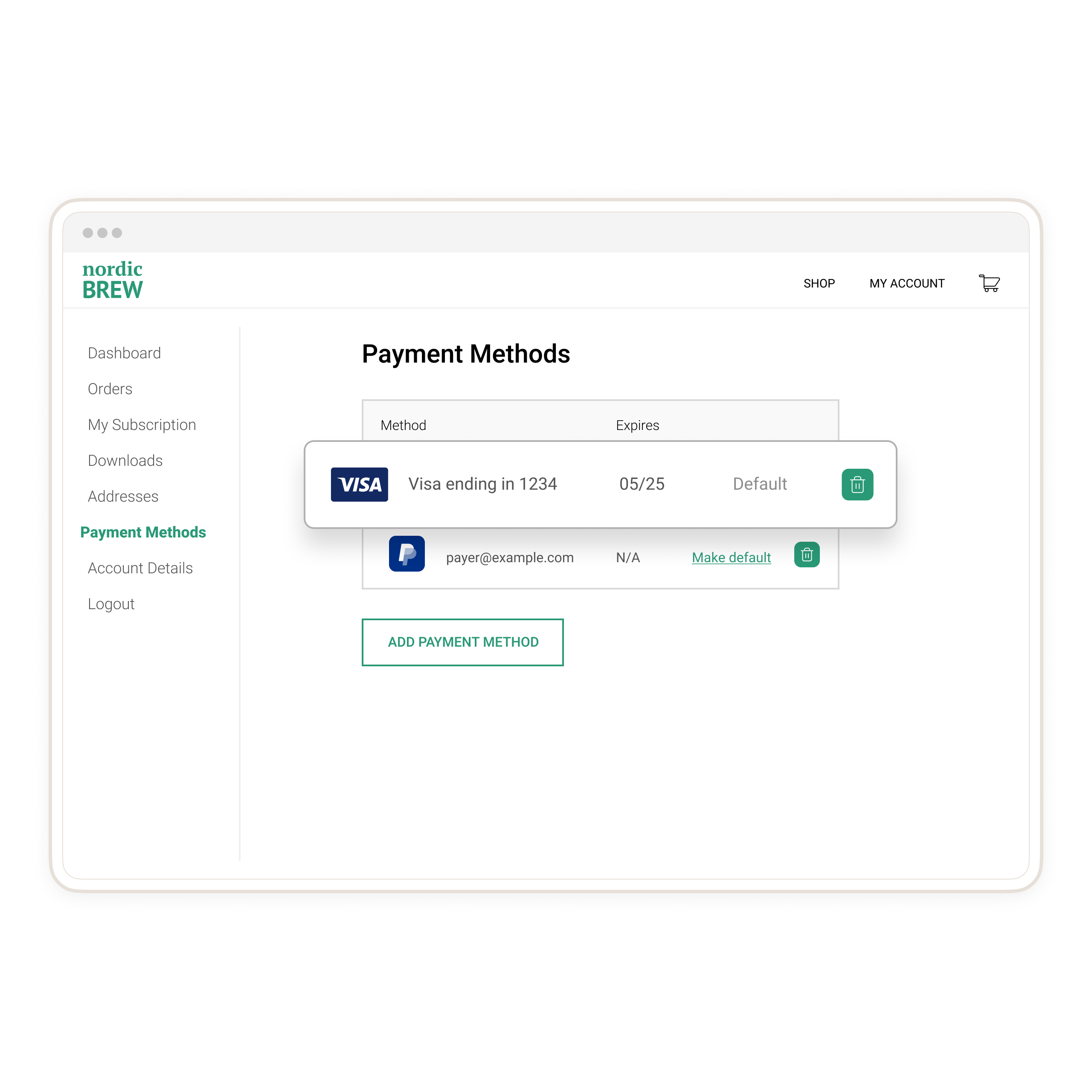
We recommend creating a page on your site where payers can see their saved payment methods as in the following example:
Go live with your integration.