On this page
No Headings
Last updated: June 7, 2026
A dispute or chargeback arises when a buyer raises concerns regarding a transaction, such as:
With PayPal Protections and evolving government regulations, payment providers can address many consumer issues in digital payments. At PayPal, we streamline dispute management and unify merchant responses. Our Dispute API helps merchants handle disputes effectively, enabling coordinated, structured resolutions based on thorough investigation.
Note: The listed scenarios related to disputes and chargebacks are not exhaustive. API users must watch out for updates regarding new dispute reasons, revised dispute response types, and other relevant updates in this space. PayPal is committed to promptly communicating these changes to ensure users stay informed.
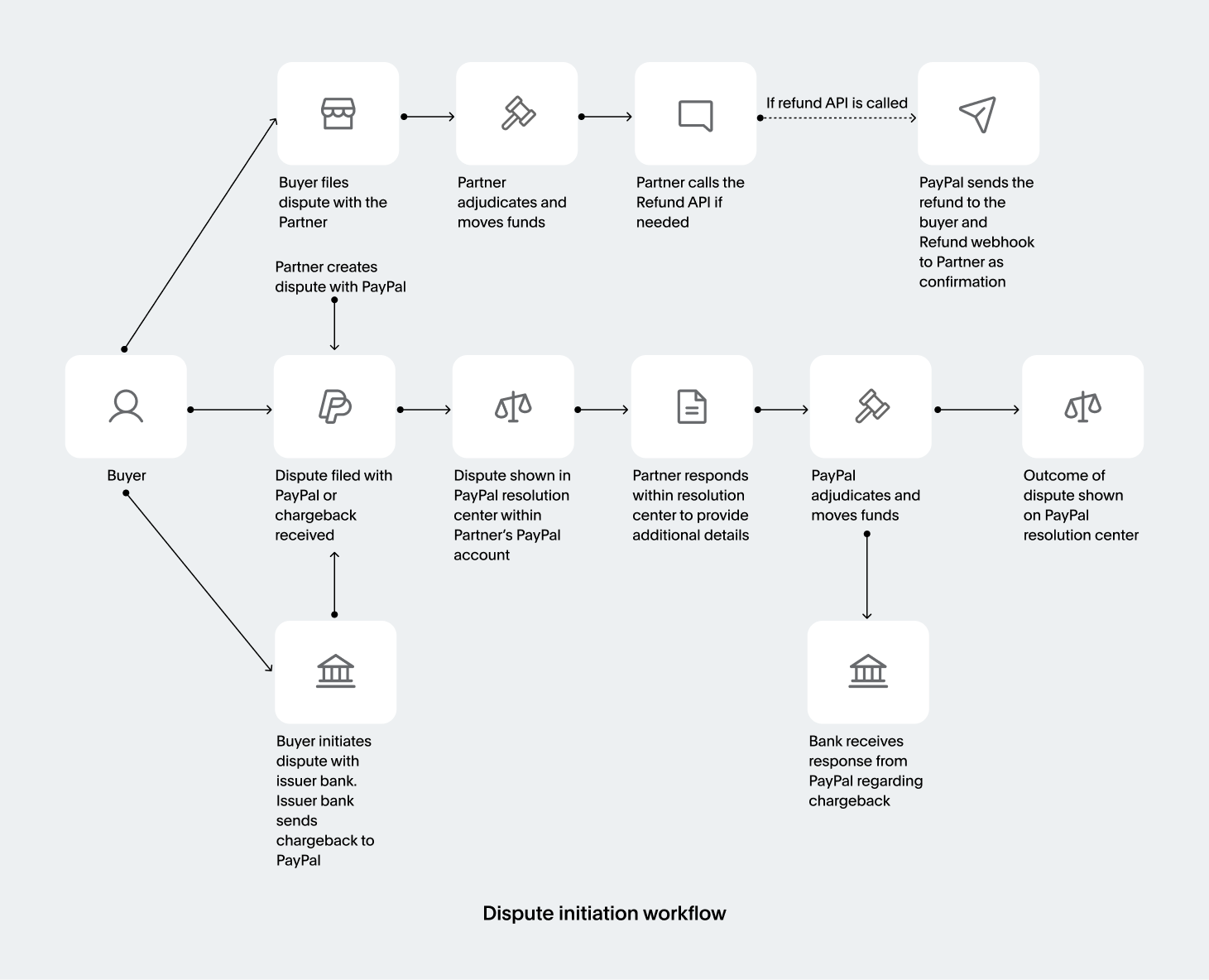
Buyers have several avenues for addressing issues with PayPal transactions. They can file a case with PayPal through the Resolution Center to dispute the charge or ask their bank or credit card company to reverse it.
When buyers file a dispute through PayPal, it is called a dispute. Conversely, if they report it to their credit card company, it is commonly labeled as a chargeback, while reversals initiated through their bank are termed ACH reversals or ACH returns.
PayPal's Disputes API coordinates responses to various case types. Depending on where a buyer reports the issue—PayPal, a bank, or a credit card company—that entity investigates and resolves it. Although steps may vary based on the reporting entity, PayPal aims to streamline and ensure consistency in case management.
| Reason code | Description |
|---|---|
| Item/Service not received (INR) | The buyer claims they ordered and paid for an item but didn't receive it. |
| Significantly not as described (SNAD) | A buyer has received the item, but it does not match the merchant's description as it looks considerably different or damaged during shipping. For example, the buyer ordered a gold-foil mirror but received a blue polished silver mirror instead. |
| Billing errors | Multiple transactional or payment errors may result in duplicate charges or incorrect amounts. |
| Unauthorized | A buyer claims they did not make the purchase and that the transaction occurred without their consent or they were victims of identity, debit, or credit card fraud. |
When a buyer files a case with PayPal by calling customer support or visiting the PayPal Resolution Center, the case becomes internal, and PayPal decides the outcome.
Item/Service Not Received or Significantly Not as Described.Item/Service Not Received or Significantly Not as Described.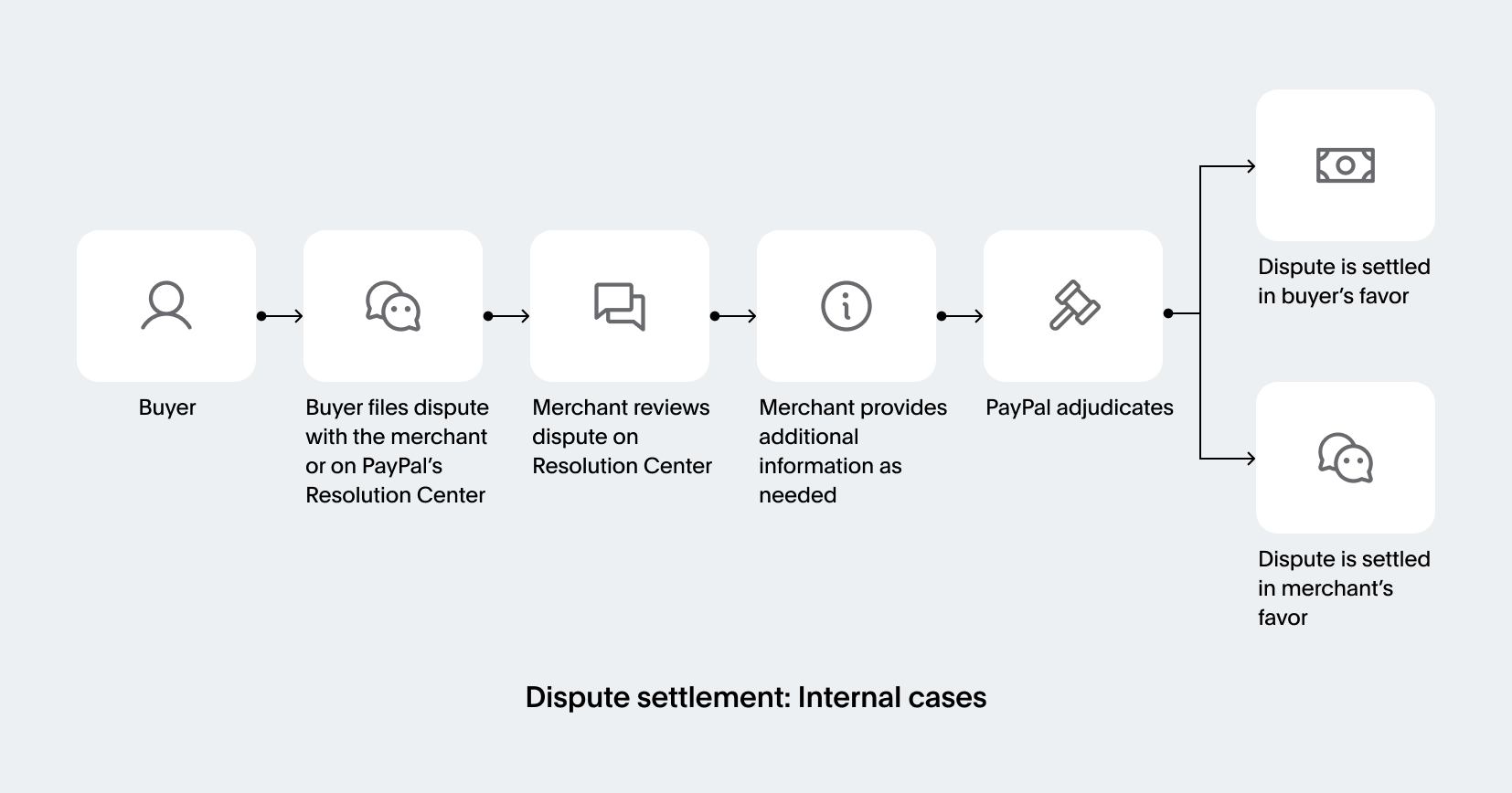
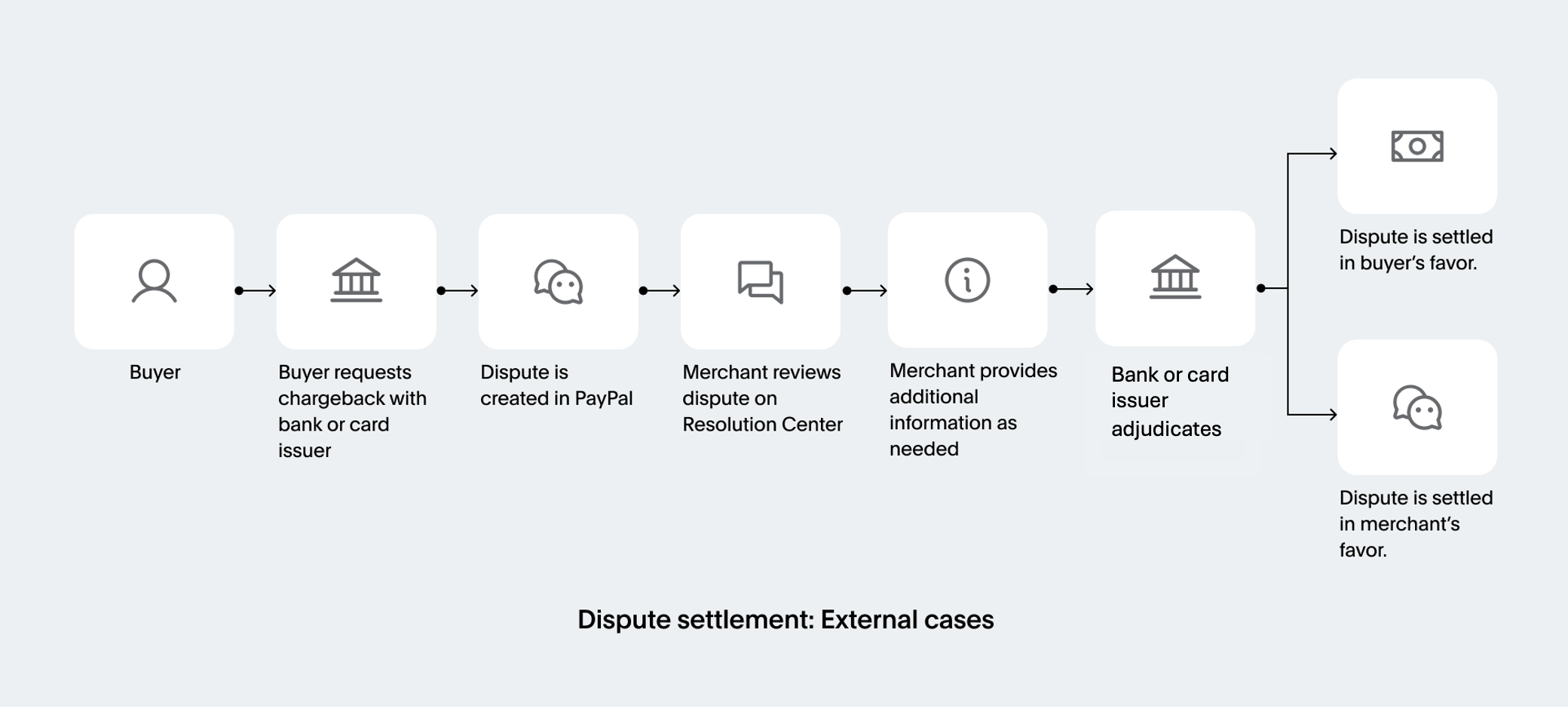
When a buyer files a case with their bank or card issuer, it becomes an external case, and the bank or the card issuer decides the outcome.
The following methods provide a reference for permissible actions as a user. You can also use the Disputes API to automate actions in the Resolution Center.
The following table shows the methods available as actions in the Resolution Center.
| Method | Resolution Center Actions |
|---|---|
| List disputes | Access the Resolution Center to view all cases listed under the Open Cases tab. Cases needing urgent attention are highlighted under the Needs Your Attention tab. |
| Show dispute details | Select the Case ID to examine all case details. Alternatively, navigate to the Case details page through the context menu and select Case details. |
| Send message to other party | Access the Case details page to communicate with the buyer. This helps address their concerns and resolve the issue amicably. |
| Make an offer to resolve a dispute | For INR and SNAD disputes and claims, merchants can offer buyers alternatives, such as issuing a partial refund, offering a refund for returning an item, or offering a replacement. |
| Deny offer | This option, exclusive to buyers, allows them to reject the offer from the merchant if they are not satisfied. |
| Accept claim | To acknowledge a claim, choose to refund the buyer and close the case, either from the Case details page or the merchant dashboard's context menu. |
| Appeal dispute | If a case is closed, merchants can appeal by selecting I disagree with the claim and providing additional information for PayPal's review. |
| Cancel dispute | This option, exclusive to buyers, allows them to close the case if they find the merchant's response or evidence satisfactory. |
| Change reason | This option, exclusive to buyers, allows them to change the reason for their case if the nature of their issue changes. |
| Acknowledge returned item | At any stage in the dispute lifecycle, merchants can request that the buyer return an item for a full refund. If the buyer agrees, PayPal allows the merchant to acknowledge the return of the item. |
| Provide evidence | If the merchant disagrees with the buyer's claim, they can deny it by presenting evidence enabling PayPal to resolve the case. |
| Provide supporting information | If the merchant disagrees with the buyer's claim, they can provide evidence to PayPal at any point. |
You can use the Disputes API to:
Choose how to manage your disputes
Enable Disputes and use the API actions
Manually manage disputes