PayPal Link Integration Guide
Last updated: Sept 23rd, 8:28pm
Important: PayPal Link is a limited-release solution available only to select partners. For more information, reach out to your PayPal integration team.
Before you start, make sure you meet the prerequisites to set up PayPal Link.
PayPal Link Sequence Diagrams
Partners can use PayPal Link to create a PayPal account, link an existing PayPal account, and update a PayPal account.
When integrating PayPal Link in a native mobile application, Magnes sends you a unique value to link Consumer Referrals and Risk Data API calls. Pass this unique value in the paypal_client_metadata_id header of the Consumer Referrals API and in the redirect to PayPal.
Create a PayPal account
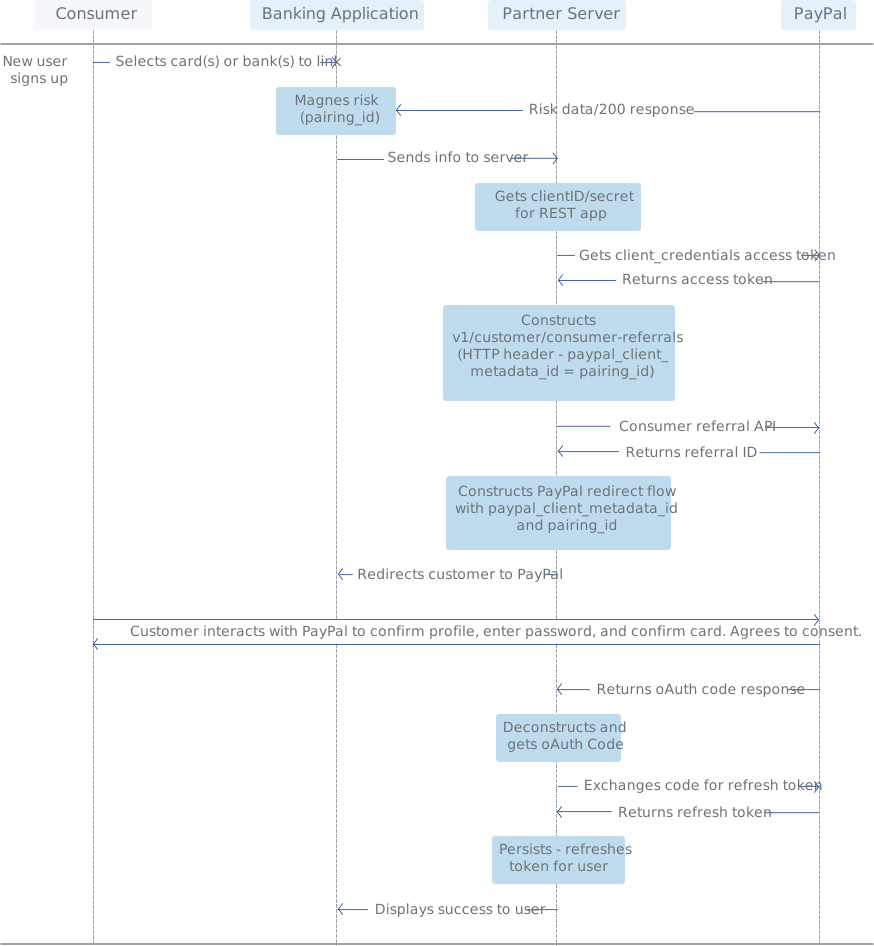
Add an account
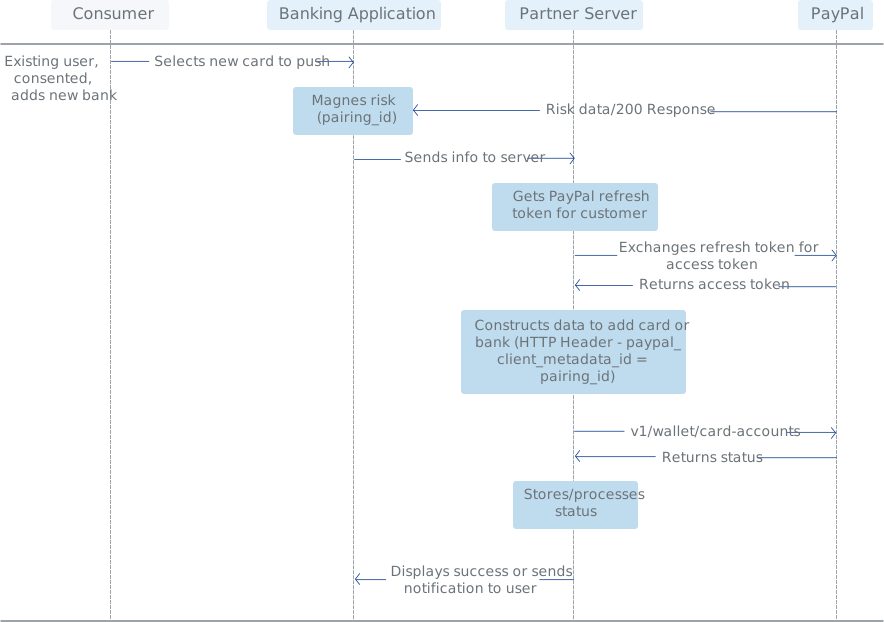
Update a PayPal account
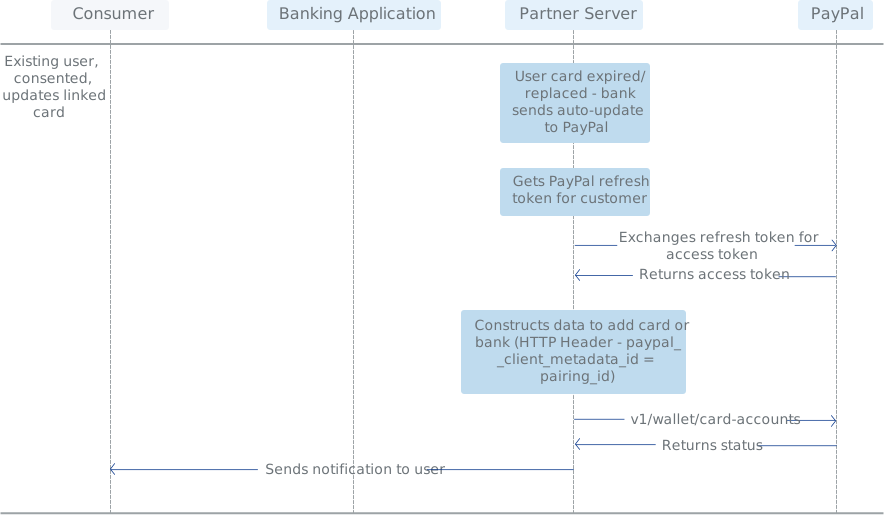
Construct an API request
See API requests for how to construct a REST API request.
Onboard an account
After you complete the prerequisites, use your access token in the header of the call to v1/customer/consumer-referrals.
When you onboard an account, you can send account data as an application/JSON or a multipart request. Use the following table to determine when to use each format:
| Format | Use Case |
|---|---|
| application/JSON | When you do not want to send card art images. |
| multipart/form-data | When you do want to send card art images. |
Refer to the sample requests for each, depending on which format you choose:
Note: Use the linked_instrument parameter to create a referral. The financial_instrument parameter is deprecated, but supported for backwards compatibility.
For additional information, see create a consumer referral.
Endpoints
- Live:
https://api-m.paypal.com/v1/customer/consumer-referrals - Test/Sandbox:
https://api-m.sandbox.paypal.com/v1/customer/consumer-referrals
JSON sample request
Create a consumer-referral resource for a customer with a credit card. This sample doesn't send card art.
1curl -v -X POST https://api-m.sandbox.paypal.com/v1/customer/consumer-referrals \2 -H "PayPal-Request-Id: 12345" \3 -H "Content-Type: application/json" \4 -H "Authorization: Bearer <Access-Token>" \5 -d '{6 "person_details": {7 "names": [8 {9 "given_name": "Niklas",10 "surname": "Frangos"11 }12 ],13 "phone_contacts": [14 {15 "phone":16 {17 "country_code": "43",18 "national_number": "123456789"19 },20 "phone_type": "MOBILE"21 }22 ],23 "addresses": [24 {25 "address": {26 "line1": "20/Wolfengasse 3",27 "line2": "Fleischmarkt",28 "city": "Vienna",29 "country_code": "AT",30 "postal_code": "A-1010"31 },32 "address_type": "HOME"33 }34 ],35 "email_addresses": [36 {37 "email_address": "[email protected]",38 "primary": true,39 "confirmed": false40 }41 ],42 "locale": "en_US"43 },44 "paypal_account_properties": {45 "account_country_code": "AT"46 },47 "linked_instruments": {48 "card_accounts": [{49 "identifier": "eyJhbGciOiJub25lIn0.eyJ2YWx1ZSI6IjYwMTE0MTk4MDM4NDI4NDQifQ.",50 "reference_financial_instrument_id": "B2121XYZ",51 "expiry_date": "2020-12",52 "billing_address": {53 "address_line_1": "2211 N 1st Street",54 "admin_area_1": "CA",55 "admin_area_2": "San Jose",56 "country_code": "US",57 "postal_code": "95035"58 },59 "account_holder_name":{60 "given_name": "John",61 "surname": "Smith"62 },63 "rewards_account": {64 "reference_financial_instrument_id": "BAA2121XYZ",65 "rewards_denomination_description": "Miles",66 "balance": "1025",67 "target_currency_code": "USD",68 "balance_in_target_currency": "10.25",69 "conversion_factor": "0.01",70 "program_name": "Discover - Cash Back Bonus",71 "program_code": "CBB"72 },73 }74 }75 }'
Multipart sample request
Create a consumer-referral resource for a customer with a credit card. This sample does send card art.
1curl -v -X POST https://api-m.sandbox.paypal.com/v1/customer/consumer-referrals \2 -H "PayPal-Request-Id: 12345" \3 -H "Content-Type: multipart/form-data; boundary=86ea9e8c-b7f7-4add-98a7-970085836aaa" \4 -H "Authorization: Bearer <Access-Token>" \5 -d '{6 --86ea9e8c-b7f7-4add-98a7-970085836aaa Content-Disposition form-data; name=\"request\" Content-Type: application/json {\"person_details\":{\"names\":[{\"given_name\":\"Niklas\",\"surname\":\"Frangos\"}],\"phone_contacts\":[{\"phone\":{\"country_code\":\"43\",\"national_number\":\"123456789\"},\"phone_type\":\"MOBILE\"}],\"addresses\":[{\"address\":{\"line1\":\"20/Wolfengasse 3\",\"line2\":\"Fleischmarkt\",\"city\":\"Vienna\",\"country_code\":\"AT\",\"postal_code\":\"A-1010\"},\"address_type\":\"HOME\"}],\"email_addresses\":[{\"email_address\":\"[email protected]\",\"primary\":true,\"confirmed\":false}],\"locale\":\"en_US\"},\"paypal_account_properties\":{\"account_country_code\":\"AT\"},\"linked_instruments\":{\"card_accounts\":[{\"identifier\":\"6011419803842844\",\"reference_financial_instrument_id\":\"B2121XYZ\",\"expiry_date\":\"2020-12\",\"billing_address\":{\"address_line_1\":\"2211 N 1st Street\",\"admin_area_1\":\"CA\",\"admin_area_2\":\"San Jose\",\"country_code\":\"US\",\"postal_code\":\"95035\"},\"account_holder_name\":{\"given_name\":\"John\",\"surname\":\"Smith\"},\"rewards_account\":{\"reference_financial_instrument_id\":\"BAA2121XYZ\",\"rewards_denomination_description\":\"Miles\",\"balance\":\"1025\",\"target_currency_code\":\"USD\",\"balance_in_target_currency\":\"10.25\",\"conversion_factor\":\"0.01\",\"program_name\":\"Discover - Cash Back Bonus\",\"program_code\":\"CBB\"},\"card_art\":{\"reference_id\":\"GAT13576232\",\"product\":{\"id\":\"AEG123ba08y08y3\",\"customer_support\":{\"email\":\"[email protected]\",\"phone_number\":{\"country_code\":\"1\",\"national_number\":\"4089671000\"}},\"product_description\":\"Discover Rewards\"},\"primary_content\":{\"id\":\"UNIQUE_ID_SAMPLE_1A\",\"format\":\"image/png\",\"width\":500,\"height\":500},\"thumbnail_content\":{\"id\":\"UNIQUE_ID_SAMPLE_1B\",\"format\":\"image/png\",\"width\":50,\"height\":50},\"metadata\":{\"id\":\"AEG123ba08y08y3\",\"background_color\":\"#00FF00\",\"foreground_color\":\"#0e19d2\",\"label_color\":\"#0e19d2\"}}}],\"authentication_factors\":[\"OTP\"]}} --86ea9e8c-b7f7-4add-98a7-970085836aaa Content-Disposition form-data; name=\"UNIQUE_ID_SAMPLE_1A\"; filename=\"discover_credit.png\" Content-Type: image/png --86ea9e8c-b7f7-4add-98a7-970085836aaa Content-Disposition form-data; name=\"UNIQUE_ID_SAMPLE_1B\"; filename=\"discover_credit_thumb.png\" Content-Type: image/png --86ea9e8c-b7f7-4add-98a7-970085836aaa--7}'
Manage the onboarding flow
Once you've created a consumer referral resource, redirect the user to PayPal using the referral id obtained. Refer to the following table for more information about constructing the redirect.
Note: Ensure your mobile integration meets the security requirements for mobile pages.
| Protocol | https:// |
| Domain |
|
| Query Parameters |
|
The following sample code demonstrates a redirect.
1https://www.sandbox.paypal.com/consumeronboarding/entry?referralid=QUFFaEpQWjFwVEhOZUdibEl1YVNCejF4bENrbE9HUkhobzlBaTBVMG1zazd2YWNoWkxlbnBKcUtHYkpPQW1acA&scope=https://uri.paypal.com/services/paypalattributes+https://uri.paypal.com/services/wallet/financial-instruments/view+https://uri.paypal.com/services/wallet/card-accounts/external-update+https://uri.paypal.com/services/wallet/card-accounts/partner-update
Handle flow return results
After the customer completes the onboarding flow, they are redirected to the return URL, as specified for the REST app in the PayPal Developer Dashboard.
The result of the onboarding flow displays in the return URL. The flow can return these fields:
-
If onboarding succeeded, the code parameter contains an OAuth authorization code that is valid for three minutes.
1code=C101.Syt5P_nbtpeImhNl-C2...bYzUfkEWMMmn2Uwtx7njonIkbKA customer can complete PayPal Link while cards are still pending in their PayPal wallet. This scenario might occur when the customer exceeds the card limit in their wallet but tells the partner to add a new card.
PayPal recommends that partners call against each selected card to verify the card is linked to the customer's PayPal wallet.
-
If an error occurs during onboarding, the return URL displays an error code and description.
1error_description=CONSENT%20DENIED&error=access_deniedA customer can add partner-issued cards to their PayPal wallet without granting consent to the partner. For example, a customer may initiate the PayPal Link flow, choose one or more cards to add to their PayPal wallet, log in and create an account, then decline to grant consent to the partner.
To prevent errors, your app should notify the customer that their PayPal account is not linked with the partner.
Pass state information to the return URL
You can use the state parameter to pass information through the flow to the return point. This parameter must consist of key-value pairs encoded as query strings. For example, when passing the parameter myParam with value xyz and another parameter, myURL, with value https://localhost/linked-accounts/, the received state parameter is myParam=xyz&myURL=https%3A%2F%2Flocalhost%2Flinked-accounts%2F.
After the customer completes the flow, you redirect the customer to a defined redirect URL. The redirect URL contains a state parameter, which you can amend with additional keys that contain information about the flow result and error details.
Return URL errors
PayPal handles most errors internally. However, sometimes PayPal returns the customer to the merchant's redirect URI with error details. For a list of errors, see Return URL errors.
Get a user refresh token
PayPal's onboarding flows return an authorization code that permits access to the customer's data. You must exchange this short-lived authorization code for a long-lived user refresh token. For more information about token types and expiration dates, see token types.
Partners must store the retrieved user refresh token securely with the customer's data.
The authorization code exchange and refresh token exchange are combined into the same section. See the HTTP status error codes table for error responses.
When doing an HTTP POST for an access_token or refresh_token, or for a new access_token using the refresh_token, you must pass in the Authorization: Basic <value> header and add the Base64 encoded string of your client ID and secret, separated by a colon as the <value>. For example:
1Base64(testClientId1234:testSecret1234) => dGVzdENsaWVudElkMTIzNDp0ZXN0U2VjcmV0MTIzNA==2-H "Authorization: Basic dGVzdENsaWVudElkMTIzNDp0ZXN0U2VjcmV0MTIzNA==" \
Authorization endpoints
- Live:
https://api-m.paypal.com/v1/oauth2/token - Sandbox:
https://api-m.sandbox.paypal.com/v1/oauth2/token
Handle errors
Sample refresh token response (consent revoked) - any attempts to complete API calls with missing customer consent fails and results in a 401 HTTP status with an invalid_refresh_token error:
1Status 4012{3 "error": "invalid_refresh_token",4 "error_description": "No consent were granted"5}
Note: Revoking consent does not permanently invalidate the refresh token. A previously-issued refresh token becomes valid again when the user gives consent at a later time. PayPal recommends that you delete refresh tokens that no longer represent active user consent.
See HTTP status codes.
Validate your integration
Allow a few weeks for your PayPal integration team to validate your integration before launching PayPal Link for your customers. PayPal validates your integration for three main criteria:
- Integration quality
- Adherence to the PayPal API programming guide
- Security
You can validate your integration by allowing PayPal directly in your application or creating application accounts for PayPal.
Add card account
To add cards to the customer's PayPal account without a redirect to PayPal, call Add Card Account.
Endpoints
- Live:
https://api-m.paypal.com/v1/wallet/card-accounts - Sandbox:
https://api-m.sandbox.paypal.com/v1/wallet/card-accounts
Sample request
1POST https://api-m.sandbox.paypal.com/v1/wallet/card-accounts2Accept: application/json3Content-Type: application/json4Authorization: Bearer A015BWrB7LIoTRkFaYe...9Nhohl0eM1cvub82UzI5{6 "beneficiary": {7 "name": {8 "first_name": "Vijay",9 "last_name": "Balki"10 },11 "name_as_in_issuer": "Vijay Balki"12 },13 "billing_address": {14 "city": "San Jose",15 "country_code": "US",16 "line1": "1234 Main St",17 "postal_code": "95131",18 "state": "CA"19 },20 "bypass_authorization": "true",21 "brand": "VISA",22 "card_number": "4559537469237257",23 "expiration_time": {24 "month": "JAN",25 "year": 202126 }27}
Sample response
1{2 "id": "CC-D3KLX959SY6BA",3 "usage_restrictions": [],4 "status_details": {5 "status": "ACTIVE",6 "reason": "NOT_APPLICABLE",7 "time_added": "2018-09-25T17:19:35.035Z",8 "time_modified": "2018-09-25T17:19:35.035Z"9 },10 "confirmation": {11 "status": "UNCONFIRMED",12 "confirmation_method": "PAYPAL_CODE_CONFIRMATION"13 },14 "related_resource_items": [],15 "urls": [],16 "institution_images": [],17 "links": []18}
Check card status
Call Check Card Status to verify if an added card is active in the customer's PayPal account. Include the customer's card number in the call.
Endpoints
- Live:
https://api-m.paypal.com/v1/wallet/check-card-account-exists - Sandbox:
https://api-m.sandbox.paypal.com/v1/wallet/check-card-account-exists
Sample request
1POST / v1 / wallet / check - card - account - exists2content - type: application / json3authorization: Bearer4A23AAF2XNDwhZLPjzumyzYcCab4GvkZUuylICT7mhXkx0ZZ6jMTSGTBKoQLX9u4OtyTrLI4QIWANZIn64SqGfo4qKdI1iEj9Q5cache - control: no - cache6accept: *7/*8host: api-m.sandbox.paypal.com9cookie: X-PP-SILOVER=name%3DSANDBOX3.API.1%26silo_version%3D1880%26app%3Dapiplatformproxyserv%26TIME%3D2339285595%26HTTP_10X_PP_AZ_LOCATOR%3Dsandbox.slc11accept-encoding: gzip, deflate12content-length: 3913{14"card_number": "1234567812345678"15}
Sample response
1+HTTP / 1.1 200 +2 status: 200 +3 date: Tue, 25 Sep 2018 17: 24: 23 GMT +4 server: Apache +5 paypal - debug - id: b34c78e0f192a, b34c78e0f192a +6 http_x_pp_az_locator: sandbox.slc +7 set - cookie: X - PP - SILOVER = name % 3 DSANDBOX3.API .1 % 26 silo_version % 3 D1880 % 26 app % 3 Dapiplatformpro +8 xyserv % 26 TIME % 3 D1198500443 % 26 HTTP_X_PP_AZ_LOCATOR % 3 Dsandbox.slc;9Expires = Tue, 25 Sep 2018 17: 54: 24 GMT;10domain = .paypal.com;11path = /; Secure; HttpOnly,X-PP-SILOVER=; Expires=Thu, 01 Jan 1970 00:00:01 GMT +12 vary: Authorization +13 content - length: 39 +14 connection: close +15 content - type: application / json +16 {17 "result": true,18 "id": "CC-D3KLX959SY6BA"19 }
Endpoints
- Live:
https://api-m.paypal.com/v1/oauth2/token/userinfo?schema=openid - Sandbox:
https://api-m.sandbox.paypal.com/v1/oauth2/token/userinfo?schema=openid
Sample request
1GET / v1 / oauth2 / token / userinfo2authorization: Bearer A23AAGy_1uaiD7pDP1t0GpYNXN - oO6lmGbec_8YsDexd4INtUFsz452pj8CxS5QPPZ874q3qlYvE80o9lrz - _K84Of5DEBAbA3content - type: application / json4cache - control: no - cache5accept: *6/*7host: api-m.sandbox.paypal.com8cookie: X-PP-SILOVER=name%3DSANDBOX3.API.1%26silo_version%3D1880%26app%3Dapiplatformproxyserv%26TIME%3D178943835%26HTTP_X_PP_AZ_LOCATOR%3Dsandbox.slc9accept-encoding: gzip, deflate
Sample response
1HTTP / 1.1 2002status: 2003date: Sat, 18 Aug 2018 05: 09: 36 GMT4server: Apache5paypal - debug - id: f3ed8e503c904, f3ed8e503c9046http_x_pp_az_locator: sandbox.slc7set - cookie: X - PP - SILOVER = name % 3 DSANDBOX3.API .1 % 26 silo_version % 3 D1880 % 26 app % 3 Dapiplatformproxyserv % 26 TIME % 3 D279607131 % 26 HTTP_X_PP_AZ_LOCATOR % 3 Dsandbox.slc;8Expires = Sat, 18 Aug 2018 05: 39: 36 GMT;9domain = .paypal.com;10path = /; Secure; HttpOnly,X-PP-SILOVER=; Expires=Thu, 01 Jan 1970 00:00:01 GMT11vary: Authorization12content - length: 25213connection: close14content - type: application / json;15charset = UTF - 8 {16 "user_id": "https://www.paypal.com/webapps/auth/identity/user/BMqJCufhBNpaMUN7cxRNSWT24TWDwEG6Wn35oGBVSZU",17 "email": "[email protected]",18 "verified": "true",19 "payer_id": "2MZ7GTCJCNLKW",20 "verified_account": "false",21 "email_verified": "true"22}
Set up webhooks
To subscribe your webhook listener to events, use either the Developer Dashboard or the Webhooks API.
Receive webhook postback
When an event occurs, a webhook is posted to the webhook listener. The webhook consists of two arrays: header and body. The body helps update back-end processes. Headers help verify the webhook.
Note: If PayPal can't reach your webhook listener, PayPal retries a webhook up to 25 times over three days.
Example webhook body
1{2 "id": "WH-0X037496M34326055-9MR30664RN4670947",3 "event_version": "1.0",4 "create_time": "2017-10-06T20:57:41.650Z",5 "resource_type": "authorization_consent_revoked",6 "event_type": "IDENTITY.AUTHORIZATION-CONSENT.REVOKED",7 "summary": "An event for identity consent revocation",8 "resource": {9 "user_id": "https://www.paypal.com/webapps/auth/identity/user/7MU58dsDbTUSREYPg1XkYchN97U_fJD_4eux8mifjMU",10 "payer_id": "KP5MLJAH95N5J",11 "scopes": "https://identity.x.com/xidentity/resources/profile/me profile12 http: //schema.openid.net/contact/email fullname http://schema.openid.net/contact/fullname http://axschema.org/namePerson email http://axschema.org/contact/email"13 },14 "links": [{15 "href": "https://api-m.sandbox.paypal.com/v1/notifications/webhooks-events/WH-0X037496M34326055-9MR30664RN4670947",16 "rel": "self",17 "method": "GET"18 },19 {20 "href": "https://api-m.sandbox.paypal.com/v1/notifications/webhooks-events/WH-0X037496M34326055-9MR30664RN4670947/resend",21 "rel": "resend",22 "method": "POST"23 }24 ]25}
Example webook headers
1{2 "PAYPAL-TRANSMISSION-ID": "fe7b70d0-aad8-11e7-9dcb-77339302725b",3 "PAYPAL-TRANSMISSION-TIME": "2017-10-06T20:57:41Z",4 "PAYPAL-TRANSMISSION-SIG": "ycEFw+w5zttcHlO+W8D0pYp/QgavAFe1tkeq9zANqR1X2aOF8Idf3tcp1dGLIQl1VlYnO0Xne7ZyJRAe1Bg9ju/zzZ/v9ly9I+H+m7qTHYuo2wedsjbF61ifv+RO+UDkHdflWx+VVB3EHbmShrNN9QL2+686FQAVFiCDdhClzasGjAAhQ6rT5GqSITIjuYKYOzljPfE2g4dlIg0QlLqcFBwXnv9QY/tKyNnk1k/lwDpRvXjZ+iqR7MCaGTGd4rtmXfm2GyjubI2bomJRH7qBHo2nfsI87PPiQHgQKcsJny43bHq4thDDFFCffHzihSowcztJZoTEWy36/i2zizDmug==,5 "PAYPAL-CERT-URL": "https://api-m.sandbox.paypal.com/v1/notifications/certs/CERT-360caa42-fca2a594-aecacc47",6 "PAYPAL-AUTH-ALGO": "SHA256withRSA",7}
For webhook headers in PHP, put HTTP_ before parameters.
1HTTP_"PAYPAL-TRANSMISSION-ID": "fe7b70d0-aad8-11e7-9dcb-77339302725b"
Verify your webhooks
When the webhook is posted, you should verify that the webhook originated from PayPal. You can use two methods to verify webhooks:
Use the PayPal Webhook Signature API
A Verify Webhook Signature API request must be a POST and have an authentication: bearer <access token>.
Endpoints
- Live:
https://api-m.paypal.com/v1/notifications/verify-webhook-signature - Sandbox:
https://api-m.sandbox.paypal.com/v1/notifications/verify-webhook-signature
Example verify webhook API request
1curl– - cert client.pem: < password > --key key.pem - X POST https: //api-m.sandbox.paypal.com/v1/notifications/verify-webhook-signature \2 -H "Authorization: Bearer: A101.Wg1MjcDlN14TqVyBII-4dgt4wJy0MxobcGBrouXNVffjK78XXXXXXXXX1tnCTsZK.ZrqKwooGLuGWWfFd96CkimrQe7a"\ -3 H "Content-Type: application/json"\ -4 d '{5"transmission_id": "fe7b70d0-aad8-11e7-9dcb-77339302725b",6"transmission_sig":7"ycEFw+w5zttcHlO+W8D0pYp/QgavAFe1tkeq9zANqR1X2aOF8Idf3tcp1dGLIQl1VlYnO0Xne7ZyJRAe1Bg9ju/zzZ/v9ly9I+H+m7qTHYuo2wedsjbF61ifv+RO+UDkHdflWx+VVB3EHbmShrNN9QL2+686FQAVFiCDdhClzasGjAAhQ6rT5GqSITIjuYKYOzljPfE2g4dlIg0QlLqcFBwXnv9QYtKyNnk1klwDpRvXjZ+iqR7MCaGTGd4rtmXfm2GyjubI2bomJRH7qBHo2nfsI87PPiQHgQKcsJny43bHq4thDDFFCffHzihSowcztJZoTEWy36/i2zizDmug==",8"transmission_time": "2017-10-06T20:57:41Z",9"cert_url": "https://api-m.sandbox.paypal.com/v1/notifications/certs/CERT-360caa42-fca2a594-aecacc47",10"auth_algo": "SHA256withRSA",11"webhook_id": "60B08444S1602201F",12"webhook_event": {13 "id": "WH-0X037496M34326055-9MR30664RN4670947",14 "event_version": "1.0",15 "create_time": "2017-10-06T20:57:41.650Z",16 "resource_type": "authorization_consent_revoked",17 "event_type": "IDENTITY.AUTHORIZATION-CONSENT.REVOKED",18 "summary": "An event for identity consent revocation",19 "resource": {20 "user_id": "https://www.paypal.com/webapps/auth/identity/user/7MU58dsDbTUSREYPg1XkYchN97U_fJD_4eux8mifjMU",21 "payer_id": "KP5MLJAH95N5J",22 "scopes": "https://identity.x.com/xidentity/resources/profile/me profile http://schema.openid.net/contact/email fullname http://schema.openid.net/contact/fullname http://axschema.org/namePerson email http://axschema.org/contact/email"23 },24 "links": [{25 "href": "https://api-m.sandbox.paypal.com/v1/notifications/webhooks-events/WH-0X037496M34326055-9MR30664RN4670947",26 "rel": "self",27 "method": "GET"28 },29 {30 "href": "https://api-m.sandbox.paypal.com/v1/notifications/webhooks-events/WH-0X037496M34326055-9MR30664RN4670947/resend",31 "rel": "resend",32 "method": "POST"33 }34 ]35}36}
Example verify webhook response
1{"verification_status":"SUCCESS"}
Use notification messages
The notification messages method verifies the webhook header but not the body.
PayPal signs PAYPAL-TRANSMISSION-SIG and stores this parameter's certificate URL in PAYPAL-CERT-URL. Run a code check to verify if PAYPAL-TRANSMISSION-SIG is signed by PAYPAL-CERT-URL.
A signed certificate is valid for two years. Do not store a certificate. Pull it down via code.
Pull sandbox certificate:
1curl https://api-m.sandbox.paypal.com/v1/notifications/certs/CERT-360caa42-fca2a594-aecacc47
Pull production certificate:
1curl https://api-m.paypal.com/v1/notifications/certs/CERT-360caa42-fca2a594-ed3bf26f
Subscribe to events
-
On the PayPal Developer Dashboard, go to My Apps & Credentials . Click Log In.
-
If you already have an app, skip to the next step. Otherwise, click Create App. Note your client ID and secret. You need these values later.
- In the **REST API apps** section, find the app that you want to subscribe to events and click the app link.
-
In the WEBHOOKS section, click Add Webhook.
-
Add the URL for your listener. The listener is the endpoint URL that listens for incoming HTTP
POSTnotification messages. These messages trigger when events occur. -
From the event types list, select the events to subscribe to your app. You can select all events or one or more individual events.
-
Click Save. The dashboard shows your webhook listener URL, the ID for the webhook, and the events to which you subscribed your app.
You can use this webhook ID to complete these Webhooks API operations:
Update card
Use the Update Card call to update the billing address of existing cards. To update a card, include the card number in the request. Name changes are not allowed.
Endpoints for Update Card API
- Live:
https://api-m.sandbox.paypal.com/v1/wallet/card-accounts - Sandbox:
https://api-m.paypal.com/v1/wallet/card-accounts
Sample request
1POST https://api-m.sandbox.paypal.com/v1/wallet/card-accounts2Accept: application/json3Content-Type: application/json4Authorization: Bearer A015BWrB7LIoTRkFaYe...9Nhohl0eM1cvub82UzI5{6 "beneficiary": {7 "name": {8 "first_name": "Vijay",9 "last_name": "Balki"10 },11 "name_as_in_issuer": "Vijay Balki"12 },13 "billing_address": {14 "city": "San Jose",15 "country_code": "US",16 "line1": "4567 Ishimatsu Pl",17 "postal_code": "95124",18 "state": "CA"19 },20 "bypass_authorization": "true",21 "brand": "VISA",22 "card_number": "4559537469237257",23 "expiration_time": {24 "month": "JAN",25 "year": 202126 }27}
Sample response
1{2 "id": "CC-D3KLX959SY6BA",3 "status_details": {4 "status": "ACTIVE",5 "reason": "NOT_APPLICABLE",6 "time_added": "2018-09-25T17:19:35.035Z",7 "time_modified ": "2018-09-25T17:21:16.016Z"8 },9 "confirmation ": {10 "status ": "UNCONFIRMED ",11 "confirmation_method ": "PAYPAL_CODE_CONFIRMATION "12 }13}
Errors
Typically, errors are due to invalid access tokens.