On this page
No Headings
Last updated: August 11, 2026
Send money immediately to multiple recipients in 96 countries and 24 currencies using only their email, phone number, or PayPal ID.
Important: To use PayPal Payouts, you'll need to request access.
Payouts make it easy for recipients to claim their money using either PayPal or Venmo:
Note: Venmo notifications require a U.S. mobile number and are mobile only.
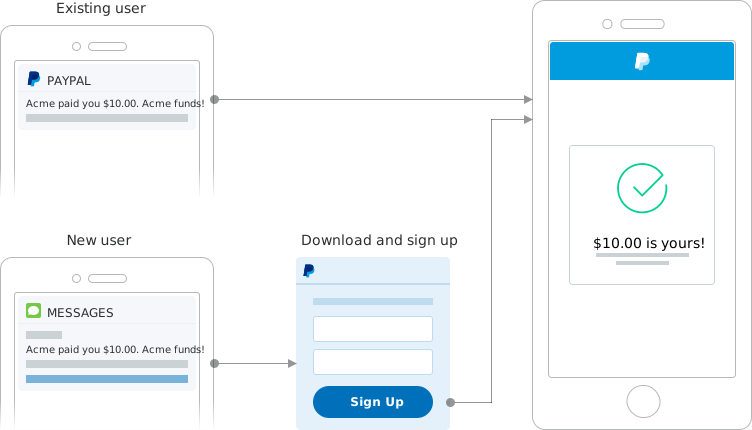
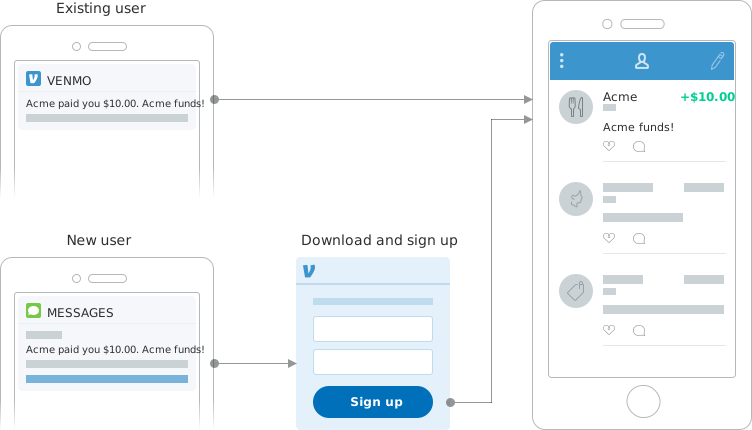
For all payout options, you'll need the following:
If you don't have one, sign up for a PayPal business account. You'll be asked for information about you and your business to secure your account. The PayPal business account serves as the digital wallet for your business.
After you sign up for an account, complete the following steps to enable the account to send payouts.
Request access to PayPal Payouts. You'll be asked for information about your business needs to ensure the solution is a good fit for you. After you apply, PayPal will email you the decision. In the meantime, you can set up and test your integration in your sandbox accounts.
These links take you to your merchant profile page to complete each step.
Payouts are funded using your PayPal balance, so be sure to add enough to cover your payout total, including fees. You can send payments in certain currencies even if you don't maintain a balance in that currency. To make payments in other currencies, you can transfer your balance to another currency.
Choose how you want to make payouts from the following options.