Save payment methods for recurring payments
Last updated: June 26, 2026
Copy / Export
Merchants initiate recurring payments based on a schedule or other criteria such as service usage. Common recurring payment examples include:
- Subscriptions such as streaming media or pet food delivery.
- Automatic bill payments, such as utilities or mobile phone services.
- Auto reloads, such as road tolls or prepaid cards.
The industry classifies recurring payments into specific types based on factors such as amount variation, frequency changes between payments, and whether the payment has a fixed duration or remains open-ended.
| Type | Amount | Billing frequency | Duration |
| Subscriptions | Fixed | Regular schedule | No fixed duration |
| Recurring | Variable | Regular schedule | No fixed duration |
| Unscheduled account on file | Fixed or variable | Variable | No fixed duration |
| Merchant-managed installments | Fixed | Defined schedule | No fixed duration |
Know before you code
- First-time users should refer to Get started with PayPal REST APIs Postman setup details, and the API suite configuration.
- Configure your merchant's server to make Orders v2 API calls. Do not call the APIs directly from the browser or client-side.
Implement recurring payments
Recurring payments with PayPal use PayPal payment tokens, also known as vault tokens, for the vaulting with the purchase checkout flow. PayPal's vaulting with purchase checkout flow operates as a single-stage process. When merchants complete a purchase, PayPal saves a payment token and returns it to the merchant. This token is called the PayPal Vault ID. See the following steps to implement recurring payments.
- Create and save the payment token through Orders: When customers choose to save their payment source in an application, use the Orders v2 API to save their funding instrument in their PayPal wallet after customers complete checkout. PayPal returns a payment token that merchants should store against the customer's account. Use this token to initiate payments when needed.
- Initiate subsequent payments with the saved payment token: When customers return to an application, merchants use the stored payment token to initiate payments against their PayPal account.
Recurring payment during initial purchase
The following steps show the complete flow for setting up recurring payments during a customer's first purchase, including vault token creation and storage:
- The payer selects PayPal Checkout, and chooses to save their payment method.
- The merchant client starts the checkout process and includes recurring payment details.
- The merchant server creates an order with the recurring payment information by calling the Orders v2 API.
- PayPal processes the order and creates a vault token for the payment method.
- PayPal sends the order ID and the vault token to the merchant.
- The merchant stores the order ID and vault token for future transactions.
Process subsequent payments with stored tokens
For subsequent transactions, the merchant server creates orders using the stored vault_id and credential information from the initial purchase. PayPal processes the payment and returns the completed transaction details.
Create payment method tokens
Initiate payment token creation during PayPal Checkout when customers sign up for services or add PayPal as a payment method for existing recurring arrangements. Include the following recurring payment information:
- Use recurring indicators. This flags the payment token for future recurring payments and customizes PayPal Checkout content to inform customers about the recurring nature of the payment.
- Recurring Billing Agreement (RBA) plan information. This provides customers with key summary information in PayPal Checkout about the recurring arrangement they are entering.
Recurring indicator
Set the recurring indicator value that represents the most appropriate type of RBA. This information sets payment network indicators correctly and must accurately represent the customer agreement to ensure compliance with payment network regulations.
Set the recurring indicator through the Create Order API's usage_pattern value at payment_source.paypal.usage_pattern during payment token creation for initial or subsequent purchases. Additional required fields are outlined in separate sections.
During payment token creation, use usage_pattern in payment_source.paypal.attributes.vault. For subsequent transactions, use usage_pattern in payment_source.paypal.stored_credential.
| RBA type | Description | Usage pattern values | Examples |
| Subscription | Represents agreements where customers are charged a fixed amount on a regular schedule with no end date. |
|
|
| Recurring | Represents RBAs where customers are charged a variable amount on a regular schedule with no end date. |
|
|
| Unscheduled | Represents RBAs where customers are charged a fixed or variable amount on an irregular schedule with no end date. |
|
|
| Installment | Represents RBAs where customers are charged a fixed amount on a fixed schedule with a defined end date. |
|
|
RBA plan information
Set RBA plan information to present customers with a key information summary about their recurring billing agreement during PayPal Checkout. This increases conversion by maintaining customer confidence about the agreement terms.
Integration requirements
Pass RBA plan information only during payment token creation for customer visibility during PayPal Checkout.
Exclude RBA information in subsequent merchant-initiated payment requests.
PayPal's RBA plan information structure supports simple to complex multi-tier arrangements through the purchase_units.items.billing_plan object in the Create Order API call.
Field description
The following table shows the parameters to pass to the Orders v2 API to configure the checkout experience for customers.
| What to pass | Payer experience | Ideal scenario | Example |
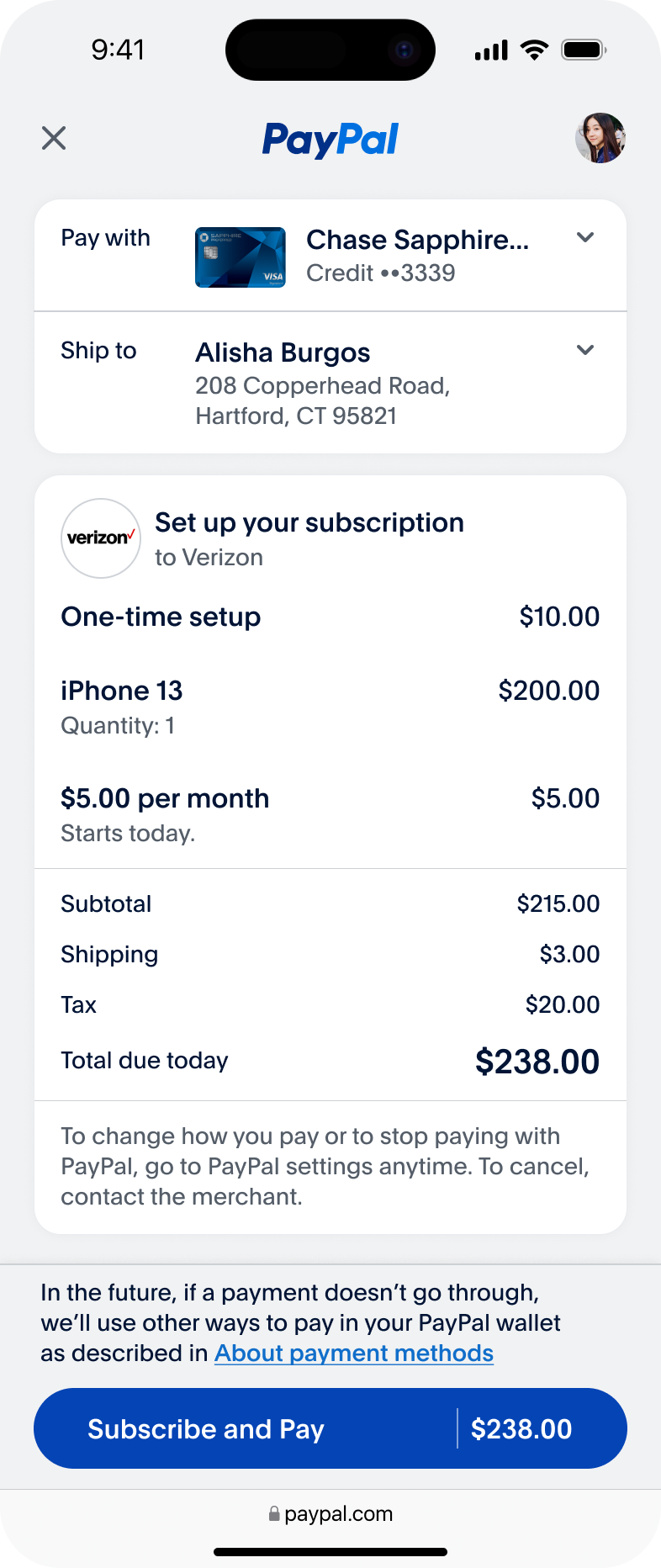
| PayPal displays the new Review Your Payment layout showing plan details, billing cycles, plan name, item amount, amount breakdown including shipping and taxes, and recurring indicator during payment method token creation. | Use this to display plan information at checkout, especially in recurring billing scenarios. | Consumer purchases a phone and subscribes to a $8.99/month phone plan starting today. |
| Not supported because at least one billing cycle is required for RBA. | N/A | N/A |
| PayPal displays the standard checkout experience without recurring payment indicators. | Use this configuration for one-time transactions only. Do not use it for recurring payments. | Consumer pays for their trip on a ride-share app. |
RBA data structure
The RBA plan contains three components: plan name, billing cycle information, and one-time charges. Pass this data using purchase_units.items[], purchase_units.items[].billing_plan, and payment_source.paypal.attributes.vault objects. See the following table for product field reference.
| Field name | Description | Example |
| Plan name |
| VidStream offers a $10/month streaming service plan with internal reference US-HDMNTH. When initiating PayPal Checkout, VidStream sets purchase_units.items.billing_plan.name to HD Premium - Monthly Plan. |
| Billing cycles |
|
|
| One-time charges | Use one-time charges to communicate certain fees that don't form part of the ongoing recurring payment arrangement. Pass information about non-recurring charges that customers incur when they initiate their recurring payment arrangement. For example, use one-time charges to communicate:
|
|
Pass all information using paypal.attributes.vault, purchase_units.items[], purchase_units.items[].billing_plan, purchase_units.amount, and purchase_units.amount.breakdown.
Implementation requirements
See the following requirements when implementing RBA plan information.
Data structure requirements:
- Use only one item with
billing_plan. Multiple billing plans are not supported. - Set item name to
Billing Planto differentiate from actual products.
Billing cycle requirements:
- Include at least 1 regular tenure type in billing cycles.
- Do not pass
start_dateinbilling_plan.billing_cyclesif your merchant wants the billing plan to start on the same day it was created.
Amount calculation:
- Add the plan price to the total order amount if the plan starts on the same day as the payment token creation.
RBA plan data fields
Use these fields to structure the recurring billing plan data and communicate plan details to customers during checkout.
Plan name
The plan name is an optional description of the product or service customers purchase using the plan name field.
Use the field purchase_units.items.billing_plan.name to set this value.
See the following table for product field reference.
| Data element | Field name | Length | Type | Priority |
| Plane name | purchase_units.items[].billing_plan.name | 127 characters | string | Mandatory |
Product details
Pair a product with your merchant's billing plan. For example, customers can purchase an iPhone and a Verizon phone plan together.
Add a new item in purchase_units.items[] to specify product details such as name, description, and quantity. Your merchant can also specify the product price by referring to the one-time charges section for pricing details.
See the following table for product field reference.
| Data element | Description | Field name | Length | Type | Priority |
| Product description | Defines the description of the product associated with the RBA. | purchase_units.items[].name | 127 characters | string | Mandatory if the product is present in the cart. |
| Product quantity | Defines the quantity of the product associated with the RBA. | purchase_units.items[].quantity | 32 characters | string | Mandatory if the product is present in the cart. |
Recurring billing cycle charges
Billing cycles define attributes for amount and duration in the recurring payment arrangement. Most arrangements use 1 or 2 billing cycles, but PayPal supports up to 3 billing cycles for complex arrangements.
Use the field purchase_units.items.billing_plan.billing_cycles to configure billing cycles.
Add purchase_units.items.billing_plan.billing_cycles.pricing_scheme.price to the total unit amount of the billing plan item when the plan starts on the same day as creation.
See the following table for billing cycle field reference:
| Data element | Description | Field name | Type and values | Priority |
| Billing cycle sequence number | The unique sequence number for each billing cycle when the RBA includes multiple billing cycles. | purchase_units.items[].billing_plan.billing_cycles.sequence | integer
| Optional
|
| Billing cycle type | This indicates whether this is a trial cycle or a regular cycle. | purchase_units.items[].billing_plan.billing_cycles.tenure_type | enum
| Your merchant needs at least one tenure type. |
| Pricing scheme | Pricing parameters for the billing cycle. | purchase_units.items[].billing_plan.billing_cycles.pricing_scheme | enum
|
|
| Pricing model | Price model for the billing cycle. | purchase_units.items[].billing_plan.billing_cycles.pricing_scheme.pricing_model | enum
| Mandatory |
| Price | Price amount for the billing cycle. | purchase_units.items[].billing_plan.billing_cycles.pricing_scheme.pricing_model.price.value | integer or decimal | Mandatory |
| Price currency code | Currency code for the price amount. | purchase_units.items[].billing_plan.billing_cycles.pricing_scheme.pricing_model.price.currency_code | string | Mandatory |
| Reload threshold amount | Threshold amount that triggers a reload for auto-reload Unscheduled Card on File (UCOF) arrangements. | purchase_units.items[].billing_plan.billing_cycles.reload_threshold_amount.value | integer or decimal | Optional
|
| Reload threshold amount currency code | Currency code for the reload threshold amount in auto-reload UCOF arrangements. | purchase_units.items[].billing_plan.billing_cycles.reload_threshold_amount.currency_code | string | Optional
|
| Billing cycle frequency unit | Time unit for the frequency count. | purchase_units.items[].billing_plan.billing_cycles.billing_frequency_unit | enum
| Mandatory for all usage patterns except UNSCHEDULED_PREPAID and UNSCHEDULED_POSTPAID. |
| Billing cycle frequency count | Duration of the billing cycle using the frequency unit. | purchase_units.items[].billing_plan.billing_cycles.billing_frequency | integer
|
|
| Expected billing cycles count | Number of times the billing cycle runs. | purchase_units.items[].billing_plan.billing_cycles.number_of_executions | integer
| Mandatory
|
| Start date | Start date for the billing cycle. | purchase_units.items[].billing_plan.billing_cycles.start_date | string
| Optional
|
Setup fee configuration
One-time charges communicate information about non-recurring fees that customers pay when starting RBA. These might include setup costs or similar initial expenses.
Pass setup fee information using the field purchase_units.shipping.items.billing_plan.setup_fee. If the billing plan is Item[0], add the setup fee to the total unit amount in items[0].unit_amount.value. See the following table for product field reference.
| Data element | Description | Field name | Type and values | Priority |
| Setup fee | One-time fee charged to customers when they first establish their recurring billing arrangement. | purchase_units.items[].billing_plan.setup_fee.value | integer or decimal | Optional |
| Setup fee currency code | Currency code for the setup fee amount. | purchase_units.items[].billing_plan.setup_fee.currency_code | string | Optional |
Product purchases
Include product information when customers purchase physical products alongside their recurring billing plan, such as buying a mobile phone while signing up for a wireless service plan.
Add products using the items[] in purchase_unit as a separate item from the billing plan. For example, if the billing plan item is items[0], this should be items[1].
Important limitations:
- Recurring billing supports only one product item.
- Do not use multiple product items.
- Include the
unit_amountfield in the total amount breakdown inpurchase_units.amount.breakdownasitem_total, including any billing plan amount fields such as setup fees or plan prices.
Product purchase fields
For detailed amount information, such as shipping and taxes, use purchase_units.amount.breakdown.shipping and purchase_units.amount.breakdown.tax_total.
See the following table for product field reference.
| Data element | Description | Field | Type and values | Priority |
| Product price | The price of the product that customers purchase alongside the billing plan, such as a phone bought with a wireless service plan. For multiple quantity products, specify unit_amount with item quantity. | purchase_units.items[].unit_amount.value | integer or decimal | Required if the merchant's cart contains a product. |
| Product price currency code | Currency code for the product price. | purchase_units.items[].unit_amount.currency_code | string
| Required if the merchant's cart contains a product. |
Order amount breakdown
For detailed amount information such as shipping and taxes, use purchase_units.amount.breakdown.shipping and purchase_units.amount.breakdown.tax_total.
Amount breakdown fields such as handling, insurance, discount, and shipping_discount are not supported for recurring purchases.
| Data element | Description | Field name | Type and values | Priority |
| Shipping fee | The shipping fee for all items within a given purchase_unit.shipping.value can not be a negative number. | purchase_units.amount.breakdown.shipping.value | string
| Optional |
| Shipping fee currency code | The three-character ISO-4217 currency code that identifies the currency. | purchase_units.amount.breakdown.shipping.currency_code | string | Optional |
| Taxes | The total tax for all items. Required if the request includes purchase_units.items.tax. Must equal the sum of (items[].tax * items[].quantity) for all items. The tax_total.value can not be a negative number. | purchase_units.amount.breakdown.tax_total.value | string | Optional |
| Tax currency code | The three-character ISO-4217 currency codethat identifies the currency. | purchase_units.amount.breakdown.tax_total.currency_code | string | Optional |
| Total amount | The value, which might be: An integer for currencies like JPY that are not typically fractional.A decimal fraction for currencies like TND that are subdivided into thousandths. For the required number of decimal places for a currency code, see Currency Codes. | purchase_units.amount.value | string | Mandatory
|
| Total currency code | The three-character ISO-4217 currency code that identifies the currency. | purchase_units.amount.currency_code | string | Mandatory |
Payment token configuration
Use the following attributes to create the payment token. This is a prerequisite for RBA plan metadata.
Object: payment_source.paypal.attributes.vault
The following sample code shows the required attributes for payment token vaulting.
"store_in_vault": "ON_SUCCESS", //To create a vaulted token
 "usage_type": "MERCHANT", //Merchant or Platform
 "usage_pattern": "SUBSCRIPTION_POSTPAID", //Recurring Indicator
See the following table for payment token configuration field reference.
| Data element | Description | Field name | Type and values | Priority |
store_in_vault | Vaulting instruction that creates a payment token only when at least one authorization or capture using that payment_source succeeds. | payment_source.paypal.attributes.vault.store_in_vault | enum
| Mandatory for vaulting use cases. |
usage_type | Identifies the person or party who initiated the payment. Use MERCHANT if the payment token will be used by the merchant directly. Use PLATFORM for future transactions on a platform such as a marketplace where customers can purchase from multiple merchants. | payment_source.paypal.attributes.vault.usage_type | enum
| Mandatory for vaulting use cases. |
usage_pattern | Pricing model of the payment token that determines the recurring billing experience. | paypal.attributes.vault.usage_pattern | enum
| Mandatory for a new RBA. |
Common use cases
The use cases show common recurring billing scenarios using the Create Order API with different use cases and configurations.
- Supported APIs: Create Order API
- Supported intents:
CaptureandAuthorize
Use case: Subscription
In this scenario, the consumer subscribes to a $5.00/month plan, starting today, and purchases an iPhone.
curl -v -X POST https://api-m.sandbox.paypal.com/v2/checkout/orders/
-H "Content-Type: application/json"
-H "Authorization: Bearer ACCESS_TOKEN"
-d '{
            "intent": "CAPTURE",
            "purchase_units": [
                {
                    "amount": {
                        "currency_code": "USD",
                        "value": "238",
                        "breakdown": {
                            "item_total": {
                                "currency_code": "USD",
                                "value": "215"
                            },
                            "shipping": {
                                "currency_code": "USD",
                                "value": "3"
                            },
                            "tax_total": {
                                "currency_code": "USD",
                                "value": "20"
                            }
                        }
                    },
                    "items": [
                        {
                            "name": "iPhone 13",
                            "description": "iPhone 13 with Verizon plan",
                            "sku": "259483234816",
                            "unit_amount": {
                                "currency_code": "USD",
                                "value": "200"
                            },
                            "tax": {
                                "currency_code": "USD",
                                "value": "20"
                            },
                            "quantity": "1",
                            "category": "DIGITAL_GOODS"
                        },
                        {
                    "name": "Billing Plan",
                    "description": "Billing plan for subscriptions",
                    "unit_amount": {
                        "currency_code": "USD",
                        "value": "15"
                    },
                    "quantity": "1",
                    "billing_plan": {
                        "name": "Verizon",
                        "setup_fee": {
                            "value": "10",
                            "currency_code": "USD"
                        },
                        "billing_cycles": [
                            {
                                "tenure_type": "REGULAR",
                                "pricing_scheme": {
                                    "price": {
                                        "value": "5",
                                        "currency_code": "USD"
                                    },
                                    "pricing_model": "FIXED"
                                },
                                "frequency": {
                                    "interval_unit": "MONTH",
                                    "interval_count": 1
                                },
                                "total_cycles": 0,
                                "sequence": 1
                            }
                        ]
                    }
                    ]
                }
            ],
            "payment_source": {
                "paypal": {
                    "attributes": {
                        "vault": {
                            "store_in_vault": "ON_SUCCESS",
                            "usage_type": "MERCHANT",
                            "usage_pattern": "SUBSCRIPTION_PREPAID"
                        }
                    },
                    "experience_context": {
                        "return_url": "https://example.com/returnUrl",
                        "cancel_url": "https://example.com/cancelUrl"
                    }
                }
            }
        }
    }'
Use case: Subscription with trial
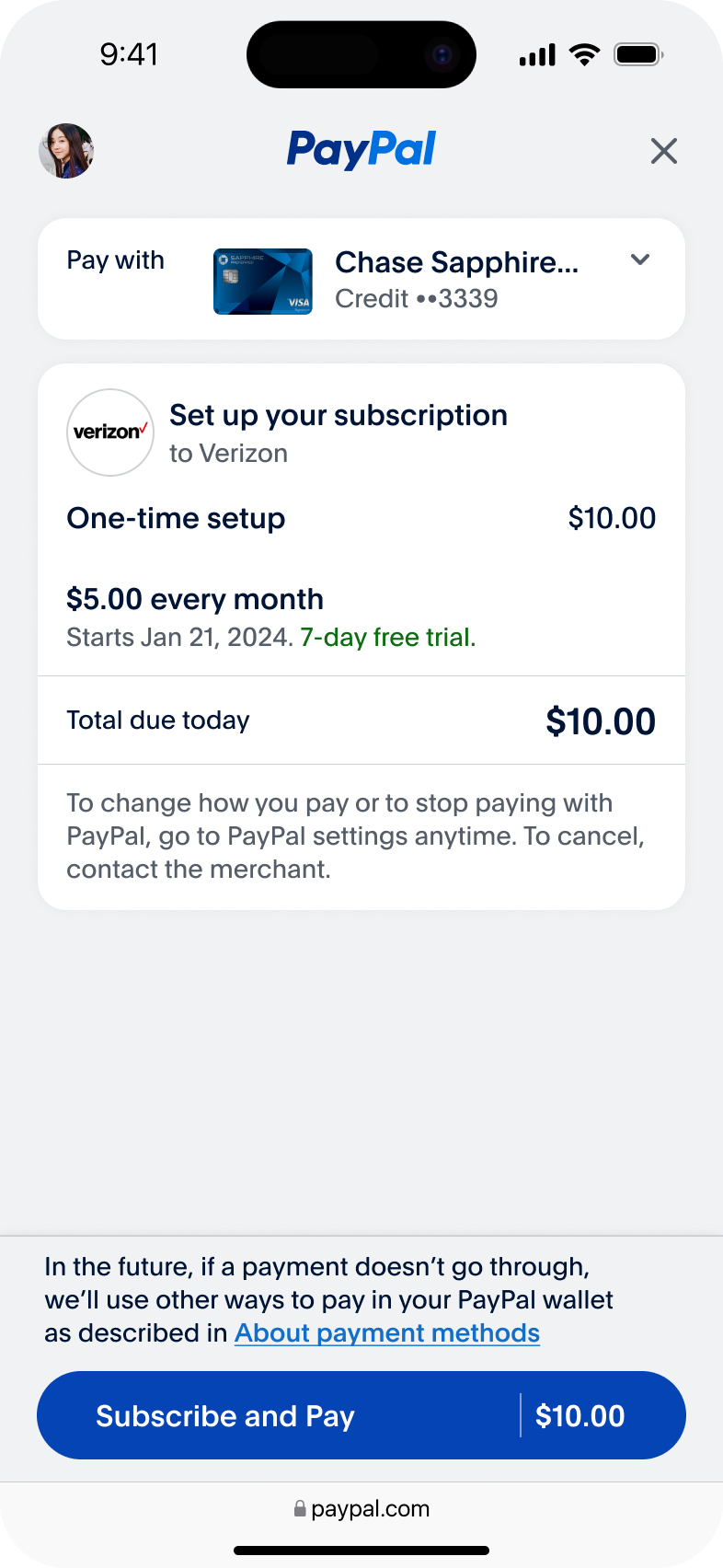
In this scenario, the consumer subscribes to a $10/month plan with a 7-day free trial.
curl -v -X POST https://api-m.sandbox.paypal.com/v2/checkout/orders/
-H "Content-Type: application/json"
-H "Authorization: Bearer ACCESS_TOKEN"
-d '{
            "intent": "CAPTURE",
            "purchase_units": [
                {
                    "amount": {
                        "currency_code": "USD",
                        "value": "10"
                    },
                     "items": [

                     {
                       "name": "Billing Plan",
          "description": "Billing plan for subscriptions",

                      "unit_amount": {
                        "currency_code": "USD",
                        "value": "10"
                    },
                    "quantity": "1",
                        "billing_plan": {

                        "name": "Verizon Subscription",
                        "setup_fee": {
                            "value": "10",
                            "currency_code": "USD"
                        },
                        "billing_cycles": [
                                {
                                    "tenure_type": "TRIAL",
                                    "pricing_scheme": {
                                        "price": {
                                            "value": "5",
                                            "currency_code": "USD"
                                        },
                                        "pricing_model": "FIXED"
                                    },
                                    "frequency": {
                                        "interval_unit": "DAY",
                                        "interval_count": 7
                                    },
                                    "sequence": 1,
                                    "start_date": "2024-01-21"
                                }
                        ]
                    }
                    ]
                      ]
                }
            ],
            "payment_source": {
                "paypal": {
                    "attributes": {
                        "vault": {
                            "store_in_vault": "ON_SUCCESS",
                            "usage_type": "MERCHANT",
                            "usage_pattern": "SUBSCRIPTION_PREPAID"

                        }
                    },
                    "experience_context": {
                        "return_url": "https://example.com/returnUrl",
                        "cancel_url": "https://example.com/cancelUrl"
                    }
                }
            }
        }
    }'
Use case: Subscription start date and one-time setup fee
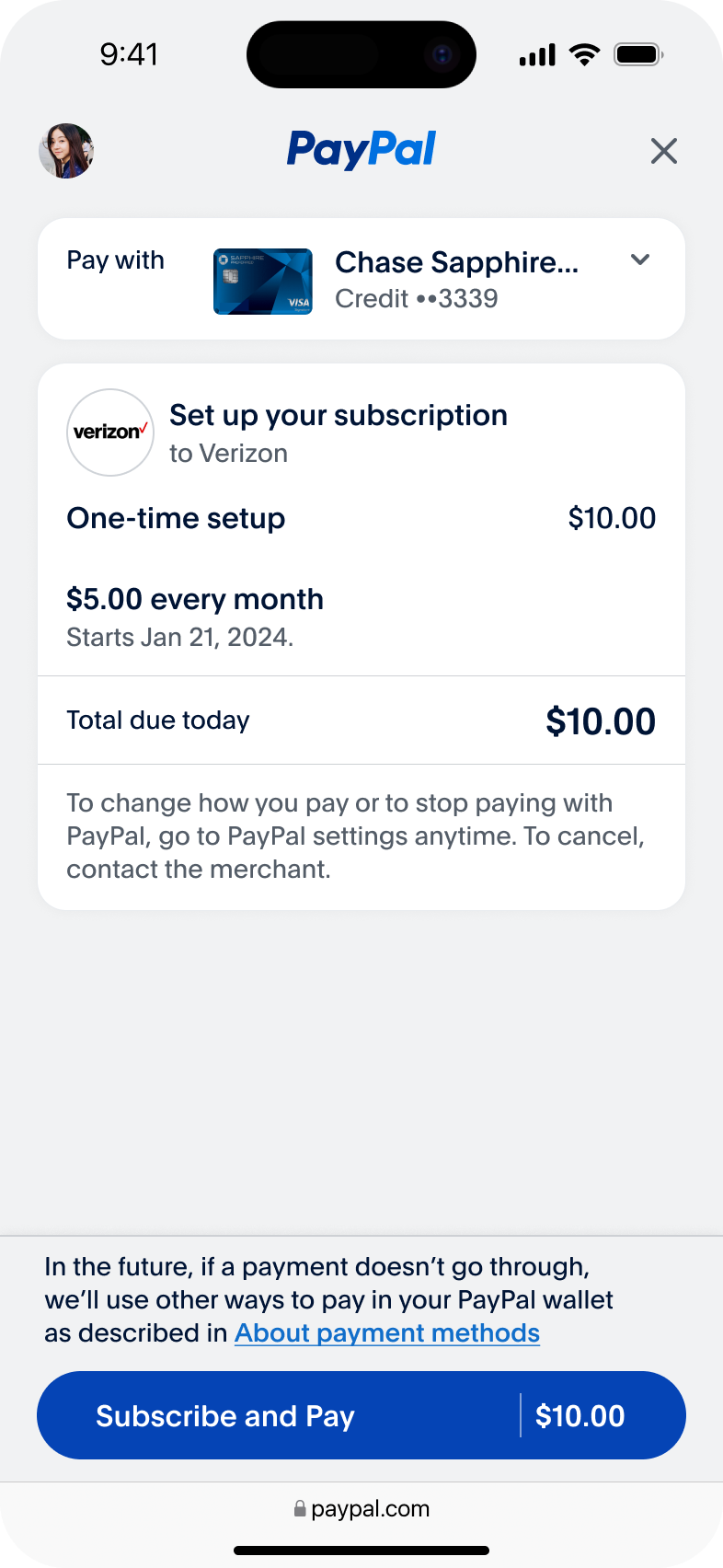
In this scenario, the consumer subscribes to a $5.00/month plan and a one-time setup charge of $10.00 with a future start date.
curl -v -X POST https://api-m.sandbox.paypal.com/v2/checkout/orders/
-H "Content-Type: application/json"
-H "Authorization: Bearer ACCESS_TOKEN"
-d '{
            "intent": "CAPTURE",
            "purchase_units": [
                {
                    "amount": {
                        "currency_code": "USD",
                        "value": "10"
                    },
                     "items": [{
                      "unit_amount": {
                        "currency_code": "USD",
                        "value": "10"
                    },
                    "quantity": "1",
                        "billing_plan": {

                        "name": "Verizon Subscription",
                        "setup_fee": {
                            "value": "10",
                            "currency_code": "USD"
                        },
                        "billing_cycles": [
                                {
                                    "tenure_type": "REGULAR",
                                    "pricing_scheme": {
                                        "price": {
                                            "value": "5",
                                            "currency_code": "USD"
                                        },
                                        "pricing_model": "FIXED"
                                    },
                                    "frequency": {
                                        "interval_unit": "DAY",
                                        "interval_count": 7
                                    },
                                    "sequence": 1,
                                    "start_date": "2024-01-21"
                                }
                        ]
                    }
                    ]
                      ]
                }
            ],
            "payment_source": {
                "paypal": {
                    "attributes": {
                        "vault": {
                            "store_in_vault": "ON_SUCCESS", //To create a vaulted token
                            "usage_type": "MERCHANT", //Merchant or Customer
                            "usage_pattern": "SUBSCRIPTION_PREPAID", //Recurring Indicator

                        }
                    },
                    "experience_context": {
                        "return_url": "https://example.com/returnUrl",
                        "cancel_url": "https://example.com/cancelUrl"
                    }
                }
            }
        }
    }'
Use case: Default subscription
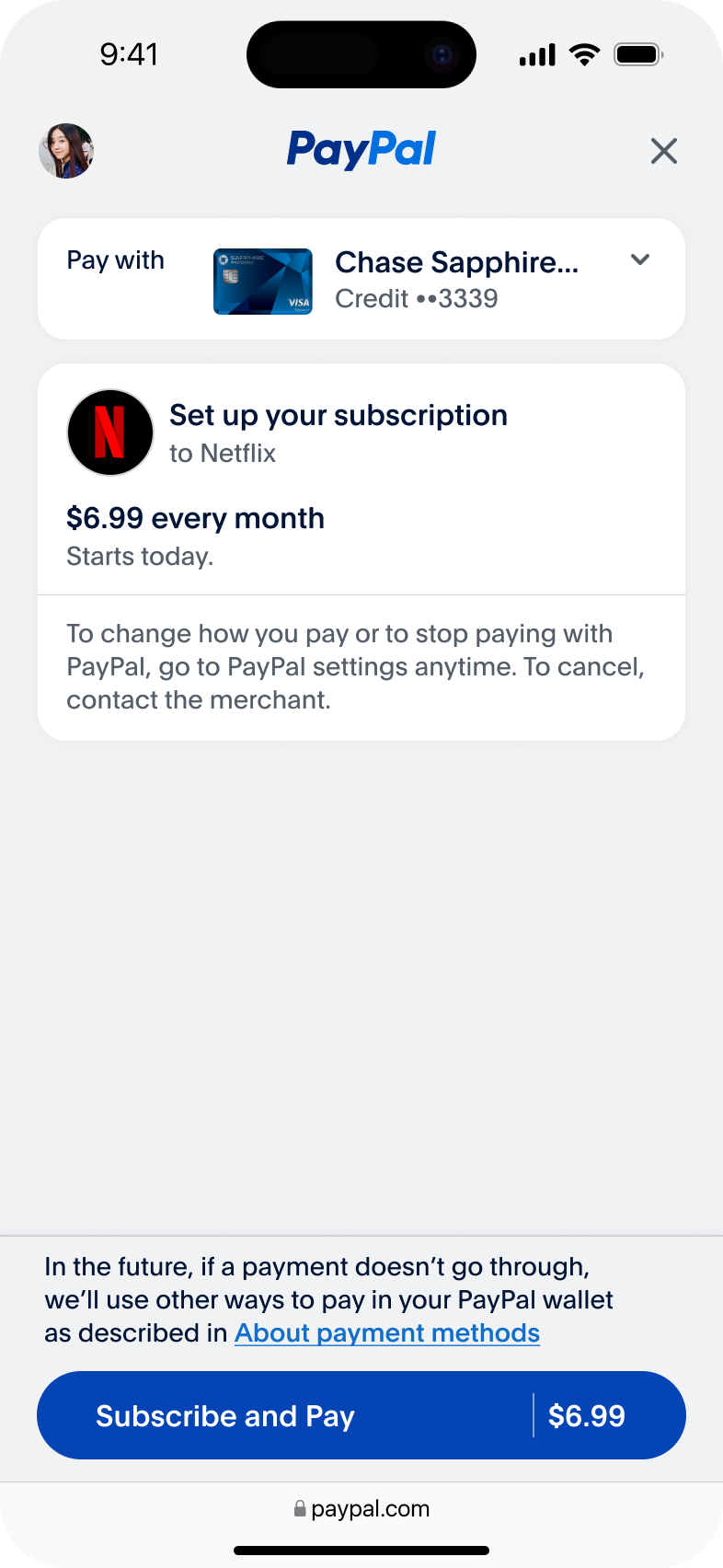
In this scenario, the consumer creates a subscription of $6.99 for their Netflix plan starting today.
curl -v -X POST https://api-m.sandbox.paypal.com/v2/checkout/orders/
-H "Content-Type: application/json"
-H "Authorization: Bearer ACCESS_TOKEN"
-d '{
    "intent": "CAPTURE",
    "payment_source": {
        "paypal": {
            "attributes": {
                "vault": {
                    "store_in_vault": "ON_SUCCESS",
                    "usage_type": "MERCHANT",
                    "usage_pattern": "SUBSCRIPTION_PREPAID"
                },
                "experience_context": {
                    "landing_page": "LOGIN",
                    "user_action": "PAY_NOW",
                    "email_address": "buyer@example.com",
                    "return_url": "https://example.com/returnUrl",
                    "cancel_url": "https://example.com/cancelUrl"
                }
            }
        }
    },
    "purchase_units": [
        {
            "items": [
                {
                    "name": "Netflix subscription plan",
                    "description": "Netflix subscription plan. Paid Monthly",
                    "sku": "259483234816",
                    "unit_amount": {
                        "currency_code": "USD",
                        "value": "6.99"
                    },
                    "quantity": "1",
                    "category": "DIGITAL_GOODS",
                    "billing_plan": {
                        "billing_cycles": [
                            {
                                "tenure_type": "REGULAR",
                                "pricing_scheme": {
                                    "price": {
                                        "value": "6.99",
                                        "currency_code": "USD"
                                    },
                                    "pricing_model": "FIXED"
                                },
                                "frequency": {
                                    "interval_unit": "MONTH",
                                    "interval_count": 1
                                },
                                "total_cycles": 0,
                                "sequence": 1
                            }
                        ]
                    }
                }
            ],
            "amount": {
                "currency_code": "USD",
                "value": "6.99",
                "breakdown": {
                    "item_total": {
                        "currency_code": "USD",
                        "value": "6.99"
                    }
                }
            }
        }
    ]
}'
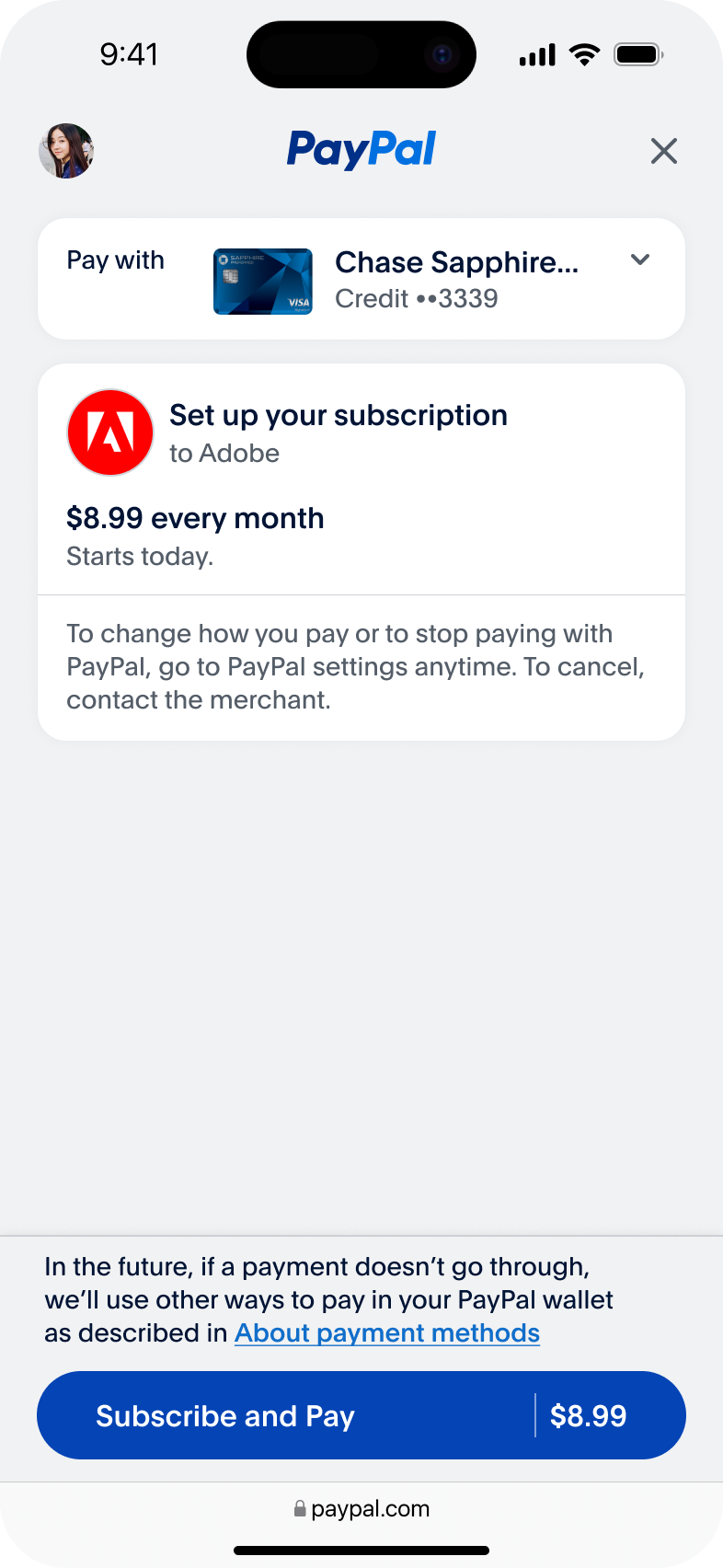
Use case: Subscription with early cancellation fees
In this scenario, the customer receives a fee if they decide to cancel the subscription early.
curl -v -X POST https://api-m.sandbox.paypal.com/v2/checkout/orders/
-H "Content-Type: application/json"
-H "Authorization: Bearer ACCESS_TOKEN"
-d '{
    "intent": "CAPTURE",
    "payment_source": {
        "paypal": {
            "attributes": {
                "vault": {
                    "store_in_vault": "ON_SUCCESS",
                    "usage_type": "MERCHANT",
                    "usage_pattern": "SUBSCRIPTION_POSTPAID"
                },
                "experience_context": {
                    "landing_page": "LOGIN",
                    "user_action": "PAY_NOW",
                    "email_address": "buyer@example.com",
                    "return_url": "https://example.com/returnUrl",
                    "cancel_url": "https://example.com/cancelUrl"
                }
            }
        }
    },
    "purchase_units": [
        {
            "items": [
                {
                    "name": "Adobe subscription plan",
                    "description": "Adobe postpaid subscription plan. Paid Monthly",
                    "sku": "259483234816",
                    "unit_amount": {
                        "currency_code": "USD",
                        "value": "6.99"
                    },
                    "quantity": "1",
                    "category": "DIGITAL_GOODS",
                    "billing_plan": {
                        "billing_cycles": [
                            {
                                "tenure_type": "REGULAR",
                                "pricing_scheme": {
                                    "price": {
                                        "value": "6.99",
                                        "currency_code": "USD"
                                    },
                                    "pricing_model": "FIXED"
                                },
                                "frequency": {
                                    "interval_unit": "MONTH",
                                    "interval_count": 1
                                },
                                "total_cycles": 0,
                                "sequence": 1
                            }
                        ]
                    }
                }
            ],
            "amount": {
                "currency_code": "USD",
                "value": "6.99",
                "breakdown": {
                    "item_total": {
                        "currency_code": "USD",
                        "value": "6.99"
                    }
                }
            }
        }
    ]
}
'
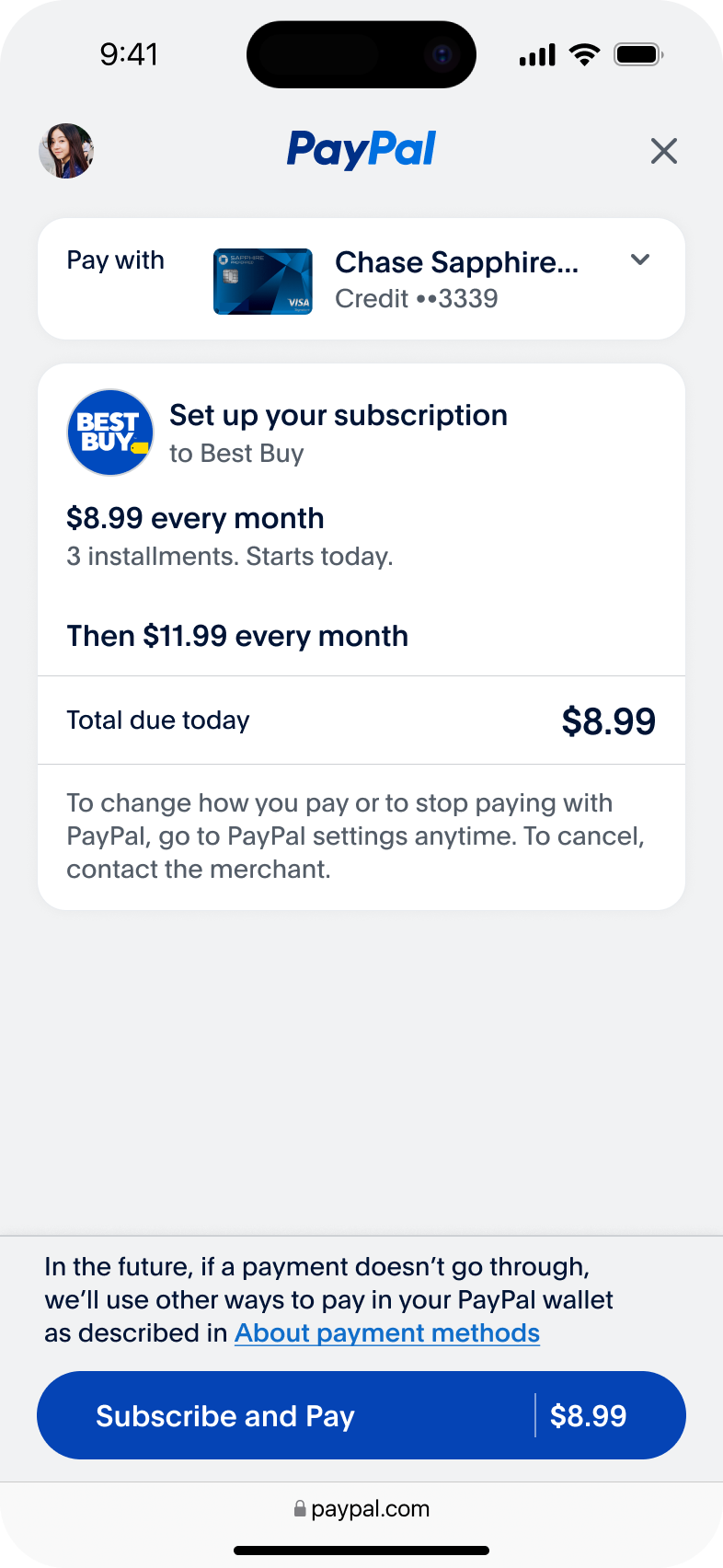
Use case: Subscription with multiple rates
In this scenario, the subscription price changes after a certain number of months.
curl -v -X POST https://api-m.sandbox.paypal.com/v2/checkout/orders/
-H "Content-Type: application/json"
-H "Authorization: Bearer ACCESS_TOKEN"
-d '{
    "intent": "CAPTURE",
    "payment_source": {
        "paypal": {
            "attributes": {
                "vault": {
                    "store_in_vault": "ON_SUCCESS",
                    "usage_type": "MERCHANT",
                    "usage_pattern": "INSTALLMENT_PREPAID"
                },
                "experience_context": {
                    "landing_page": "LOGIN",
                    "user_action": "PAY_NOW",
                    "email_address": "buyer@example.com",
                    "return_url": "https://example.com/returnUrl",
                    "cancel_url": "https://example.com/cancelUrl"
                }
            }
        }
    },
    "purchase_units": [
        {
            "items": [
                {
                    "name": "Best Buy subscription plan",
                    "description": "Best Buy subscription plan with varied rates",
                    "sku": "2594832348",
                    "unit_amount": {
                        "currency_code": "USD",
                        "value": "8.99"
                    },
                    "quantity": "1",
                    "category": "DIGITAL_GOODS",
                    "billing_plan": {
                        "billing_cycles": [
                            {
                                "tenure_type": "TRIAL",
                                "pricing_scheme": {
                                    "price": {
                                        "value": "8.99",
                                        "currency_code": "USD"
                                    },
                                    "pricing_model": "FIXED"
                                },
                                "frequency": {
                                    "interval_unit": "MONTH",
                                    "interval_count": 1
                                },
                                "total_cycles": 3,
                                "sequence": 1
                            },
                            {
                                "tenure_type": "REGULAR",
                                "pricing_scheme": {
                                    "price": {
                                        "value": "11.99",
                                        "currency_code": "USD"
                                    },
                                    "pricing_model": "FIXED"
                                },
                                "frequency": {
                                    "interval_unit": "MONTH",
                                    "interval_count": 1
                                },
                                "total_cycles": 0,
                                "sequence": 2,
                                "start_date": "2024-07-16"
                            }
                        ]
                    }
                }
            ],
            "amount": {
                "currency_code": "USD",
                "value": "8.99",
                "breakdown": {
                    "item_total": {
                        "currency_code": "USD",
                        "value": "8.99"
                    }
                }
            }
        }
    ]
}'
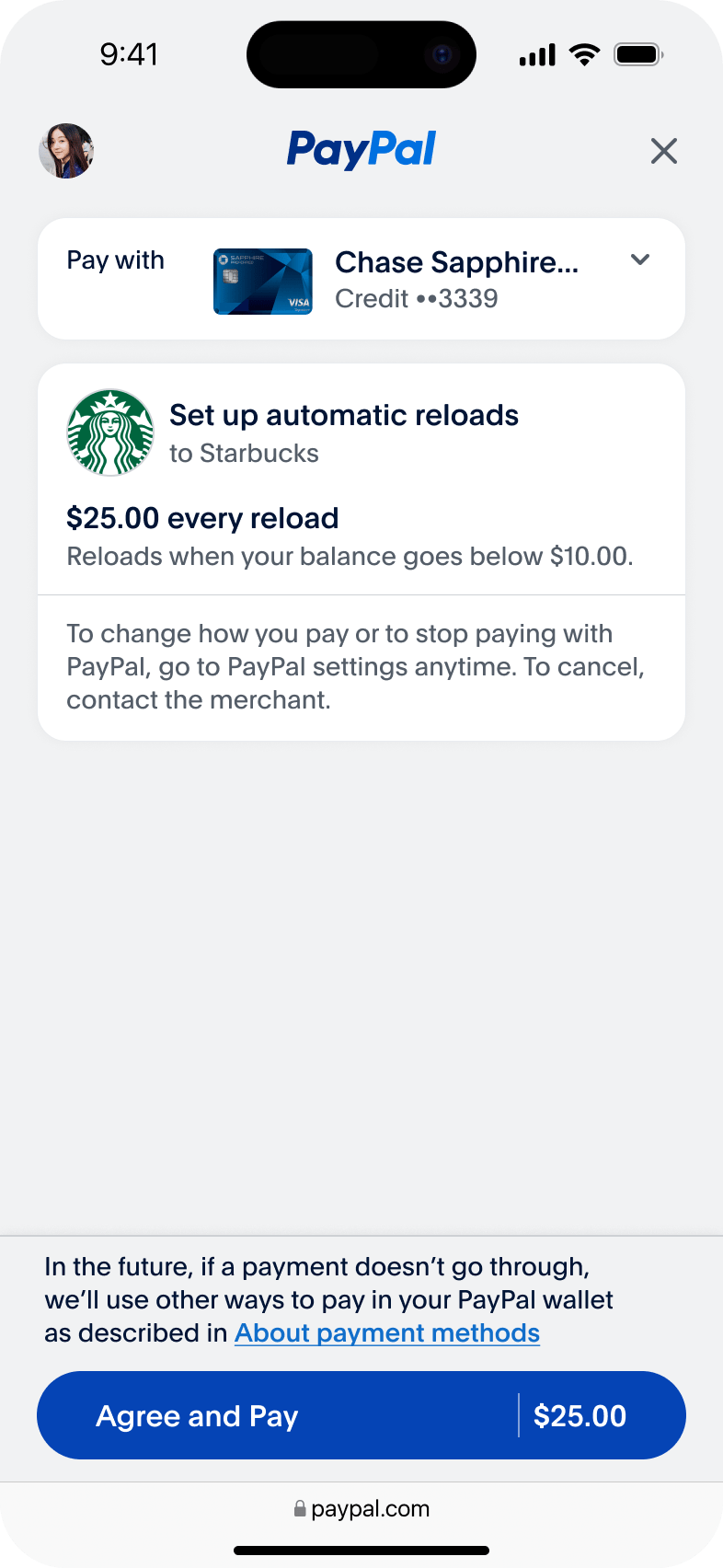
Use case: Consumer creates auto-reload plan
In this scenario, the consumer creates an auto-reload plan for their coffee program prepaid card. The system reloads $25 every time their prepaid card balance drops below $10.
{
    "intent": "CAPTURE",
    "payment_source": {
        "paypal": {
            "attributes": {
                "vault": {
                    "store_in_vault": "ON_SUCCESS",
                    "usage_type": "MERCHANT",
                    "usage_pattern": "UNSCHEDULED_PREPAID"
                },
                "experience_context": {
                    "landing_page": "LOGIN",
                    "user_action": "PAY_NOW",
                    "email_address": "buyer@example.com",
                    "return_url": "https://example.com/returnUrl",
                    "cancel_url": "https://example.com/cancelUrl"
                }
            }
        }
    },
    "purchase_units": [
        {
            "items": [
                {
                    "name": "Starbucks subscription plan",
                    "description": "Starbucks subscription plan with auto reload",
                    "sku": "259483234",
                    "unit_amount": {
                        "currency_code": "USD",
                        "value": "25"
                    },
                    "quantity": "1",
                    "category": "DIGITAL_GOODS",
                    "billing_plan": {
                        "billing_cycles": [
                            {
                                "tenure_type": "REGULAR",
                                "pricing_scheme": {
                                    "price": {
                                        "value": "25",
                                        "currency_code": "USD"
                                    },
                                    "reload_threshold_amount": {
                                        "currency_code": "USD",
                                        "value": "10.0"
                                    },
                                    "pricing_model": "AUTO_RELOAD"
                                },
                                "frequency": {
                                    "interval_unit": "MONTH",
                                    "interval_count": 1
                                },
                                "total_cycles": 0,
                                "sequence": 1,
                                "start_date": "2024-04-16"
                            }
                        ]
                    }
                }
            ],
            "amount": {
                "currency_code": "USD",
                "value": "25",
                "breakdown": {
                    "item_total": {
                        "currency_code": "USD",
                        "value": "25"
                    }
                }
            }
        }
    ]
}
Process recurring payments
Use the payment method token created as an output to charge customers for recurring payments.
Call the Order endpoint of the Orders v2 API with the payment_source = paypal object to process recurring charges. This API requires the following inputs:
- Intent: Indicates whether to capture payment immediately or authorize it for later capture. Use
CAPTUREfor sale transactions andAUTHORIZEfor auth-capture. - Vault ID: The PayPal-generated ID for the saved payment token.
- Amount: The total order amount.
- Stored credential: Provides additional details for recurring transactions when processing payments with PayPal wallet vaulted payment methods.
| Field name | Values | Description |
stored_credential.payment_initiator |
| The person or party who initiated or triggered the payment. Use MERCHANT for merchant-initiated transactions where the payer is not present and CUSTOMER for payer-present scenarios. (Mandatory) |
stored_credential.usage |
| The following values specify the payment sequence:
|
stored_credential.usage_pattern |
| Defines the billing pattern for stored payments. |
Stored credential
Use the following structure to process recurring payments with stored payment methods.
"stored_credential": {
                        "payment_initiator": "MERCHANT",
                        "usage": "SUBSEQUENT",
                        "usage_pattern": "SUBSCRIPTION_PREPAID"
                    }
Complete request payload
Include the stored credential object in the Orders v2 API request to charge customers for recurring payments. The usage pattern is optional for subsequent transactions. Include it only if you want to change the pattern from when you originally created the subscription.
Authorize prepaid subscription payments
Include the stored credential object in the Orders v2 API request to process recurring subscription payments.
curl -v -X POST https://api-m.sandbox.paypal.com/v2/checkout/orders/
-H "Content-Type: application/json"
-H "Authorization: Bearer ACCESS_TOKEN"
-d '{
            "intent": "CAPTURE",
            "purchase_units": [
                {
                 "description": "HD Premium Plan",
                  "invoice_id": "test-invoice-id",
                  "amount": {
                        "currency_code": "USD",
                        "value": "100.00"
                    }
                }
            ],
            "payment_source": {
                "paypal": {
                    "vault_id": "VAULT-ID",
                    "stored_credential": {
                        "payment_initiator": "MERCHANT",
                        "usage": "SUBSEQUENT",
                        "usage_pattern": "SUBSCRIPTION_PREPAID"
                    }
                }
            }
        }
}'
For multi-step Order API integrations, include stored_credential information in Capture, Authorize, and Confirm API calls.
Error scenarios
Handle all HTTP failure codes in your merchant's implementation, including 4xx client errors and 5xx server errors. PayPal also returns 422 status codes for custom business logic errors, as shown in the subsequent transactions section.
Unsupported patterns
Your merchant's implementation must avoid the following patterns:
- Do not pass multiple items in the
purchase_units.items[]array. - Do not pass multiple purchase units in a single order.
- Avoid
items[]with billing plan quantities greater than 1. - Use single-step order creation for recurring purchases.
- Multi-step processes are not supported.
- Include payment source information when creating orders.
- Do not use setup or product price fields in Confirm, Authorize, or Capture operations.
- Do not include billing plan data in patch operations.
Amount-related errors
- Amount breakdown fields such as handling, discount, shipping discount, and insurance are not supported in
purchase_units.amount.breakdown. - When the billing plan start date matches the vaulted payment creation date and include setup fees or product prices in the request, add these amounts to
items[].unit_amountand include the total inpurchase_units.amount.value. - PayPal validates that shipping, tax, and unit amounts add up to
purchase_units.amount.value. Be sure to include separate values for these amounts inpurchase_units.amount.breakdown.
PayPal does not support the following amount breakdown fields in purchase_units.amount.breakdown: handling, discount, shipping discount, and insurance.
- When the billing plan start date matches the vaulted payment creation date and include setup fees or product prices in the request, add these amounts to
items[].unit_amountand include the total inpurchase_units.amount.value. - PayPal validates that shipping, tax, and unit amounts add up to
purchase_units.amount.value. Be sure to include separate values for these amounts inpurchase_units.amount.breakdown.
API execution
Use a single step order creation process to pass the payment source information with billing plan details in the create order request.
Billing plan specifications
Review these billing plan requirements to ensure your merchant's integration handles recurring payments correctly and avoids common configuration errors.
| Usage pattern | Supported | Auto reload support | Trial billing cycle | Notes |
SUBSCRIPTION | Requires at least one regular billing cycle. | |||
RECURRING | Requires at least one regular billing cycle. | |||
INSTALLMENT | Requires at least one regular billing cycle. | |||
UNSCHEDULED_PREPAID | Supports auto reload. | |||
UNSCHEDULED_POSTPAID | Supports auto reload. |
Ensure that at least one billing cycle includes a start date, and use only one currency across all amount fields.
Subsequent transactions
The following sample code shows a common 422 error that occurs when required vault credentials are missing from a subsequent transaction request.
{
    "title": "Create Order - 422 Unprocessable Entity Error - Missing Required parameter - Billing_Agreement_Id or Vault_Id with PayPal wallet stored credentials",
    "description": "This code sample attempts to create an order with PayPal wallet stored credentials but it does not contain a valid billing agreement id or a vault id. The request fails.",
    "runnable": true,
    "operationId": "orders.create",
    "request": {
        "method": "POST",
        "path": "v2/checkout/orders",
        "headers": {
            "Content-Type": "application/json",
            "Authorization": "Bearer ACCESS-TOKEN"
        },
        "body": {
            "intent": "CAPTURE",
            "purchase_units": [
                {
                    "reference_id": "PUHF",
                    "amount": {
                        "currency_code": "USD",
                        "value": "10.00"
                    }
                }
            ],
            "payment_source": {
                "paypal": {
                    "paypal": {
                        "stored_credential": {
                            "payment_initiator": "MERCHANT",
                            "usage": "SUBSEQUENT",
                            "usage_pattern": "SUBSCRIPTION_PREPAID"
                        }
                    }
                }
            }
        }
    },
    "response": {
        "status": "422 Unprocessable Entity",
        "headers": {
            "Content-Type": "application/json"
        },
        "body": {
            "name": "UNPROCESSABLE_ENTITY",
            "message": "Request is not well-formed, syntactically incorrect, or violates schema.",
            "debug_id": "10398537340c8",
            "details": [
                {
                    "field": "/payment_source/paypal/vault_id",
                    "location": "body",
                    "issue": "PAYPAL_STORED_CREDENTIAL_MISSING_REQUIRED_PARAMETER",
                    "description": "A 'billing_agreement_id' or 'vault_id' is required for the recurring billing scenario when the merchant uses payment_source.paypal.stored_credential."
                }
            ],
            "links": [
                {
                    "href": "https://developer.paypal.com/api/orders/v2/error-messages",
                    "rel": "information_link"
                }
            ]
        }
    }
}