On this page
No Headings
Last updated: June 4, 2026
This product is deprecated and should not be used for new integrations. Use Payment Links and Buttons instead. For information about migrating, visit the Upgrade Hub.
The following code samples demonstrate various features of PayPal-hosted Automatic Billing buttons:
Important: This page contains unencrypted button code for illustrative purposes only. To prevent malicious tampering of buttons on your live website, always encrypt your manually created buttons.
The following sample HTML code illustrates a basic Automatic Billing button, with these features:
min_amount HTML variableRegular House Cleaning above the button<form action="https://www.paypal.com/cgi-bin/webscr" method="post"> <!-- Identify your business so that you can bill for payments. --> <input type="hidden" name="business" value="your-secure-merchant-ID"> <!-- Specify an Automatic Billing button. --> <input type="hidden" name="cmd" value="_xclick-auto-billing"> <!-- Specify details about the automatic billing plan. --> <input type="hidden" name="currency_code" value="USD"> <input type="hidden" name="item_name" value="Regular House Cleaning"> <input type="hidden" name="set_customer_limit" value="max_limit_own"> <input type="hidden" name="min_amount" value="240.00"> <!-- Make sure you get the buyer's address during checkout. -- > <input type="hidden" name="no_shipping" value="2"> <!-- Display the description and a text box to enter the maximum. --> <table> <tr><td><strong>Regular House Cleaning</strong></td></tr> <tr><td>Enter the maximum amount you want to pay each month.</td></tr> <tr><td>$ <input type="text" name="max_amount" value=""> USD</td></tr> <!-- Inform buyers of the monthly minimum payment --> <tr><td>You will pay at least $240.00 USD.</td></tr> </table> <!-- Display the Automatic Billing button --> <table> <tr><td><i>Sign up for</i></td></tr> <tr><td><input type="image" name="submit" src="https://www.paypalobjects.com/en_US/i/btn/btn_auto_billing_LG.gif" alt="PayPal - The safer, easier way to pay online!"></td></tr> </table> <img alt="" width="1" height="1" src="https://www.paypalobjects.com/en_US/i/scr/pixel.gif" </form>
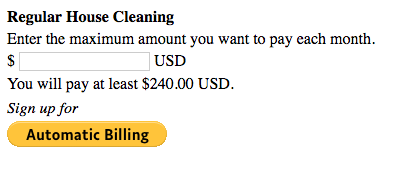
The preceding sample code produces the following result on your webpage:
The preceding sample code produces the following result on your webpage:
The sample code below illustrates an Automatic Billing button with these features:
Regular House Cleaning above the button<form action="https://www.paypal.com/cgi-bin/webscr" method="post"> <!-- Identify your business so that you can bill for payments. --> <input type="hidden" name="business" value="your-secure-merchant-ID"> <!-- Specify an Automatic Billing button. --> <input type="hidden" name="cmd" value="_xclick-auto-billing"> <!-- Specify details about the automatic payment plan. --> <input type="hidden" name="currency_code" value="USD"> <input type="hidden" name="item_name" value="Regular House Cleaning"> <input type="hidden" name="set_customer_limit" value="max_limit_defined"> <!-- Make sure you get the buyer's address during checkout. -- > <input type="hidden" name="no_shipping" value="2"> <!-- Specify the price that PayPal uses for each option. --> <input type="hidden" name="option_select0" value="240"> <input type="hidden" name="option_amount0" value="240"> <input type="hidden" name="option_select1" value="300"> <input type="hidden" name="option_amount1" value="300"> <input type="hidden" name="option_select2" value="450"> <input type="hidden" name="option_amount2" value="450"> <input type="hidden" name="option_index" value="0"> <!-- Display the description and a drop-down of options with prices. --> <table> <tr> <td><input type="hidden" name="on0" value="Regular house cleaning"> <strong>Regular House Cleaning</strong></td> </tr> <tr> <td>Select the maximum amount you want to pay each month.</td> </tr> <tr> <td>$ <select name="os0"> <option value="240"> 240</option> <option value="300"> 300</option> <option value="450"> 450</option> </select> USD</td> </tr> <!-- Display the Automatic Billing button. --> <tr><td><i>Sign up for</i></td></tr> <tr><td><input type="image" name="submit" src="https://www.paypalobjects.com/en_US/i/btn/btn_auto_billing_LG.gif" alt="PayPal - The safer, easier way to pay online!"></td></tr> </table> <img alt="" width="1" height="1" src="https://www.paypalobjects.com/en_US/i/scr/pixel.gif" </form>
The sample code above produces the following result on your webpage:
The sample code above produces the following result on your webpage: