On this page
No Headings
Last updated: June 4, 2026
This product is deprecated and should not be used for new integrations. Use Payment Links and Buttons instead. For information about migrating, visit the Upgrade Hub.
These code samples show how to configure PayPal-hosted Buy Now buttons:
Important: This page contains unencrypted button code for illustrative purposes only. To prevent malicious tampering of buttons on your live website, always encrypt your manually created buttons.
This code sample configures a basic Buy Now button with these features:
<form action="https://www.paypal.com/cgi-bin/webscr" method="post"> <!-- Identify your business so that you can collect the payments. --> <input type="hidden" name="business" value="[email protected]"> <!-- Specify a Buy Now button. --> <input type="hidden" name="cmd" value="_xclick"> <!-- Specify details about the item that buyers will purchase. --> <input type="hidden" name="item_name" value="Hot Sauce-12oz. Bottle"> <input type="hidden" name="amount" value="5.95"> <input type="hidden" name="currency_code" value="USD"> <!-- Display the payment button. --> <input type="image" name="submit" border="0" src="https://www.paypalobjects.com/en_US/i/btn/btn_buynow_LG.gif" alt="Buy Now"> <img alt="" border="0" width="1" height="1" src="https://www.paypalobjects.com/en_US/i/scr/pixel.gif" > </form>This code sample configures a basic Buy Now button with an option menu named "Type of umbrella."
<form action="https://www.paypal.com/cgi-bin/webscr" method="post"> <!-- Identify your business so that you can collect the payments. --> <input type="hidden" name="business" value="[email protected]"> <!-- Specify a Buy Now button. --> <input type="hidden" name="cmd" value="_xclick"> <!-- Specify details about the item that buyers will purchase. --> <input type="hidden" name="item_name" value="Premium Umbrella"> <input type="hidden" name="amount" value="50.00"> <input type="hidden" name="currency_code" value="USD"> <!-- Provide a drop-down menu option field. --> <input type="hidden" name="on0" value="Type">Type of umbrella <br /> <select name="os0"> <option value="Select Type">-- Select Type --</option> <option value="Standard">Standard</option> <option value="Collapsable">Collapsable</option> </select> <br /> <!-- Display the payment button. --> <input type="image" name="submit" border="0" src="https://www.paypalobjects.com/en_US/i/btn/btn_buynow_LG.gif" alt="Buy Now"> <img alt="" border="0" width="1" height="1" src="https://www.paypalobjects.com/en_US/i/scr/pixel.gif" > </form>This sample code displays this image on your web page:
This sample code displays this image on your web page:
This code sample configures a basic Buy Now button with a drop-down menu of product options. Each option has its own price.
This code sample configures a basic Buy Now button with a drop-down menu of product options. Each option has its own price.
Drop-down menus with option prices use the following variables:
currency_code: Sets the currency for option prices.item_index: Identifies which drop-down menu of product option has prices.option_select and option_amount: Repeats the prices for each option.Paste this code onto your web page below an image or a text description of the item.
<form action="https://www.paypal.com/cgi-bin/webscr" method="post"> <!-- Identify your business so that you can collect the payments. --> <input type="hidden" name="business" value="[email protected]"> <!-- Specify a Buy Now button. --> <input type="hidden" name="cmd" value="_xclick"> <!-- Specify details about the item that buyers will purchase. --> <input type="hidden" name="item_name" value="Design"> <input type="hidden" name="currency_code" value="USD"> <!-- Provide a drop-down menu option field. --> <input type="hidden" name="on0" value="Type">Design<br /> <select name="os0"> <option value="Select a type">-- Select a type --</option> <option value="Standard">Striped</option> <option value="Collapsible">Solid</option> </select> <br /> <!-- Provide a drop-down menu option field with prices. --> <input type="hidden" name="on1" value="Design">Design <br /> <select name="os1"> <option value="Striped">Striped - $30.00 USD</option> <option value="Solid">Solid - $25.0 USD</option> <option value="Dots">Dots - $20.00 USD</option> </select> <br /> <!-- Specify the price that PayPal uses for each option. --> <input type="hidden" name="option_index" value="1"> <input type="hidden" name="option_select0" value="Striped"> <input type="hidden" name="option_amount0" value="30.00"> <input type="hidden" name="option_select1" value="Solid"> <input type="hidden" name="option_amount1" value="25.00"> <input type="hidden" name="option_select2" value="Dots"> <input type="hidden" name="option_amount2" value="20.00"> <!-- Display the payment button. --> <input type="image" name="submit" border="0" src="https://www.paypalobjects.com/en_US/i/btn/btn_buynow_LG.gif" alt="Buy Now"> <img alt="" border="0" width="1" height="1" src="https://www.paypalobjects.com/en_US/i/scr/pixel.gif"> </form>This sample code displays this image on your web page:
This sample code displays this image on your web page:
This code sample configures a basic Buy Now button with a text box for entering product options.
<form action="https://www.paypal.com/cgi-bin/webscr" method="post"> <!-- Identify your business so that you can collect the payments. --> <input type="hidden" name="business" value="[email protected]"> <!-- Specify a Buy Now button. --> <input type="hidden" name="cmd" value="_xclick"> <!-- Specify details about the item that buyers will purchase. --> <input type="hidden" name="item_name" value="Hot Sauce-12 oz. Bottle"> <input type="hidden" name="amount" value="5.95"> <input type="hidden" name="currency_code" value="USD"> <!-- Provide the buyer with a text box option field. --> <input type="hidden" name="on0" value="strong>Size">Enter your size (S, M, L, X, XX) <br /> <input type="text" name="os0" maxlength="60"> <br /> <!-- Display the payment button. --> <input type="image" name="submit" border="0" src="https://www.paypalobjects.com/en_US/i/btn/btn_buynow_LG.gif" alt="Buy Now"> <img alt="" border="0" width="1" height="1" src="https://www.paypalobjects.com/en_US/i/scr/pixel.gif" > </form>This sample code displays this image on your web page:
This sample code displays this image on your web page:
This sample code configures a basic Buy Now button that prompts buyers to specify item quantities. Use this option carefully because buyers might request more items than you have in your inventory. To avoid this issue, set up inventory tracking.
This sample code configures a basic Buy Now button that prompts buyers to specify item quantities. Use this option carefully because buyers might request more items than you have in your inventory. To avoid this issue,
<form action="https://www.paypal.com/cgi-bin/webscr" method="post"> <!-- Identify your business so that you can collect the payments. --> <input type="hidden" name="business" value="[email protected]"> <!-- Specify a Buy Now button. --> <input type="hidden" name="cmd" value="_xclick"> <!-- Specify details about the item that buyers will purchase. --> <input type="hidden" name="item_name" value="Premium Umbrella"> <input type="hidden" name="amount" value="50.00"> <input type="hidden" name="currency_code" value="USD"> <!-- Prompt buyers to enter the quantities they want. --> <input type="hidden" name="undefined_quantity" value="1"> <!-- Display the payment button. --> <input type="image" name="submit" border="0" src="https://www.paypalobjects.com/en_US/i/btn/btn_buynow_LG.gif" alt="Buy Now"> <img alt="" border="0" width="1" height="1" src="https://www.paypalobjects.com/en_US/i/scr/pixel.gif" > </form>This sample code displays a similar image during checkout:
This sample code displays a similar image during checkout: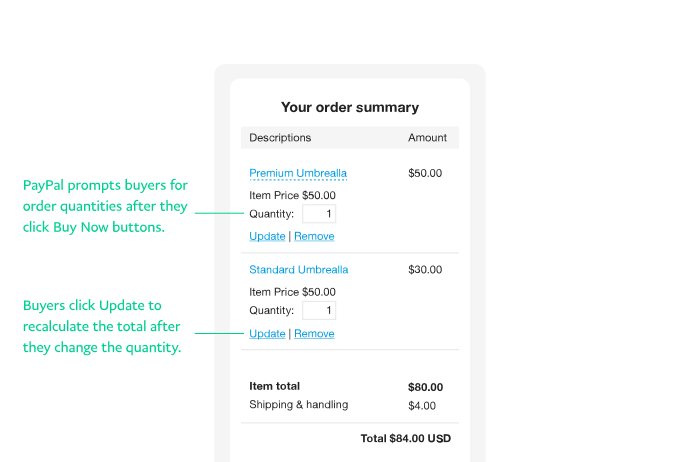
This sample code configures a basic Buy Now button that:
Paste this code onto your web page below an image or a text description of the item.
<form action="https://www.paypal.com/cgi-bin/webscr" method="post"> <!-- Identify your business so that you can collect the payments. --> <input type="hidden" name="business" value="[email protected]"> <!-- Specify a Buy Now button. --> <input type="hidden" name="cmd" value="_xclick"> <!-- Specify details about the item that buyers purchase. --> <input type="hidden" name="item_name" value="Hot Sauce-12 oz. Bottle"> <input type="hidden" name="amount" value="5.95"> <input type="hidden" name="currency_code" value="USD"> <!-- Specify the discount amounts that apply to the order. --> <input type="hidden" name="discount_amount" value="2.00"> <!-- Prompt buyers to enter the quantities they want. --> <input type="hidden" name="undefined_quantity" value="1"> <!-- Display the payment button. --> <input type="image" name="submit" border="0" src="https://www.paypalobjects.com/en_US/i/btn/btn_buynow_LG.gif" alt="Buy Now"> <img alt="" border="0" width="1" height="1" src="https://www.paypalobjects.com/en_US/i/scr/pixel.gif" > </form>This sample code configures a basic Buy Now button that:
Paste this code onto your web page below an image or a text description of the item.
<form action="https://www.paypal.com/cgi-bin/webscr" method="post"> <!-- Identify your business so that you can collect the payments. --> <input type="hidden" name="business" value="[email protected]"> <!-- Specify a Buy Now button. --> <input type="hidden" name="cmd" value="_xclick"> <!-- Specify details about the item that buyers will purchase. --> <input type="hidden" name="item_name" value="Hot Sauce-12 oz. Bottle"> <input type="hidden" name="amount" value="5.95"> <input type="hidden" name="currency_code" value="USD"> <!-- Specify the discount amounts that apply to the item. --> <input type="hidden" name="discount_amount" value="0.15"> <input type="hidden" name="discount_amount2" value="0.20"> <input type="hidden" name="discount_num" value="4"> <!-- Prompt buyers to enter the quantities they want. --> <input type="hidden" name="undefined_quantity" value="1"> <!-- Display the payment button. --> <input type="image" name="submit" border="0" src="https://www.paypalobjects.com/en_US/i/btn/btn_buynow_LG.gif" alt="Buy Now"> <img alt="" border="0" width="1" height="1" src="https://www.paypalobjects.com/en_US/i/scr/pixel.gif" > </form>This sample code configures a basic Buy Now button that:
Paste this code onto your web page below an image or a text description of the item.
<form action="https://www.paypal.com/cgi-bin/webscr" method="post"> <!-- Identify your business so that you can collect the payments. --> <input type="hidden" name="business" value="[email protected]"> <!-- Specify a Buy Now button. --> <input type="hidden" name="cmd" value="_xclick"> <!-- Specify details about the item that buyers will purchase. --> <input type="hidden" name="item_name" value="Hot Sauce-12 oz. Bottle"> <input type="hidden" name="amount" value="5.95"> <input type="hidden" name="currency_code" value="USD"> <!-- Specify the discount percentages that apply to the item. --> <input type="hidden" name="discount_rate" value="5"> <input type="hidden" name="discount_rate2" value="10"> <input type="hidden" name="discount_num" value="4"> <!-- Prompt buyers to enter the quantities they want. --> <input type="hidden" name="undefined_quantity" value="1"> <!-- Display the payment button. --> <input type="image" name="submit" border="0" src="https://www.paypalobjects.com/en_US/i/btn/btn_buynow_LG.gif" alt="Buy Now"> <img alt="" border="0" width="1" height="1" src="https://www.paypalobjects.com/en_US/i/scr/pixel.gif" > </form>This sample code shows a basic Buy Now button that:
If the buyer purchases only 1 unit of the item, it is the full price. If the buyer purchases more than 2 units, the 2nd unit is free and any additional units are full price.
If the buyer purchases only 1 unit of the item, it is the full price. If the buyer purchases more than 2 units, the 2nd unit is free and any additional units are full price.
<form action="https://www.paypal.com/cgi-bin/webscr" method="post"> <!-- Identify your business so that you can collect the payments. --> <input type="hidden" name="business" value="[email protected]"> <!-- Specify a Buy Now button. --> <input type="hidden" name="cmd" value="_xclick"> <!-- Specify details about the item that buyers will purchase. --> <input type="hidden" name="item_name" value="Hot Sauce-12 oz. Bottle"> <input type="hidden" name="amount" value="5.95"> <input type="hidden" name="currency_code" value="USD"> <!-- Specify the discount percentages that apply to the item. --> <input type="hidden" name="discount_rate" value="0"> <input type="hidden" name="discount_rate2" value="100"> <input type="hidden" name="discount_num" value="1"> <!-- Prompt buyers to enter the quantities they want. --> <input type="hidden" name="undefined_quantity" value="1"> <!-- Display the payment button. --> <input type="image" name="submit" border="0" src="https://www.paypalobjects.com/en_US/i/btn/btn_buynow_LG.gif" alt="Buy Now"> <img alt="" border="0" width="1" height="1" src="https://www.paypalobjects.com/en_US/i/scr/pixel.gif" > </form>