Why Immutable PDFs Matter: Lessons from a Financial Agreement Generation Approach

Apr 10, 2026
28 min read
Context
At first glance, generating agreements dynamically sounds straightforward. In practice, it comes with a very strict constraint.
Legal teams provide approved templates where every detail—spacing, alignment, fonts, and positioning—is already finalized. In some cases, these documents are already reviewed or even signed.
That means:
· The generated PDF must match the original exactly
· Even small layout shifts are unacceptable
· The document must render consistently across viewers
· The output must remain unchanged once generated
This quickly becomes less about generating a document and more about ensuring fidelity, consistency, and immutability.
What Didn’t Work
Before arriving at the final solution, we explored a few different approaches.
HTML → PDF
We started with HTML templates because they are flexible and easy to generate dynamically.
This worked well for content generation, but not for matching legal templates:
· Layout didn’t align with the original documents
· Small CSS differences caused visible shifts
· Rendering varied across engines
Even minor misalignment made the output unusable for legal purposes.
DOCX → PDF
Next, we tried DOCX templates with placeholders.
The idea was simple: - Legal teams maintain DOCX templates - Replace placeholders with runtime data - Convert DOCX to PDF in Java
This improved authoring, but introduced a different set of issues:
· Conversion caused layout inconsistencies
· Fonts and spacing changed depending on the library
· The same document could render differently across environments
Even when the data was correct, the document was not reliable visually.
The real challenge was not generating data, but preserving the exact structure of the original document.
The Approach That Worked
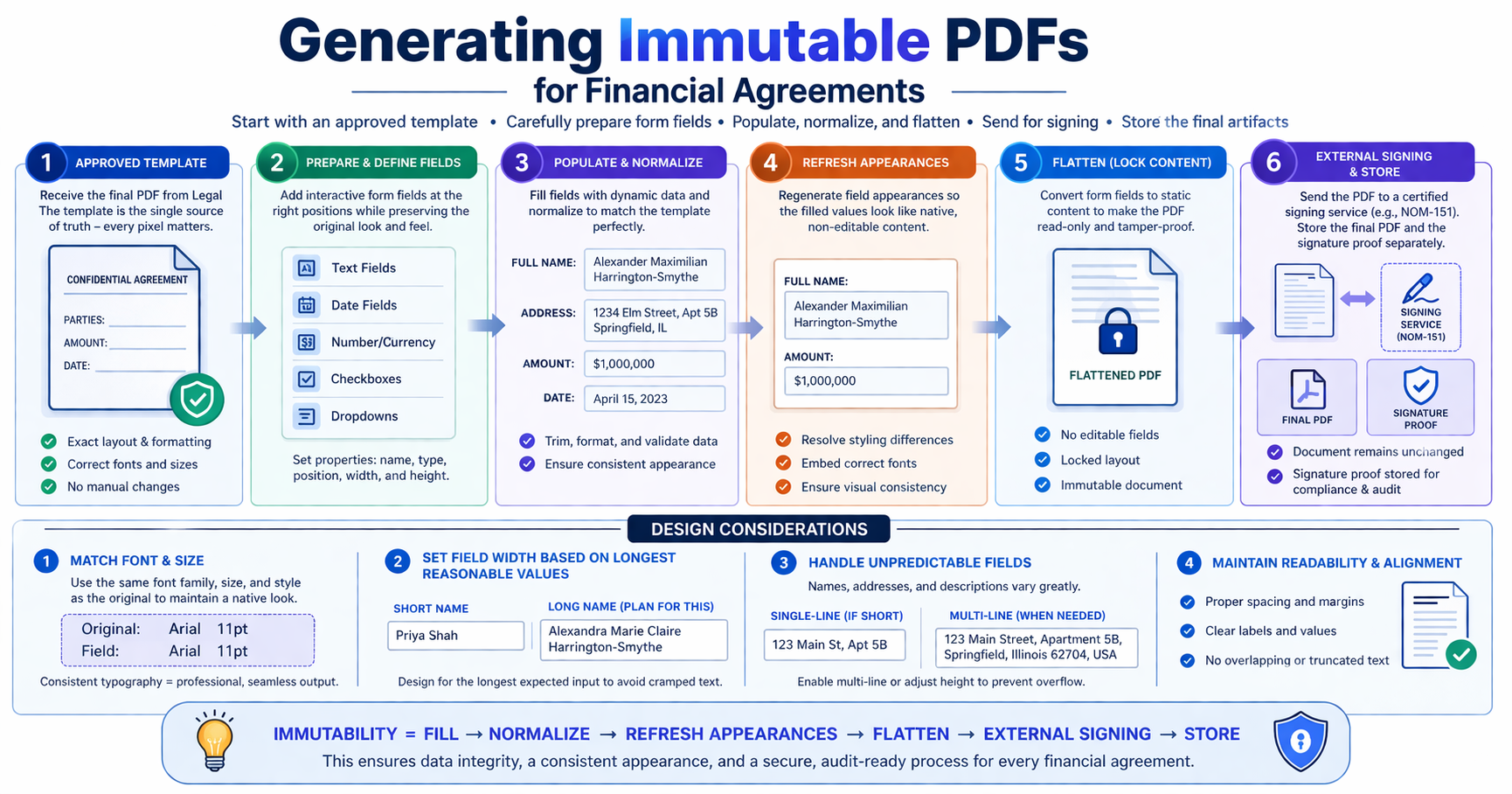
We moved to using PDF templates with predefined AcroForm fields.
Once we had the final PDF layout from legal, the next step was not just filling values—it was preparing that PDF so it could be filled reliably at runtime.
That meant adding form fields to the PDF
right locations and with the right characteristics.
This part mattered as much as the filling logic itself, because a poorly sized or poorly styled field would break the visual fidelity of the document even if the data was correct.
The approach worked because it let us:
· Preserve the exact layout of the legal-approved PDF
· Add field regions only where dynamic values were needed
· Keep the font family, font size, and overall appearance aligned with the surrounding document
· Avoid conversion-related inconsistencies entirely
In other words, the PDF remained the source of truth, and engineering worked within that structure instead of recreating it elsewhere.
How It Works
The process starts with the final PDF provided by legal. At this point, the document is treated as a fixed artifact—its layout, spacing, typography, and positioning are already finalized and should not be altered.
The next step is identifying which parts of the document need to be dynamic. These are typically values such as names, dates, or account details
Defining form fields within a fixed layout
Once the dynamic regions are identified, we prepare the PDF by introducing form fields (AcroForm fields) at those exact locations.
This is not just a mechanical step. Each field must be carefully designed so that it integrates seamlessly with the existing layout.
For every field, we need to decide:
· The exact position within the document
· The width and height of the field
· Whether the field should be single-line or multi-line
· The font family and font size to be used
· The alignment relative to surrounding text
Because the PDF layout is fixed, the available space for each field is constrained. This makes sizing decisions critical.
Handling predictable vs unpredictable values
Not all fields behave the same way. Some values are predictable in length and format, while others vary significantly.
Predictable fields include: - Dates - Numeric values - IDs or reference numbers
These can be sized with confidence because their format is known.
Unpredictable fields include: - Full names - Addresses - Free-form text
For these, we need to anticipate variability.
A practical approach we followed:
· Estimate the longest reasonable value the field should support
· Use that estimate to define the field width
· Ensure the field still looks natural within the document
If a single-line field becomes visually cramped or forces awkward spacing, we consider multi-line handling where the template allows it.
This is a balance between:
· Preserving the original design
· Supporting real-world data
Preserving typography and visual consistency
Another important aspect is maintaining the look and feel of the original document.
When form fields are added, they should not appear as overlays or injected elements. They should visually blend into the template.
To achieve this, we align with the existing document style:
· Use the same font family already present in the PDF
· Match the font size expected in that section
· Maintain consistent alignment and spacing
Even small mismatches in font or size can make the document look inconsistent or tampered with.
Runtime interaction with the PDF
Once the fields are properly defined, runtime processing becomes more straightforward.
The application performs the following steps:
1. Load the PDF template
2. Access the AcroForm structure
3. Retrieve field definitions by name
4. Map runtime data to those fields
5. Populate the fields with values
6. Normalize appearances to ensure consistent rendering
7. Refresh appearances so values are visible
8. Flatten the document to remove editability
9. Send the document for signing and persist it
Before flattening, the PDF behaves like an interactive form. Users can modify values if they open it in an editor.
After flattening, all fields are converted into static content. At this point, the document becomes a final artifact and can no longer be edited.
This separation between preparation (field definition) and execution (field population and flattening) is key to making the system reliable.
Implementation
PDDocument document =load(pdf);PDAcroForm form =getForm(document);
fillFields(form, data);
validateFields(form);
setupFonts(form);
normalizeAppearance(form);
form.refreshAppearances();
flatten(form);
returnsave(document);
What this ensures
This flow looks simple, but each step plays a specific role:
· fillFields: maps known field names to runtime values
· validateFields: ensures template and data are in sync
· setupFonts / normalizeAppearance: standardizes rendering across viewers
· refreshAppearances: ensures values are actually visible
· flatten: converts the document into a final, non-editable artifact
Together, these steps guarantee that:
· Field mapping is explicit and predictable
· Missing fields are detected early
· Rendering is consistent across environments
· The final document is immutable and safe to use downstream
Field Mapping and Validation
Field names are predefined in the template and treated as a contract.
We enforce a strict validation approach:
· All expected fields must exist
· Missing fields result in failure
· No silent fallbacks
Additional checks include:
· Handling null or empty values
· Formatting data (dates, amounts, identifiers)
· Distinguishing required vs optional fields
This helps ensure every generated document is complete and correct.
Rendering and Appearance Handling
Rendering in PDFs depends on appearance definitions, not just stored values.
We handle this explicitly by:
· Setting form-level font resources
· Normalizing field-level appearance strings
· Regenerating appearances
Without this step:
· Values may not be visible in some viewers
· Fonts may render inconsistently
In other words, rendering is part of correctness—not just presentation.
Field Constraints
Field sizing is one of the most practical and nuanced parts of working with PDF forms.
Once the layout is fixed by the template, every field must fit within a predefined area. Unlike dynamic layouts (like HTML), the PDF does not reflow content automatically. This means that the data must adapt to the layout—not the other way around.
Understanding data variability
The first step is understanding how different types of data behave.
Some fields are highly predictable:
· Dates typically follow a fixed format
· Numeric values have known ranges and precision
· Identifiers follow structured patterns
These can be sized with relatively high confidence.
Other fields are much less predictable:
· Full names can vary widely in length
· Addresses may span multiple lines
· Free-form text may exceed expected limits
These require a more careful approach.
Designing for the worst reasonable case
To handle unpredictable fields, we used a practical strategy:
· Assume the longest reasonable value that could appear
· Use that assumption to define the field width
· Validate inputs against this expectation
For example, when designing a “full name” field, we consider edge cases such as long compound names or multiple surnames.
This ensures that most real-world inputs fit without breaking the layout.
Handling overflow and readability
Even with careful sizing, there are cases where data does not fit cleanly into a single line.
In such situations, we consider:
· Allowing multi-line fields where supported
· Adjusting formatting to improve readability
· Applying validation rules to prevent extreme cases
The goal is not just to fit the data, but to ensure the document remains readable and visually consistent.
Maintaining visual consistency
Field sizing cannot be treated in isolation. It must align with the surrounding content.
This means:
· Matching font size with adjacent text
· Aligning text baselines
· Preserving spacing between elements
If a field is too wide, too narrow, or misaligned, it becomes noticeable—even if the data itself is correct.
Balancing constraints and flexibility
Ultimately, field constraints require balancing:
· Fixed layout from the template
· Variable nature of user input
· Readability and visual consistency
This is where much of the practical complexity lies. Getting this right ensures that the final document looks natural, not programmatically generated.
Field Structure Considerations
PDF forms can have hierarchical structures:
· Terminal fields (store values)
· Non-terminal fields (group other fields)
This affects how flattening works.
We detect the structure and apply the appropriate flattening strategy to ensure consistent results across templates.
Enforcing Immutability
Filling fields alone does not make a PDF immutable.
The document remains editable until we flatten it.
Flattening:
· Removes form field interactivity
· Converts values into static content
· Prevents further modification
The order of operations is important:
Fill → Normalize → Refresh → Flatten
Signing and Compliance
We use an external service to sign documents with NOM-151 compliant signatures.
This allows us to:
· Avoid managing cryptographic keys in the application
· Ensure signatures are auditable
· Meet regulatory requirements
The trade-off is additional latency (~500ms), which is acceptable given the guarantees.
Performance Considerations
Key factors affecting performance:
· PDF parsing and serialization
· Network calls for signing
· Storage operations
Optimizations include:
· Running independent steps in parallel
· Avoiding unnecessary processing
· Reusing templates where possible
Failure Handling
We handle failure cases explicitly:
· Missing fields → fail fast
· Appearance issues → log and continue where safe
· Flattening issues → retry strategy
· Invalid templates → reject early
The goal is simple: avoid silent failures and ensure predictable outcomes.
End-to-End Flow
Load → Fill → Validate → Normalize → Refresh → Flatten → Sign → Store
Each step has a clear purpose and responsibility.
Lessons Learned
· Start with the final format when precision matters
· Avoid conversion pipelines for fixed-layout documents
· Treat templates as the source of truth
· Validate inputs and templates strictly
· Treat rendering as part of correctness
· Understand field structure before operating on it
· Enforce immutability explicitly
· Delegate security-sensitive operations
· Design for auditability from the beginning
Closing
A PDF is not just an output—it is the agreement.
Once generated, it must remain stable, accurate, and verifiable.
Getting there requires attention to layout, rendering, validation, and immutability—not just data population.
The complexity lies in the details, and those details are what make the system reliable.
Recommended

Developer Day for Fastlane by PayPal: A Masterclass of Innovation

5 min read
Pay by Bank for E-Commerce | Using Bank Accounts to Make Purchases with SMBs [SEPA]
5 min read

PayPal Dev Days 2025: Building Smarter Commerce
5 min read