
App Switch
The SSL certificates for Braintree Mobile (iOS and Android) SDKs are set to expire on March 30, 2026. This will impact existing versions of the SDK in published versions of your app. To reduce the impact, upgrade the Android SDK to version 4.45.0+ or version 5.0.0+ for the new SSL certifications.
If you do not decommission your app versions that include the older SDK versions or force upgrade your app with the updated certificates by the expiration date, 100% of your customer traffic will fail.
App Switch enables buyers with the PayPal app installed to start checkout or vaulting in a merchant app or website and seamlessly complete the flow in the PayPal app. This provides a low-friction authentication experience using native PayPal app login methods such as biometrics or passkeys.
When App Switch is enabled, the Braintree Android SDK attempts to switch to the PayPal app after PayPalLauncher().launch is called, provided the PayPal app is installed, and the buyer meets eligibility requirements. If App Switch is unavailable, the SDK automatically falls back to the PayPal web experience.
This guide is for merchants who are using the Braintree Android SDK with the following flows:
- Vaulted Payments flow: Vaulting without Purchase
- One-time Payments flow: One Time “Pay Now”
- App Switch does not currently support the One-time Continue flow or Vaulting with the purchase flow.
- App Switch is currently only supported for US merchants
- The buyer initiates PayPal checkout or vaulting from the merchant’s native mobile app.
- If the PayPal app is installed and the buyer is eligible, the SDK switches context from the merchant app to the PayPal app.
- The buyer is authenticated in the PayPal app using low-friction login methods such as biometrics, passkeys, or an existing PayPal app session.
- The buyer reviews the transaction or vaulting details and approves the action in the PayPal app.
- The buyer is redirected back to the merchant app.
- The merchant app completes the transaction or successfully vaults PayPal as a payment method.
- Get the SDK
- Set up App Links
- Register App Link in Control Panel
- Set App Link in SDK during PayPalClient initialization
- Kotlin
- Kotlin
- Kotlin
Understand the buyer flow
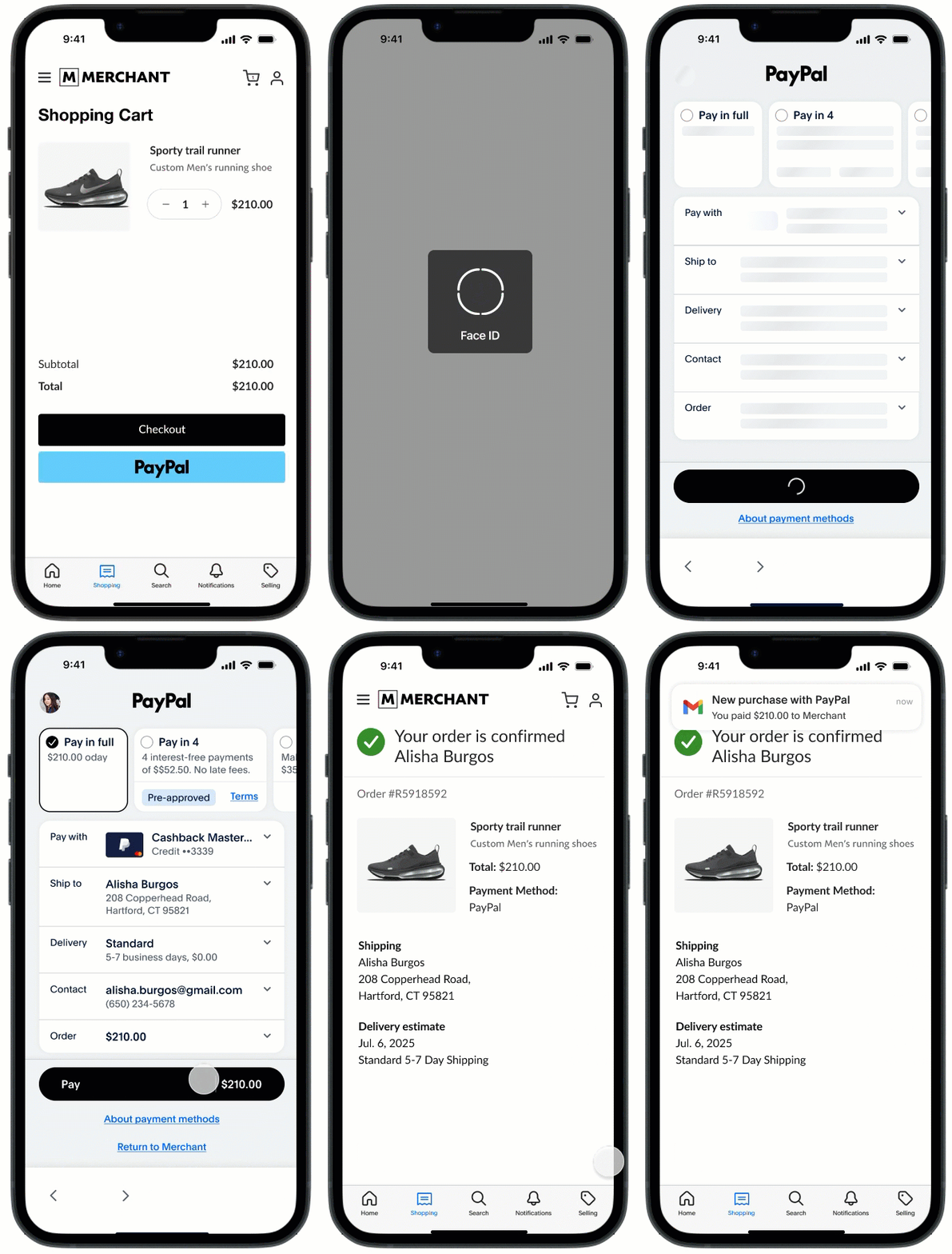
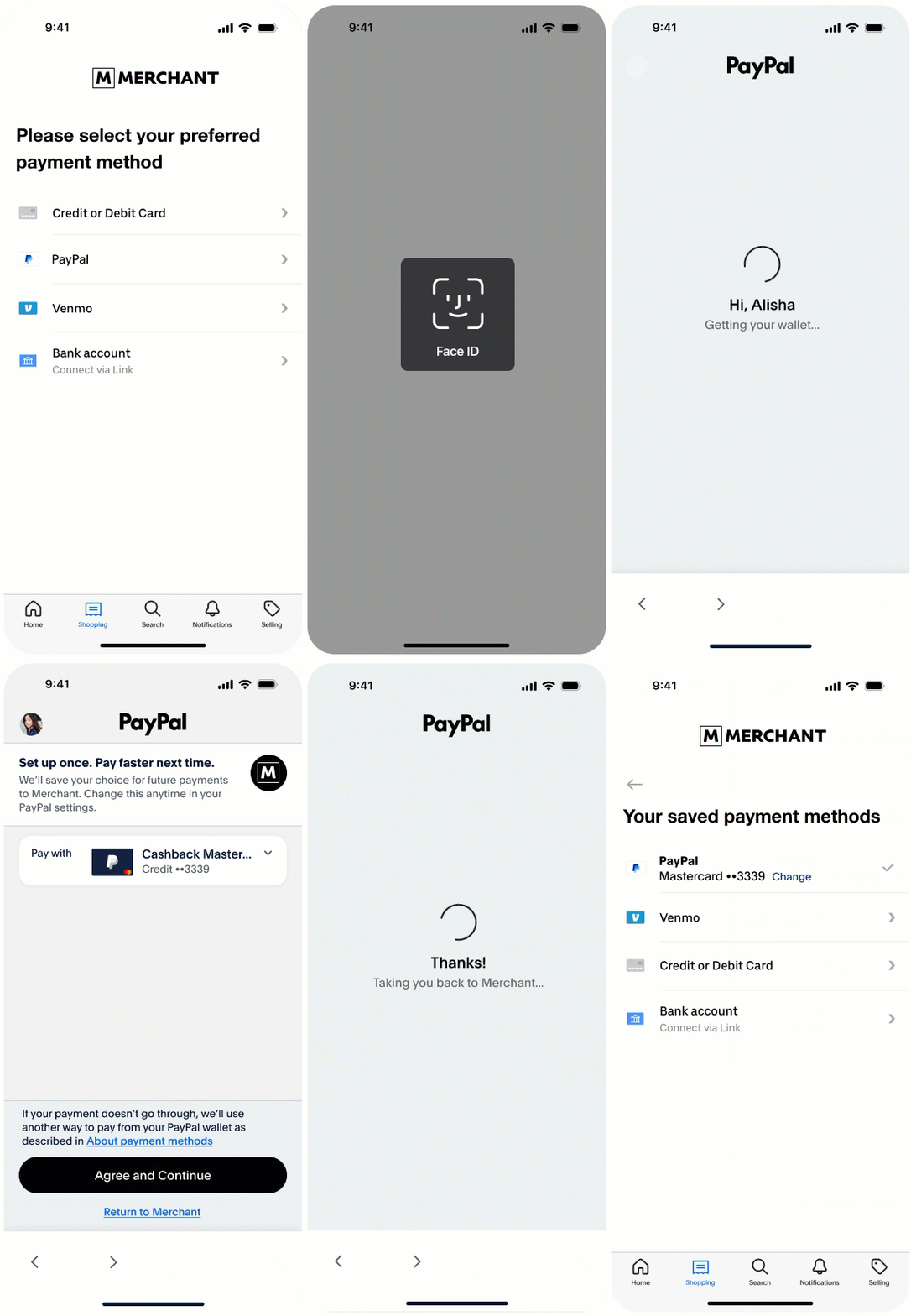
The following steps describe the buyer experience when App Switch is available and used during checkout or vaulting.
One-time payments with Pay Now
Vaulted payments without purchase
Before you begin
Integrate App Switch
Enable App Switch on the PayPal request and supply the buyer’s email and phone number when available. When enablePayPalAppSwitch is true, the Braintree Android SDK attempts to switch to the PayPal app (after calling PayPalLauncher().launch(...)) if the PayPal app is installed and the buyer is eligible. Otherwise, it falls back to the web flow.
request.userAuthenticationEmail = "buyer@example.com"
request.userPhoneNumber = PayPalPhoneNumber("1", "2223334444")
request.enablePayPalAppSwitch = true
Code Sample
Vaulted paymentsclass VaultedPaymentActivity : AppCompatActivity() {
private lateinit var payPalLauncher: PayPalLauncher
private lateinit var payPalClient: PayPalClient
override fun onCreate(savedInstanceState: Bundle?) {
super.onCreate(savedInstanceState)
// PayPalLauncher must be initialized in onCreate
payPalLauncher = PayPalLauncher()
// can initialize the PayPalClient outside of onCreate if desired
payPalClient = PayPalClient(
        context = this,
        authorization = "[TOKENIZATION_KEY or CLIENT_TOKEN]",
        appLinkReturnUrl = Uri.parse("https://merchant-app.com"), // Merchant App Link
        "com.merchant.app.deeplink.braintree" // Fallback deep link return url scheme
    )
}
// ONLY REQUIRED IF YOUR ACTIVITY LAUNCH MODE IS SINGLE_TOP
override fun onNewIntent(intent: Intent) {
super.onNewIntent(intent)
handleReturnToApp(intent)
}
// ALL OTHER ACTIVITY LAUNCH MODES
override fun onResume() {
super.onResume()
handleReturnToApp(intent)
}
private fun handleReturnToApp(intent: Intent) {
// fetch stored PayPalPendingRequest.Success
val pendingRequest: String = fetchPendingRequestFromPersistantStore()
when (val paymentAuthResult = payPalLauncher.handleReturnToApp(
pendingRequest = PayPalPendingRequest.Started(pendingRequest),
intent = intent
)) {
is PayPalPaymentAuthResult.Success -> {
completePayPalFlow(paymentAuthResult)
// clear stored PayPalPendingRequest.Success
}
is PayPalPaymentAuthResult.NoResult -> {
// user returned to app without completing PayPal flow, handle accordingly
}
is PayPalPaymentAuthResult.Failure -> {
// handle error case
}
}
}
private fun completePayPalFlow(paymentAuthResult: PayPalPaymentAuthResult.Success) {
payPalClient.tokenize(paymentAuthResult) { result ->
when (result) {
is PayPalResult.Success -> { /* handle result.nonce */ }
is PayPalResult.Failure -> { /* handle result.error */ }
is PayPalResult.Cancel -> { /* handle user canceled */ }
}
}
}
private fun onPayPalButtonClick() {
val payPalVaultRequest = PayPalVaultRequest(
hasUserLocationConsent = true,
billingAgreementDescription = "Your agreement description"
)
payPalVaultRequest.userAuthenticationEmail = "sally@gmail.com"
request.userPhoneNumber = PayPalPhoneNumber("1", "2223334444")
payPalVaultRequest.enablePayPalAppSwitch = true
payPalClient.createPaymentAuthRequest(this, payPalVaultRequest) { paymentAuthRequest ->
when (paymentAuthRequest) {
is PayPalPaymentAuthRequest.ReadyToLaunch -> {
val pendingRequest = payPalLauncher.launch(this, paymentAuthRequest)
when (pendingRequest) {
is PayPalPendingRequest.Started -> {/* store pending request */ }
is PayPalPendingRequest.Failure -> { /* handle error */ }
}
}
is PayPalPaymentAuthRequest.Failure -> { /* handle paymentAuthRequest.error */ }
}
}
}
}class CheckoutActivity : AppCompatActivity() {
private lateinit var payPalLauncher: PayPalLauncher
private lateinit var payPalClient: PayPalClient
override fun onCreate(savedInstanceState: Bundle?) {
super.onCreate(savedInstanceState)
// PayPalLauncher must be initialized in onCreate
payPalLauncher = PayPalLauncher()
// can initialize the PayPalClient outside of onCreate if desired
payPalClient = PayPalClient(
context = this,
authorization = "[TOKENIZATION_KEY or CLIENT_TOKEN]",
appLinkReturnUrl = Uri.parse("https://merchant-app.com"), // Merchant App Link
"com.merchant.app.deeplink.braintree" // Fallback deep link return url scheme
)
}
// ONLY REQUIRED IF YOUR ACTIVITY LAUNCH MODE IS SINGLE_TOP
override fun onNewIntent(intent: Intent) {
super.onNewIntent(intent)
handleReturnToApp(intent)
}
// ALL OTHER ACTIVITY LAUNCH MODES
override fun onResume() {
super.onResume()
handleReturnToApp(intent)
}
private fun handleReturnToApp(intent: Intent) {
// fetch stored PayPalPendingRequest.Success
val pendingRequest: String = fetchPendingRequestFromPersistantStore()
when (val paymentAuthResult = payPalLauncher.handleReturnToApp(
pendingRequest = PayPalPendingRequest.Started(pendingRequest),
intent = intent
)) {
is PayPalPaymentAuthResult.Success -> {
completePayPalFlow(paymentAuthResult)
// clear stored PayPalPendingRequest.Success
// clear the intent data
intent.data = null
}
is PayPalPaymentAuthResult.NoResult -> {
// user returned to app without completing PayPal flow, handle accordingly
}
is PayPalPaymentAuthResult.Failure -> {
// handle error case
}
}
}
private fun completePayPalFlow(paymentAuthResult: PayPalPaymentAuthResult.Success) {
payPalClient.tokenize(paymentAuthResult) { result ->
when (result) {
is PayPalResult.Success -> { /* handle result.nonce */ }
is PayPalResult.Failure -> { /* handle result.error */ }
is PayPalResult.Cancel -> { /* handle user canceled */ }
}
}
}
private fun onPayPalButtonClick() {
val request = PayPalCheckoutRequest(
amount = "12.34",
hasUserLocationConsent = true
)
request.userAuthenticationEmail = "sally@gmail.com"
request.userPhoneNumber = PayPalPhoneNumber("1", "2223334444")
request.enablePayPalAppSwitch = true
payPalClient.createPaymentAuthRequest(this, request) { paymentAuthRequest ->
when (paymentAuthRequest) {
is PayPalPaymentAuthRequest.ReadyToLaunch -> {
val pendingRequest = payPalLauncher.launch(this, paymentAuthRequest)
when (pendingRequest) {
is PayPalPendingRequest.Started -> {/* store pending request */ }
is PayPalPendingRequest.Failure -> { /* handle error */ }
}
}
is PayPalPaymentAuthRequest.Failure -> { /* handle paymentAuthRequest.error */ }
}
}
}
}Best Practices
These best practices are crucial for ensuring an optimal user experience and improved conversion rates.
1. Show a loading indicator after PayPal button click
-
When the user taps the PayPal button:
- Turn off the payment button to prevent duplicate submissions
- Display a loading indicator while the network request is in progress
The loading indicator not only protects against accidental double-clicks but also reassures the user that processing is underway.
2. Provide buyer email and phone number
Although optional, Providing this data helps PayPal to:
- Personalize the buyer experience
- Improve risk assessment
- Optimize approval rates
Phone number formatting requirements
When passing a phone number, ensure it is sanitized into its canonical format:
- Country code should be numeric only (no “+” prefix).
- National number must include digits only—remove spaces, hyphens, parentheses, and other formatting characters.
- Do not include the country code in the national number.
- Do not include leading zeros that are not part of the actual national number.
Example:request.userPhoneNumber = PayPalPhoneNumber("1", "2223334444")
3. Handling return to your app
When the buyer returns to your app (either automatically or manually):
- Remove the loading indicator when your app returns to the foreground.
- This allows the user to continue where they left off, especially when they return without approving or canceling the transaction (for example, by backgrounding the PayPal app).
- Show the loading indicator again.
- Turn off the PayPal button.
- Continue processing until the transaction completes.
4. Set fallback deep link return URL
A buyer may uncheck the "Open supported links" setting on their Android device, which prevents them from returning to your app from the PayPal app through app links. You can provide a fallback deep link return URL scheme that will be used to complete the session. The regular Chrome Custom Tab flow will be displayed when the deep link fallback return URL is used, and App Switch will not occur in this scenario. Follow these steps to configure the deep link return URL scheme in your AndroidManifest.xml and pass the deep link return URL in your PayPalClient constructor.
- Kotlin
payPalClient = PayPalClient(
context = this,
authorization = "[TOKENIZATION_KEY or CLIENT_TOKEN]",
appLinkReturnUrl = Uri.parse("https://merchant-app.com"), // Merchant App Link
"com.merchant.app.deeplink.braintree" // Fallback deep link return url scheme
)For detailed testing procedures and production deployment guidance, see the Testing and Go Live section.