
Disputes and Chargebacks Guide
What is a dispute?
A dispute occurs when a customer contacts their card-issuing bank to challenge a charge instead of reaching out to you directly. The bank temporarily pulls funds back while the case is reviewed, and you have an opportunity to respond with evidence.
Common dispute reasons include:
- Fraud: The cardholder says they did not authorize the transaction (for example, stolen or compromised card).
- Product or service not received: The customer claims they never received the goods or services.
- Product or service not as described: The customer says what they received was materially different from what was advertised.
- Processing error: Issues such as duplicate charges or incorrect amounts.
- Subscription cancellation: The customer believes they cancelled but was still billed.
You can use Braintree's dispute tools and reports in this guide to understand which transactions are affected and how they tie back to your in-store and online activity.
The dispute process
The dispute process follows a consistent set of stages, from the moment you're notified through to the final decision by the card issuer. This section walks through each step so your teams know what to expect and when they need to act.
1. Notification
You are notified when a dispute is opened on a transaction. Notifications can appear as:
- Email notifications: Sent to the contacts configured for your Braintree account.
- Webhooks: Programmatic alerts to your systems when a dispute is created or updated.
- Control Panel alerts: Disputes surfaced in the Braintree Control Panel disputes area.
Each notification includes key details such as the disputed transaction ID, dispute reason, and amount. In many cases you have a limited initial review period (often on the order of 7-10 days) to decide how to respond, after which the window to submit evidence may close.
You can use the Disputes dashboard in the Control Panel to see all disputes in one place and to start working specific cases.
2. Decide your response
For each dispute, you need to choose whether to accept it or contest it.
- Accept the dispute: You do not submit evidence, and the funds remain with the cardholder. This is often used when you agree the charge should be reversed (for example, clear error, known fraud, or customer-service gesture).
- Challenge the dispute: You collect and submit supporting evidence that shows the transaction was valid and the goods or services were provided as agreed.
Your decision should factor in the transaction details, the cost of the disputed amount, and the likelihood of success based on the available evidence.
- Accept the dispute and refund to the customer.
- Or fight the dispute (provide evidence).
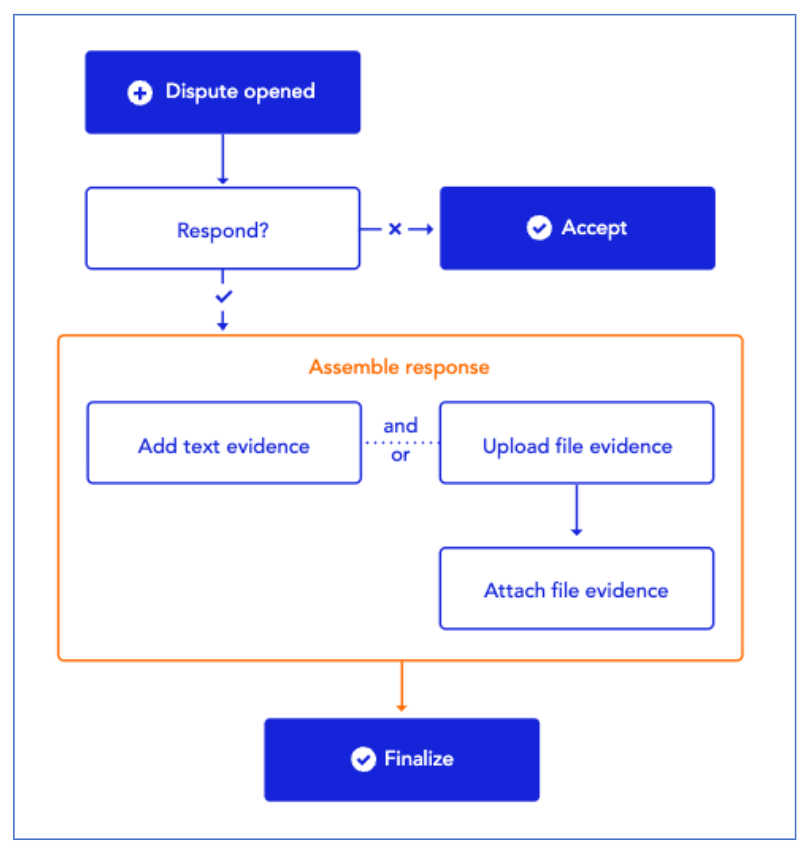
3. Assemble evidence
If you choose to challenge a dispute, you need to gather documentation that supports your position. Evidence may include:
- Receipt/transaction record: Proof that the payment was completed successfully, including date, amount, and card details.
- Delivery or pickup confirmation: Evidence showing the product or service was shipped, delivered, or collected, such as signed delivery slips or pickup logs.
- Customer communication: Emails or messages that show what was agreed or discussed with the customer.
- Product photos: Images that confirm the item's condition or what was delivered.
- Customer communication: Emails, messages, or support tickets that show what was agreed with the customer and any attempts to resolve the issue.
- Product or service documentation: Product photos, service descriptions, or work orders that show what was delivered.
- Terms and conditions: Store policies or terms the customer agreed to at checkout, such as refund, cancellation, or no-show policies.
For in-store transactions, you can also draw on data points such as Store ID, Reader ID, and Entry Mode to demonstrate that the card was presented in person and processed through your Verifone terminals. In response to fraud for a PIN-authenticated transaction, you should provide evidence that the transaction was processed using a PIN-enabled terminal, even if the customer presented a non-PIN.
4. Submit response
After assembling evidence, you submit it through the Braintree dispute workflows.
- Attach your supporting documents in the Control Panel dispute view or via your existing operational process.
- Make sure the evidence clearly addresses the dispute reason. For example, focus on delivery proof for "not received," or on policies and communication for "cancellation" cases.
- Confirm that any personally identifiable information is handled in line with your internal compliance standards.
Once your response is submitted, the card network or issuer reviews the case using their rules and timelines.
5. Wait for resolution
The card issuer or network makes the final decision based on the evidence and the applicable network rules. Many disputes are resolved within roughly 60-75 days, though actual timeframes can vary by card network and case type.
Possible outcomes:
- Won: The dispute is resolved in your favour and funds are returned to you.
- Lost: The dispute is decided against you and funds remain with the cardholder.
- Partial outcome: In some cases, only part of the amount may be returned or adjusted.
You can monitor dispute status changes from the Disputes dashboard and tie related transactions back to your reporting using the reports described in the Reports and Analytics Guide and Money and Reporting Overview.
Accessing disputes in Braintree
Use this section to understand where disputes appear in Braintree and how you can manage them alongside your in-store and online transactions.
Finding disputes
Use the Disputes dashboard in the Braintree Control Panel to locate and manage disputes across your in-store and online activity. From there, you can search, filter, and drill into individual dispute records.
- Disputes dashboard: View all disputes in a single, centralized place.
- Search by customer, amount, date: Quickly find disputes using key transaction details.
- Filter by status: Narrow results based on the current dispute stage.
Dispute statuses
Disputes progress through several statuses as they move from creation to final decision. Common statuses include:
- Open: A new dispute has been created on a transaction.
- Pending response: Action is required from you, typically to decide whether to accept or submit evidence.
- Under review: The card network or issuer is reviewing the case and your submitted evidence.
- Won: The dispute was resolved in your favour.
- Lost: The dispute was decided against you.
- Accepted: You chose not to challenge the dispute and accepted the outcome.
You can use these statuses to prioritize work, focusing first on disputes in "Pending response" or close to their response deadline.
Preventing disputes
Reducing disputes starts with clear communication and strong in-store practices.
Best practices
- Clear store policies: Make refund, return, and cancellation rules easy for customers to understand at purchase.
- Detailed receipts: Provide precise transaction details, including item descriptions and totals.
- Customer signatures (when required): Capture signatures to confirm customer authorization and acceptance.
- Clear merchant descriptor: Ensure customers recognize your business name on their bank or card statements.
- Fast refund processing: Issue legitimate refunds quickly to help avoid disputes being filed through the bank.
- Proactive customer service: Resolve issues directly with customers before they escalate to disputes.
Store-specific tips
- Train staff on proper card handling: Reduce errors during in-store payments by following standard procedures.
- Keep transaction records: Store transaction and order information for reference when disputes occur.
- Verify cardholder identity for high-value transactions: Check identification where appropriate to reduce fraud.
- Document delivery or pickup: Keep proof that items were delivered or collected, especially for high-value orders.
You can support many of these practices with data from your reports and Control Panel, such as Transaction Origin, Entry Mode, Store ID, and Order ID for in-store payments.
Dispute automation (advanced)
If you have higher dispute volumes, you may be able to streamline how your teams handle them. Advanced features can include:
- Auto-respond to certain dispute types: Automatically respond to specific, low-risk dispute categories based on predefined rules.
- Template evidence packets: Use pre-built evidence sets so teams can respond consistently and quickly.
- Alert routing to the right team member: Send dispute alerts to the correct team or queue based on store, region, or dispute type.
Ask your PayPal Account Manager about:
- Chargeback protection options: Programs that can help reduce financial risk from eligible disputes.
- Automated evidence submission: Workflows where the system can submit evidence on your behalf for certain dispute types.
These capabilities complement the operational guidance in this guide and the reporting tools described in the Reports and Analytics Guide and Money and Reporting Overview.