Enroll a PayPal payment account in an existing wallet
Last updated: Aug 15th, 6:18am
Allow users who already have a registered mobile wallet to add PayPal as a valid payment tender in that wallet.
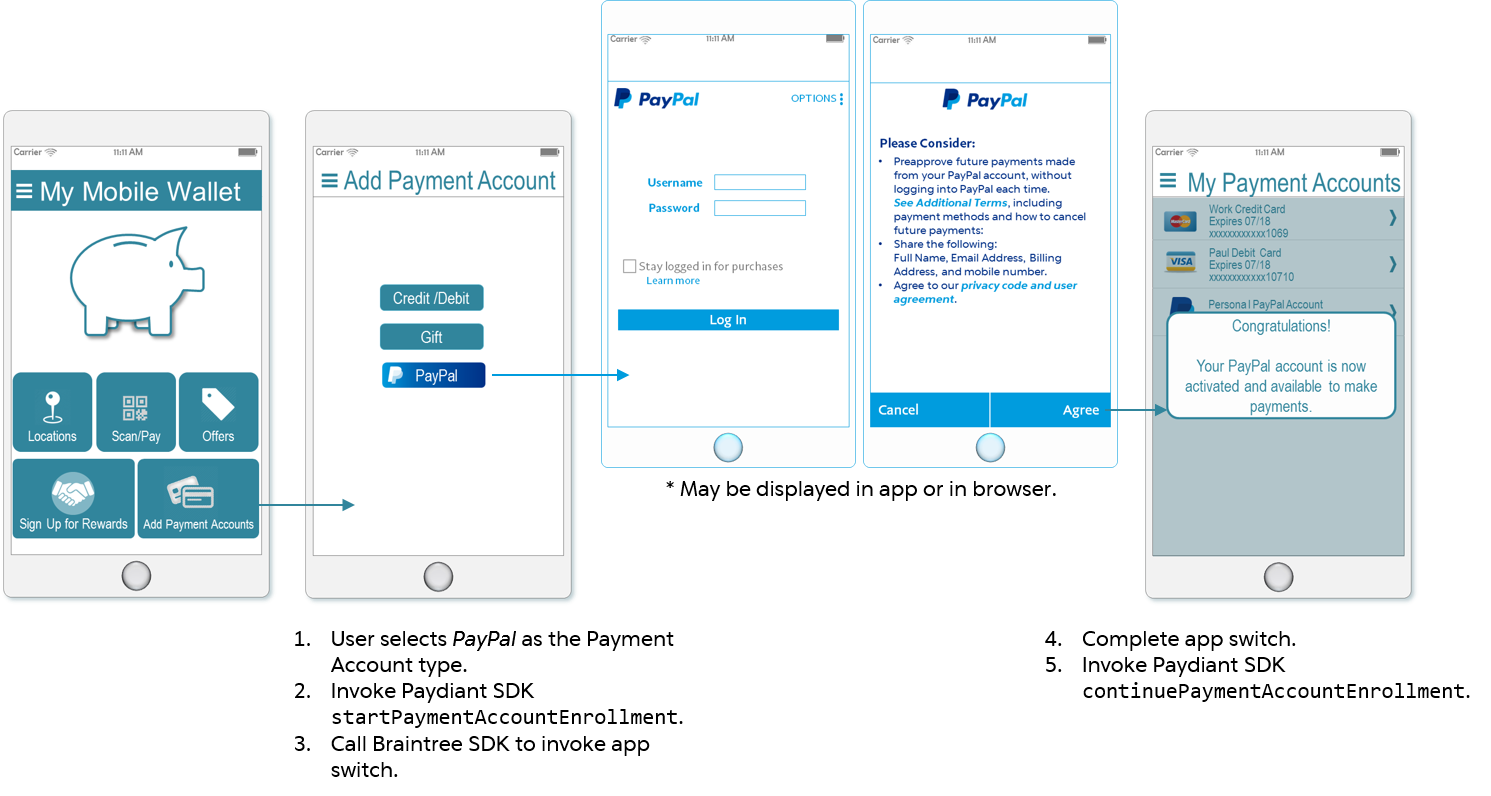
Figure 3: Payment account enrollment screen flow
As shown in Figure 3, the app provides an operator specific to the PayPal account type. When selected, call the PayPal Braintree SDK client and invoke the app switch; the Braintree SDK client checks whether the One-Touch client is installed on the device, and displays the PayPal login and consent screens in the app or in a browser, accordingly. In either case, once the user consents to the integration, the Braintree SDK client returns the BTPaymentAccountNonce and switches the focus back to the mobile wallet app.
Figure 4 shows the data process flow involved in the assisted registration.
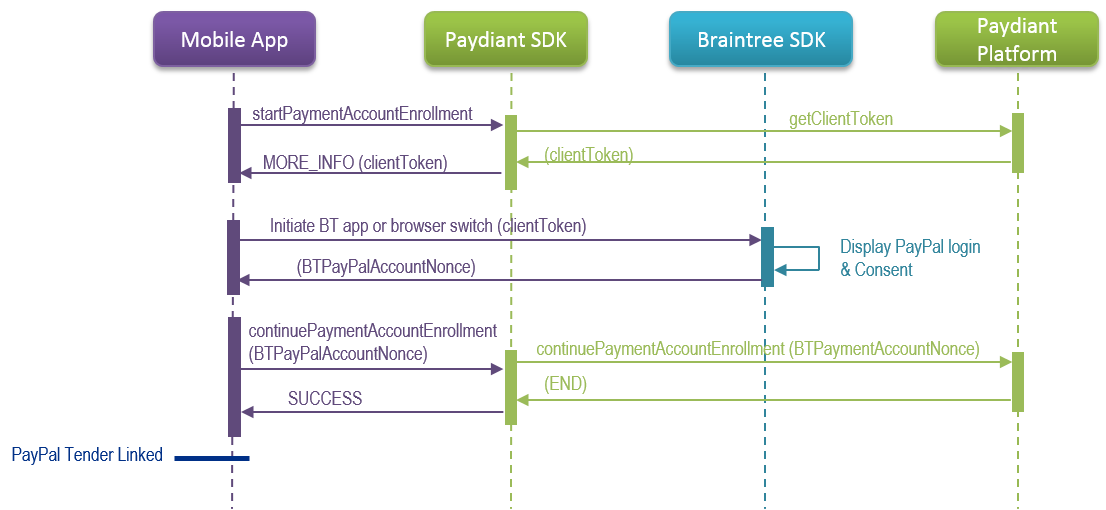
Figure 4: PayPal account enrollment sequence diagram
The next sections provide implementation and samples for each of the relevant calls depicted in Figure 4.
Start enrollment
Use these commands to begin enrollment and implement the success and failure responses.
Invoke the specific WLW SDK call to start payment account enrollment for your device.
OS Command iOS startPaymentAccountEnrollment:(PDStartPaymentAccountEnrollmentRequest *)request;Android startPaymentAccountEnrollment (StartPaymentAccountEnrollment startPaymentAccountEnrollment);Within each of the parameter objects, the following data must be passed:
iOS Property Description enrollmentTypeRequired Enum
A value specifying whether WLW will be the system of record for the payment account. For this use case, the only supported value iskPDEnrollmentTypeProvisionpaymentAccountTypeUriRequired String
WLW’s unique identifier for the type of payment account.paymentAccountNetworkTypeUriRequired String
WLW’s unique identifier for the payment processor.additionalDataRequired Array
A set of property instances that define other data required for the enrollment. For this use case, you must define the following:
key =NICKNAME
value =PayPalImplement the device OS-specific WLW SDK callback to handle the success response.
OS Command iOS startPaymentAccountEnrollmentCompletionBlock:(PDStartPaymentAccountEnrollmentResponse *)responseAndroid onStartPaymentAccountEnrollmentSuccess (PaymentAccountEnrollment paymentAccountEnrollment)Within either respective parameter object, the following data may be returned:
Property Description enrollmentStateEnum
An EnrollmentState enum value indicating whether the enrollment process is complete or requires another step. For this step in the implementation, the value for this parameter will beMORE_INFO.paydiantCorrelationIdString
WLW’s unique identifier for the enrollment process. Required for each step in the enrollment to correctly associate all related data.externalCorrelationIdString
PayPal’s unique identifier for the enrollment; required for all related enrollment calls to ensure accurate processing and logging.additionalEnrollmentDataArray/List
The set of key/value definitions representing properties relevant for the enrollment. For this step in the implementation, PayPal returns thebtClientTokenwithin this property.Configure the success response to initialize Braintree SDK client using the returned token value.
Implement the device OS-specific WLW SDK callback to handle the failure response.
OS Command iOS startPaymentAccountEnrollmentFailureBlock:(PDPaydiantError *managePaymentInstrumentError);Android onStartPaymentAccountEnrollmentError (PaydiantException exception)Within each of the parameter objects, the following data may be returned:
Property Description DescriptionString
The basic error description returned by the SDK.statusMessageString
The Mobile Gateway description associated with the returnedstatusCode.statusCodeInteger
The code representing the failure reason from the Mobile Gateway.rawErrorDescriptionString
An error description reported by the device operating system.localizedDescriptionString
A custom message relevant to the error.errorInformationString
An object containing error information as obtained from an external party, such as the response from a payment provider.
Samples
Sample Start PayPal Enrollment in Existing Wallet for iOS
1- (void)addPayPal:(PDTenderType *)tender {23 PDStartPaymentAccountEnrollmentRequest * request = [[PDStartPaymentAccountEnrollmentRequest alloc] init];4 request.enrollmentType = kPDEnrollmentTypeProvision;5 request.paymentAccountTypeUri = tender.paymentAccountType.paymentAccountTypeUri;6 request.paymentAccountNetworkTypeUri = tender.paymentAccountNetworkType.paymentAccountNetworkTypeUri;78 NSMutableArray * additionalInfo = [[NSMutableArray alloc] init];910 PDStartPaymentAccountEnrollmentAdditionalData * instances = PDStartPaymentAccountEnrollmentAdditionalData alloc] init];11 instances.additionalDataKey = @"NICK_NAME";12 instances.additionalDataValue = @"PayPal";13 [additionalInfo addObject: instances];1415 request.additionalData = additionalInfo;1617 PDManagePaymentInstrumentsCoordinator * managePayInstr = [[PDManagePaymentInstrumentsCoordinator alloc] init];18 [CommonUtil showProgressIndicatorOnView: self];19 [managePayInstr startPaymentAccountEnrollment: request completionBlock: ^(PDStartPaymentAccountEnrollmentResponse * response) {20 NSString *paydiantCorrelationId = response.paymentAccountEnrollment.paydiantCorrelationId;21 NSString *externalCorrelationId = response.paymentAccountEnrollment.externalCorrelationId;22 NSArray *additionalData = response.paymentAccountEnrollment.additionalEnrollmentData;2324 if (additionalData.count <0) {25 PDAdditionalEnrollmentData *pdData = additionalData[0];26 NSString *btClientToken = pdData.additionalEnrollmentDataValue;27 BTAPIClient *apiClient = [[BTAPIClient alloc] initWithAuthorization: btClientToken];28 BTPayPalDriver *btPayPalDriver = [[BTPayPalDriver alloc] initWithAPIClient: apiClient];29 btPayPalDriver.appSwitchDelegate = (id) self;30 btPayPalDriver.viewControllerPresentingDelegate = (id) self;31 BTPayPalRequest *checkout = [[BTPayPalRequest alloc] init];32 [btPayPalDriver requestBillingAgreement: checkout completion: ^(BTPayPalAccountNonce * _Nullable tokenizedPayPalCheckout, NSError * _Nullable error) {33 if (error) {34 NSLog(@"ERROR = %@", error);35 [CommonUtil hideProgressIndicatorOnView: self];36 [CommonUtil displayMessageWithTitle:@"Error"37 andDescription: @"Your PayPal account could not be linked at this time. Please try again."];38 }39 else if (tokenizedPayPalCheckout) {40 NSString * nonce = tokenizedPayPalCheckout.nonce;41 NSLog(@"Got a nonce: %@", nonce);42 }43 }44 }45 }46}
Sample Start PayPal Enrollment in Existing Wallet for Android
1{2 StartPaymentAccountEnrollment paymentAccountEnrollment = new StartPaymentAccountEnrollment();3 List <AdditionalData> additionalDataList = new ArrayListAdditionalData();4 AdditionalData nickNameAdditionalData = new AdditionalData();5 nickNameAdditionalData.setKey(getString(R.string.additional_data_nickname_key));6 nickNameAdditionalData.setValue(getString(R.string.additional_data_nickname_value));7 additionalDataList.add(nickNameAdditionalData);8 paymentAccountEnrollment.setAdditionalData(additionalDataList);9 paymentAccountEnrollment.setEnrollmentType(EnrollmentType.PROVISION);10 paymentAccountEnrollment.setPaymentAccountTypeUri(accountTypeURI);11 paymentAccountEnrollment.setPaymentAccountNetworkTypeUri(accountNetworkTypeURI);12 paymentAccountManagementService.startPaymentAccountEnrollment(paymentAccountEnrollment);13 Log.d(ApplicationConstants.LOG_TAG, "startPaymentAccountEnrollment()");14}
Initialize Braintree SDK client
See Initialize Braintree SDK client for samples and links to the Braintree documentation you can use to learn how to initialize the Braintree SDK client.
Continue enrollment
Once the Braintree SDK returns the payment account nonce, use these commands to continue the enrollment and set the success and failure responses.
OS Command iOS continuePaymentAccountEnrollment:(PDContinuePaymentAccountEnrollmentRequest *)request;Android continuePaymentAccountEnrollment (ContinuePaymentAccountEnrollment continuePaymentAccountEnrollment);Within each of the parameter objects, the following data must be passed:
Property Description paydiantCorrelationIdRequired String
WLW’s unique identifier for the enrollment, which was returned in the start enrollment response.externalCorrelationIdRequired String
PayPal’s unique identifier for the enrollment, which was returned in the start enrollment response.additionalEnrollmentDataRequired Array/List
A set of property instances that define other data relevant to the enrollment. For this use case, you must define the following:
key =PAYMENT_METHOD_NONCE
value =<BTPayPalAccountNonce>returned by Braintree clientImplement the device OS-specific WLW SDK callback to handle the success response.
OS Command iOS continuePaymentAccountEnrollmentCompletionBlock:(PDContinuePaymentAccountEnrollmentResponse *)responseAndroid onContinuePaymentAccountEnrollmentSuccess (PaymentAccountEnrollment paymentAccountEnrollment)Within either respective parameter object, the following data may be returned:
Property Description enrollmentStateEnum
An EnrollmentState enum value indicating whether the enrollment process is complete or requires another step. For this step in the implementation, the value for this parameter will beEND.paydiantCorrelationIdString
WLW’s unique identifier for the enrollment process. This ID must be passed with each step in the enrollment to ensure that all related data is correctly associated.externalCorrelationIdString
PayPal’s unique identifier for the enrollment, which must be passed in all related enrollment calls going forward to ensure accurate processing and logging.additionalEnrollmentDataArray/List
A set of key/value definitions representing properties relevant for the enrollment. For this step in the implementation, this parameter should be null.Configure the success response to display a confirmation message and return to the Payment Account Summary screen.
Implement the device OS-specific WLW SDK callback to handle the failure response.
OS Command iOS continuePaymentAccountEnrollmentFailureBlock:(PDPaydiantError *managePaymentInstrumentError)Android onContinuePaymentAccountEnrollmentError (PaydiantException exception)Within each of the parameter objects, the following data may be returned:
Property Description DescriptionString
The basic error description returned by the SDK.statusMessageString
The Mobile Gateway description associated with the returnedstatusCode.statusCodeInteger
The numerical code representing the reason for failure from the Mobile Gateway.rawErrorDescriptionString
An error description reported by the device system.localizedDescriptionString
A custom message relevant to the error.errorInformationString
Error data passed by an external party, such as the response from a payment provider.
Sample Complete PayPal Enrollment in Existing Wallet for iOS
1@Override2...3PDContinuePaymentAccountEnrollmentRequest *continuePaymentAccountEnrollmentRequest =4[[PDContinuePaymentAccountEnrollmentRequest alloc] init];5NSMutableArray *additionalInfo = [[NSMutableArray alloc] init];67PDAdditionalEnrollmentData *instances = [[PDAdditionalEnrollmentData alloc] init];8instances = [[PDAdditionalEnrollmentData alloc] init];9instances.additionalEnrollmentDataKey = @"PAYMENT_METHOD_NONCE";10instances.additionalEnrollmentDataValue = nonce;1112[additionalInfo addObject:instances];1314continuePaymentAccountEnrollmentRequest.paydiantCorrelationId = paydiantCorrelationId;15continuePaymentAccountEnrollmentRequest.externalCorrelationId = externalCorrelationId;16continuePaymentAccountEnrollmentRequest.additionalEnrollmentData = additionalInfo;1718[managePayInstr continuePaymentAccountEnrollment:continuePaymentAccountEnrollmentRequest19 completionBlock:^(PDContinuePaymentAccountEnrollmentResponse *response) {20 if (response.paymentAccountEnrollment.enrollmentState == kPDEnrollmentStateEnd) {21 [CommonUtil hideProgressIndicatorOnView:self];22 [CommonUtil displayMessageWithTitle:@"Success"23 andDescription:@"Your PayPal Account has been added to your mobile wallet successfully."];24 [[NSNotificationCenter defaultCenter] postNotificationName:kPaymentAccountsChangedNotification object:self];25 }2627} failureBlock:^(PDPaydiantError *managePaymentInstrumentsError) {28 [CommonUtil hideProgressIndicatorOnView:self];29 [CommonUtil displayError:managePaymentInstrumentsError];30}];3132} else {33 [CommonUtil hideProgressIndicatorOnView:self];34 [CommonUtil displayMessageWithTitle:@"Error"35 andDescription:@"PayPal account linking cancelled: your account has not been added to your wallet."];36 }37}];38}