
Overview
ACH Instant Verifications is a feature that allows you to instantly verify a customer's US bank account through open banking connections, before initiating an ACH payment. ACH Instant Verifications provides real-time confirmation that the account is valid. This process is initiated and consented to by the customer, ensuring transparency and control over their financial data.
It streamlines the payment experience, reduces failed transactions, and helps you make smarter payment decisions. Braintree uses secure, permission-based data connections to access this information directly from the customer's bank, ensuring speed, accuracy, and trust in transaction.
Instant verification flow
There are 4 steps in the instant verification flow:
- Initiate: Merchant initiates instant verification session from checkout page
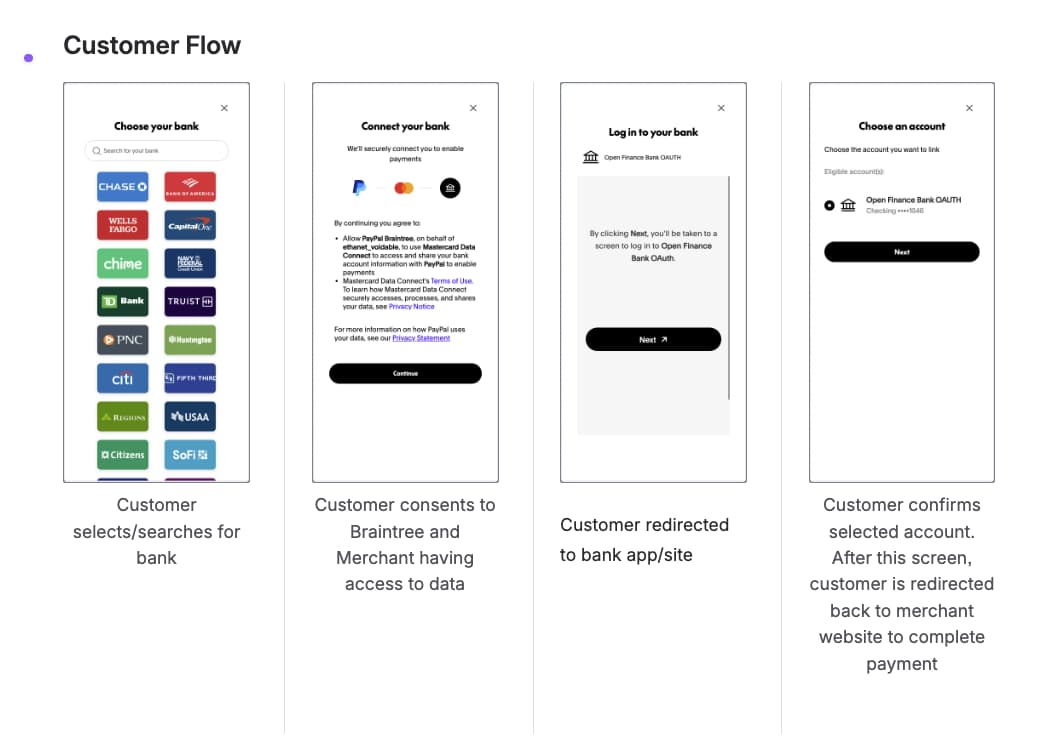
- Connect account: Customer selects bank, authenticates, and selects account to connect
- Get authorization: Merchant retrieves account info and one-time use token from Braintree
- Vault or transact: Merchant initiates transaction using nonce or vaults nonce for persistent payment method token
Customer flow
Integration requirements
Before integrating Instant Verifications, ensure your environment meets the following requirements:
Merchant eligibility
Instant Verification is currently available to merchants operating in the United States with ACH Direct Debit enabled.
Platform support
Integration is supported on desktop and mobile web platforms (responsive web only; native apps are not currently supported).
Server SDK
| Language | Minimum version |
|---|---|
| Java | 3.45.0 |
| .NET | 5.35.0 |
| Node.js | 3.34.0 |
| PHP | 6.29.0 |
| Python | 4.39.0 |
| Ruby | 4.31.0 |
Client SDK
- JavaScript
3.134.0or higher
Configuration
To finish your configuration, you will need to complete the domain registration steps below.
Domain registration
In order to test and use Instant Verifications, you'll need to register any domains you plan to use as the return_url or cancel_url. You can do this through the Braintree control panel using the instructions below. You will have to do this in both your sandbox and production environments.
Rules for domain names
A domain name:
- Must not start with a scheme (e.g.
https://) - Must be between 4 and 255 characters
- Cannot contain spaces or wildcards (
*) - Can consist of a top-level domain, a second-level domain, and 0 or more subdomains — e.g.
a.b.example.comwhereexampleis the second-level domain,comis the top-level domain, andaandbare subdomains - The top-level domain must consist of 2 to 63 letters
- Each subdomain and the second-level domain must consist of 1 to 63 alphanumeric characters and/or hyphens
- Each subdomain and the second-level domain cannot start or end with a hyphen
- The top-level domain, second-level domain, and subdomains must be separated by a dot (
.) - Can end with a trailing dot
Sandbox environment
Register your sandbox domain name in the Braintree Control Panel:
- Log into your sandbox Control Panel
- Click on the gear icon in the top right corner
- Click Account Settings from the drop-down menu
- Scroll to the Vaulting section
- Next to Instant Verification, click the Options link
- Enter the domain of your return page in the Specify Your Domain Names section
- Click Add Domain Names
Production environment
Register your production domain name in the Braintree Control Panel:
- Log into your production Control Panel
- Click on the gear icon in the top right corner
- Click Account Settings from the drop-down menu
- Scroll to the Vaulting section
- Next to Instant Verification, click the Options link
- Enter the domain of your return page in the Specify Your Domain Names section
- Click Add Domain Names