
Deprecation Policy
Use this page to understand how and when Braintree deprecates major versions of the JavaScript client SDK, so you can plan your upgrades before a version stops receiving support.
We recommend that you make regular updates to your Braintree integration and update your client SDK version at least once a year.
Overview
Braintree makes regular updates to our client SDKs and follows semantic versioning guidelines with these updates. Whenever we need to make updates that will require code changes to existing integrations, we increase the major version number of the SDK to indicate that your integration will likely need to be updated for it to work with the newest version.
Examples of changes that would require a major version update:
- Adding or dropping support for a specific version of a mobile OS or web browser.
- Security updates and changes.
We do our best to add support for these without introducing a new major version, but if the changes required are great enough, they could result in a breaking change.
Platform support
We regularly review the most widely used browsers and OS versions for each of our client platforms and make support decisions based on this information.
The active major version of the Braintree JS SDK supports the current and previous major versions of the following browsers:
- Chrome (desktop and Android).
- Firefox.
- Safari (desktop and iOS).
- Samsung Internet.
- Microsoft Edge.
Status categories
Client SDKs can have one of the following statuses:
| Status | Description | State of development |
|---|---|---|
| Active | An active SDK version is the most current and fully supported SDK. It's the recommended version for everyone to use. Only 1 exists at a time. | This version receives new features. |
| Inactive | An SDK becomes inactive after Braintree assigns it a deprecation date. Any number can exist at a time. | No new features are added, only security updates. |
| Deprecated | Braintree supports processing for 1 year after the deprecation date, but you should upgrade immediately to avoid disruption. Any number can exist at a time. | Deprecated SDKs don't receive updates. |
| Unsupported | A retired SDK version is no longer supported by Braintree developers or Braintree Support. Any number can exist at a time. | Processing for these SDKs can be suspended at any time. |
Here's a visual representation of how client SDK major version statuses can change over time:
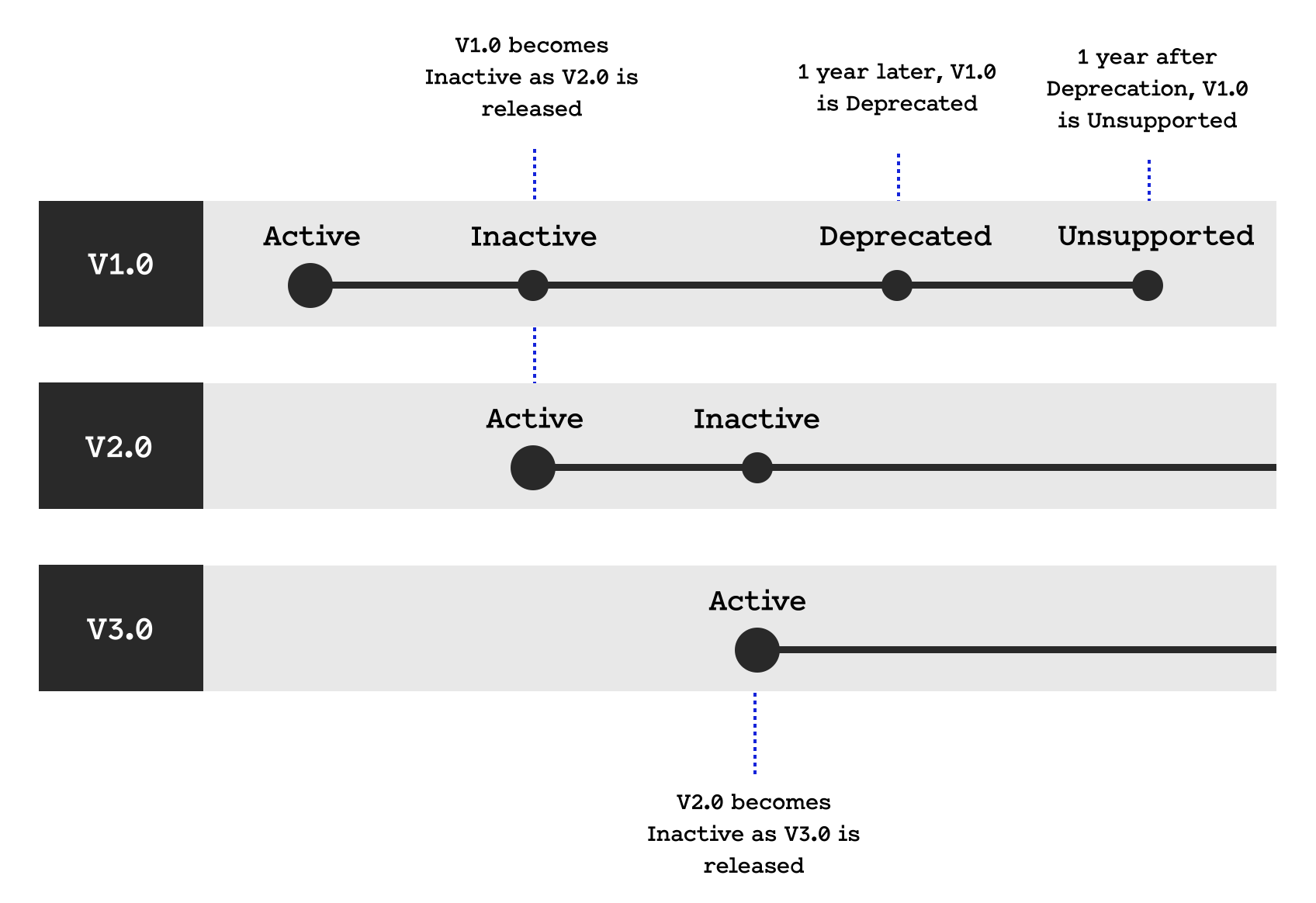
The README for each client SDK includes the status and deprecation dates for all major versions, and we update these statuses as we release new major versions.
There may be unforeseen circumstances where we need to make exceptions to these statuses. If that happens, we do our best to communicate these changes.
Tips for following SDK versions
We recommend watching the SDK on Github to stay informed about the latest version of the client SDK you're using.
In addition, we may contact you if there are upcoming changes that require updating your client SDK.