Integrate Log in with PayPal
Allow customers to use their PayPal account to sign in to your website or app. Reduce sign-up friction and streamline account access.
Last updated: October 14, 2026
Copy / Export
Follow these steps to add the Log in with PayPal button to your website or app.
Know before you code
Get started
- Complete the steps in Get started to get the following sandbox account information from the Developer Dashboard:
- Your client ID
- Your access token
- Your business account credentials
- Your personal account credentials
- This integration uses the Identity API.
1. Enable Log in with PayPal
-
Log into the Developer Dashboard.
-
From Apps & Credentials, select your app.
-
Under Other features, select the Log in with PayPal checkbox and then select Advanced Settings.
-
Enter a Return URL. Your website or app redirects your users to this URL after they complete the Log in with PayPal flow.
-
Select the user information you want shared with your website or app:
- We recommend that you ask your users to share only the minimum amount of information that you need. The fewer permissions you ask for, the more likely it is your users will grant them.
- If you intend to use payouts or money withdrawal, select the following:
- Account verification status
- PayPal account ID (payer ID)
Note: You'll have access to the values of the attributes that you select. However, this doesn't authorize you to email users. You must provide your users with a separate option to opt-in or opt-out of communications not related to purchases (such as marketing emails, newsletters, and offers).
-
Enter your Privacy policy URL and User agreement URL.
- For testing purposes, you can enter
https://example.com. - When you go live, replace the example URLs with your live URLs. The PayPal privacy and security team reviews these URLs and they are necessary for activating Log in with PayPal for your website or app.
- For testing purposes, you can enter
2. Add Log in with PayPal button
You have two options for adding the Log in with PayPal button to your website or app:
| Option | Use case |
|---|---|
| Generate button | If you want the simplest integration, use the PayPal button generator to dynamically generate the necessary JavaScript. |
| Build button | If you want greater control and customization options, manually build the button and construct your own authorization endpoint and parameters. |
3. Get access token
Exchange the authorization code for an access token so you can call PayPal's user profile service.
- Make a call to PayPal's tokenservice endpoint:
https://api-m.sandbox.paypal.com/v1/oauth2/token. - Pass the authorization code to the tokenservice endpoint with the following parameters:
| Parameter | Specify in | Description |
|---|---|---|
Authorization | header | Separate your Base64-encoded client ID and secret credentials by a colon (:). |
grant_type | form body | The type of credentials that you provide to obtain a refresh token. Set to authorization_code. |
code | form body | Enter the PayPal-generated authorization code. |
curl -X POST https://api-m.sandbox.paypal.com/v1/oauth2/token \
 -H 'Authorization: Basic {Your Base64-encoded ClientID:Secret}' \
 -d 'grant_type=authorization_code&code={authorization_code}'
Note: The access token expires after a short period of time, so you also receive a refresh token that you use to periodically refresh the access token. When you need to make a call to the user info service, use the refresh token first to get a new access token that you can then use to call the user info service.
| Field | Type | Description |
|---|---|---|
scope: {scope} | String | A list of space-separated permissions associated with the access token. |
access_token: {access token} | String | Identifies the actual token used to call the user info endpoint. |
token_type: {type} | String | Defines the type of token. In this case, the token type is Bearer. |
expires_in: 28800 | String | Identifies the number of seconds until the access token expires. The default is 28800 seconds or 8 hours. |
refresh_token: {refresh token} | String | Identifies the actual token used to refresh the access token. |
nonce: {nonce} | String | A one-time use random string generated from server-specific data is used to prevent replay attacks. |
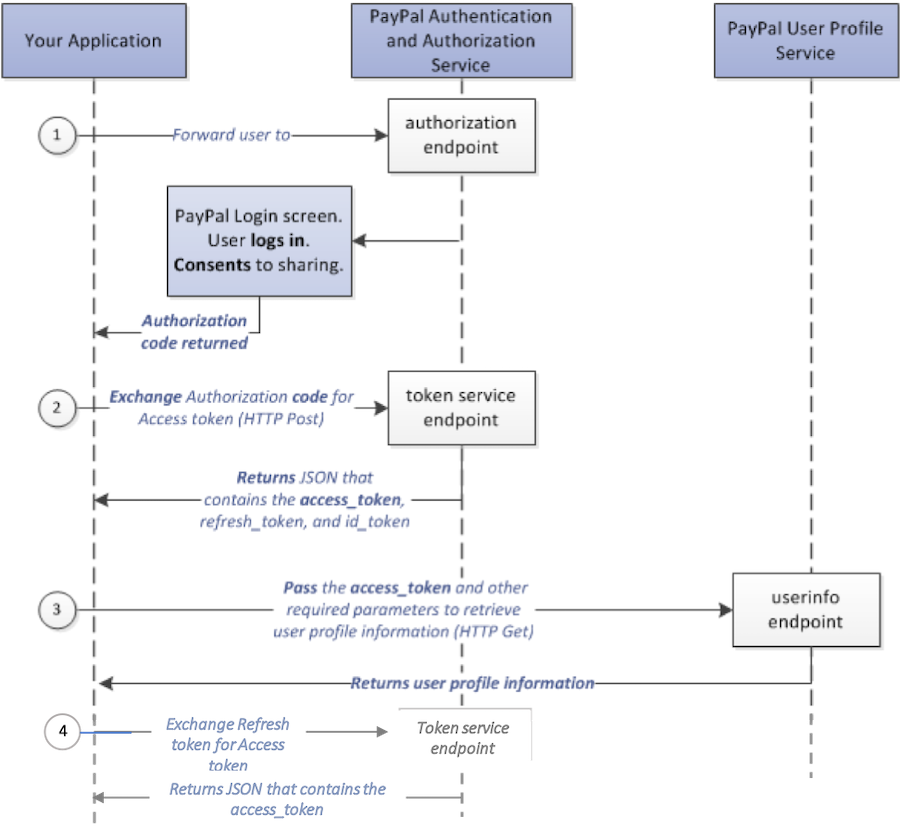
4. Exchange refresh token for access token
-
Make a call to PayPal's tokenservice endpoint:
https://api-m.sandbox.paypal.com/v1/oauth2/token -
Pass the refresh token to the tokenservice endpoint with the following parameters:
| Parameter | Specify in | Description |
|---|---|---|
Authorization | header | Separate your Base64-encoded client ID and secret credentials by a colon (:). |
grant_type | form body | Set to refresh_token. |
curl -X POST https://api-m.sandbox.paypal.com/v1/oauth2/token \
 -H 'Authorization: Basic {Your Base64-encoded ClientID:Secret}=' \
-d 'grant_type=refresh_token&refresh_token={refresh token}'| Field | Type | Description |
|---|---|---|
scope: {scope} | String | A list of space-separated permissions associated with the access token. |
token_type: {type} | String | Defines the type of token. In this case, the token type is Bearer. |
expires_in: 28800 | String | Identifies the number of seconds until the access token expires. The default is 28800 seconds or 8 hours. |
access_token: {access token} | String | Identifies the actual token used to call the user info endpoint. |
nonce: {nonce} | String | A one-time use random string generated from server-specific data is used to prevent replay attacks. |
5. Get customer info
Call the Show user profile information method with the desired parameters to obtain the customer information.
6. Test
- Log in to the Developer Dashboard and create a new sandbox test account.
- Click your Log in with PayPal button.
- Log in to PayPal using the test buyer account you created.
- Make sure you received a non-empty authorization code in the return URL query parameter.
- Exchange the authorization code for a token as described in Get access token.
- Call the user info endpoint with the access token and verify that you received the correct user information.
7. Go live
App review
Because Log in with PayPal involves sharing customer data, PayPal must review your app and approve it, before it can go live. All scopes require PayPal's approval.
- For live apps, once you finish configuring Log in with PayPal and select the Save button, your application is automatically submitted for review. The review process typically takes a few weeks.
- For sandbox apps, you don't need to submit your app for review. Log in with PayPal is enabled once you finish configuring your app in the Developer Dashboard and select the Save button.
Note: The app review process typically takes a few weeks. Plan for the app approval process before your planned go live date.
Replace sandbox credentials with live credentials
- Button URL: change the endpoint from
https://www.sandbox.paypal.com/connect?tohttps://www.paypal.com/connect?
Example
https://www.paypal.com/connect?flowEntry=static&client_id=CLIENT-ID&response_type=code&scope=openid%20profile%20email%20address&redirect_uri=https%3A%2F%2Fwww.google.com&state=123456- Code to token: change the endpoint from
https://api-m.sandbox.paypal.com/v1/oauth2/tokentohttps://api-m.paypal.com/v1/oauth2/token - User info: change the endpoint from
https://api-m.sandbox.paypal.com/v1/identity/oauth2/userinfotohttps://api-m.paypal.com/v1/identity/oauth2/userinfo
Test a live user flow
- Click your Log in with PayPal button.
- Log in to the PayPal window using a real buyer account. If you don't have a real PayPal buyer account, go to the PayPal website and click Sign Up.
- Click on the Log in with PayPal button to complete the consent.
- Make sure you received a non-empty authorization code in the return URL query parameter.
- Exchange the authorization code to token as described in Get access token.
- Call the user info endpoint with the access token and verify that you receive the correct user information.
Next steps
Best practices
Follow these best practices to get the most out of your integration