
Customization
Starting October 1, 2026, the Drop-in SDK will be deprecated. No new features, improvements, or bug fixes will be released after this date. Payment processing will continue to be supported until October 1, 2027, but we strongly recommend migrating to the Braintree SDK as soon as possible to avoid future disruption.
Starting October 1, 2027, the Drop-in SDK will become unsupported. Braintree support team will no longer provide assistance for this SDK, and payment processing may be suspended at any time.
Action required: Migrate to the Braintree Android SDK to continue processing payments and receive ongoing updates, security fixes, and support.
Display a saved payment method
If you pass a
customer_id
when
generating a client token, Drop-in will display that customer's saved payment methods and
automatically add any newly-entered payment methods to their Vault record.
Google Pay will not be automatically vaulted on the client.
Delete a saved payment method
If you authorize Drop-in using client tokens generated with customer_ids, you can also enable customers to remove saved payment methods from their Vault records. To support this functionality, enable Drop-in's Vault Manager:
- Java
- Kotlin
DropInRequest request = new DropInRequest();
request.setVaultManagerEnabled(true);
Drop-in will then display an edit button which launches the Vault Manager.
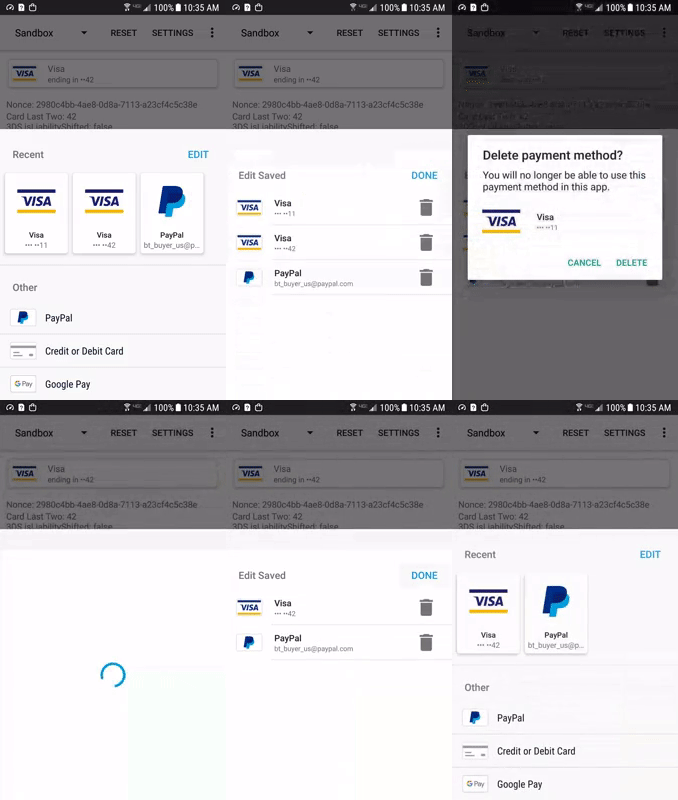
We do not recommend enabling Vault Manager if you are using Braintree's recurring billing; doing so would give your customers the ability to delete payment methods associated with subscriptions.
Collect cardholder name
You can collect the cardholder name as part of the credit card form. This field can be marked as optional or required.
- Android
- Kotlin
DropInRequest request = new DropInRequest();
request.setCardHolderNameStatus(CardForm.FIELD_OPTIONAL);
// To make the field required
// request.setCardHolderNameStatus(CardForm.FIELD_REQUIRED);
Premium Fraud Management Tools
To use Premium Fraud Management Tools for your Drop-in form, you'll need to complete these 3 steps at the same time:
- Enable Premium Fraud Management Tools in the Control Panel
- Update your client-side integration to collect device data
- Update your server-side integration to pass device data on transaction and verification requests
If there is any delay between enabling in the Control Panel and making the code changes, the integration will not work properly. See the Premium Fraud Management Tools guide for more details.
If you choose to automatically vault a customer's new payment method, verifications for those payment methods will not include device data when they are evaluated by our Premium Fraud Management Tools. Subsequent transactions can still pass device data.