
Vaulted Payments
This guide shows how to vault a customer's PayPal account so you can charge it later without requiring the customer to be present or to re-authenticate with PayPal.
The vault processes payments for recurring billing, and also supports non-recurring transactions so your customers don't need to re-enter their information each time they make a purchase from you.
With the vaulted payment flow, the user can:
Select or add shipping addresses in the PayPal account
Select or add funding instruments in the PayPal account
Use two-factor authentication, currently supported only in the US, UK, CA, DE, AT, and AU
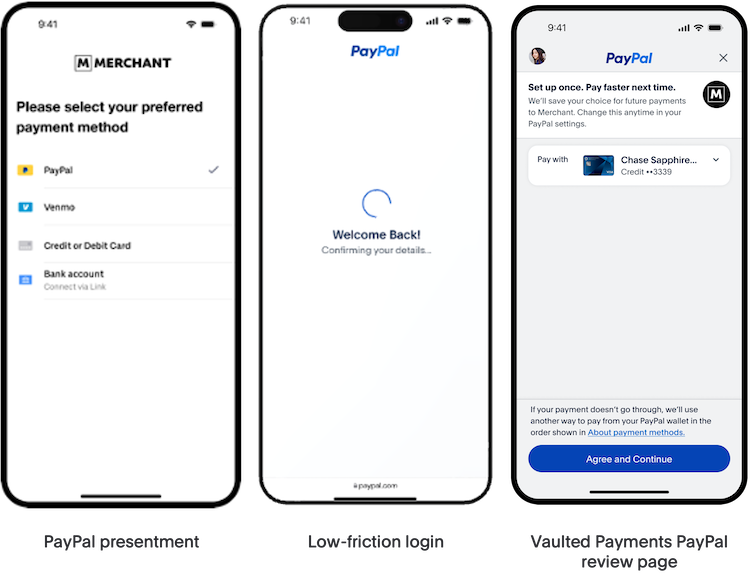
Typical use cases for the vaulted payment flow include:
- Faster payments for repeat customers
- Subscriptions
- Recurring billing, for example automatic top-ups or usage-based charges
Invoke the vault flow
This section covers the PayPal Checkout v6 integration (braintree.paypalCheckoutV6), a session-based way to charge the buyer and save their PayPal account to the vault in a single flow. Use createCheckoutWithVaultSession to start this combined flow. See the Client-Side Implementation guide for full setup details.
Prerequisites
Before you invoke the vault flow, be sure you have:
A Braintree client authorization, such as a client token, to create the Braintree client instance
The PayPal JavaScript SDK, loaded through the
paypalCheckoutV6component'sloadPayPalSDKmethodA button element on your checkout page for the buyer to select, with an ID your script can reference when attaching the click listener
Initialize the Braintree client and PayPal Checkout v6 instance, load the PayPal SDK, then create a checkout-with-vault session and start it when the buyer selects your PayPal button.
- JavaScript
async function setupCheckoutWithVault() {
  try {
    const client = await braintree.client.create({ authorization: "CLIENT-TOKEN" });
    const paypal = await braintree.paypalCheckoutV6.create({ client: client });
    await paypal.loadPayPalSDK();
    const session = paypal.createCheckoutWithVaultSession({
      amount: "10.00",
      currency: "USD",
      intent: "capture",
      billingAgreementDetails: {
        description: "Monthly subscription to Totally Real Products!",
      },
      onApprove: async function (data) {
        const payload = await paypal.tokenizePayment({ orderID: data.orderId, payerID: data.payerId });
        console.log("Checkout with vault nonce:", payload.nonce);
      },
    });
    document
      .getElementById("paypal-checkout-with-vault-button")
      .addEventListener("click", function () {
        session.start();
      });
  } catch (err) {
    // Handle error
  }
}
The console logs the checkout-with-vault nonce once tokenization succeeds, so you can confirm the flow completed before you move to your server-side integration.
The tokenizePayment response includes an implicitlyVaultedPaymentMethodToken you can store for future charges without re-prompting the buyer. These tokens don't have an explicit expiration date and can be used with our vault API on the server side.
See the PayPal Checkout v6 client reference for more information on the options available.